
gitlab的安装和基本维护
基本介绍
GitLab是一个自托管的Git项目仓库,可以自己搭建个人代码管理的仓库,功能与github类似。
安装
操作系统:CentOS6.5
gitlab官网下载安装地址:https://about.gitlab.com/downloads/#centos6
1.安装依赖的包
yum install curl openssh-server openssh-clients postfix cronie

service postfix start

chkconfig postfix on

lokkit -s http -s ssh
2.使用gitlab官网的脚本安装
curl -sS https://packages.gitlab.com/install/repositories/gitlab/gitlab-ce/script.rpm.sh | sudo bash

yum install gitlab-ce
或者使用gitlab的rpm安装gitlab
curl -LJO https://packages.gitlab.com/gitlab/gitlab-ce/packages/el/6/gitlab-ce-XXX.rpm/download

rpm -i gitlab-ce-XXX.rpm
如果一切顺利,gitlab将安装完成!
3.这里我先修改下配置文件(将访问地址改为主机的ip地址),默认为主机名访问(http://hostname 默认的访问地址)
修改结果如下:
[root@locahost~]# grep -n "^[a-Z]" /etc/gitlab/gitlab.rb

:external_url 'http://10.10.100.38'
4.配置并启动gitlab
gitlab-ctl reconfigure
5.安装完毕后,使用Web登录
打开浏览器输入http://10.10.100.38 #10.10.100.38为我的gitlab主机ip地址.
第一次登录要求设置root密码
登录成功之后,是这样的
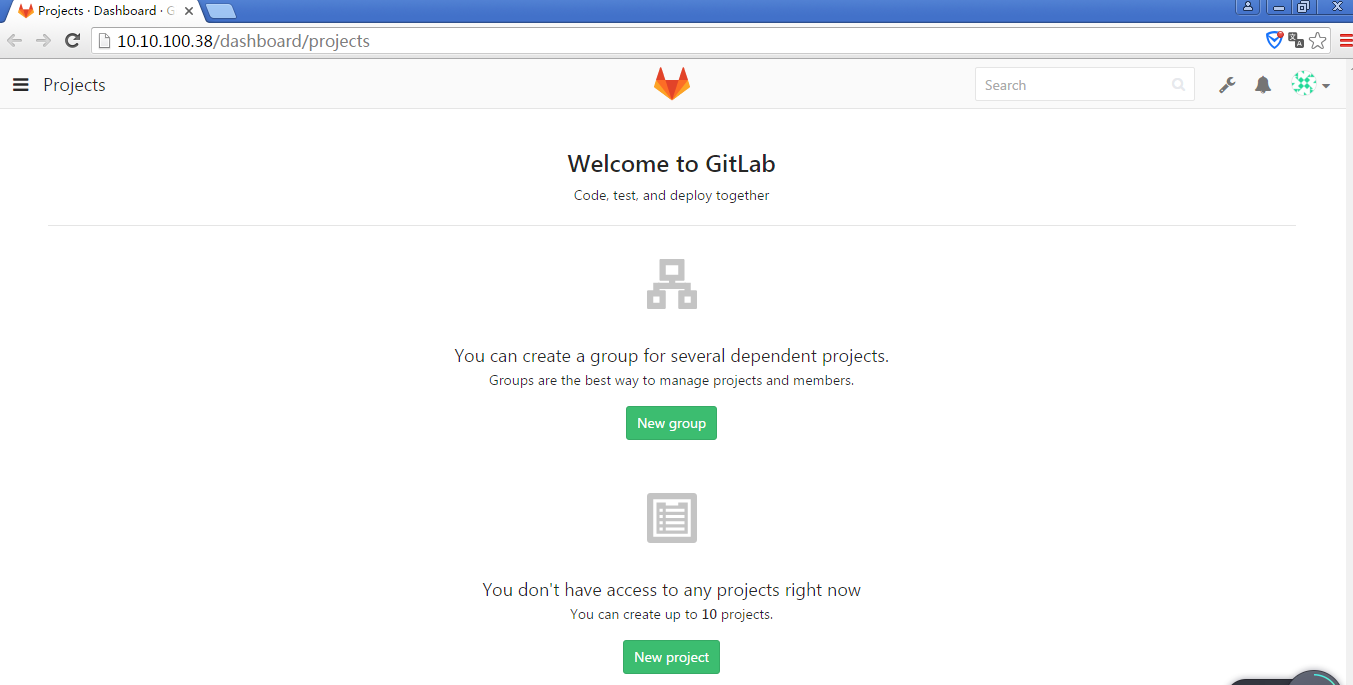
至此,gitlab的安装访问正常...
安装完gitlab后的运维操作:
初次配置服务
sudo gitlab-ctl reconfigure
启动服务
sudo gitlab-ctl start
停止服务
sudo gitlab-ctl stop
重启服务
sudo gitlab-ctl restart
检查服务状态
sudo gitlab-ctl status
一般服务状态显示信息
显示格式:
状态 : 进程名称:(进程ID)运行时间(秒);进程的日志服务进程和运行时间
[root@localhost~]# gitlab-ctl status

run: gitlab-workhorse: (pid 14584) 3325s; down: log: 0s, normally up, want up

run: logrotate: (pid 14593) 3324s; run: log: (pid 31243) 612s

run: nginx: (pid 14602) 3323s; down: log: 0s, normally up, want up

run: postgresql: (pid 11749) 3741s, want down; down: log: 3721s, normally up, want up

run: redis: (pid 14613) 3322s; down: log: 0s, normally up, want up

run: sidekiq: (pid 8677) 4118s, got TERM; down: log: 0s, normally up, want up

run: unicorn: (pid 14619) 3322s; run: log: (pid 7844) 4153s
| 状态 | 说明 |
| run | 运行状态 |
| down | 服务停止 |
检查服务的日志信息
# 检查redis的日志

sudo gitlab-ctl tail redis

# 检查postgresql的日志

sudo gitlab-ctl tail postgresql

# 检查gitlab-workhorse的日志

sudo gitlab-ctl tail gitlab-workhorse

# 检查logrotate的日志

sudo gitlab-ctl tail logrotate

# 检查nginx的日志

sudo gitlab-ctl tail nginx

# 检查sidekiq的日志

sudo gitlab-ctl tail sidekiq

# 检查unicorn的日志

sudo gitlab-ctl tail unicorn
gitlab管理员密码忘记,怎么重置密码
Gitlab 修改root用户密码
使用rails工具打开终端
sudo gitlab-rails console production
查询用户的email,用户名,密码等信息,id:1 表示root账号
user = User.where(id: 1).first
重新设置密码
user.password = '新密码'

user.password_confirmation = '新密码'
保存密码
user.save!
完整的操作ruby脚本
user = User.where(id: 1).first

user.password = '新密码'

user.password_confirmation = '新密码'

user.save!
然后使用重置过的密码重新登录。
Git 图形界面操作工具
- SourceTree https://www.sourcetreeapp.com/
- TortoiseGit https://code.google.com/p/tortoisegit/wiki/Download?tm=2
参考文档:
http://www.cnblogs.com/stevendes/p/6218928.html
http://www.cnblogs.com/yangliheng/p/5760185.html
https://about.gitlab.com/downloads/#centos6
http://www.tuicool.com/articles/mEbAZbE
gitlab的安装和基本维护的更多相关文章
- Centos下的GitLab的安装汉化和数据备份以及管理员密码重置
前言: 安装版本:gitlab-ce-8.8.5-ce.1.el7.x86_64.rpm 下载地址: https://mirrors.tuna.tsinghua.edu.cn/gitlab-ce/yu ...
- Gitlab 快速部署及日常维护 (二)
一.概述 上一篇我们将Gitlab的安装部署和初始化设置部分全部讲解完成了,接下来我们介绍Gitlab在日常工作中常遇见的问题进行梳理说明. 二.Gitlab的安装和维护过程中常见问题 1.Gitla ...
- gitlab一键安装 (转)
原文地址:http://www.2cto.com/os/201411/353292.html 0 简介bitnami和gitlab bitnami BitNami是一个开源项目,该项目产生的开源软件包 ...
- gitlab的安装以及汉化
gitlab的安装 首先在网上下载好任意版本gitlab的rpm包 推荐下面的地址: https://mirrors.tuna.tsinghua.edu.cn/gitlab-ce/yum/el7/gi ...
- gitlab一键安装+配置(备份+LADP认证)
gitlab一键安装+配置(备份+LADP认证) #gitlab一键安装 #centos6 mini, GitLab社区版 #参考官方最新文档 https://www.gitlab.com.cn/in ...
- Gitlab的安装与实践
tucao 先让我来吐槽一下下,使用GitHub以及Bitbucket比较不太稳定,尤其是后者,可以说是极其不稳定,甚至无法克隆仓库到本地.因此,决定安装一款开源且免费的Git服务到自己的服务器主机上 ...
- Gitlab的安装及项目新建
1. Gitlab的安装及仓库创建 1.1下载gitlab安装包 1).官网下载速度较慢 建议先行下载 国内的源里面可以找到最新的版本https://mirrors.tuna.tsinghua.edu ...
- DevOps之一 Gitlab的安装与配置
gitlab的安装 参考治疗:https://www.gitlab.com.cn/installation/#centos-7 http://www.21yunwei.com/archives/435 ...
- gitlab的安装和基本使用
一.gitlab的安装 1)安装依赖包 sudo yum install git vim gcc glibc-statc telnet -y sudo yum install -y curl poli ...
随机推荐
- Delphi TWebBrowser编程简述(转帖)
Delphi 3开始有了TWebBrowser构件,不过那时是以ActiveX控件的形式出现的,而且需要自己引入,在其后的4.0和5.0中,它就在封装好shdocvw.dll之后作为Internet构 ...
- Up and running with Apache Spark on Apache Kudu
After the GA of Apache Kudu in Cloudera CDH 5.10, we take a look at the Apache Spark on Kudu integra ...
- Linux内核分析:recv、recvfrom、recvmsg函数实现
先看一下这三个函数的声明: #include <sys/types.h> #include <sys/socket.h> ssize_t recv(int sockfd, vo ...
- Django admin 常用方法 model 增加只读权限
1.Django admin model 设置查看权限 Django model 默认只有增加.删除.修改权限.没有查看权限 #model class Ad_Campaing(models.Model ...
- RabbitMQ基础组件和SpringBoot整合RabbitMQ简单示例
交换器(Exchange) 交换器就像路由器,我们先是把消息发到交换器,然后交换器再根据绑定键(binding key)和生产者发送消息时的路由键routingKey, 按照交换类型Exchange ...
- iOS App中第一次运行添加半透明新手指引
实现方式: 在当前View上一个蒙层,然后找出需要标记的地方圈为白色,那些箭头和提示文字都是UI做出来的图上自带的. 代码: 判断是第一次运行APP后进入页面调用 -(void)newGuide { ...
- Android VLC播放器二次开发2——CPU类型检查+界面初始化
上一篇讲了VLC整个程序的模块划分和界面主要使用的技术,今天分析一下VLC程序初始化过程,主要是初始化界面.加载解码库的操作.今天主要分析一下org.videolan.vlc.gui.MainActi ...
- netty tcp拆包
private List<byte[]> getCompletePacket(byte[] bytes, ByteBuf byteBuf) { byte[] clone = bytes.c ...
- 高并发TCP连接数目问题
linux可通过五元组唯一确定一个链接:源IP,源端口,目的IP,目的端口,传输层协议.而一个端口不允许被两个及以上进程占用(一个进程可同时占用多个端口),据此是否可以推测一台linux服务器最多可以 ...
- mongoDB 删除集合后,空间不释放
mongoDB 删除集合后,空间不释放,添加新集合,没有重新利用之前删除集合所空出来的空间,也就是数据库大小只增不减. 方法有: 1.导出导入 dump & restore 2.修复数据库 r ...