
SpringBoot整合Spring Security使用Demo
https://start.spring.io/ 生成SpringBoot项目
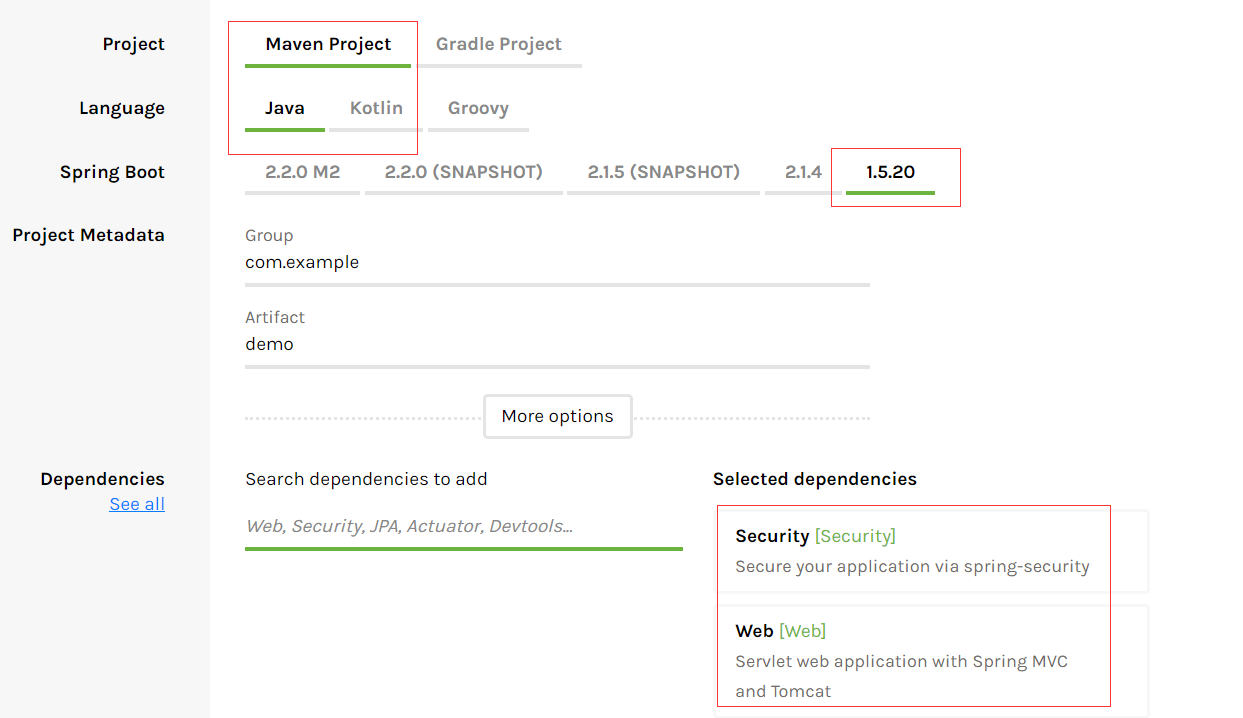
pom文件应该是我这样的:
<?xml version="1.0" encoding="UTF-8"?>
<project xmlns="http://maven.apache.org/POM/4.0.0"
    xmlns:xsi="http://www.w3.org/2001/XMLSchema-instance"
    xsi:schemaLocation="http://maven.apache.org/POM/4.0.0 http://maven.apache.org/xsd/maven-4.0.0.xsd">
    <modelVersion>4.0.0</modelVersion>
    <parent>
        <groupId>org.springframework.boot</groupId>
        <artifactId>spring-boot-starter-parent</artifactId>
        <version>1.5.20.RELEASE</version>
        <relativePath /> <!-- lookup parent from repository -->
    </parent>
    <groupId>org.dreamtech</groupId>
    <artifactId>demo</artifactId>
    <version>0.0.1-SNAPSHOT</version>
    <packaging>war</packaging>
    <name>demo</name>
    <description>Demo project for Spring Security</description>

    <properties>
        <java.version>1.8</java.version>
    </properties>

    <dependencies>
        <dependency>
            <groupId>org.springframework.boot</groupId>
            <artifactId>spring-boot-starter-security</artifactId>
        </dependency>
        <dependency>
            <groupId>org.springframework.boot</groupId>
            <artifactId>spring-boot-starter-web</artifactId>
        </dependency>
        <!-- 在IDEA中如果项目运行失败,注释掉这一项即可 -->
        <dependency>
            <groupId>org.springframework.boot</groupId>
            <artifactId>spring-boot-starter-tomcat</artifactId>
            <scope>provided</scope>
        </dependency>
        <dependency>
            <groupId>org.springframework.boot</groupId>
            <artifactId>spring-boot-starter-test</artifactId>
            <scope>test</scope>
        </dependency>
        <dependency>
            <groupId>org.springframework.security</groupId>
            <artifactId>spring-security-test</artifactId>
            <scope>test</scope>
        </dependency>
    </dependencies>

    <build>
        <plugins>
            <plugin>
                <groupId>org.springframework.boot</groupId>
                <artifactId>spring-boot-maven-plugin</artifactId>
            </plugin>
        </plugins>
    </build>

</project>
Controller:
package org.dreamtech.demo;

import org.springframework.boot.SpringApplication;
import org.springframework.boot.autoconfigure.EnableAutoConfiguration;
import org.springframework.boot.autoconfigure.SpringBootApplication;
import org.springframework.security.access.prepost.PreAuthorize;
import org.springframework.security.config.annotation.method.configuration.EnableGlobalMethodSecurity;
import org.springframework.web.bind.annotation.RequestMapping;
import org.springframework.web.bind.annotation.RestController;

/**
 * Spring Boot启动类
 * @author Xu Yiqing
 *
 */
@SpringBootApplication
@RestController
@EnableAutoConfiguration
@EnableGlobalMethodSecurity(prePostEnabled = true)
public class DemoApplication {

    public static void main(String[] args) {
        SpringApplication.run(DemoApplication.class, args);
    }

    /**
     * 根目录,所有人都可以访问
     * @return
     */
    @RequestMapping("/")
    public String helloSpringBoot() {
        return "hello spring boot";
    }

    /**
     * 只有经过身份认证后才可以访问
     * @return
     */
    @RequestMapping("/hello")
    public String helloWorld() {
        return "hello world";
    }

    /**
     * 经过身份认证且身份必须是ADMIN才可以访问,并且是在方法执行前进行验证
     * @return
     */
    @PreAuthorize("hasRole('ROLE_ADMIN')")
    @RequestMapping("/role")
    public String role() {
        return "admin auth";
    }

}
Spring Security配置文件:
package org.dreamtech.demo;

import org.springframework.beans.factory.annotation.Autowired;
import org.springframework.context.annotation.Configuration;
import org.springframework.security.config.annotation.authentication.builders.AuthenticationManagerBuilder;
import org.springframework.security.config.annotation.web.builders.HttpSecurity;
import org.springframework.security.config.annotation.web.builders.WebSecurity;
import org.springframework.security.config.annotation.web.configuration.EnableWebSecurity;
import org.springframework.security.config.annotation.web.configuration.WebSecurityConfigurerAdapter;

/**
 * Spring Security配置文件
 * @author Xu Yiqing
 *
 */
@Configuration
@EnableWebSecurity
public class SpringSecurityConfig extends WebSecurityConfigurerAdapter {

    @Autowired
    private MyUserService myUserService;

    @Override
    protected void configure(AuthenticationManagerBuilder auth) throws Exception {
        /* 可以将用户名密码存在内存中,也可以采用自定义Service从数据库中取
        auth.inMemoryAuthentication().withUser("admin").password("12345").roles("ADMIN");
        auth.inMemoryAuthentication().withUser("test").password("test").roles("USER");
        */
        auth.userDetailsService(myUserService).passwordEncoder(new MyPasswordEncoder());
    }

    @Override
    protected void configure(HttpSecurity http) throws Exception {
        // 配置对根路径放行,其他请求拦截,对logout放行,允许表单校验,禁用CSRF
        http.authorizeRequests().antMatchers("/").permitAll().anyRequest().authenticated().and().logout().permitAll()
                .and().formLogin();
        http.csrf().disable();
    }

    @Override
    public void configure(WebSecurity web) throws Exception {
        // 配置忽略js、css、images静态文件
        web.ignoring().antMatchers("/js/**", "/css/**", "/images/**");
    }

}
自定义密码加密器:
package org.dreamtech.demo;

import org.springframework.security.authentication.encoding.Md5PasswordEncoder;
import org.springframework.security.crypto.password.PasswordEncoder;

/**
 * 自定义密码加密器
 *
 * @author Xu Yiqing
 *
 */
@SuppressWarnings("deprecation")
public class MyPasswordEncoder implements PasswordEncoder {

    // 加密需要的盐
    private static final String SALT = "666";

    /**
     * 加密
     */
    @Override
    public String encode(CharSequence rawPassword) {
        Md5PasswordEncoder encoder = new Md5PasswordEncoder();
        return encoder.encodePassword(rawPassword.toString(), SALT);
    }

    /**
     * 匹配
     */
    @Override
    public boolean matches(CharSequence rawPassword, String encodedPassword) {
        Md5PasswordEncoder encoder = new Md5PasswordEncoder();
        return encoder.isPasswordValid(encodedPassword, rawPassword.toString(), SALT);
    }

}
Service:
package org.dreamtech.demo;

import org.springframework.security.core.userdetails.UserDetails;
import org.springframework.security.core.userdetails.UserDetailsService;
import org.springframework.security.core.userdetails.UsernameNotFoundException;
import org.springframework.stereotype.Component;

/**
 * 自定义服务
 * @author Xu Yiqing
 *
 */
@Component
public class MyUserService implements UserDetailsService {

    /**
     * 从DAO层根据用户名查询
     */
    @Override
    public UserDetails loadUserByUsername(String username) throws UsernameNotFoundException {
        UserDetails userDetails = null;
        // DAO操作 ......
        return userDetails;
    }

}
这里的Service层只是做一个示例
如果想看具体的效果,应该使用configure中注释掉的那两行进行测试
总结:
Spring Security优点:功能较齐全,高度兼容Spring
Spring Security缺点:体系庞大,配置繁琐,不够直观
所以,在实际开发中,人们通常选用Apache Shiro代替Spring Security
SpringBoot整合Spring Security使用Demo的更多相关文章
- springBoot整合spring security实现权限管理(单体应用版)--筑基初期
写在前面 在前面的学习当中,我们对spring security有了一个小小的认识,接下来我们整合目前的主流框架springBoot,实现权限的管理. 在这之前,假定你已经了解了基于资源的权限管理模型 ...
- springBoot整合spring security+JWT实现单点登录与权限管理--筑基中期
写在前面 在前一篇文章当中,我们介绍了springBoot整合spring security单体应用版,在这篇文章当中,我将介绍springBoot整合spring secury+JWT实现单点登录与 ...
- SpringBoot整合Spring Security
好好学习,天天向上 本文已收录至我的Github仓库DayDayUP:github.com/RobodLee/DayDayUP,欢迎Star,更多文章请前往:目录导航 前言 Spring Securi ...
- SpringBoot 整合Spring Security框架
引入maven依赖 <!-- 放入spring security依赖 --> <dependency> <groupId>org.springframework.b ...
- SpringBoot 整合 spring security oauth2 jwt完整示例 附源码
废话不说直接进入主题(假设您已对spring security.oauth2.jwt技术的了解,不懂的自行搜索了解) 依赖版本 springboot 2.1.5.RELEASE spring-secu ...
- springboot配置spring security 静态资源不能访问
在springboot整合spring security 过程中曾遇到下面问题:(spring boot 2.0以上版本 spring security 5.x (spring secur ...
- springboot+maven整合spring security
springboot+maven整合spring security已经做了两次了,然而还是不太熟悉,这里针对后台简单记录一下需要做哪些事情,具体的步骤怎么操作网上都有,不再赘述.1.pom.xml中添 ...
- SpringBoot安全篇Ⅵ --- 整合Spring Security
知识储备: 关于SpringSecurity的详细学习可以查看SpringSecurity的官方文档. Spring Security概览 应用程序的两个主要区域是"认证"和&qu ...
- SpringBoot集成Spring Security入门体验
一.前言 Spring Security 和 Apache Shiro 都是安全框架,为Java应用程序提供身份认证和授权. 二者区别 Spring Security:重量级安全框架 Apache S ...
随机推荐
- 高德地图 地铁图adcode 城市代码
北京 1100天津 1200石家庄 1301沈阳 2101大连 2102长春 2201哈尔滨 2301上海 3100南京 3201无锡 3202苏州 3205杭州 3301宁波 3302合肥 3401 ...
- Python configparser 读取指定节点内容失败
# !/user/bin/python # -*- coding: utf-8 -*- import configparser # 生成一个config文件 config = configparser ...
- 转载:selenium webdriver定位不到元素的五种原因及解决办法
1.动态id定位不到元素for example: //WebElement xiexin_element = driver.findElement(By.id("_mail_c ...
- MyBatis 中一对一和一对多的映射关系
1 一对一映射 比如每位学生有一个地址. public class Address { private Integer addrId; private String street; private S ...
- 安装VMware错误,Microsoft Runtime DLL 安装程序未能完成安装
安装VMware-workstation-full-12.5.6-5528349, 出现如下错误: 这时候,要注意了,不要点击"确认",如果手快点击了,没关系再次运行VMware安 ...
- BZOJ_1260_[CQOI2007]涂色paint _区间DP
BZOJ_1260_[CQOI2007]涂色paint _区间DP 题意: 假设你有一条长度为5的木版,初始时没有涂过任何颜色.你希望把它的5个单位长度分别涂上红.绿.蓝.绿.红色,用一个长度为5的字 ...
- PoiDocxDemo【Android将表单数据生成Word文档的方案之二(基于Poi4.0.0),目前只能java生成】
版权声明:本文为HaiyuKing原创文章,转载请注明出处! 前言 这个是<PoiDemo[Android将表单数据生成Word文档的方案之二(基于Poi4.0.0)]>的扩展,上一篇是根 ...
- IE不兼容ES6箭头函数的解决方法(在浏览器中使用)
polyfill.js下载方法: npm install babel-polyfill --save 页面中引用"polyfill.js" 和 "browser.min. ...
- typecho设置文章密码保护
在别人博客看到了一个需要输入密码才能访问文章的功能,像下图一样 typecho也是有这个功能,不需要插件就可以实现.在编辑文章时,右边高级选项,公开度里有个密码保护可以选择 效果图 不过这样的界面不是 ...
- 深入javascript的主流的模块规范
文章首发于sau交流学习社区 一.前言 目前主流的模块规范: 1.UMD通用模块 2.CommonJs 3.es6 module 二.UMD模块(通用模块) (function (global, fa ...