
Spring MVC(二)基于标注的MVC
1.基于标注的Spring MVC
1.1 建立一个项目导入jar包(ioc aop mvc) 拷贝容器对应的配置文件到src下
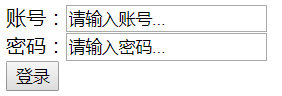
在WEB-INF建立一个login.jsp
1.2 在web.xml 配置一个DispatcherServlet 并且使用
初始化参数 contextConfigLocation 关联容器对应的配置文件
1.3 开启基于标注 Spring MVC
开启组件扫描 <context:component-scan base-package="" />
开启mvc的标注 <mvc:annotation-driven /> 自动配置了一个HandlerMapping
1.4 写一个普通的java类使用@Controller 把java类变成控制器
控制器方法的返回值可以是String也可以是 ModelAndView
方法名任意参数任意
在控制器方法上加 @RequestMapping("/请求路径")
1.5 配置视图处理器
 <?xml version="1.0" encoding="UTF-8"?>

 <beans xmlns="http://www.springframework.org/schema/beans"

     xmlns:xsi="http://www.w3.org/2001/XMLSchema-instance"

     xmlns:context="http://www.springframework.org/schema/context"

     xmlns:lang="http://www.springframework.org/schema/lang"

     xmlns:mvc="http://www.springframework.org/schema/mvc"

     xmlns:util="http://www.springframework.org/schema/util"

     xmlns:task="http://www.springframework.org/schema/task"

     xmlns:aop="http://www.springframework.org/schema/aop"

     xsi:schemaLocation="http://www.springframework.org/schema/mvc http://www.springframework.org/schema/mvc/spring-mvc-4.1.xsd

         http://www.springframework.org/schema/task http://www.springframework.org/schema/task/spring-task-4.1.xsd

         http://www.springframework.org/schema/beans http://www.springframework.org/schema/beans/spring-beans.xsd

         http://www.springframework.org/schema/context http://www.springframework.org/schema/context/spring-context-4.1.xsd

         http://www.springframework.org/schema/lang http://www.springframework.org/schema/lang/spring-lang-4.1.xsd

         http://www.springframework.org/schema/aop http://www.springframework.org/schema/aop/spring-aop-4.1.xsd

         http://www.springframework.org/schema/util http://www.springframework.org/schema/util/spring-util-4.1.xsd">

     <!-- 开启组件扫描 -->

     <context:component-scan base-package="com.xcz"></context:component-scan>

     <!-- 开启mvc标注 -->

     <mvc:annotation-driven></mvc:annotation-driven>

     <!-- 配置视图处理器 -->

     <bean class="org.springframework.web.servlet.view.InternalResourceViewResolver">

         <property name="prefix" value="/WEB-INF/"></property>

         <property name="suffix" value=".jsp"></property>

     </bean>

 </beans>
mvc.xml
 <%@ page language="java" contentType="text/html; charset=utf-8"

     pageEncoding="utf-8"%>

 <!DOCTYPE html PUBLIC "-//W3C//DTD HTML 4.01 Transitional//EN" "http://www.w3.org/TR/html4/loose.dtd">

 <html>

 <head>

 <meta http-equiv="Content-Type" content="text/html; charset=utf-8">

 <title>Insert title here</title>

 </head>

 <body>

     <form action="" method="post">

         账号:<input type="text" value="请输入账号..."><br>

         密码:<input type="text" value="请输入密码..."><br>

         <input type="submit" value="登录"><br>

     </form>

 </body>

 </html>
login.jsp
 <?xml version="1.0" encoding="UTF-8"?>

 <web-app xmlns:xsi="http://www.w3.org/2001/XMLSchema-instance" xmlns="http://xmlns.jcp.org/xml/ns/javaee" xsi:schemaLocation="http://xmlns.jcp.org/xml/ns/javaee http://xmlns.jcp.org/xml/ns/javaee/web-app_3_1.xsd" version="3.1">

   <display-name>SpringMVC-03</display-name>

   <welcome-file-list>

     <welcome-file>index.html</welcome-file>

     <welcome-file>index.htm</welcome-file>

     <welcome-file>index.jsp</welcome-file>

     <welcome-file>default.html</welcome-file>

     <welcome-file>default.htm</welcome-file>

     <welcome-file>default.jsp</welcome-file>

   </welcome-file-list>

   <!-- 配置请求入口 -->

   <servlet>

       <servlet-name>SpringMVC</servlet-name>

     <servlet-class>org.springframework.web.servlet.DispatcherServlet</servlet-class>

     <!-- 配置初始化参数 -->

         <init-param>

             <param-name>contextConfigLocation</param-name>

             <param-value>classpath:mvc.xml</param-value>

         </init-param>

         <load-on-startup>1</load-on-startup>

     </servlet>

   <servlet-mapping>

       <servlet-name>SpringMVC</servlet-name>

       <url-pattern>*.do</url-pattern>

   </servlet-mapping>

 </web-app>
web.xml
 package com.xcz.controller;

 import org.springframework.stereotype.Controller;

 import org.springframework.web.bind.annotation.RequestMapping;

 @Controller

 public class LoginController {

     @RequestMapping("/login.do")

     public String Login() {

         return "login";

     }

 }
controller
Spring MVC(二)基于标注的MVC的更多相关文章
- 使用 Spring 2.5 基于注解驱动的 Spring MVC
http://www.ibm.com/developerworks/cn/java/j-lo-spring25-mvc/ 概述 继 Spring 2.0 对 Spring MVC 进行重大升级后,Sp ...
- ASP.NET MVC基于标注特性的Model验证:将ValidationAttribute应用到参数上
原文:ASP.NET MVC基于标注特性的Model验证:将ValidationAttribute应用到参数上 ASP.NET MVC默认采用基于标准特性的Model验证机制,但是只有应用在Model ...
- ASP.NET MVC基于标注特性的Model验证:一个Model,多种验证规则
原文:ASP.NET MVC基于标注特性的Model验证:一个Model,多种验证规则 对于Model验证,理想的设计应该是场景驱动的,而不是Model(类型)驱动的,也就是对于同一个Model对象, ...
- 基于ASP.NET MVC的热插拔模块式开发框架(OrchardNoCMS)介绍(二)
基于ASP.NET MVC的热插拔模块式开发框架(OrchardNoCMS)介绍(二) 之前文章中给大家说明了下我这个小小的想法,发现还是有不少人的支持和关注.你们的鼓励是对我最大的支持. 我总结了了 ...
- Spring MVC(二)--Spring MVC登陆实例
本文通过一个简单的登陆实例实现Spring MVC的流程,同时整合 MyBatis使用,流程是这样的: 1.访问一个URL进入登陆界面 2.输入正确的用户名和密码,成功则进入index页面,否则留在登 ...
- 七天学会ASP.NET MVC (二)——ASP.NET MVC 数据传递
通过第一天的学习之后,我们相信您已经对MVC有一些基本了解. 本节所讲的内容是在上节的基础之上,因此需要确保您是否掌握了上一节的内容.本章的目标是在今天学习结束时利用最佳实践解决方案创建一个小型的MV ...
- 基于ASP.NET MVC和Bootstrap搭建响应式个人博客站(一)
1.0 为什么要做这个博客站? www.zynblog.com 在工作学习中,经常要搜索查找各种各样的资料,每次找到相关资料后都会顺手添加到浏览器书签中,时间一长,书签也就满了.而且下次再点击这个 ...
- 用 ASP.NET MVC 实现基于 XMLHttpRequest long polling(长轮询) 的 Comet
ASP.NET 计时器 http://www.cnblogs.com/dudu/archive/2011/10/17/2215321.html http://www.cnblogs.com/w ...
- 七天学会ASP.NET MVC (二)——ASP.NET MVC 数据传递 【转】
http://www.cnblogs.com/powertoolsteam/p/MVC_two.html 通过第一天的学习之后,我们相信您已经对MVC有一些基本了解. 本节所讲的内容是在上节的基础之上 ...
随机推荐
- ecs云服务器 mysql经常自动停止挂掉重启问题分析
我的ecs服务器为1g内存的配置,在部署了nginx,mysql,redis,node服务后跑起项目来,(mysql使用默认配置),每过几天便发现了经常会出现数据库自动停止挂掉,然后几分钟后重启的现象 ...
- udf提权原理详解
0x00-前言 这个udf提权复现搞了三天,终于搞出来了.网上的教程对于初学者不太友好,以至于我一直迷迷糊糊的,走了不少弯路.下面就来总结一下我的理解. 想要知道udf提权是怎么回事,首先要先知道ud ...
- PostgreSQL:安装及中文显示
一.PostgreSQL PostgreSQL (也称为Post-gress-Q-L)是一个跨平台的功能强大的开源对象关系数据库管理系统,由 PostgreSQL 全球开发集团(全球志愿者团队)开发. ...
- spring boot redis 数据库缓存用法
缓存处理方式应该是 1.先从缓存中拿数据,如果有,直接返回.2.如果拿到的为空,则数据库查询,然后将查询结果存到缓存中.由此实现方式应该如下: private String baseKey = &qu ...
- 讲解:为什么重写equals时必须重写hashCode方法
一 :string类型的==和equals的区别: 结论:"=="是判断两个字符串的内存地址是否相等,equals是比较两个字符串的值是否相等,具体就不做扩展了,有兴趣的同学可以去 ...
- ASP.NET Core微服务实战系列
希望给你3-5分钟的碎片化学习,可能是坐地铁.等公交,积少成多,水滴石穿,码字辛苦,如果你吃了蛋觉得味道不错,希望点个赞,谢谢关注. 前言 这里记录的是个人奋斗和成长的地方,该篇只是一个系列目录和构想 ...
- 结合JDK源码看设计模式——模板方法模式
前言: 相信很多人都听过一个问题:把大象关进冰箱门,需要几步? 第一,把冰箱门打开:第二,把大象放进去:第三,把冰箱门关上.我们可以看见,这个问题的答案回答的很有步骤.接下来我们介绍一种设计模式--模 ...
- js初级入门
javascript的数据类型 (symbol)一.原始数据类型 或 基本数据类型 6种 1,undefined (1,申明未赋值,2,函数没有返回值)2,null (空,不存在)3,number ( ...
- 涨姿势:抛弃字母、数字和下划线写SHELL
PHP中异或 (^) 的概念 <?php echo"A"^"?";?> <?php echo"A"^"?&quo ...
- Windows Server 2016 安装虚拟机版黑群晖
硬件配置 Dell R730 CPU: Intel(R) Xeon(R) CPU E5-2603 v4 @1.70GHz(6 cores) Ram: 16Gb HDD: 系统-600GB SAS X2 ...