
Inheritance with EF Code First: Part 1 – Table per Hierarchy (TPH)
以下三篇文章是Entity Framework Code-First系列中第七回:Entity Framework Code-First(7):Inheritance Strategy 提到的三篇。这三篇文章写的时间有点久远,还是在2010年,提到EF应该在4.1版本之前,使用的还是ObjectContext而不是现在的DbContext,内容供参考
-------------------------------------------------------------------------------------------------------------------------------------------------------------------------------------
Inheritance with EF Code First: Part 1 – Table per Hierarchy (TPH)
| A simple strategy for mapping classes to database tables might be “one table for every entity persistent class.” This approach sounds simple enough and, indeed, works well until we encounter inheritance. Inheritance is such a visible structural mismatch between the object-oriented and relational worlds because object-oriented systems model both “is a” and “has a” relationships. SQL-based models provide only "has a" relationships between entities; SQL database management systems don’t support type inheritance—and even when it’s available, it’s usually proprietary or incomplete.
There are three different approaches to representing an inheritance hierarchy:
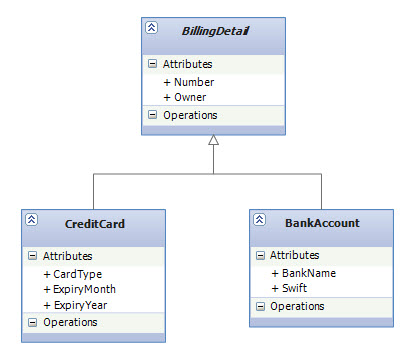
I will explain each of these strategies in a series of posts and this one is dedicated to TPH. In this series we'll deeply dig into each of these strategies and will learn about "why" to choose them as well as "how" to implement them. Hopefully it will give you a better idea about which strategy to choose in a particular scenario. Inheritance Mapping with Entity Framework Code FirstAll of the inheritance mapping strategies that we discuss in this series will be implemented by EF Code First CTP5. The CTP5 build of the new EF Code First library has been released by ADO.NET team earlier this month. EF Code-First enables a pretty powerful code-centric development workflow for working with data. I’m a big fan of the EF Code First approach, and I’m pretty excited about a lot of productivity and power that it brings. When it comes to inheritance mapping, not only Code First fully supports all the strategies but also gives you ultimate flexibility to work with domain models that involves inheritance. The fluent API for inheritance mapping in CTP5 has been improved a lot and now it's more intuitive and concise in compare to CTP4. A Note For Those Who Follow Other Entity Framework ApproachesIf you are following EF's "Database First" or "Model First" approaches, I still recommend to read this series since although the implementation is Code First specific but the explanations around each of the strategies is perfectly applied to all approaches be it Code First or others. A Note For Those Who are New to Entity Framework and Code-FirstIf you choose to learn EF you've chosen well. If you choose to learn EF with Code First you've done even better. To get started, you can find a great walkthrough by Scott Guthrie here and another one by ADO.NET team here. In this post, I assume you already setup your machine to do Code First development and also that you are familiar with Code First fundamentals and basic concepts. You might also want to check out my other posts on EF Code First like Complex Types and Shared Primary Key Associations. A Top Down Development ScenarioThese posts take a top-down approach; it assumes that you’re starting with a domain model and trying to derive a new SQL schema. Therefore, we start with an existing domain model, implement it in C# and then let Code First create the database schema for us. However, the mapping strategies described are just as relevant if you’re working bottom up, starting with existing database tables. I’ll show some tricks along the way that help you dealing with nonperfect table layouts. The Domain ModelIn our domain model, we have a BillingDetail base class which is abstract (note the italic font on the UML class diagram below). We do allow various billing types and represent them as subclasses of BillingDetail class. As for now, we support CreditCard and BankAccount: |
|
 |
|
Implement the Object Model with Code FirstAs always, we start with the POCO classes. Note that in our DbContext, I only define one DbSet for the base class which is BillingDetail. Code First will find the other classes in the hierarchy based on Reachability Convention. |
|
public abstract class BillingDetail |
|
| This object model is all that is needed to enable inheritance with Code First. If you put this in your application you would be able to immediately start working with the database and do CRUD operations. Before going into details about how EF Code First maps this object model to the database, we need to learn about one of the core concepts of inheritance mapping: polymorphic and non-polymorphic queries. | |
Polymorphic QueriesLINQ to Entities and EntitySQL, as object-oriented query languages, both support polymorphic queries—that is, queries for instances of a class and all instances of its subclasses, respectively. For example, consider the following query: |
|
IQueryable<BillingDetail> linqQuery = from b in context.BillingDetails select b; |
|
| Or the same query in EntitySQL: | |
string eSqlQuery = @"SELECT VAlUE b FROM BillingDetails AS b"; |
|
linqQuery and eSqlQuery are both polymorphic and return a list of objects of the type BillingDetail, which is an abstract class but the actual concrete objects in the list are of the subtypes of BillingDetail: CreditCard and BankAccount.
Non-polymorphic QueriesAll LINQ to Entities and EntitySQL queries are polymorphic which return not only instances of the specific entity class to which it refers, but all subclasses of that class as well. On the other hand,Non-polymorphic queries are queries whose polymorphism is restricted and only returns instances of a particular subclass. In LINQ to Entities, this can be specified by using OfType<T>()Method. For example, the following query returns only instances of BankAccount: |
|
IQueryable<BankAccount> query = from b in context.BillingDetails.OfType<BankAccount>() |
|
| EntitySQL has OFTYPE operator that does the same thing: | |
string eSqlQuery = @"SELECT VAlUE b FROM OFTYPE(BillingDetails, Model.BankAccount) AS b"; |
|
| In fact, the above query with OFTYPE operator is a short form of the following query expression that uses TREAT and IS OF operators: | |
string eSqlQuery = @"SELECT VAlUE TREAT(b as Model.BankAccount) |
|
| (Note that in the above query, Model.BankAccount is the fully qualified name for BankAccount class. You need to change "Model" with your own namespace name.) | |
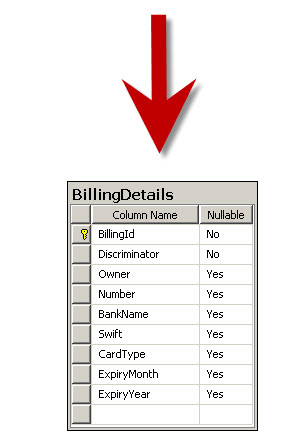
Table per Hierarchy (TPH)An entire class hierarchy can be mapped to a single table. This table includes columns for all properties of all classes in the hierarchy. The concrete subclass represented by a particular row is identified by the value of a type discriminator column. You don’t have to do anything special in Code First to enable TPH. It's the default inheritance mapping strategy: |
|
|
|
 |
|
| This mapping strategy is a winner in terms of both performance and simplicity. It’s the best-performing way to represent polymorphism—both polymorphic and nonpolymorphic queries perform well—and it’s even easy to implement by hand. Ad-hoc reporting is possible without complex joins or unions. Schema evolution is straightforward. | |
Discriminator ColumnAs you can see in the DB schema above, Code First has to add a special column to distinguish between persistent classes: the discriminator. This isn’t a property of the persistent class in our object model; it’s used internally by EF Code First. By default, the column name is "Discriminator", and its type is string. The values defaults to the persistent class names —in this case, “BankAccount” or “CreditCard”. EF Code First automatically sets and retrieves the discriminator values. |
|
TPH Requires Properties in SubClasses to be Nullable in the DatabaseTPH has one major problem: Columns for properties declared by subclasses will be nullable in the database. For example, Code First created an (INT, NULL) column to map CardType property in CreditCard class. However, in a typical mapping scenario, Code First always creates an (INT, NOT NULL) column in the database for an int property in persistent class. But in this case, since BankAccount instance won’t have a CardType property, the CardType field must be NULL for that row so Code First creates an (INT, NULL) instead. If your subclasses each define several non-nullable properties, the loss of NOT NULL constraints may be a serious problem from the point of view of data integrity. TPH Violates the Third Normal FormAnother important issue is normalization. We’ve created functional dependenciesbetween nonkey columns, violating the third normal form. Basically, the value of Discriminator column determines the corresponding values of the columns that belong to the subclasses (e.g. BankName) but Discriminator is not part of the primary key for the table. As always, denormalization for performance can be misleading, because it sacrifices long-term stability, maintainability, and the integrity of data for immediate gains that may be also achieved by proper optimization of the SQL execution plans (in other words, ask your DBA). |
|
Generated SQL QueryLet's take a look at the SQL statements that EF Code First sends to the database when we write queries in LINQ to Entities or EntitySQL. For example, the polymorphic query for BillingDetails that you saw, generates the following SQL statement: |
|
|
|
| Or the non-polymorphic query for the BankAccount subclass generates this SQL statement: | |
|
|
Note how Code First adds a restriction on the discriminator column and also how it only selects those columns that belong to BankAccount entity.
Change Discriminator Column Data Type and Values With Fluent APISometimes, especially in legacy schemas, you need to override the conventions for the discriminator column so that Code First can work with the schema. The following fluent API code will change the discriminator column name to "BillingDetailType" and the values to "BA" and "CC" for BankAccount and CreditCard respectively: |
|
protected override void OnModelCreating(DbModelBuilder modelBuilder) |
|
| Also, changing the data type of discriminator column is interesting. In the above code, we passed strings to HasValue method but this method has been defined to accepts a type of object: | |
public void HasValue(object value); |
|
| Therefore, if for example we pass a value of type int to it then Code First not only use our desired values (i.e. 1 & 2) in the discriminator column but also changes the column type to be (INT, NOT NULL): | |
modelBuilder.Entity<BillingDetail>() |
|
SummaryIn this post we learned about Table per Hierarchy as the default mapping strategy in Code First. The disadvantages of the TPH strategy may be too serious for your design—after all, denormalized schemas can become a major burden in the long run. Your DBA may not like it at all. In the next post, we will learn about Table per Type (TPT) strategy that doesn’t expose you to this problem. |
原文地址:http://weblogs.asp.net/manavi/inheritance-mapping-strategies-with-entity-framework-code-first-ctp5-part-1-table-per-hierarchy-tph
Inheritance with EF Code First: Part 1 – Table per Hierarchy (TPH)的更多相关文章
- Inheritance with EF Code First: Part 3 – Table per Concrete Type (TPC)
Inheritance with EF Code First: Part 3 – Table per Concrete Type (TPC) This is the third (and last) ...
- Inheritance with EF Code First: Part 2 – Table per Type (TPT)
In the previous blog post you saw that there are three different approaches to representing an inher ...
- EF Code First 学习笔记:表映射
多个实体映射到一张表 Code First允许将多个实体映射到同一张表上,实体必须遵循如下规则: 实体必须是一对一关系 实体必须共享一个公共键 观察下面两个实体: public class Perso ...
- EF Code First 学习笔记:表映射 多个Entity到一张表和一个Entity到多张表
多个实体映射到一张表 Code First允许将多个实体映射到同一张表上,实体必须遵循如下规则: 实体必须是一对一关系 实体必须共享一个公共键 观察下面两个实体: public class Per ...
- EF Code First 学习笔记:表映射(转)
多个实体映射到一张表 Code First允许将多个实体映射到同一张表上,实体必须遵循如下规则: 实体必须是一对一关系 实体必须共享一个公共键 观察下面两个实体: public class Per ...
- EF Code First学习系列
EF Model First在实际工作中基本用不到,前段时间学了一下,大概的了解一下.现在开始学习Code First这种方式.这也是在实际工作中用到最多的方式. 下面先给出一些目录: 1.什么是Co ...
- 1.什么是Code First(EF Code First 系列)
EF4.1中开始支持Code First .这种方式在领域设计模式中非常有用.使用Code First模式,你可以专注于领域设计,根据需要,为你一个领域的对象创建类集合,而不是首先来设计数据库,然后来 ...
- 从零开始,搭建博客系统MVC5+EF6搭建框架(1),EF Code frist、实现泛型数据仓储以及业务逻辑
前言 从上篇30岁找份程序员的工作(伪程序员的独白),文章开始,我说过我要用我自学的技术,来搭建一个博客系统,也希望大家给点意见,另外我很感谢博客园的各位朋友们,对我那篇算是自我阶段总结文章 ...
- IoC容器Autofac - Autofac + Asp.net MVC + EF Code First(转载)
转载地址:http://www.cnblogs.com/JustRun1983/archive/2013/03/28/2981645.html 有修改 Autofac通过Controller默认构造 ...
随机推荐
- python使用 db.select 返回的数据只能遍历一次
python中通过find从mongo中查出的数据,或者通过select返回的数据,其实返回的是游标,当你进行便利一次之后,游标指向最后, 所以当你再一次进行便利时,便出现数据为空的现象. 解决办法: ...
- LeetCode Employee Importance
原题链接在这里:https://leetcode.com/problems/employee-importance/description/ 题目: You are given a data stru ...
- 基于Python语言使用RabbitMQ消息队列(五)
Topics 在前面教程中我们改进了日志系统,相比较于使用fanout类型交易所只能傻瓜一样地广播,我们用direct获得了选择性接收日志的能力. 虽然使用direct类型交易所改进了我们的系统,但它 ...
- 新的开发域名 fastadmin.tk
新的开发域名 fastadmin.tk 这个的所有子域名批向 127.0.0.1,可以用于开发. 以后不用再修改系统的 hosts. 使用案例 手把手教你安装 FastAdmin 到虚拟主机 (php ...
- [转]Angular移除不必要的$watch之性能优化
双向绑定是Angular的核心概念之一,它给我们带来了思维方式的转变:不再是DOM驱动,而是以Model为核心,在View中写上声明式标签.然后,Angular就会在后台默默的同步View的变化到Mo ...
- 导入镜像后,容器内httpd起不来
导入镜像后发现bash进程为1 与之前apache启动的进程冲突了 解决办法:删除apache进程号,通过apachectl重启apache进程
- (转)NHibernate各种数据库配置写法
本文转载自:http://blog.csdn.net/hsg77/article/details/23463733 //NHibernate各种数据库连接参数文件配置方法说明 //配置文件Config ...
- Day2-Python基础2---集合和文件操作
一.集合操作 集合是一个无序的,不重复的数据组合,它的主要作用如下: 去重,把一个列表变成集合,就自动去重了 关系测试,测试两组数据之前的交集.差集.并集等关系 s = set([1,4,5,7,3, ...
- net.sf.json.JSONObject 和org.json.JSONObject
参考 net.sf.json.JSONObject 和org.json.JSONObject 的差别
- filter中获取spring bean
import java.io.IOException; import javax.servlet.Filter; import javax.servlet.FilterChain; import ja ...