
Inheritance with EF Code First: Part 2 – Table per Type (TPT)
|
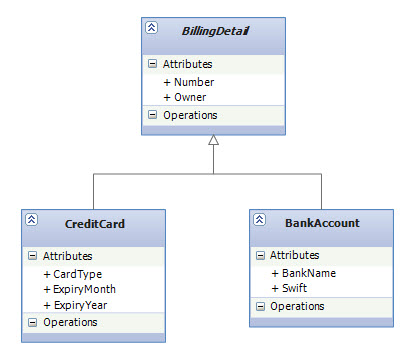
In the previous blog post you saw that there are three different approaches to representing an inheritance hierarchy and I explained Table per Hierarchy (TPH) as the default mapping strategy in EF Code First. We argued that the disadvantages of TPH may be too serious for our design since it results in denormalized schemas that can become a major burden in the long run. In today’s blog post we are going to learn about Table per Type (TPT) as another inheritance mapping strategy and we'll see that TPT doesn’t expose us to this problem. Table per Type (TPT)Table per Type is about representing inheritance relationships as relational foreign key associations. Every class/subclass that declares persistent properties—including abstract classes—has its own table. The table for subclasses contains columns only for each noninherited property (each property declared by the subclass itself) along with a primary key that is also a foreign key of the base class table. This approach is shown in the following figure: |
 |
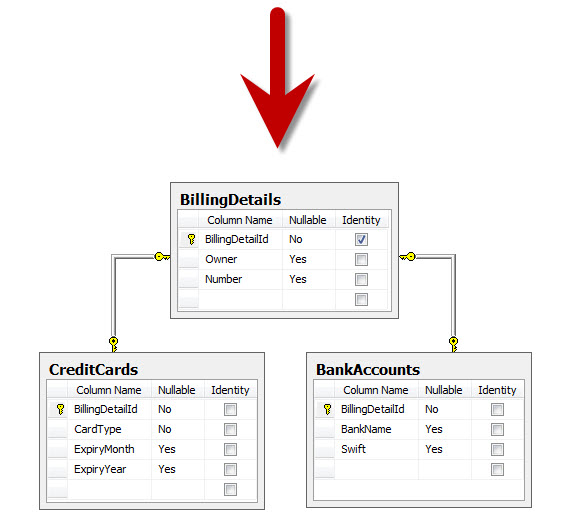 |
For example, if an instance of the CreditCard subclass is made persistent, the values of properties declared by the BillingDetail base class are persisted to a new row of the BillingDetails table. Only the values of properties declared by the subclass (i.e. CreditCard) are persisted to a new row of the CreditCards table. The two rows are linked together by their shared primary key value. Later, the subclass instance may be retrieved from the database by joining the subclass table with the base class table.
TPT AdvantagesThe primary advantage of this strategy is that the SQL schema is normalized. In addition, schema evolution is straightforward (modifying the base class or adding a new subclass is just a matter of modify/add one table). Integrity constraint definition are also straightforward (note how CardType in CreditCards table is now a non-nullable column). Implement TPT in EF Code FirstWe can create a TPT mapping simply by placing Table attribute on the subclasses to specify the mapped table name (Table attribute is a new data annotation and has been added toSystem.ComponentModel.DataAnnotations namespace in CTP5): |
public abstract class BillingDetail |
| If you prefer fluent API, then you can create a TPT mapping by using ToTable() method: |
protected override void OnModelCreating(DbModelBuilder modelBuilder) |
Polymorphic AssociationsA polymorphic association is an association to a base class, hence to all classes in the hierarchy with dynamic resolution of the concrete class at runtime. For example, consider the BillingInfo property of User in the following domain model. It references one particular BillingDetail object, which at runtime can be any concrete instance of that class. |
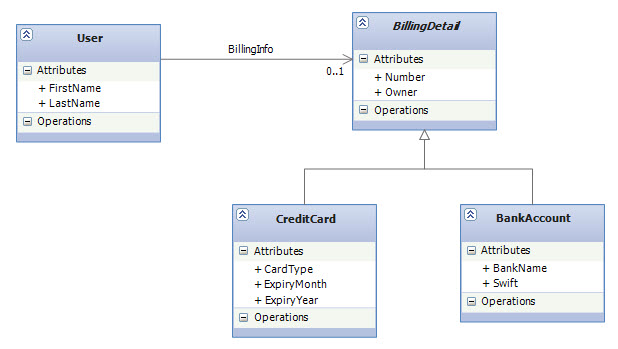 |
In fact, because BillingDetail is abstract, the association must refer to an instance of one of its subclasses only—CreditCard or BankAccount—at runtime.
Implement Polymorphic Associations with EF Code FirstWe don’t have to do anything special to enable polymorphic associations in EF Code First; The user needs a unidirectional association to some BillingDetails, which can be CreditCard or BankAccount so we just create this association and it would be naturally polymorphic: |
public class User |
| In other words, as you can see above, a polymorphic association is an association that may refer instances of a subclass of the class that was explicitly specified as the type of the navigation property (e.g. User.BillingInfo).
The following code demonstrates the creation of an association to an instance of the CreditCard subclass: |
using (var context = new InheritanceMappingContext()) |
| Now, if we navigate the association in a second context, EF Code First automatically retrieves the CreditCard instance: |
using (var context = new InheritanceMappingContext()) |
Polymorphic Associations with TPTAnother important advantage of TPT is the ability to handle polymorphic associations. In the database a polymorphic association to a particular base class will be represented as a foreign key referencing the table of that particular base class. (e.g. Users table has a foreign key that references BillingDetails table.) |
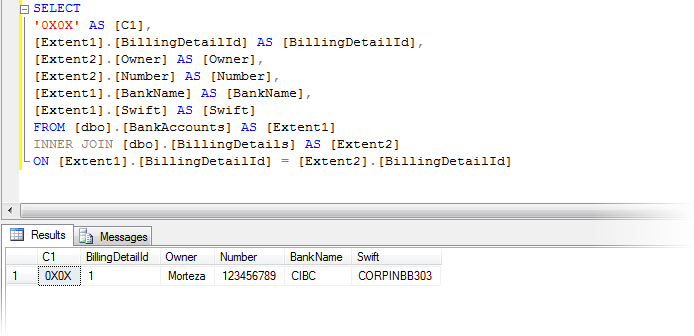
Generated SQL For QueriesLet’s take an example of a simple non-polymorphic query that returns a list of all the BankAccounts: |
var query = from b in context.BillingDetails.OfType<BankAccount>() select b; |
| Executing this query (by invoking ToList() method) results in the following SQL statements being sent to the database (on the bottom, you can also see the result of executing the generated query in SQL Server Management Studio): |
 |
| Now, let’s take an example of a very simple polymorphic query that requests all the BillingDetails which includes both BankAccount and CreditCard types: |
var query = from b in context.BillingDetails select b; |
| This LINQ query seems even more simple than the previous one but the resulting SQL query is not as simple as you might expect: |
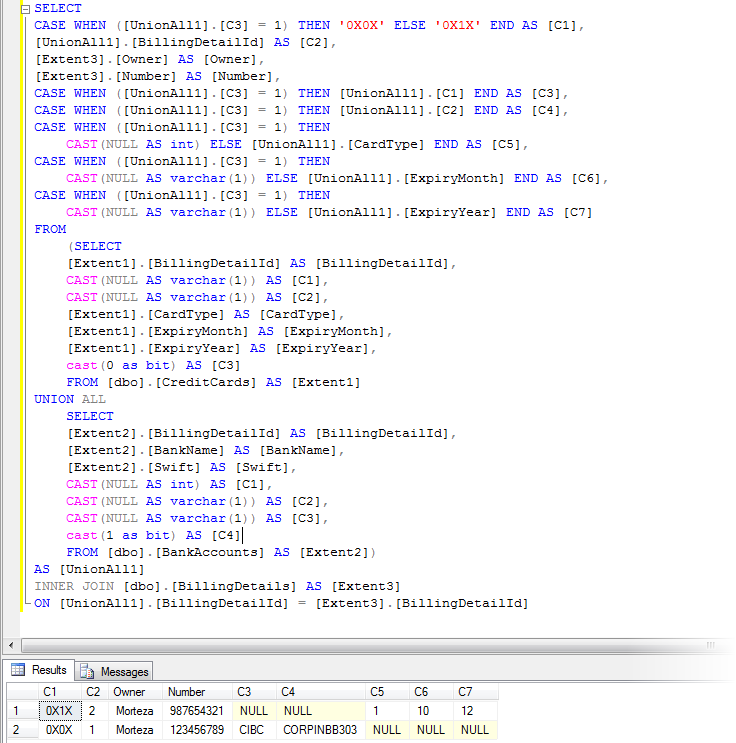 |
As you can see, EF Code First relies on an INNER JOIN to detect the existence (or absence) of rows in the subclass tables CreditCards and BankAccounts so it can determine the concrete subclass for a particular row of the BillingDetails table. Also the SQL CASE statements that you see in the beginning of the query is just to ensure columns that are irrelevant for a particular row have NULL values in the returning flattened table. (e.g. BankName for a row that represents a CreditCard type)
TPT ConsiderationsEven though this mapping strategy is deceptively simple, the experience shows that performance can be unacceptable for complex class hierarchies because queries always require a join across many tables. In addition, this mapping strategy is more difficult to implement by hand— even ad-hoc reporting is more complex. This is an important consideration if you plan to use handwritten SQL in your application (For ad hoc reporting, database views provide a way to offset the complexity of the TPT strategy. A view may be used to transform the table-per-type model into the much simpler table-per-hierarchy model.) |
SummaryIn this post we learned about Table per Type as the second inheritance mapping in our series. So far, the strategies we’ve discussed require extra consideration with regard to the SQL schema (e.g. in TPT, foreign keys are needed). This situation changes with the Table per Concrete Type (TPC) that we will discuss in the next post. |
原文地址:http://weblogs.asp.net/manavi/inheritance-mapping-strategies-with-entity-framework-code-first-ctp5-part-2-table-per-type-tpt
Inheritance with EF Code First: Part 2 – Table per Type (TPT)的更多相关文章
- Inheritance with EF Code First: Part 3 – Table per Concrete Type (TPC)
Inheritance with EF Code First: Part 3 – Table per Concrete Type (TPC) This is the third (and last) ...
- Inheritance with EF Code First: Part 1 – Table per Hierarchy (TPH)
以下三篇文章是Entity Framework Code-First系列中第七回:Entity Framework Code-First(7):Inheritance Strategy 提到的三篇.这 ...
- EF Code First学习系列
EF Model First在实际工作中基本用不到,前段时间学了一下,大概的了解一下.现在开始学习Code First这种方式.这也是在实际工作中用到最多的方式. 下面先给出一些目录: 1.什么是Co ...
- 1.什么是Code First(EF Code First 系列)
EF4.1中开始支持Code First .这种方式在领域设计模式中非常有用.使用Code First模式,你可以专注于领域设计,根据需要,为你一个领域的对象创建类集合,而不是首先来设计数据库,然后来 ...
- 从零开始,搭建博客系统MVC5+EF6搭建框架(1),EF Code frist、实现泛型数据仓储以及业务逻辑
前言 从上篇30岁找份程序员的工作(伪程序员的独白),文章开始,我说过我要用我自学的技术,来搭建一个博客系统,也希望大家给点意见,另外我很感谢博客园的各位朋友们,对我那篇算是自我阶段总结文章 ...
- IoC容器Autofac - Autofac + Asp.net MVC + EF Code First(转载)
转载地址:http://www.cnblogs.com/JustRun1983/archive/2013/03/28/2981645.html 有修改 Autofac通过Controller默认构造 ...
- MVC项目实践,在三层架构下实现SportsStore-01,EF Code First建模、DAL层等
SportsStore是<精通ASP.NET MVC3框架(第三版)>中演示的MVC项目,在该项目中涵盖了MVC的众多方面,包括:使用DI容器.URL优化.导航.分页.购物车.订单.产品管 ...
- EF Code First 学习笔记:表映射
多个实体映射到一张表 Code First允许将多个实体映射到同一张表上,实体必须遵循如下规则: 实体必须是一对一关系 实体必须共享一个公共键 观察下面两个实体: public class Perso ...
- EF Code First一对一、一对多、多对多关联关系配置
1.EF Code First一对一关联关系 项目结构图: 实体类: Account.cs using System; using System.Collections.Generic; using ...
随机推荐
- canvas基础学习(二)
一.图像绘制 canvas绘制图像的方法是ctx.drawImage();该方法有三种使用方式 1.ctx.drawImage(img,x,y); img是指图像对象,x和y分别是这个图像左上角在ca ...
- FMDB的操作(转),这篇比我写的好
直接看吧 http://blog.devtang.com/blog/2012/04/22/use-fmdb/
- uva489(需要考虑周全)
这个题是简单题,但是我的思路本身不周全,忽略了一种比较“无理”的情况,而导致WA多次.我是把猜的串全扫一遍以后判断出结果,但是实际上可能是前面已经全猜对了,但是这个选手是个逗比,已经猜对了还要猜,而且 ...
- C++对C语言的拓展(4)—— 函数重载
函数重载(Function Overload):用同一个函数名定义不同的函数,当函数名和不同的参数搭配时函数的含义不同. 1.重载规则 (1)函数名相同: (2)参数个数不同,参数的类型不同,参数顺序 ...
- js 科学计数转数字或字符串
- spark远程调试
基本流程1.远程运行spark,打开Spark master机器的JVM的jdwp,让其阻塞监听指定端口(8888),让其有终端向指定端口发送特定请求再执行:2.IntelliJ配置socket远程连 ...
- WPF案例:如何设计搜索框(自定义控件的原则和方法)
我们平时自定义WPF控件的方法有:Style,DataTemplate,ControlTemplate, DependencyProperty, CustomControl等几个方法. 按照优先顺序应 ...
- .Net 之Tuple 类
Tuple是什么 按照Msdn 上说:提供用于创造元组对象的静态方法.从字面意思并不能理解他的作用: Tuple 是个静态类,提供8个静态泛型方法:T 可以是值类型,也可是引用类型: 使用场景 ...
- 未在本地计算机上注册 Microsoft.ACE.OLEDB.12.0 提供程序
Visual Studio 8使用了Access数据库,provider选择了ACE.OLEDB,但是运行时出现了错误,提示未在本地计算机上注册"Microsoft.ACE.OLEDB.12 ...
- JavaScript组合设模式--改进上述引入的例子
对于组合设计模式: (1)组合模式中把对象分为两种(组合对象,和叶子对象) (2)组合对象和叶子对象实现:同一批操作 (3)对组合对象执行的操作可以向下传递到叶子节点进行操作 (4)这样就会弱化类与类 ...