
wpf treeview 数据绑定 递归绑定节点
1.先上效果
将所有节点加入ComboBox数据源,在ComboBox中选择时下方Treeview显示该节点下的子节点。
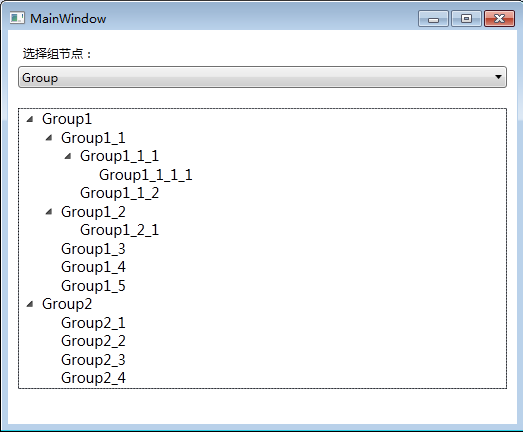
1.xaml文件,将以下代码加入界面合适位置
     <StackPanel>

             <StackPanel Margin="10">

                 <Label Content="选择组节点:"></Label>

                 <ComboBox MaxDropDownHeight="100" Name="cmbGoup" DropDownClosed="cmbGoup_DropDownClosed"></ComboBox>

             </StackPanel>

             <StackPanel Margin ="10">

                 <TreeView x:Name="tvGroup">

                     <TreeView.ItemTemplate>

                         <HierarchicalDataTemplate ItemsSource="{Binding Nodes}">

                             <StackPanel>

                                 <TextBlock VerticalAlignment="Center" FontSize="14" Text="{Binding GroupName}" Margin="2,0,0,0"></TextBlock>

                             </StackPanel>

                         </HierarchicalDataTemplate>

                     </TreeView.ItemTemplate>

                 </TreeView>

             </StackPanel>

         </StackPanel>
2.后台代码
a.用于绑定的节点类
     public class Group

     {

         public Group()

         {

             this.Nodes = new List<Group>();

             this.ParentId = ;//主节点的父id默认为0

         }

         public List<Group> Nodes { get; set; }

         public int ID { get; set; }//id

         public int ParentId { get; set; }//parentID

         public string GroupName { get; set; }

     }
b.主界面类代码
public partial class MainWindow : Window

    {

        public MainWindow()

        {

            InitializeComponent();

            #region 用于绑定的数据

            List<Group> grpLst = new List<Group>(){

                new Group(){ID=,GroupName="Group", ParentId = -},

                new Group(){ID=,GroupName="Group1",ParentId=},

                new Group(){ID=,GroupName="Group2",ParentId=},

                new Group(){ID=,GroupName="Group1_1",ParentId=},

                new Group(){ID=,GroupName="Group1_2",ParentId=},

                new Group(){ID=,GroupName="Group1_3",ParentId=},

                new Group(){ID=,GroupName="Group1_4",ParentId=},

                new Group(){ID=,GroupName="Group1_5",ParentId=},

                new Group(){ID=,GroupName="Group2_1",ParentId=},

                new Group(){ID=,GroupName="Group2_2",ParentId=},

                new Group(){ID=,GroupName="Group2_3",ParentId=},

                new Group(){ID=,GroupName="Group2_4",ParentId=},

                new Group(){ID=,GroupName="Group1_1_1",ParentId=},

                new Group(){ID=,GroupName="Group1_1_2",ParentId=},

                new Group(){ID=,GroupName="Group1_2_1",ParentId=},

                new Group(){ID=,GroupName="Group1_1_1_1",ParentId=}

            };

            #endregion

            this.cmbGoup.ItemsSource = grpLst;//comboBox数据源

            this.cmbGoup.SelectedValuePath = "ID";

            this.cmbGoup.DisplayMemberPath = "GroupName";

            List<Group> lstGroup = getTreeData(-, grpLst);//初始化时获取父节点为-1的数据

            this.tvGroup.ItemsSource = lstGroup;//数据绑定

        }

        /// <summary>

        /// 递归生成树形数据

        /// </summary>

        /// <param name="delst"></param>

        /// <returns></returns>

        public List<Group> getTreeData(int parentid, List<Group> nodes)

        {

            List<Group> mainNodes = nodes.Where(x => x.ParentId == parentid).ToList<Group>();

            List<Group> otherNodes = nodes.Where(x => x.ParentId != parentid).ToList<Group>();

            foreach (Group grp in mainNodes)

            {

                grp.Nodes = getTreeData(grp.ID, otherNodes);

            }

            return mainNodes;

        }

        /// <summary>

        /// 下拉框关闭事件

        /// </summary>

        /// <param name="sender"></param>

        /// <param name="e"></param>

        private void cmbGoup_DropDownClosed(object sender, EventArgs e)

        {

            if (this.cmbGoup.SelectedValue == null)

            {

                return;

            }

            int groupId = (int)this.cmbGoup.SelectedValue;//选中的组号

            List<Group> lstGroup = getTreeData(groupId, (List<Group>)cmbGoup.ItemsSource);

            this.tvGroup.ItemsSource = lstGroup;

        }

    }
wpf treeview 数据绑定 递归绑定节点的更多相关文章
- WPF—TreeView无限极绑定集合形成树结构
1.如图所示:绑定树效果图 2.前台Xaml代码: <Window x:Class="WpfTest.MainWindow" xmlns="http://schem ...
- [No0000D1]WPF—TreeView无限极绑定集合形成树结构
1.如图所示:绑定树效果图 2.前台Xaml代码: <Window x:Class="WpfTest.MainWindow" xmlns="http://schem ...
- WPF TreeView 展开到指定节点
最近在做一个交换机管理的项目,有一个交换机的树,做树的搜索的时候 展开节点居然有点难,自己记录下来 ,以后用的到的时候可以看一下. 展开代码如下,其中 SwitchTree是treeview空间的名称 ...
- ASP.NET树形控件TreeView的递归绑定
来自:http://blog.csdn.net/xqf003/article/details/4958727
- 潜移默化学会WPF(难点控件treeview)--改造TreeView(CheckBox多选择版本),递归绑定数据
原文:潜移默化学会WPF(难点控件treeview)--改造TreeView(CheckBox多选择版本),递归绑定数据 目前自己对treeview的感慨很多 今天先讲 面对这种 表结构的数据 的其中 ...
- TreeView树形控件递归绑定数据库里的数据
TreeView树形控件递归绑定数据库里的数据. 第一种:性能不好 第一步:数据库中查出来的表,字段名分别为UNAME(显示名称),DID(关联数据),UTYPE(类型) 第二步:前台代码 <% ...
- TreeView递归绑定无限分类数据
TreeView递归绑定无限分类数据 实现一个动态绑定,无限级分类数据时,需要将数据绑定到TreeView控件,分类表的结构是这样的: 字段 类型 Id int ParentId int Name N ...
- WPF 组织机构下拉树多选,递归绑定方式现实
使用HierarchicalDataTemplate递归绑定现实 XAML代码: <UserControl x:Class="SunCreate.CombatPlatform.Clie ...
- WPF TreeView Indent 减少节点的缩进
www.swack.cn - 原文链接:WPF TreeView Indent 减少节点的缩进 问题 最近一个需求,需要在界面中实现Windows资源管理器TreeView的界面.但是我发现,我做出的 ...
随机推荐
- mongodb 遇到问题-查询单个需要包装id
mongodb,get字符查询需要传入特定的包装id才能识别 const ObjectID = require('mongodb').ObjectID exports.queryOne = (req, ...
- __x__(6)0905第二天__标签属性=“值”
<!DOCTYPE html> <html> <head> <meta charset="utf-8" /> <title&g ...
- 问题:CGI返回给前端的汉字数据是乱码(已解决)
今天,我在写CGI程序,把后台数据返回到前台页面上,出现乱码, 不好看,所以,我在Content-type:application后面加了字符集的设置(字符集和前端一样), fprintf(stdou ...
- 在区块链侧链上进行Dapp技术开发
我在白皮书里提到过,asch使用的是不同于以太坊和比特币的侧链架构,dapp是运行在侧链上的,每套侧链对应一个dapp. 侧链的独立性 侧链架构的好处是代码和数据独立,不增加主链的负担,避免数据过度膨 ...
- PDF文件怎么转换成PPT
在日常办公中大家都会发现PDF文件目前是比较常见的一种文件,有的时候大家会需要将PDF转换成PPT为了去更好的演示,毕竟PPT文件在演示方面具有着较好的特点,那如何将PDF文件转换成PPT文件呢,今天 ...
- windows redis 自动启动
start.bat D: D:\dev\redis- redis-server.exe redis.conf redis.vbs createobject( 之后,把 start.bat 放在redi ...
- 报文分析4、TCP协议的头结构
TCP协议的头结构 来源端口(2字节) 目的端口(2字节) 序号(4字节) 确认序号(4字节) 头长度(4位) 保留(6位) URG ACK PSH RST SYN PIN 窗口大小(2字节) 校验和 ...
- webpack 知识点
安装 webpack npm install -g webpack npm install -g webpack-cli@2.x 初始化项目 npm init -y npm install --sav ...
- 有几个PAT
描述 字符串APPAPT中包含了两个单词“PAT”,其中第一个PAT是第2位(P),第4位(A),第6位(T):第二个PAT是第3位(P),第4位(A),第6位(T). 现给定字符串,问一共可以形成多 ...
- VScode 中 vue文件template中不能使用tab补齐标签
选择 文件-->首选项-->设置-->搜索 emmet,选择 编辑 setting.json, 添加下列代码: "emmet.includeLanguages" ...