
[No0000D1]WPF—TreeView无限极绑定集合形成树结构
1.如图所示:绑定树效果图
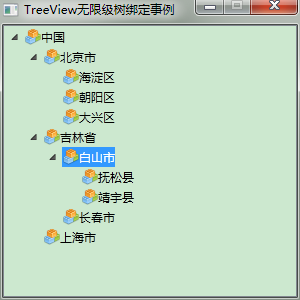
2.前台Xaml代码:
<Window x:Class="WpfTest.MainWindow"

        xmlns="http://schemas.microsoft.com/winfx/2006/xaml/presentation"

        xmlns:x="http://schemas.microsoft.com/winfx/2006/xaml"

        xmlns:mode="clr-namespace:WpfTest"

        Title="TreeView无限级树绑定事例" Height="300" Width="300" WindowStartupLocation="CenterScreen" ResizeMode="CanMinimize">

    <Grid>

        <Grid.Resources>

            <HierarchicalDataTemplate DataType="{x:Type mode:Node}" ItemsSource="{Binding Nodes}">

                <StackPanel Orientation="Horizontal" Margin="0,2,0,2">

                    <!--<Image Source="pack://application:,,,/WpfTest;Component/Resources/KnowDot.png" Width="16" Height="16" />-->

                    <!--<Image Source="Resources/KnowDot.png" Width="16" Height="16" />-->

                    <Image Source="/WpfTest;Component/Resources/KnowDot.png" Width="16" Height="16" />

                    <TextBlock Text="{Binding Name}" ToolTip="{Binding Name}" Tag="{Binding}"/>

                </StackPanel>

            </HierarchicalDataTemplate>

        </Grid.Resources>

        <TreeView Name="TreeView"/>

    </Grid>

</Window>
2.后台cs代码:采用递归无限极向下查询
using System;

using System.Collections.Generic;

using System.Linq;

using System.Text;

using System.Windows;

using System.Windows.Controls;

using System.Windows.Data;

using System.Windows.Documents;

using System.Windows.Input;

using System.Windows.Media;

using System.Windows.Media.Imaging;

using System.Windows.Navigation;

using System.Windows.Shapes;

using System.Threading;

using System.Diagnostics;

using System.Windows.Markup;

namespace WpfTest

{

    /// <summary>

    /// MainWindow.xaml 的交互逻辑

    /// </summary>

    public partial class MainWindow : Window

    {

        public MainWindow()

        {

            InitializeComponent();

            List<Node> nodes = new List<Node>()

            {

                new Node { ID = , Name = "中国" },

                new Node { ID = , Name = "北京市", ParentID =  },

                new Node { ID = , Name = "吉林省", ParentID =  },

                new Node { ID = , Name = "上海市", ParentID =  },

                new Node { ID = , Name = "海淀区", ParentID =  },

                new Node { ID = , Name = "朝阳区", ParentID =  },

                new Node { ID = , Name = "大兴区", ParentID =  },

                new Node { ID = , Name = "白山市", ParentID =  },

                new Node { ID = , Name = "长春市", ParentID =  },

                new Node { ID = , Name = "抚松县", ParentID =  },

                new Node { ID = , Name = "靖宇县", ParentID =  }

            };

            // 绑定树

            List<Node> outputList = Bind(nodes);

            //(TreeView.SelectedItem as Node).ID

            this.TreeView.ItemsSource = outputList;

            //TreeViewItem item = new TreeViewItem();

            //item.Header = "";

        }

        /// <summary>

        /// 绑定树

        /// </summary>

        List<Node> Bind(List<Node> nodes)

        {

            List<Node> outputList = new List<Node>();

            for (int i = ; i < nodes.Count; i++)

            {

                if (nodes[i].ParentID == -)

                {

                    outputList.Add(nodes[i]);

                }

                else

                {

                    FindDownward(nodes, nodes[i].ParentID).Nodes.Add(nodes[i]);

                }

            }

            return outputList;

        }

        /// <summary>

        /// 递归向下查找

        /// </summary>

        Node FindDownward(List<Node> nodes, int id)

        {

            if (nodes == null) return null;

            for (int i = ; i < nodes.Count; i++)

            {

                if (nodes[i].ID == id)

                {

                    return nodes[i];

                }

                Node node = FindDownward(nodes[i].Nodes, id);

                if (node != null)

                {

                    return node;

                }

            }

            return null;

        }

    }

    public class Node

    {

        public Node()

        {

            this.Nodes = new List<Node>();

            this.ParentID = -;

        }

        public int ID { get; set; }

        public string Name { get; set; }

        public int ParentID { get; set; }

        public List<Node> Nodes { get; set; }

    }

}
[No0000D1]WPF—TreeView无限极绑定集合形成树结构的更多相关文章
- WPF—TreeView无限极绑定集合形成树结构
1.如图所示:绑定树效果图 2.前台Xaml代码: <Window x:Class="WpfTest.MainWindow" xmlns="http://schem ...
- wpf treeview 数据绑定 递归绑定节点
1.先上效果 将所有节点加入ComboBox数据源,在ComboBox中选择时下方Treeview显示该节点下的子节点. 1.xaml文件,将以下代码加入界面合适位置 <StackPanel&g ...
- 转:打造DropDownList,TreeView,ListBox无限极分类目录树
[csharp] view plaincopyprint? #region DropDownList无限递归显示层次关系 /// <summary> /// 创建无限分级下拉列表框 /// ...
- WPF 绑定集合 根据集合个数改变样式 INotifyCollectionChanged
问题:当前ListBox Items 绑定 集合数据源ListA时候:ListA集合数据源中存在另外一个集合ListB,当更改或往ListB集合中添加数据的时候,通知改变? 实体类继承 INotify ...
- WPF Binding学习(四) 绑定各种数据源
转自:http://blog.csdn.net/lisenyang/article/details/18312199 1.集合作为数据源 首先我们先创建一个模型类 public class Stude ...
- WPF TreeView HierarchicalDataTemplate
原文 WPF TreeView HierarchicalDataTemplate HierarchicalDataTemplate 的DataType是本层的绑定,而ItemsSource是绑定下层的 ...
- C#无限极分类树-创建-排序-读取 用Asp.Net Core+EF实现
今天做一个管理后台菜单,想着要用无限极分类,记得园子里还是什么地方见过这种写法,可今天找了半天也没找到,没办法静下心来自己写了: 首先创建节点类(我给它取名:AdminUserTree): /// & ...
- [WPF 基础知识系列] —— 绑定中的数据校验Vaildation
前言: 只要是有表单存在,那么就有可能有对数据的校验需求.如:判断是否为整数.判断电子邮件格式等等. WPF采用一种全新的方式 - Binding,来实现前台显示与后台数据进行交互,当然数据校验方式也 ...
- 【laravel5.4】Baum无限极分类和collect助手函数、transform()中间件(转换数据)方法使用
1.目的,无限极分类 /* * getdepartment:获取[当前登录用户对应公司的所有有效部门] * DB::table ==>返回查询构造器结果,不会返回一个collect实例 * 而 ...
随机推荐
- android学习十二(android的Content Provider(内容提供器)的使用)
文件存储和SharePreference存储以及数据存储一般为了安全,最好用于当前应用程序中訪问和存储数据.内容提供器(Content Provider)主要用于在不同的应用程序之间实现数据共享的功能 ...
- TLB的作用及工作原理
TLB的作用及工作过程 以下内容摘自<步步惊芯——软核处理器内部设计分析>一书 页表一般都很大,并且存放在内存中,所以处理器引入MMU后,读取指令.数据需要访问两次内存:首先通过查询页表得 ...
- Effective Java 第三版—— 85. 其他替代方式优于Java本身序列化
Tips 书中的源代码地址:https://github.com/jbloch/effective-java-3e-source-code 注意,书中的有些代码里方法是基于Java 9 API中的,所 ...
- [转]Anatomy of a Program in Memory
Memory management is the heart of operating systems; it is crucial for both programming and system a ...
- 【规范】前端编码规范——css 规范
编码 在 css 首行设置文件编码为 UTF-8. @charset "UTF-8"; class 命名 class 名称应当尽可能短,并且意义明确.使用有意义的名称,使用有组织的 ...
- data.frame类型数据如何将第一列值替换为行号
data.frame类型数据如何将第一列值替换为行号 row.names(data) <- data[, 1]data <- data[, -1]
- 必读:Spark与kafka010整合
版权声明:本文为博主原创文章,未经博主同意不得转载. https://blog.csdn.net/rlnLo2pNEfx9c/article/details/79648890 SparkStreami ...
- jq 日期区间处理
<html lang="en"><head> <meta charset="UTF-8"> <title>Tit ...
- GraphX学习笔记——Programming Guide
学习的资料是官网的Programming Guide https://spark.apache.org/docs/latest/graphx-programming-guide.html 首先是Gra ...
- tensorflow中moving average的用法
一般在保存模型参数的时候,都会保存一份moving average,是取了不同迭代次数模型的移动平均,移动平均后的模型往往在性能上会比最后一次迭代保存的模型要好一些. tensorflow-model ...