
Docker:企业级私有仓库harbor[十六]
一、安装配置
1、下载安装包
链接:https://pan.baidu.com/s/1Z9I7zYXSt-8ve3lFT2YCeg

提取码:iuqj
2、安装docker和docker-compose
curl -o /etc/yum.repos.d/epel.repo http://mirrors.aliyun.com/repo/epel-7.repo

yum install -y python2-pip

pip install -i  https://pypi.tuna.tsinghua.edu.cn/simple docker-compose
3、上传harbor-offline-installer-v1.5.1.tgz安装包到/opt,并解压
[root@luoahong opt]# pwd

/opt

[root@luoahong opt]# ll

total 844664

drwx--x--x 4 root root        28 Jan 17 18:03 containerd

drwxr-xr-x 4 root root       229 Jan 18 18:51 harbor

-rw-r--r-- 1 root root 864933610 Jan 18 18:40 harbor-offline-installer-v1.5.1.tgz
4、修改harbor.cfg配置文件
hostname = 192.168.228.135

harbor_admin_password = 12345
5、执行install.sh
[root@luoahong harbor]# ./install.sh

[Step 0]: checking installation environment ...

Note: docker version: 18.09.1

Note: docker-compose version: 1.23.2

[Step 1]: loading Harbor images ...

52ef9064d2e4: Loading layer [==================================================>]  135.9MB/135.9MB

4a6862dbadda: Loading layer [==================================================>]  23.25MB/23.25MB

...........

[Step 2]: preparing environment ...

Generated and saved secret to file: /data/secretkey

Generated configuration file: ./common/config/nginx/nginx.conf

Generated configuration file: ./common/config/adminserver/env

Generated configuration file: ./common/config/ui/env

Generated configuration file: ./common/config/registry/config.yml

Generated configuration file: ./common/config/db/env

Generated configuration file: ./common/config/jobservice/env

Generated configuration file: ./common/config/jobservice/config.yml

Generated configuration file: ./common/config/log/logrotate.conf

Generated configuration file: ./common/config/jobservice/config.yml

Generated configuration file: ./common/config/ui/app.conf

Generated certificate, key file: ./common/config/ui/private_key.pem, cert file: ./common/config/registry/root.crt

The configuration files are ready, please use docker-compose to start the service.

[Step 3]: checking existing instance of Harbor ...

[Step 4]: starting Harbor ...

Creating network "harbor_harbor" with the default driver

Creating harbor-log ... done

Creating harbor-db          ... done

Creating harbor-adminserver ... done

Creating redis              ... done

Creating registry           ... done

Creating harbor-ui          ... done

Creating harbor-jobservice  ... done

Creating nginx              ... done

✔ ----Harbor has been installed and started successfully.----

Now you should be able to visit the admin portal at http://192.168.228.135.

For more details, please visit https://github.com/vmware/harbor .
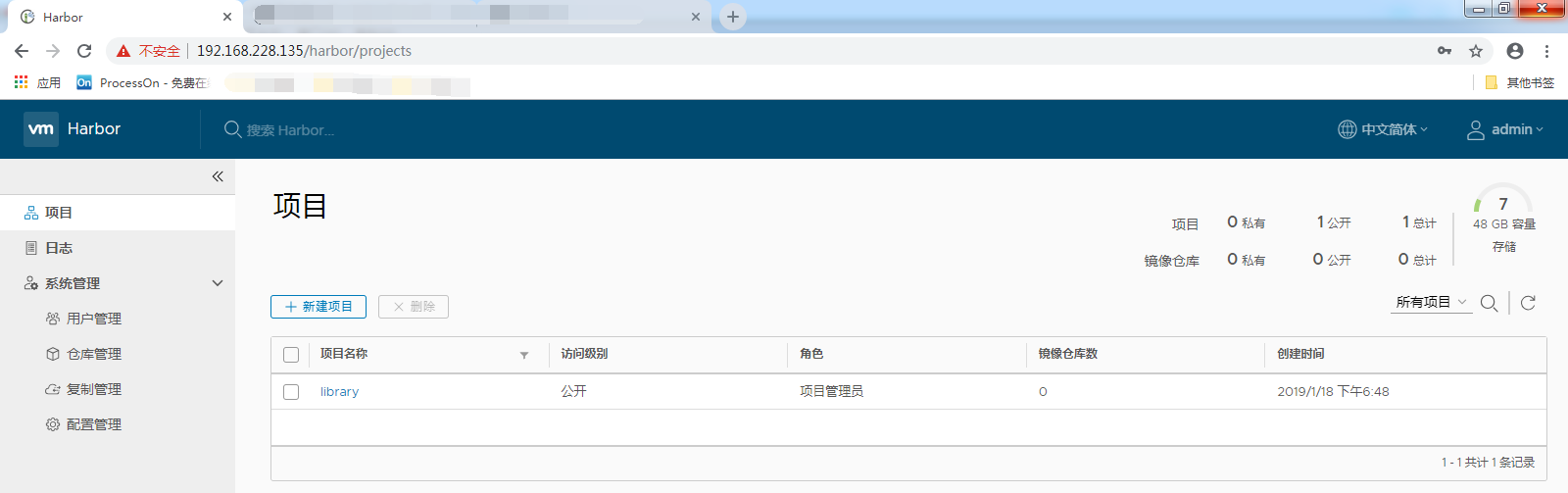
6、web界面测试截图
二、推送文件
1、推送报错
[root@luoahong1 ~]# docker push 192.168.228.135/library/busybox:latest

The push refers to repository [192.168.228.135/library/busybox]

Get https://192.168.228.135/v2/: dial tcp 192.168.228.135:443: connect: connection refused

[root@luoahong1 ~]# systemctl restart docker

[root@luoahong1 ~]# docker push 192.168.228.135/library/busybox:latest

The push refers to repository [192.168.228.135/library/busybox]

683f499823be: Preparing

denied: requested access to the resource is denied
修改/etc/docker/daemon.json文件
[root@luoahong1 ~]#  vim /etc/docker/daemon.json

"insecure-registries": ["192.168.228.135"]
2、推送成功
[root@luoahong1 ~]# docker login

Login with your Docker ID to push and pull images from Docker Hub. If you don't have a Docker ID, head over to https://hub.docker.com to create one.

Username: admin

Password:

Error: Password Required

[root@luoahong1 ~]# docker login 192.168.228.135

Username: admin

Password:

WARNING! Your password will be stored unencrypted in /root/.docker/config.json.

Configure a credential helper to remove this warning. See

https://docs.docker.com/engine/reference/commandline/login/#credentials-store

Login Succeeded

[root@luoahong1 ~]# docker push 192.168.228.135/library/busybox:latest

The push refers to repository [192.168.228.135/library/busybox]

683f499823be: Pushed

latest: digest: sha256:bbb143159af9eabdf45511fd5aab4fd2475d4c0e7fd4a5e154b98e838488e510 size: 527
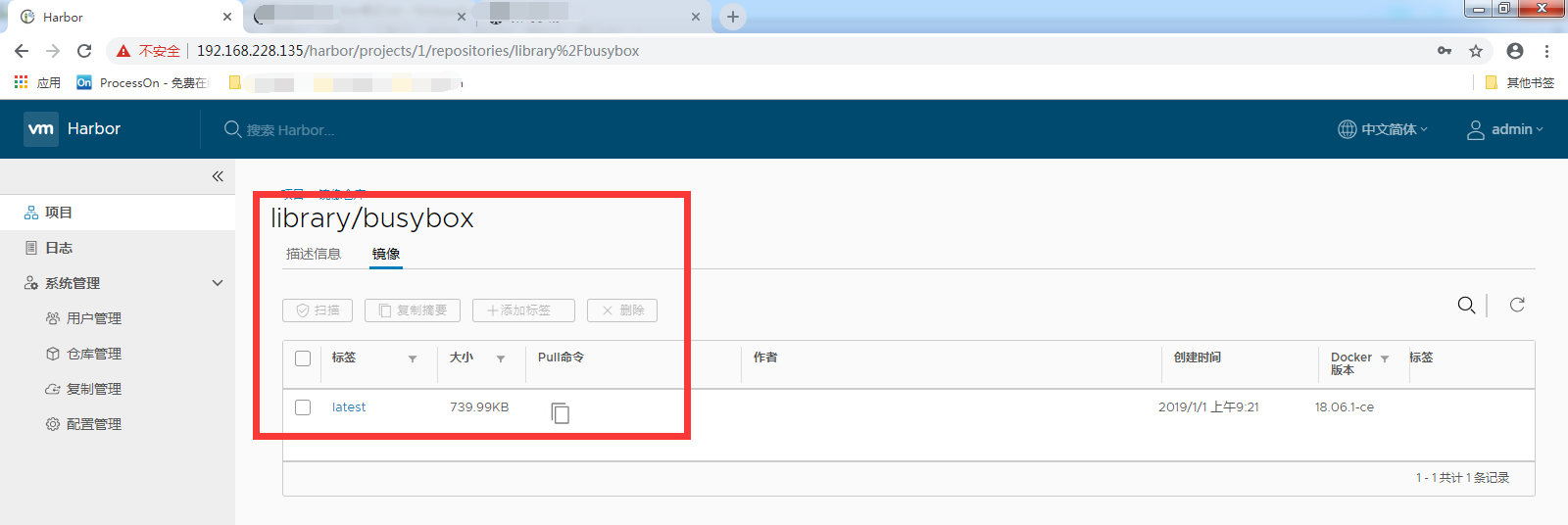
3、web界面截图
三、其他功能
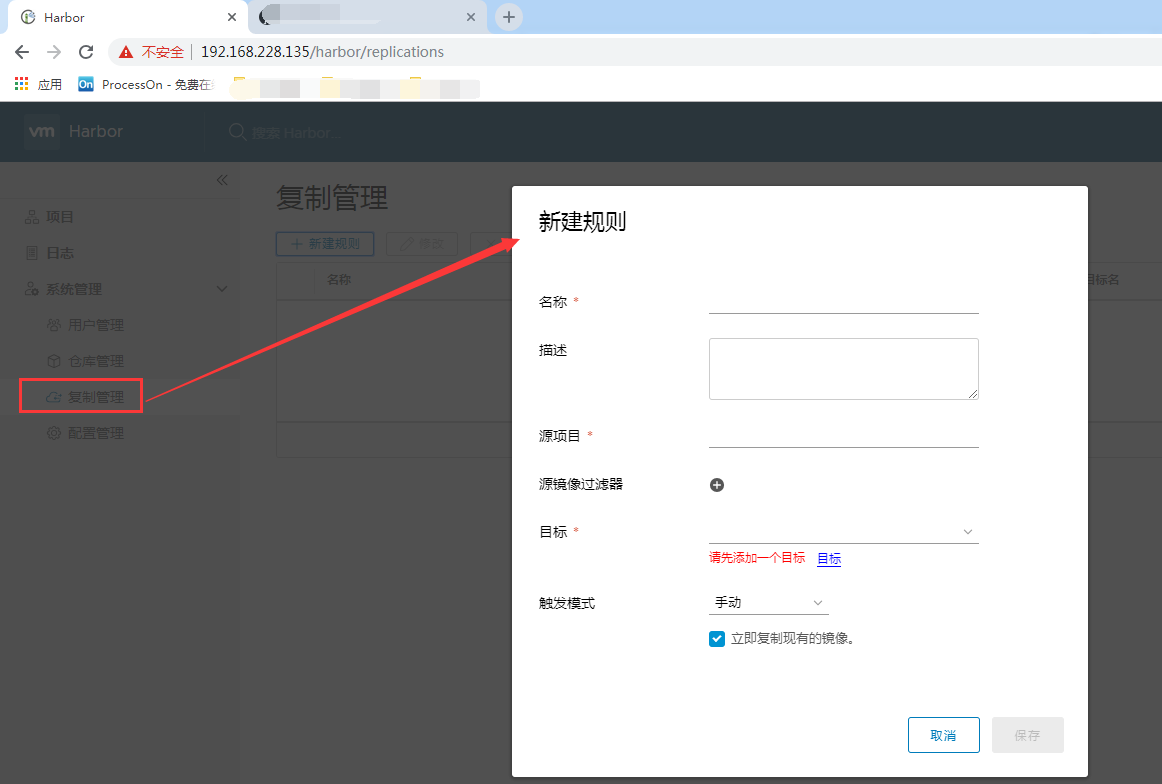
1、两台hub同步
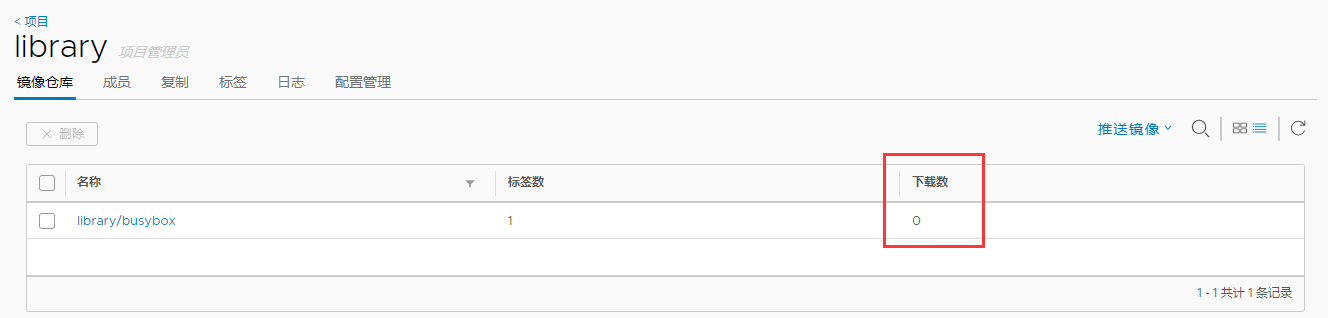
2、下载数量统计
3、下载加密
Docker:企业级私有仓库harbor[十六]的更多相关文章
- Kubernetes-5:搭建企业级私有仓库Harbor
搭建企业级私有仓库Harbor 安装需求 python版本 >= 2.7 Docker引擎版本 >= 1.10 docker-compose版本 >= 1.6.0 安装环境 一.Py ...
- 菜鸟系列docker——搭建私有仓库harbor(6)
docker 搭建私有仓库harbor 1. 准备条件 安装docker sudo yum update sudo yum install -y yum-utils device-mapper-per ...
- Docker: 企业级镜像仓库Harbor的使用
上一节,演示了Harbor的安装部署 这次我们来讲解 Harbor的使用. 我们需要了解到: 1. 如何推镜像到镜像仓库 2. 如何从镜像仓库拉取镜像 3. 如何运行从私有仓库拉取的镜像 # 查看 h ...
- Docker 企业级镜像仓库 Harbor 的搭建与维护
目录 一.什么是 Harbor 二.Harbor 安装 2.1.Harbor 安装环境 2.2.Harbor安装 2.3 配置HTTPS 三.Harbor 的使用 3.1.登录Harbor并使用 3. ...
- Docker: 企业级镜像仓库Harbor部署(http)
Harbor离线安装包下载地址:https://github.com/goharbor/harbor Docker compose(安装harbor需要用到docker compose)下载地址:ht ...
- docker企业级镜像仓库Harbor管理
Harbor概述 Harbor是由VMWare公司开源的容器镜像仓库.事实上,Harbor是在Docker Registry上进行了相应的企业级扩展,从而获得了更加广泛的应用,这些新的企业级特性包括: ...
- docker 搭建私有仓库 harbor
前提 已安装好 docker 和 docker-compose 环境:CentOS Linux release 7.5 docker 版本:18.09.05 1.安装harbor wget -P / ...
- docker企业级镜像仓库harbor
第一步:安装docker和docker-compose 第二步:下载harbor-offine-installer-v1.5.1.tgz 第三步:上传到/opt,并解压 第四步:修改harbor.cf ...
- Docker企业级镜像仓库harbor(vmware 中国团队)
第一步:安装docker和docker-compose 第二步:下载harbor-offline-installer-v1.3.0.tgz 第三步:上传到/opt,并解压 第四步:修改harbor.c ...
随机推荐
- SQL Server -- 回忆笔记(三):ADO.NET之C#操作数据库
SQL Server知识点回忆篇(三):ADO.NET之C#操作数据库 1.连接数据库 (1)创建连接字符串: 使用windows身份验证时的连接字符串: private string conStr= ...
- 【原】Java学习笔记023 - 字符串缓冲区_正则表达式
package cn.temptation; import java.util.Arrays; public class Sample01 { public static void main(Stri ...
- java反射(java.lang.reflect)---java.lang.reflect.Modifier中状态码
1. 详情请看jvm(虚拟机)规范 java.lang.reflect.Modifier public static final int ABSTRACT 1024 public static fin ...
- jenkins使用开始踩坑(1)
上篇文章 安装教程 :https://www.cnblogs.com/linuxchao/p/linuxchao-jenkins-setup.html 一.前戏 话说上一篇文章安装完 JDK 和 je ...
- c#实验一:基于winform的冒泡排序练习
一.界面设计 在排序前textbox中输入数字,以逗号隔开,通过两个button实现降序排序或升序排序,然后在排序后textbox中显示 三个关键点: 1.监测输入是否合法,最好使用正则表达式 2.拆 ...
- jspdf生成pdf并在页面展示
jspdf调用ouput即可 https://blog.csdn.net/dragonzoebai/article/details/18243823 获取页面生成pdf:jspdf+html2canv ...
- Docker(1):CentOS7 安装Docker
1.查看系统内核,docker要求系统的内核版本高于3.10 # uname -r 2.升级yum包,确保最新 # yum update 3.安装所需要依赖包 # yum install - ...
- Dockerfile 规范
https://time-track.cn/compile-docker-from-source.html 参考 https://time-track.cn/install-docker-on-ubu ...
- Android开发欢迎页点击跳过倒计时进入主页
没点击跳过自然进入主页,点击跳过之后立即进入主页 1.欢迎页布局activity_sp.xml放一张背景图(图片随你便啦)再放一个盛放倒计时的TextView <?xml versi ...
- 4-STM32物联网开发WIFI(ESP8266)+GPRS(Air202)系统方案安全篇(为域名申请SSl证书)
3-STM32物联网开发WIFI(ESP8266)+GPRS(Air202)系统方案安全篇(购买域名,域名绑定IP) 然后就是等着..... 假设可以了 咱呢是配置MQTT实现SSL安全加密通信,所以 ...