
python开发_thread_线程_搜索本地文件
在之前的blog中,曾经写到过关于搜索本地文件的技术文章
如:
下面说说python中关于线程来搜索本地文件
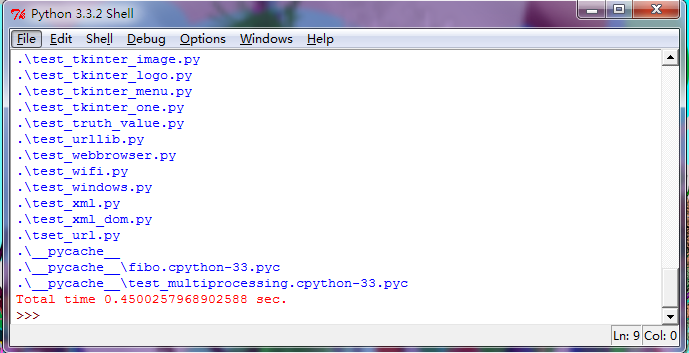
利用多个线程处理搜索的问题,我们可以发现他很快....
========================================================
下面是代码部分:
========================================================
 # A parallelized "find(1)" using the thread module.

 # This demonstrates the use of a work queue and worker threads.

 # It really does do more stats/sec when using multiple threads,

 # although the improvement is only about 20-30 percent.

 # (That was 8 years ago.  In 2002, on Linux, I can't measure

 # a speedup. :-( )

 # I'm too lazy to write a command line parser for the full find(1)

 # command line syntax, so the predicate it searches for is wired-in,

 # see function selector() below.  (It currently searches for files with

 # world write permission.)

 # Usage: parfind.py [-w nworkers] [directory] ...

 # Default nworkers is 4

 import sys

 import getopt

 import time

 import os

 from stat import *

 import _thread as thread

 # Work queue class.  Usage:

 #   wq = WorkQ()

 #   wq.addwork(func, (arg1, arg2, ...)) # one or more calls

 #   wq.run(nworkers)

 # The work is done when wq.run() completes.

 # The function calls executed by the workers may add more work.

 # Don't use keyboard interrupts!

 class WorkQ:

     # Invariants:

     # - busy and work are only modified when mutex is locked

     # - len(work) is the number of jobs ready to be taken

     # - busy is the number of jobs being done

     # - todo is locked iff there is no work and somebody is busy

     def __init__(self):

         self.mutex = thread.allocate()

         self.todo = thread.allocate()

         self.todo.acquire()

         self.work = []

         self.busy = 0

     def addwork(self, func, args):

         job = (func, args)

         self.mutex.acquire()

         self.work.append(job)

         self.mutex.release()

         if len(self.work) == 1:

             self.todo.release()

     def _getwork(self):

         self.todo.acquire()

         self.mutex.acquire()

         if self.busy == 0 and len(self.work) == 0:

             self.mutex.release()

             self.todo.release()

             return None

         job = self.work[0]

         del self.work[0]

         self.busy = self.busy + 1

         self.mutex.release()

         if len(self.work) > 0:

             self.todo.release()

         return job

     def _donework(self):

         self.mutex.acquire()

         self.busy = self.busy - 1

         if self.busy == 0 and len(self.work) == 0:

             self.todo.release()

         self.mutex.release()

     def _worker(self):

         time.sleep(0.00001)     # Let other threads run

         while 1:

             job = self._getwork()

             if not job:

                 break

             func, args = job

             func(*args)

             self._donework()

     def run(self, nworkers):

         if not self.work:

             return # Nothing to do

         for i in range(nworkers-1):

             thread.start_new(self._worker, ())

         self._worker()

         self.todo.acquire()

 # Main program

 def main():

     nworkers = 4

     #print(getopt.getopt(sys.argv[1:], '-w:'))

     opts, args = getopt.getopt(sys.argv[1:], '-w:')

     for opt, arg in opts:

         if opt == '-w':

             nworkers = int(arg)

     if not args:

         #print(os.curdir)

         args = [os.curdir]

     wq = WorkQ()

     for dir in args:

         wq.addwork(find, (dir, selector, wq))

     t1 = time.time()

     wq.run(nworkers)

     t2 = time.time()

     sys.stderr.write('Total time %r sec.\n' % (t2-t1))

 # The predicate -- defines what files we look for.

 # Feel free to change this to suit your purpose

 def selector(dir, name, fullname, stat):

     # Look for world writable files that are not symlinks

     return (stat[ST_MODE] & 0o002) != 0 and not S_ISLNK(stat[ST_MODE])

 # The find procedure -- calls wq.addwork() for subdirectories

 def find(dir, pred, wq):

     try:

         names = os.listdir(dir)

     except os.error as msg:

         print(repr(dir), ':', msg)

         return

     for name in names:

         if name not in (os.curdir, os.pardir):

             fullname = os.path.join(dir, name)

             try:

                 stat = os.lstat(fullname)

             except os.error as msg:

                 print(repr(fullname), ':', msg)

                 continue

             if pred(dir, name, fullname, stat):

                 print(fullname)

             if S_ISDIR(stat[ST_MODE]):

                 if not os.path.ismount(fullname):

                     wq.addwork(find, (fullname, pred, wq))

 # Call the main program

 main()
更多信息:http://www.oschina.net/code/explore/Python-3.1.3/Demo/threads/find.py
========================================================
More reading,and english is important.
I'm Hongten

大哥哥大姐姐,觉得有用打赏点哦!多多少少没关系,一分也是对我的支持和鼓励。谢谢。
Hongten博客排名在100名以内。粉丝过千。
Hongten出品,必是精品。
E | hongtenzone@foxmail.com B | http://www.cnblogs.com/hongten
========================================================
python开发_thread_线程_搜索本地文件的更多相关文章
- python开发_搜索本地文件信息写入文件
功能:#在指定的盘符,如D盘,搜索出与用户给定后缀名(如:jpg,png)相关的文件 #然后把搜索出来的信息(相关文件的绝对路径),存放到用户指定的 #文件(如果文件不存在,则建立相应的文件)中 之前 ...
- python开发_thread_线程基础
说到线程,我们要知道啥是串行,啥是并行程序 举个例子: 串行程序,就是一个一个的执行程序 #python threading import time ''' 每一秒中,输出:this is a dem ...
- win10无法搜索本地文件,修复方法?
win10无法搜索本地文件,实在太不方便了,网上查了一圈没几个方法有效的,筛选出来2个成功解决的问题,具体是哪个起到作用,不太清楚,都放上来,大家自行选择! 方法1:按“Windows+ X”后选择“ ...
- 获取文件的缩略图Thumbnail和通过 AQS - Advanced Query Syntax 搜索本地文件
演示如何获取文件的缩略图 FileSystem/ThumbnailAccess.xaml <Page x:Class="XamlDemo.FileSystem.ThumbnailAcc ...
- 重新想象 Windows 8 Store Apps (22) - 文件系统: 访问文件夹和文件, 通过 AQS 搜索本地文件
原文:重新想象 Windows 8 Store Apps (22) - 文件系统: 访问文件夹和文件, 通过 AQS 搜索本地文件 [源码下载] 重新想象 Windows 8 Store Apps ( ...
- 使用python内置模块os和openpyxl搜索指定文件夹下Excel中的内容
在指定路径下,搜索Excel文件中包含的指定内容,首先需要遍历指定路径,得到该路径下所有Excel文件的绝对/相对路径:然后读取Excel中内容,将文件中的每个单元格的值与要搜索的内容进行判断(正则比 ...
- Python开发环境Wing IDE搜索工具介绍
Wing IDE编辑器的搜索工具提供了一个基于友好GUI的搜索和替换工具. 某些情况下搜索可能会跨越整个文件,也有可能被限制到当前所选择的区域:可以区分大小写,也可以设置为不区分:可以被限制为只匹配整 ...
- Android开发 MediaPlayer入门_播放本地视频
前言 MediaPlayer,可以播放视频/音频,并且它支持本地和网络文件的播放.本片博客作为入门教程,先以最通俗的方式解释播放文件本地视频.(如果你嫌MediaPlayer还是太麻烦可以试试选择Vi ...
- Python开发基础-Day5-字符编码、文件处理和函数基础(草稿)
字符编码 为什么要有字符编码? 字符编码是为了让计算机能识别我们人写的字符,因为计算机只认识高低电平,也就是二进制数"0","1". 一个文件用什么编码方式存储 ...
随机推荐
- Flip Bits
Determine the number of bits required to flip if you want to convert integer n to integer m. Notice ...
- scp加端口号
scp -P 21110 root@192.168.0.1:/home/abc.txt root@192.168.0.2:/root 注意: 参数-P 的位置一定要紧跟在scp命令后面 参数-P 指的 ...
- Cloud Lab: 泰晓实验云台【转】
转自:http://tinylab.org/cloud-lab/ 可快速构建的计算机课程在线实验平台 由 Wu Zhangjin 创建于 2017/10/06 评论 打赏 项目描述 泰晓实验云台 项目 ...
- 使用pandas把mysql的数据导入MongoDB。
使用pandas把mysql的数据导入MongoDB. 首先说下我的需求,我需要把mysql的70万条数据导入到mongodb并去重, 同时在第二列加入一个url字段,字段的值和第三列的值一样,代码如 ...
- j-linkV8固件更新(任意版本)
在使用j-link v8调试程序时,容易出现固件丢失或出错的情况,导致电脑不能识别,j-link上面的灯不亮.我今天刚刚遇到了这个情况,于是就拆开外壳,在网上搜索资料,发现刷固件相关的还真多,但是有一 ...
- 读书笔记 effective c++ Item 42 理解typename的两种涵义
1. class和typename含义相同的例子 问题:在下面的模板声明中class和typename的区别是什么? template<class T> class Widget; // ...
- ArcMap2SLD使用
1.首先打开ArcMap,加载一副mxd地图: 2.打开ArcGIS2SLD,如下图所示: 3.选择样式文件的保存形式,一副mxd地图可能有多个图层,选中In Separate Dateien/In ...
- sld一张图
- git忽略特殊文件或文件夹
1.在项目目录中添加“.gitignore”文件,项目目录就是你存放git工程的目录就是有“.git”目录的目录 vi .gitignore 2.在文件中添加如下内容,其中“/runtime/”是忽略 ...
- P2733 家的范围 Home on the Range
又是一校内模拟赛见的题 不知道为什么出题人怎么这么喜欢USACO的Farmer John的他的牛... 感觉这道题不是特别的难,但也不很水 同机房的神仙们都说这个题是一道二维前缀和的裸题,但我当时的确 ...