
ASP.NET Core:WebAppCoreRESTful
| ylbtech-ASP.NET Core:WebAppCoreRESTFul |
| 1.返回顶部 |
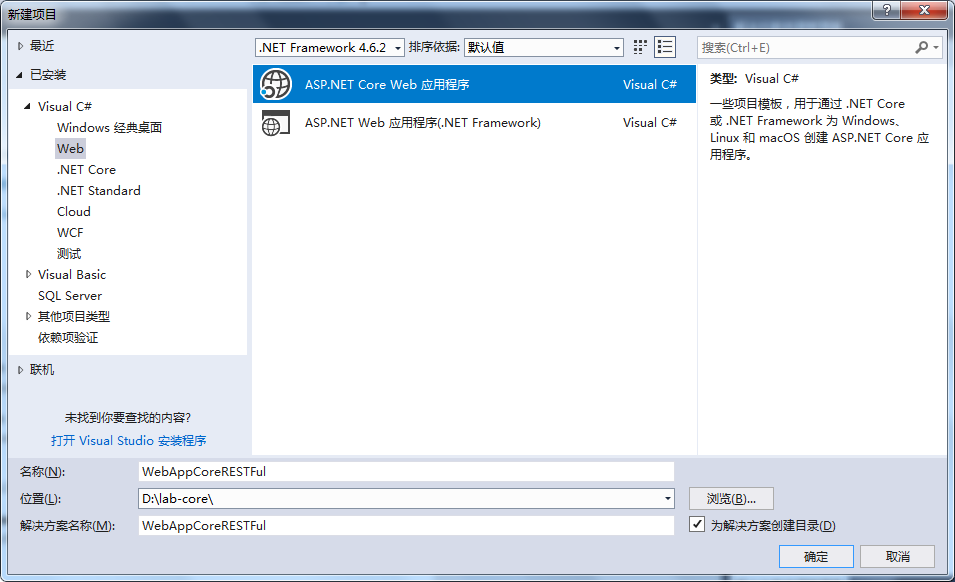
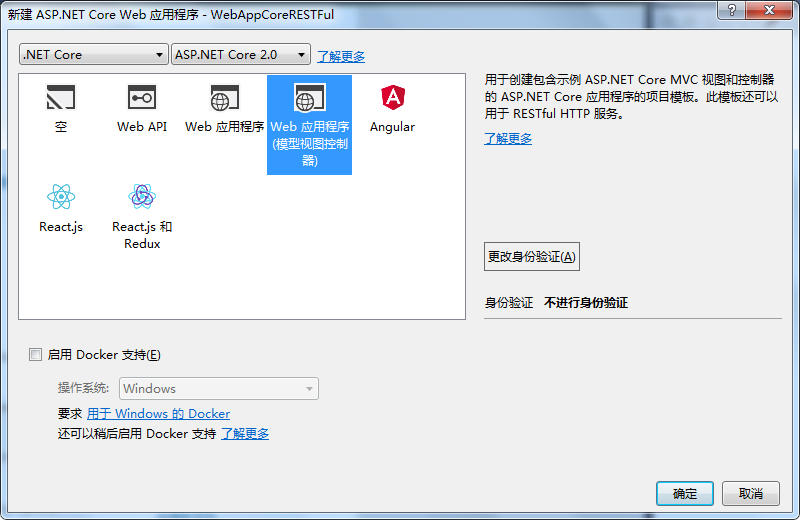
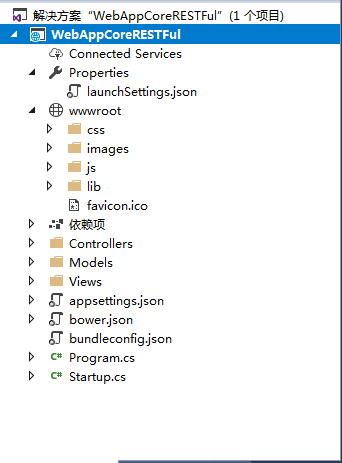 |
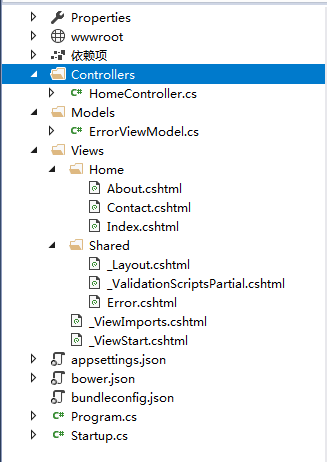 |
| 2. Controllers返回顶部 |
using System;

using System.Collections.Generic;

using System.Diagnostics;

using System.Linq;

using System.Threading.Tasks;

using Microsoft.AspNetCore.Mvc;

using WebAppCoreRESTFul.Models;

namespace WebAppCoreRESTFul.Controllers

{

    public class HomeController : Controller

    {

        public IActionResult Index()

        {

            return View();

        }

        public IActionResult About()

        {

            ViewData["Message"] = "Your application description page.";

            return View();

        }

        public IActionResult Contact()

        {

            ViewData["Message"] = "Your contact page.";

            return View();

        }

        public IActionResult Error()

        {

            return View(new ErrorViewModel { RequestId = Activity.Current?.Id ?? HttpContext.TraceIdentifier });

        }

    }

}
| 3. Models返回顶部 |
using System;

namespace WebAppCoreRESTFul.Models

{

    public class ErrorViewModel

    {

        public string RequestId { get; set; }

        public bool ShowRequestId => !string.IsNullOrEmpty(RequestId);

    }

}
| 4. Views返回顶部 |
@{

    ViewData["Title"] = "About";

}

<h2>@ViewData["Title"]</h2>

<h3>@ViewData["Message"]</h3>

<p>Use this area to provide additional information.</p>
@{

    ViewData["Title"] = "Contact";

}

<h2>@ViewData["Title"]</h2>

<h3>@ViewData["Message"]</h3>

<address>

    One Microsoft Way<br />

    Redmond, WA 98052-6399<br />

    <abbr title="Phone">P:</abbr>

    425.555.0100

</address>

<address>

    <strong>Support:</strong> <a href="mailto:Support@example.com">Support@example.com</a><br />

    <strong>Marketing:</strong> <a href="mailto:Marketing@example.com">Marketing@example.com</a>

</address>
@{
ViewData["Title"] = "Home Page";
}
<div id="myCarousel" class="carousel slide" data-ride="carousel" data-interval="6000">
<ol class="carousel-indicators">
<li data-target="#myCarousel" data-slide-to="0" class="active"></li>
<li data-target="#myCarousel" data-slide-to="1"></li>
<li data-target="#myCarousel" data-slide-to="2"></li>
<li data-target="#myCarousel" data-slide-to="3"></li>
</ol>
<div class="carousel-inner" role="listbox">
<div class="item active">
<img src="~/images/banner1.svg" alt="ASP.NET" class="img-responsive" />
<div class="carousel-caption" role="option">
<p>
Learn how to build ASP.NET apps that can run anywhere.
<a class="btn btn-default" href="https://go.microsoft.com/fwlink/?LinkID=525028&clcid=0x409">
Learn More
</a>
</p>
</div>
</div>
<div class="item">
<img src="~/images/banner2.svg" alt="Visual Studio" class="img-responsive" />
<div class="carousel-caption" role="option">
<p>
There are powerful new features in Visual Studio for building modern web apps.
<a class="btn btn-default" href="https://go.microsoft.com/fwlink/?LinkID=525030&clcid=0x409">
Learn More
</a>
</p>
</div>
</div>
<div class="item">
<img src="~/images/banner3.svg" alt="Package Management" class="img-responsive" />
<div class="carousel-caption" role="option">
<p>
Bring in libraries from NuGet, Bower, and npm, and automate tasks using Grunt or Gulp.
<a class="btn btn-default" href="https://go.microsoft.com/fwlink/?LinkID=525029&clcid=0x409">
Learn More
</a>
</p>
</div>
</div>
<div class="item">
<img src="~/images/banner4.svg" alt="Microsoft Azure" class="img-responsive" />
<div class="carousel-caption" role="option">
<p>
Learn how Microsoft's Azure cloud platform allows you to build, deploy, and scale web apps.
<a class="btn btn-default" href="https://go.microsoft.com/fwlink/?LinkID=525027&clcid=0x409">
Learn More
</a>
</p>
</div>
</div>
</div>
<a class="left carousel-control" href="#myCarousel" role="button" data-slide="prev">
<span class="glyphicon glyphicon-chevron-left" aria-hidden="true"></span>
<span class="sr-only">Previous</span>
</a>
<a class="right carousel-control" href="#myCarousel" role="button" data-slide="next">
<span class="glyphicon glyphicon-chevron-right" aria-hidden="true"></span>
<span class="sr-only">Next</span>
</a>
</div>
<div class="row">
<div class="col-md-3">
<h2>Application uses</h2>
<ul>
<li>Sample pages using ASP.NET Core MVC</li>
<li><a href="https://go.microsoft.com/fwlink/?LinkId=518004">Bower</a> for managing client-side libraries</li>
<li>Theming using <a href="https://go.microsoft.com/fwlink/?LinkID=398939">Bootstrap</a></li>
</ul>
</div>
<div class="col-md-3">
<h2>How to</h2>
<ul>
<li><a href="https://go.microsoft.com/fwlink/?LinkID=398600">Add a Controller and View</a></li>
<li><a href="https://go.microsoft.com/fwlink/?LinkId=699315">Manage User Secrets using Secret Manager.</a></li>
<li><a href="https://go.microsoft.com/fwlink/?LinkId=699316">Use logging to log a message.</a></li>
<li><a href="https://go.microsoft.com/fwlink/?LinkId=699317">Add packages using NuGet.</a></li>
<li><a href="https://go.microsoft.com/fwlink/?LinkId=699318">Add client packages using Bower.</a></li>
<li><a href="https://go.microsoft.com/fwlink/?LinkId=699319">Target development, staging or production environment.</a></li>
</ul>
</div>
<div class="col-md-3">
<h2>Overview</h2>
<ul>
<li><a href="https://go.microsoft.com/fwlink/?LinkId=518008">Conceptual overview of what is ASP.NET Core</a></li>
<li><a href="https://go.microsoft.com/fwlink/?LinkId=699320">Fundamentals of ASP.NET Core such as Startup and middleware.</a></li>
<li><a href="https://go.microsoft.com/fwlink/?LinkId=398602">Working with Data</a></li>
<li><a href="https://go.microsoft.com/fwlink/?LinkId=398603">Security</a></li>
<li><a href="https://go.microsoft.com/fwlink/?LinkID=699321">Client side development</a></li>
<li><a href="https://go.microsoft.com/fwlink/?LinkID=699322">Develop on different platforms</a></li>
<li><a href="https://go.microsoft.com/fwlink/?LinkID=699323">Read more on the documentation site</a></li>
</ul>
</div>
<div class="col-md-3">
<h2>Run & Deploy</h2>
<ul>
<li><a href="https://go.microsoft.com/fwlink/?LinkID=517851">Run your app</a></li>
<li><a href="https://go.microsoft.com/fwlink/?LinkID=517853">Run tools such as EF migrations and more</a></li>
<li><a href="https://go.microsoft.com/fwlink/?LinkID=398609">Publish to Microsoft Azure Web Apps</a></li>
</ul>
</div>
</div>
<!DOCTYPE html>
<html>
<head>
<meta charset="utf-8" />
<meta name="viewport" content="width=device-width, initial-scale=1.0" />
<title>@ViewData["Title"] - WebAppCoreRESTFul</title> <environment include="Development">
<link rel="stylesheet" href="~/lib/bootstrap/dist/css/bootstrap.css" />
<link rel="stylesheet" href="~/css/site.css" />
</environment>
<environment exclude="Development">
<link rel="stylesheet" href="https://ajax.aspnetcdn.com/ajax/bootstrap/3.3.7/css/bootstrap.min.css"
asp-fallback-href="~/lib/bootstrap/dist/css/bootstrap.min.css"
asp-fallback-test-class="sr-only" asp-fallback-test-property="position" asp-fallback-test-value="absolute" />
<link rel="stylesheet" href="~/css/site.min.css" asp-append-version="true" />
</environment>
</head>
<body>
<nav class="navbar navbar-inverse navbar-fixed-top">
<div class="container">
<div class="navbar-header">
<button type="button" class="navbar-toggle" data-toggle="collapse" data-target=".navbar-collapse">
<span class="sr-only">Toggle navigation</span>
<span class="icon-bar"></span>
<span class="icon-bar"></span>
<span class="icon-bar"></span>
</button>
<a asp-area="" asp-controller="Home" asp-action="Index" class="navbar-brand">WebAppCoreRESTFul</a>
</div>
<div class="navbar-collapse collapse">
<ul class="nav navbar-nav">
<li><a asp-area="" asp-controller="Home" asp-action="Index">Home</a></li>
<li><a asp-area="" asp-controller="Home" asp-action="About">About</a></li>
<li><a asp-area="" asp-controller="Home" asp-action="Contact">Contact</a></li>
</ul>
</div>
</div>
</nav>
<div class="container body-content">
@RenderBody()
<hr />
<footer>
<p>© 2018 - WebAppCoreRESTFul</p>
</footer>
</div> <environment include="Development">
<script src="~/lib/jquery/dist/jquery.js"></script>
<script src="~/lib/bootstrap/dist/js/bootstrap.js"></script>
<script src="~/js/site.js" asp-append-version="true"></script>
</environment>
<environment exclude="Development">
<script src="https://ajax.aspnetcdn.com/ajax/jquery/jquery-2.2.0.min.js"
asp-fallback-src="~/lib/jquery/dist/jquery.min.js"
asp-fallback-test="window.jQuery"
crossorigin="anonymous"
integrity="sha384-K+ctZQ+LL8q6tP7I94W+qzQsfRV2a+AfHIi9k8z8l9ggpc8X+Ytst4yBo/hH+8Fk">
</script>
<script src="https://ajax.aspnetcdn.com/ajax/bootstrap/3.3.7/bootstrap.min.js"
asp-fallback-src="~/lib/bootstrap/dist/js/bootstrap.min.js"
asp-fallback-test="window.jQuery && window.jQuery.fn && window.jQuery.fn.modal"
crossorigin="anonymous"
integrity="sha384-Tc5IQib027qvyjSMfHjOMaLkfuWVxZxUPnCJA7l2mCWNIpG9mGCD8wGNIcPD7Txa">
</script>
<script src="~/js/site.min.js" asp-append-version="true"></script>
</environment> @RenderSection("Scripts", required: false)
</body>
</html>
<environment include="Development">

    <script src="~/lib/jquery-validation/dist/jquery.validate.js"></script>

    <script src="~/lib/jquery-validation-unobtrusive/jquery.validate.unobtrusive.js"></script>

</environment>

<environment exclude="Development">

    <script src="https://ajax.aspnetcdn.com/ajax/jquery.validate/1.14.0/jquery.validate.min.js"

            asp-fallback-src="~/lib/jquery-validation/dist/jquery.validate.min.js"

            asp-fallback-test="window.jQuery && window.jQuery.validator"

            crossorigin="anonymous"

            integrity="sha384-Fnqn3nxp3506LP/7Y3j/25BlWeA3PXTyT1l78LjECcPaKCV12TsZP7yyMxOe/G/k">

    </script>

    <script src="https://ajax.aspnetcdn.com/ajax/jquery.validation.unobtrusive/3.2.6/jquery.validate.unobtrusive.min.js"

            asp-fallback-src="~/lib/jquery-validation-unobtrusive/jquery.validate.unobtrusive.min.js"

            asp-fallback-test="window.jQuery && window.jQuery.validator && window.jQuery.validator.unobtrusive"

            crossorigin="anonymous"

            integrity="sha384-JrXK+k53HACyavUKOsL+NkmSesD2P+73eDMrbTtTk0h4RmOF8hF8apPlkp26JlyH">

    </script>

</environment>
@model ErrorViewModel

@{

    ViewData["Title"] = "Error";

}

<h1 class="text-danger">Error.</h1>

<h2 class="text-danger">An error occurred while processing your request.</h2>

@if (Model.ShowRequestId)

{

    <p>

        <strong>Request ID:</strong> <code>@Model.RequestId</code>

    </p>

}

<h3>Development Mode</h3>

<p>

    Swapping to <strong>Development</strong> environment will display more detailed information about the error that occurred.

</p>

<p>

    <strong>Development environment should not be enabled in deployed applications</strong>, as it can result in sensitive information from exceptions being displayed to end users. For local debugging, development environment can be enabled by setting the <strong>ASPNETCORE_ENVIRONMENT</strong> environment variable to <strong>Development</strong>, and restarting the application.

</p>
@using WebAppCoreRESTFul

@using WebAppCoreRESTFul.Models

@addTagHelper *, Microsoft.AspNetCore.Mvc.TagHelpers
@{

    Layout = "_Layout";

}
| 5.返回顶部 |
using System;

using System.Collections.Generic;

using System.IO;

using System.Linq;

using System.Threading.Tasks;

using Microsoft.AspNetCore;

using Microsoft.AspNetCore.Hosting;

using Microsoft.Extensions.Configuration;

using Microsoft.Extensions.Logging;

namespace WebAppCoreRESTFul

{

    public class Program

    {

        public static void Main(string[] args)

        {

            BuildWebHost(args).Run();

        }

        public static IWebHost BuildWebHost(string[] args) =>

            WebHost.CreateDefaultBuilder(args)

                .UseStartup<Startup>()

                .Build();

    }

}
using System;

using System.Collections.Generic;

using System.Linq;

using System.Threading.Tasks;

using Microsoft.AspNetCore.Builder;

using Microsoft.AspNetCore.Hosting;

using Microsoft.Extensions.Configuration;

using Microsoft.Extensions.DependencyInjection;

namespace WebAppCoreRESTFul

{

    public class Startup

    {

        public Startup(IConfiguration configuration)

        {

            Configuration = configuration;

        }

        public IConfiguration Configuration { get; }

        // This method gets called by the runtime. Use this method to add services to the container.

        public void ConfigureServices(IServiceCollection services)

        {

            services.AddMvc();

        }

        // This method gets called by the runtime. Use this method to configure the HTTP request pipeline.

        public void Configure(IApplicationBuilder app, IHostingEnvironment env)

        {

            if (env.IsDevelopment())

            {

                app.UseDeveloperExceptionPage();

                app.UseBrowserLink();

            }

            else

            {

                app.UseExceptionHandler("/Home/Error");

            }

            app.UseStaticFiles();

            app.UseMvc(routes =>

            {

                routes.MapRoute(

                    name: "default",

                    template: "{controller=Home}/{action=Index}/{id?}");

            });

        }

    }

}
| 6.返回顶部 |
 |
作者:ylbtech 出处:http://ylbtech.cnblogs.com/ 本文版权归作者和博客园共有,欢迎转载,但未经作者同意必须保留此段声明,且在文章页面明显位置给出原文连接,否则保留追究法律责任的权利。 |
ASP.NET Core:WebAppCoreRESTful的更多相关文章
- ASP.NET Core:部署项目到Ubuntu Server
概述 基于上一篇成功安装Ubuntu Server 16.10的基础上,接下来继续我们ASP.NET Core项目的部署之旅! 只是对于这些年整天和Windows打交道的我,初次使用Linux确实有点 ...
- 实战Asp.Net Core:DI生命周期
title: 实战Asp.Net Core:DI生命周期 date: 2018-11-30 21:54:52 --- 1.前言 Asp.Net Core 默认支持 DI(依赖注入) 软件设计模式,那使 ...
- 初识ASP.NET CORE:二、优劣
Which one is right for me? ASP.NET is a mature web platform that provides all the services that you ...
- 初识ASP.NET CORE:一、HTTP pipeline
完整的http请求在asp.net framework中的处理流程: Asp.Net HttpRequest--> HTTP.exe--> inetinfo.exe(w3wp.exe)-& ...
- ASP.NET Core:CMD命令行+记事本 创建Console程序和Web Application
今天看了Scott关于ASP.NET Core的介绍视频,发现用命令行一步一步新建项目.添加Package.Restore.Build.Run 执行的实现方式,更让容易让我们了解.NET Core的运 ...
- ASP.NET Core:使用Dapper和SwaggerUI来丰富你的系统框架
一.概述 1.用VS2017创建如下图的几个.NET Standard类库,默认版本为1.4,你可以通过项目属性进行修改,最高支持到1.6,大概五月份左右会更新至2.0,API会翻倍,很期待! 排名分 ...
- 实战Asp.Net Core:部署应用
1.前言 某一刻,你已经把 .Net Core 的程序写好了.接下来,还可以做什么呢?那就是部署了. 作为一名开发工程师,如果不会部署自己开发的应用,那么这也是不完整的.接下来,我们就来说说,如何部署 ...
- ASP.NET Core:WebAppCoreReact
ylbtech-ASP.NET Core:WebAppCoreReact 1.返回顶部 1. 2. 3. 4. 5. 6. 7. 2. wwwroot 返回顶部 3. Clie ...
- ASP.NET Core:Pages
ylbtech-ASP.NET Core:Pages 1.返回顶部 1._Layout.cshtm <!DOCTYPE html> <html> <head> &l ...
随机推荐
- IntelliJ IDEA设置properties文件显示中文
配置这里: 注意:上面是Default Settings,还需要在Settings中设置成上面一样的.
- Maven插件开发教程收集(待实践)
官方教程:http://maven.apache.org/plugin-developers/index.html http://blog.csdn.net/csfreebird/article/de ...
- php 处理大文件方法 SplFileObject
$csv_file = 'tmp.csv'; $start = isset($_GET['start']) ?intval($_GET['start']) : 1; // 从第几行开始读取 $num ...
- oracle内核学习总结
http://blog.csdn.net/bcbobo21cn/article/category/3092145/1
- Python基础语法07--面向对象+正则表达式
Python 面向对象 Python从设计之初就已经是一门面向对象的语言,正因为如此,在Python中创建一个类和对象是很容易的.本章节我们将详细介绍Python的面向对象编程. 如果你以前没有接触过 ...
- 单词number 和 numeral 的区别
原文: http://blog.sina.com.cn/s/blog_72cd06360100vn7t.html be of 的用法,相当于表征特征或属性的形容词. 简单地说,“of + 名词”等于“ ...
- git log 查看版本演变历史
1.查看git操作历史 $ git log #git 查看git操作历史 $ git log --oneline #git 简洁的查看git变更记录 $ git log -n4 --onelin ...
- 设计模式入门之原型模式Prototype
//原型模式:用原型实例指定创建对象的种类,并通过拷贝这些原型创建新的对象 //简单来说,当进行面向接口编程时,假设须要复制这一接口对象时.因为不知道他的详细类型并且不能实例化一个接口 //这时就须要 ...
- MySQL远程访问时非常慢的解决方案
服务器放在局域网内进行测试时,数据库的访问速度还是很快.但当服务器放到外网后,数据库的访问速度就变得非常慢. 后来在网上发现解决方法,my.cnf里面添加 [mysqld] skip-name-res ...
- typedef和#define的差别——————【Badboy】
typedef 和#define 都经常使用来定义一个标识符及keyword的别名.但他们之间有关键的差别. typedef 是语言编译过程的一部分; #define是宏定义语句,它本身并不在编译过程 ...