
APIDOC的使用
工具名称:APIDOC
Git地址:https://github.com/apidoc/apidoc
项目地址:http://apidocjs.com/
样例项目:http://apidocjs.com/example_basic/
APIDOC使用指南:https://www.jianshu.com/p/34eac66b47e3
全局安装
安装NodeJS后自动安装了npm管理工具,使用npm管理工具在cmd下安装apidoc
注意:Windows用户需在cmd下执行安装命令,不要在git bash下执行安装命令;如果安装过程中失败或安装到某一模块时停顿,则选择连接另外一个网络重试
cd d:cd nodejsnpm install apidoc -g
编写注释
编写header.md
### 错误代码

1. 返回成功的标识为 code,值为“200000”说明返回成功,值大于200000说明返回错误2. 返回的错误描述为 msg,值可能为空3. 返回的数据为 data,值可能为空

**示例代码**

   成功

   {       "code":200000,       "msg":"操作成功",       "data":""   }

   失败

   {       "code":200001,       "msg":"参数不全",       "data":""   }
编写错误码:例如:restapi/controllers/ResponseCode.php
<?php
/**
 *
 * User: qiaoweinqing
 * Date: 2018/5/30
 * Time: 19:51
 */

namespace restapi\controllers;

class ResponseCode
{
    /**
     * @apiDefine ResponseCode 返回码
     */

    /**
     * @apiDescription
     * 200000   执行成功
     *
     * 200010   缺少参数
     *
     * 200020   系统错误
     *
     * 201001 - 204000   标签模块
     * @api {常量} 类ResponseCode
     * @apiParam {200000} SUCESS_CODE 返回成功
     * @apiParam {200010} ERROR_CODE_MISS_PARAM 缺少参数
     *
     * @apiParam {201001} ERROR_CODE_TAG_NAME_IS_NULL 标签名称不能为空
     * @apiParam {201002} ERROR_CODE_PARENT_TAG_CODE_IS_NULL 父级标签编码不能为空
     * @apiParam {201003} ERROR_CODE_ATTRIBUTES_REQUIRED 参数必填
     * @apiParam {201004} ERROR_CODE_TAG_SAVE_FAILED 创建或修改标签失败
     * @apiParam {201005} ERROR_CODE_TAG_ID_IS_NULL 标签ID不能为空
     * @apiParam {201006} ERROR_CODE_TAG_ID_NOT_EXISTENT 标签不存在
     * @apiParam {201007} ERROR_CODE_TAG_DELETE_FAILED 删除标签失败
     * @apiParam {201008} ERROR_CODE_PERMISSION_DENY 无权限
     *
     * @apiGroup ResponseCode
     */
    public function responserCode(){

    }

    const SUCESS_CODE=200000;

    const ERROR_CODE_MISS_PARAM=200010;

    // 标签
    const ERROR_CODE_TAG_NAME_IS_NULL = 201001;
    const ERROR_CODE_PARENT_TAG_CODE_IS_NULL = 201002;
    const ERROR_CODE_ATTRIBUTES_REQUIRED = 201003;
    const ERROR_CODE_TAG_SAVE_FAILED = 201004;
    const ERROR_CODE_TAG_ID_IS_NULL = 201005;
    const ERROR_CODE_TAG_ID_NOT_EXISTENT = 201006;
    const ERROR_CODE_TAG_DELETE_FAILED = 201007;
    const ERROR_CODE_PERMISSION_DENY = 201008;

}
编写API:例如:restapi/controllers/TagController.php
<?php
/**
 * 道强
 */
namespace restapi\controllers;

use core\models\Tag;
use Yii;
use restapi\controllers\CommonController;
use restapi\controllers\ResponseCode;
use service\tag\TagService;

class TagController extends CommonController
{
    public $enableCsrfValidation = false;

    /**
     * @apiDefine TagController 标签管理
     * 标签编码规则:使用创建当天的6位年月日加上当天的标签生成6位顺序数;例如:2019年04月19日生成的第二个标签,编码为"190419000002"
     */

    /**
     * @api {post} /tag/create-or-update-children 创建或更新子标签
     * @apiName actionCreateOrUpdateChildren
     * @apiGroup TagController
     * @apiDescription 在指定标签下创建或更新多个字标签的信息,主要包括更新字标签的名称和标签的类型
     *
     * @apiParam {String} platform  平台唯一标识
     * @apiParam {String} [user]  用户唯一标识
     * @apiParam {String} parent_tag_code 父级标签编码
     * @apiParam {Array} children  字标签信息列表
     * @apiParam {String} children.tag_name  子标签名称
     * @apiParam {String} children.tag_code  子标签编码
     * @apiParam {Number} children.tag_type  子标签类型
     * @apiParamExample {json} 请求示例
     * {
     *     "platform": "yaogonghui",
     *     "user": "",
     *     "parent_tag_code": "190419000001",
     *     "children": [
     *             {
     *                 "tag_name": "规格",
     *                 "tag_code": "190419000002",
     *                 "tag_type": 1,
     *             },
     *             {
     *                 "tag_name": "产地",
     *                 "tag_code": "190419000003",
     *                 "tag_type": 1,
     *             }],
     * }
     * @apiSuccess {Number} success_num     创建或更新子标签成功条数
     * @apiSuccess {Array} children    子标签信息列表
     * @apiSuccess {Number} children.id     子标签ID
     * @apiSuccess {String} children.platform     子标签所属平台
     * @apiSuccess {String} children.user     子标签所属用户
     * @apiSuccess {String} children.tag_name     子标签名称
     * @apiSuccess {String} children.tag_code     子标签编码
     * @apiSuccess {Number} children.tag_type     子标签类型
     * @apiSuccess {String} children.tag_icon     子标签图标
     * @apiSuccess {Number} children.tag_sequence     子标签显示顺序
     * @apiSuccess {String} children.tag_remark     子标签备注说明
     * @apiSuccess {Number} children.created_at     子标签创建时间戳
     * @apiSuccess {Number} children.updated_at     子标签更新时间戳
     * @apiSuccess {Number} children.is_del     子标签是否软删除
     *
     * @apiSuccessExample 返回示例
     * {
     *     "code": 200000,
     *     "ret": {
     *         "success_num": 2,
     *         "children": [
     *             {
     *                 "id": "2",
     *                 "platform": "",
     *                 "user": "",
     *                 "tag_name": "规格",
     *                 "tag_code": "190419000002",
     *                 "tag_type": 1,
     *                 "tag_icon": "",
     *                 "tag_sequence": 1,
     *                 "tag_remark": "",
     *                 "created_at": 1555593200,
     *                 "updated_at": 1555593200,
     *                 "is_del": 0,
     *             },
     *              {
     *                 "id": "3",
     *                 "platform": "",
     *                 "user": "",
     *                 "tag_name": "产地",
     *                 "tag_code": "190419000003",
     *                 "tag_type": 1,
     *                 "tag_icon": "",
     *                 "tag_sequence": 2,
     *                 "tag_remark": "",
     *                 "created_at": 1555593200,
     *                 "updated_at": 1555593200,
     *                 "is_del": 0,
     *             }]
     *      },
     *     "alertMsg": "创建或更新子标签成功!"
     * }
     *
     * @apiError 201004 创建或修改标签失败
     * @apiError 200010 缺少参数
     * @apiError 201001 标签名称不能为空
     * @apiError 201002 父级标签编码不能为空
     */
    public function actionCreateOrUpdateChildren()
    {
        $params = Yii::$app->request->post();
        $result = TagService::createOrUpdateChildren($params);
        return $this->responseData($result['data'], $result['code'], $result['msg']);
    }

    /**
     * @api {post} /tag/update 修改标签
     * @apiName actionUpdate
     * @apiGroup TagController
     * @apiDescription 修改标签的所属父级、名称
     *
     * @apiParam {String} platform  平台唯一标识
     * @apiParam {String} [user]   用户唯一标识
     * @apiParam {String} tag_code  标签编码
     * @apiParam {String} parent_tag_code  父级标签编码
     * @apiParam {String} tag_name  标签名称
     * @apiParamExample {json} 请求示例
     * {
     *     "platform": "yaogonghui",
     *     "user": "18519654001",
     *     "tag_code": "190419000002",
     *     "parent_tag_code": "190419000001",
     *     "tag_name": "规格",
     * }
     * @apiSuccess {Number} success_num     成功条数
     * @apiSuccess {String} tag_code 标签编码
     * @apiSuccess {String} parent_tag_code 父级标签编码
     * @apiSuccess {String} tag_name 标签名称
     * @apiSuccessExample 返回示例
     * {
     *     "code": 200000,
     *     "ret": {
     *         "success_num": 1,
     *         "tag_code": "190419000002",
     *         "parent_tag_code": "190419000001",
     *         "tag_name": "规格",
     *      },
     *     "alertMsg": "修改标签信息成功!"
     * }
     * @apiError 201004 创建或修改标签失败
     * @apiError 200010 缺少参数
     * @apiError 201001 标签名称不能为空
     * @apiError 201002 父级标签编码不能为空
     */
    public function actionUpdate()
    {
//        var_dump(Yii::$app->request->get());
//        var_dump(Yii::$app->request->post());
//        var_dump(Yii::$app->request->bodyParam);
//        var_dump(json_decode(Yii::$app->request->getRawBody(), true));
        $params = Yii::$app->request->post();

        $result = TagService::update($params);

        return $this->responseData($result['data'], $result['code'], $result['msg']);

    }

    /**
     * @api {post} /tag/delete 删除标签及其所有子标签
     * @apiName actionDelete
     * @apiGroup TagController
     *
     * @apiParam {String} platform  平台唯一标识
     * @apiParam {String} [user]  用户唯一标识
     * @apiParam {String} tag_code  标签编码
     * @apiParamExample {json} 请求示例
     * {
     *     "platform": "yaogonghui",
     *     "user": "",
     *     "tag_code": "190419000001",
     * }
     * @apiSuccess {Number} success_num     成功条数
     * @apiSuccessExample 返回示例
     * {
     *     "code": 200000,
     *     "ret": {"success_num": 3},
     *     "alertMsg": "删除标签及其字标签成功!"
     * }
     *
     * @apiError 201007 删除标签失败
     */
    public function actionDelete()
    {
        $params = Yii::$app->request->post();
        $result = TagService::delete($params);
        return $this->responseData($result['data'], $result['code'], $result['msg']);
    }

    /**
     * @api {post} /tag/update-sequence 标签移位
     * @apiName actionUpdateSequence
     * @apiGroup TagController
     * @apiDescription 将标签移动至参照物标签的后面
     *
     * @apiParam {String} platform  平台唯一标识
     * @apiParam {String} [user]  用户唯一标识
     * @apiParam {String} tag_code  标签编码
     * @apiParam {String} dest_tag_code  参照物标签的编码
     * @apiParamExample {json} 请求示例
     * {
     *     "platform": "yaogonghui",
     *     "user": "",
     *     "tag_code": "190419000002",
     *     "dest_tag_code": "190419000003",
     * }
     * @apiSuccess {Number} success_num     影响的标签记录数
     * @apiSuccessExample 返回示例
     * {
     *     "code": 200000,
     *     "ret": {"success_num": 5},
     *     "alertMsg": "标签移位成功!"
     * }
     *
     * @apiError 201004 创建或修改标签失败
     */
    public function actionUpdateSequence()
    {
        $params = Yii::$app->request->post();
        $result = TagService::updateSequence($params);
        return $this->responseData($result['data'], $result['code'], $result['msg']);
    }

    /**
     * @api {get} /tag/list-tree 标签树列表
     * @apiName actionListTree
     * @apiGroup TagController
     *
     * @apiParam {String} platform  平台唯一标识
     * @apiParam {String} [user]  用户唯一标识
     * @apiParam {String} [tag_code_path]   标签编码从父级至子级使用文件目录分隔符"/"拼接
     * @apiParam {String} [deep=0]    从叶子标签开始计算的深度,0代表无限级深度
     * @apiParamExample {json} 请求示例
     * {
     *     "platform": "yaogonghui",
     *     "user": "18519654001",
     *     "tag_code_path": "190419000001/190419000002",
     *     "deep": 1
     * }
     *
     * @apiSuccess {Array} list 标签列表
     * @apiSuccess {Number} list.id     标签ID
     * @apiSuccess {String} list.platform     标签所属平台
     * @apiSuccess {String} list.user     标签所属用户
     * @apiSuccess {String} list.tag_name     标签名称
     * @apiSuccess {String} list.tag_code     标签编码
     * @apiSuccess {Number} list.tag_type     标签类型
     * @apiSuccess {String} list.tag_icon     标签图标
     * @apiSuccess {Number} list.tag_sequence     标签显示顺序
     * @apiSuccess {String} list.tag_remark     标签备注说明
     * @apiSuccess {Number} list.created_at     标签创建时间戳
     * @apiSuccess {Number} list.updated_at     标签更新时间戳
     * @apiSuccess {Number} list.is_del     标签是否软删除
     * @apiSuccess {Array} list.children     字标签列表
     * @apiSuccess {Array} pagination   分页信息
     * @apiSuccess {Number} pagination.total   总条数
     * @apiSuccess {Number} pagination.pageSize   每页条数
     * @apiSuccess {Number} pagination.current   当前页
     * @apiSuccessExample 返回示例
     *
     * {
     *     "code": 200000,
     *     "ret": {
     *          "id": "1",
     *          "platform": "",
     *          "user": "",
     *          "tag_name": "白芍",
     *          "tag_code": "190419000001",
     *          "tag_type": 1,
     *          "tag_icon": "",
     *          "tag_sequence": 1,
     *          "tag_remark": "",
     *          "created_at": 1555593200,
     *          "updated_at": 1555593200,
     *          "is_del": 0,
     *          "children": [
     *             {
     *                 "id": "2",
     *                 "platform": "",
     *                 "user": "",
     *                 "tag_name": "规格",
     *                 "tag_code": "190419000002",
     *                 "tag_type": 1,
     *                 "tag_icon": "",
     *                 "tag_sequence": 1,
     *                 "tag_remark": "",
     *                 "created_at": 1555593200,
     *                 "updated_at": 1555593200,
     *                 "is_del": 0,
     *                 "children": [
     *                      {
     *                          "id": "4",
     *                          "platform": "",
     *                          "user": "",
     *                          "tag_name": "统货",
     *                          "tag_code": "190419000004",
     *                          "tag_type": 1,
     *                          "tag_icon": "",
     *                          "tag_sequence": 1,
     *                          "tag_remark": "",
     *                          "created_at": 1555593200,
     *                          "updated_at": 1555593200,
     *                          "is_del": 0,
     *                      }]
     *             }]
     *         "pagination": {
     *             "total": 3,
     *             "pageSize": 20,
     *             "current": 1
     *         }
     *     },
     *     "alertMsg": "标签列表查询成功"
     * }
     * @apiError 201006 标签不存在
     */
    public function actionListTree()
    {
        $params = Yii::$app->request->post();

//        $params['tag_code_path'] = '190419000001';
//        $params['deep'] = 2;

        if (!isset($params['user'])){
            $params['user'] = '';
        }
        if (!isset($params['tag_code_path'])){
            $params['tag_code_path'] = '';
        }
        if (!isset($params['deep'])){
            $params['deep'] = 0;
        }
        $result = TagService::listTree($params);
//        echo '<pre>';
//        print_r($result);
//        echo '</pre>';
//        die;
        return $this->responseData($result['data'], $result['code'], $result['msg']);
    }
}
生成API文档
cd f:
cd project/chgg-user-service-api
cd restapi
apidoc -i restapi/controllers/ -c restapi/web/ -o restapi/web/apidoc
解释:
# APIDOC的使用命令api/controllers指的是RestAPI代码目录api/web指的是RestAPI的入口脚本index.php的目录api/web/apidoc指的是API文档的存放目录
apidoc -i restapi/controllers/ -c restapi/web/ -o restapi/web/apidoc
可封装未sh脚本
./genapidoc.sh

#具体内容为
apidoc -i restapi/controllers/ -c restapi/web/ -o restapi/web/apidoc
实例文档地址:
http://tagdoc.test.chinahanguang.com/index.html
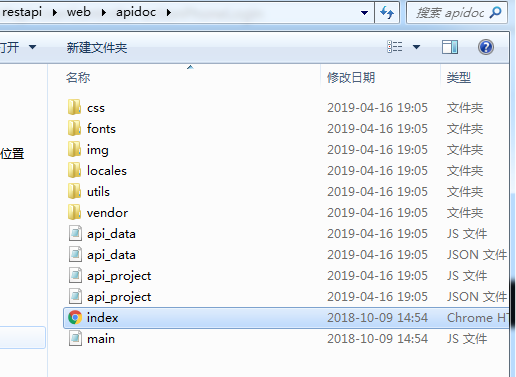
生成结果

更多示例
/**
     * @apiDefine TestController 测试管理
     */

    /**
     *
     * @apiDeprecated 现在请使用(#Test:_test)
     * @api {post} /tag/test 01-测试
     * @apiGroup    TestController
     * @apiName     actionTest
     * @apiVersion 1.6.2
     * @apiPermission 无
     * @apiExample  {curl} 使用curl
     *  curl -i http://localhost/tag/test
     *
     * @apiHeader {String} access_token 授权令牌
     * @apiHeaderExample {json} 请求头示例
     *  {
     *      "access_token": "abcdddd78789a7t89e8t9t9ew8t7e89t89te"
     *  }
     * @apiParam {String} [firstname]  Optional 姓
     * @apiParam {String} lastname     Mandatory 名
     * @apiParam {String} country="中国" Mandatory 国籍
     * @apiParam {Number} [age=18]     Optional 年龄
     * @apiParam (Login) {String} pass 登录密码
     * @apiParamExample {json} 请求示例
     *  {
     *      "content": "This is an example content"
     *  }
     * @apiSuccess {String} firstname 姓
     * @apiSuccessExample 返回示例
     * {
     *     "code": 200000,
     *     "ret": {
     *         "id": 1,
     *         "pid": "0",
     *         "tag_name": "药材"
     *         "tag_code": "0011"
     *     },
     *     "alertMsg": "创建标签成功!"
     * }
     * @apiSampleRequest http://www.example.com
     * @apiError 10001 缺少参数
     * @apiErrorExample {json} 错误示例
     *     HTTP/1.1 404 Not Found
     *     {
     *       "error": "未找到用户"
     *     }
     */
    public function actionTest()
    {

    }
APIDOC的使用的更多相关文章
- apidoc
1.安装node http://nodejs.cn/download/ 下载二进制包,解压,配置环境 export NODE_HOME=/usr/local/nodeexport PATH=$NODE ...
- 基于php开发的RESTful ApiDoc文档
apiDoc基于rest的web API文档生成器,可以根据代码注释生成web api文档,自动生成静态的html网页文档,不仅支持项目版本号,还支持API版本号. 使用apiDoc不需要自己麻烦的调 ...
- ApiDoc 文档使用方式
1.安装node.js 2.打开node.js 命令窗(shell)键入npm install apidoc -g 自动安装(几分钟) 3. C:\Users\user\AppData\Roaming ...
- apidoc,一个相当不错的文档生成器
http://apidocjs.com/ 例子:myapp目录下的MyCode.java /** * * @api {get} /company/list 获取公司信息 * @apiName 获取公司 ...
- webApi文档好帮手-apidoc使用教程
来源:http://blog.csdn.net/xumin198908/article/details/41964159 在开发后台接口的过程中,我们肯定要提供一份api接口文档给终端app. 目前大 ...
- 使用apidoc根据JS文件生成接口文档
1.安装nodejs.下载网址:http://www.nodejs.org: 2.安装apidoc.运行cmd,切换到nodejs的安装目录,在命令行输入: 1 npm install apidoc ...
- 关于apidoc文档生成不了的一个原因
前几天在写完API后,写注释文档,然后很习惯的去用apidoc取生成注释文档,但是奇怪的事发生了,没有注释的内容,也没有报错:注释代码如下: /* * @api {get} /applet/:id 根 ...
- apidoc快速生成在线文档,apidoc生成静态文件的生成规则以及原理分析
在老大的指引下,需要将系统的json文件格式转换成apidoc的json格式,也就是json格式的重组,但是这个apidoc的生成格式是不固定的,因为apidoc有自己一套的生成规则,我需要研究一下是 ...
- Node与apidoc的邂逅——NodeJS Restful 的API文档生成
作为后台根据需求文档开发完成接口后,交付给前台(angular vue等)做开发,不可能让前台每个接口调用都去查看你的后台代码一点点查找.前台开发若不懂你的代码呢?让他一个接口一个接口去问你怎么调用, ...
- 接口文档神器之apidoc
//@desn:apidoc linux环境 windows环境使用 //@desn:码字不宜,转载请注明出处 //@author:张慧源 <turing_zhy@163.com> / ...
随机推荐
- oldboy-作业01.登录多次进行账号锁定
"""可以支持多个用户登录 (提示,通过列表存多个账户信息)用户3次认证失败后,退出程序,再次启动程序尝试登录时,还是锁定状态(提示:需把用户锁定的状态存到文件里) &q ...
- Python:Day15 函数
函数参数补充: 还可以这样传参: def f(*args): print(args) f(*[1,3,4,5]) #输出结果:(1, 3, 4, 5) 注意这是一个元组 def f2(**kwargs ...
- 【移动端】meta使用
<!doctype html> <html> <head> <meta charset="utf-8"> <meta http ...
- [MicroPython]STM32F407开发板DIY声光控开关
1.实验目的 1. 学习在PC机系统中扩展简单I/O 接口的方法. 2. 进一步学习编制数据输出程序的设计方法. 3. 学习光敏模块的工作原理. 4. 学习声音的工作原理. 5. 学习F40 7Mic ...
- python:利用xlrd模块操作excel
在自动化测试过程中,对测试数据的管理和维护是一个不可忽视的点.一般来说,如果测试用例数据不是太多的话,使用excel管理测试数据是个相对来说不错的选择. 这篇博客,介绍下如何利用python的xlrd ...
- linux驱动之中断处理过程C程序部分
当发生中断之后,linux系统在汇编阶段经过一系列跳转,最终跳转到asm_do_IRQ()函数,开始C程序阶段的处理.在汇编阶段,程序已经计算出发生中断的中断号irq,这个关键参数最终传递给asm_d ...
- mybatis 代码生成器(IDEA, Maven)及配置详解(部分配置你应该不知道)
目录 1 创建代码生成器 1.1 创建Maven项目 1.2 配置 generator.xml 1.3 配置 pom.xml 1.4 使用及测试 2 XML 配置详解 2.1 优先 2.2 官网没有的 ...
- 深入理解Redis的持久化
RDB RDB是将当前数据生成快照保存到硬盘上. RDB的工作流程: 1. 执行bgsave命令,Redis父进程判断当前是否存在正在执行的子进程,如RDB/AOF子进程,如果存在bgsave命令直接 ...
- Codeforces Round #486 (Div. 3)-C. Equal Sums
C. Equal Sums time limit per test 2 seconds memory limit per test 256 megabytes input standard input ...
- Oja’s rule
目录 Oja's rule 背景 Hebbian learning 主要的一些理论 论文里面一些主要的假设 引理1 引理2 引理3 定理1 LEMMA 3(ALL) 引理 4 定理 2 定理 3(关于 ...