
ConstraintLayout使用
引言
ConstraintLayout是一个ViewGroup,允许您以灵活的方式定位和调整小部件的方法,项目中的布局嵌套问题对项目性能有着不小的威胁,布局能实现扁平化的话会让软件性能得到很大的提升,而ConstraintLayout就是为了解决布局嵌套问题,提示项目的性能。官文有详细对比ConstraintLayout的性能优势。
使用方式:implementation 'com.android.support.constraint:constraint-layout:1.1.3'
Relative positioning(相对定位)
ConstraintLayout 最基本的属性控制有以下几个,即 layout_constraintXXX_toYYYOf 格式的属性,即将“View A”的方向 XXX 置于 “View B”的方向 YYY 。View B 可以是父容器即 ConstraintLayout ,用“parent”来表示。
- layout_constraintLeft_toLeftOf:View A 与 View B 左对齐
- layout_constraintLeft_toRightOf:View A左边置于View B的右边
- layout_constraintTop_toTopOf:View A顶部与View B顶部对齐
- layout_constraintBaseline_toBaselineOf:View A 内部文字与 View B 内部文字对齐
- layout_constraintRight_toLeftOf:以下类似
- layout_constraintRight_toRightOf
- layout_constraintTop_toBottomOf
- layout_constraintBottom_toTopOf
- layout_constraintBottom_toBottomOf
- layout_constraintStart_toEndOf
- layout_constraintStart_toStartOf
- layout_constraintEnd_toStartOf
- layout_constraintEnd_toEndOf
例如:TextView在Button的底部对齐,如果想设置两个View的间距,可以使用android:layout_marginXXX来设置,但其中一个View是Gone的,还需要保存间距可以使用app:layout_goneMarginXXX来设置。
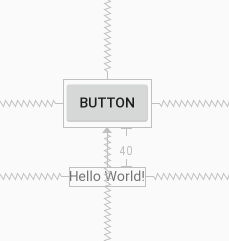
<TextView

        android:layout_width="wrap_content"

        android:layout_height="wrap_content"

        android:text="Hello World!"

        app:layout_constraintLeft_toLeftOf="parent"

        app:layout_constraintRight_toRightOf="parent"

        android:layout_marginTop="40dp"

        app:layout_constraintTop_toBottomOf="@+id/button"/>

<Button

        android:text="Button"

        android:layout_width="wrap_content"

        android:layout_height="wrap_content"

        android:id="@+id/button"

        app:layout_constraintBottom_toBottomOf="parent"

        app:layout_constraintTop_toTopOf="parent"

        app:layout_constraintEnd_toEndOf="parent"

        app:layout_constraintStart_toStartOf="parent"/>
Bias(偏压)
相反的约束时的默认设置是使窗口小部件居中; 但是您可以使用偏差属性调整定位以使一侧偏向另一侧。
* layout_constraintHorizontal_bias:横向偏压
* layout_constraintVertical_bias:竖向偏压例如,想把Button向右横向偏压0.6
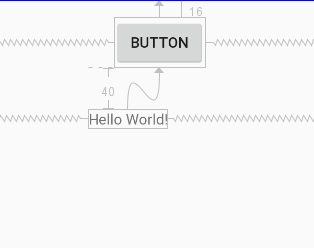
<TextView

        android:layout_width="wrap_content"

        android:layout_height="wrap_content"

        android:text="Hello World!"

        app:layout_constraintLeft_toLeftOf="parent"

        app:layout_constraintRight_toRightOf="parent"

        android:layout_marginTop="40dp"

        app:layout_constraintTop_toBottomOf="@+id/button"/>

<Button

        android:text="@string/button"

        android:layout_width="wrap_content"

        android:layout_height="wrap_content"

        android:id="@+id/button"

        android:layout_marginTop="16dp"

        app:layout_constraintTop_toTopOf="parent"

        app:layout_constraintEnd_toEndOf="parent"

        app:layout_constraintStart_toStartOf="parent"

        app:layout_constraintHorizontal_bias="0.6"/>
Circular positioning(循环定位)
以角度和距离约束窗口小部件中心相对于另一个窗口小部件中心,这允许您将小部件放在圆上,可以使用以下属性。
* layout_constraintCircle :引用另一个小部件ID
* layout_constraintCircleRadius :到其他小部件中心的距离
* layout_constraintCircleAngle :小部件应该处于哪个角度(以度为单位,从0到360)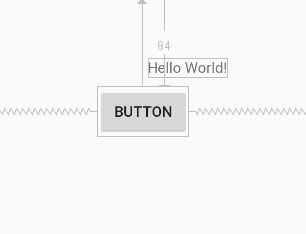
<Button

        android:text="@string/button"

        android:layout_width="wrap_content"

        android:layout_height="wrap_content"

        android:id="@+id/button"

        app:layout_constraintTop_toTopOf="parent"

        app:layout_constraintEnd_toEndOf="parent"

        app:layout_constraintStart_toStartOf="parent" android:layout_marginTop="84dp"

        app:layout_constraintHorizontal_bias="0.547"/>

<TextView

        android:layout_width="wrap_content"

        android:layout_height="wrap_content"

        android:text="Hello World!"

        app:layout_constraintCircle="@+id/button"

        app:layout_constraintCircleRadius="60dp"

        app:layout_constraintCircleAngle="45"/>
Constraints(约束)
将维度设置为WRAP_CONTENT,在1.1之前的版本中,它们将被视为文字维度 - 这意味着约束不会限制生成的维度。虽然通常这足够,但在某些情况下,您可能希望使用WRAP_CONTENT,但仍然强制执行约束以限制生成的维度。在这种情况下,您可以添加一个相应的属性。
* app:layout_constrainedWidth=”true|false”
* app:layout_constrainedHeight=”true|false”当维度设置为时MATCH_CONSTRAINT,默认行为是使结果大小占用所有可用空间,可以使用以下属性。
* layout_constraintWidth_min和layout_constraintHeight_min:将设置此维度的最小大小
* layout_constraintWidth_max和layout_constraintHeight_max:将设置此维度的最大大小
* layout_constraintWidth_percent和layout_constraintHeight_percent:将此维度的大小设置为父级的百分比要使用百分比,您需要设置以下内容:
* 尺寸应设置为MATCH_CONSTRAINT(0dp)
* 默认值应设置为百分比app:layout_constraintWidth_default="percent" 或app:layout_constraintHeight_default="percent"
* 然后将layout_constraintWidth_percent 或layout_constraintHeight_percent属性设置为0到1之间的值Ratio(比)
可以将view的一个维度定义为另一个维度的比率。为此,您需要将至少一个约束维度设置为0dp(即MATCH_CONSTRAINT),并将该属性layout_constraintDimensionRatio设置为给定比率。例如
<Button android:layout_width="wrap_content"

        android:layout_height="0dp"

        app:layout_constraintDimensionRatio="1:1" />
两个尺寸都设置为MATCH_CONSTRAINT(0dp),您也可以使用比率,系统设置满足所有约束的最大尺寸并保持指定的纵横比。要根据另一个特定边的尺寸限制一个特定边,可以预先附加W,“或” H,分别约束宽度或高度。例如
<Button android:layout_width="0dp"

        android:layout_height="0dp"

        app:layout_constraintDimensionRatio="H,16:9"

        app:layout_constraintBottom_toBottomOf="parent"

        app:layout_constraintTop_toTopOf="parent"/>
Chains(链)
设置属性layout_constraintHorizontal_chainStyle或layout_constraintVertical_chainStyle链的第一个元素时,链的行为将根据指定的样式更改(默认值CHAIN_SPREAD)。
- CHAIN_SPREAD - 元素将展开(默认样式)
- 加权链接CHAIN_SPREAD模式,如果设置了一些小部件MATCH_CONSTRAINT,它们将分割可用空间
- CHAIN_SPREAD_INSIDE - 类似,但链的端点不会分散
- CHAIN_PACKED - 链条的元素将被包装在一起。然后,子项的水平或垂直偏差属性将影响打包元素的定位
Optimizer(优化器)
通过标记app:layout_optimizationLevel添加到ConstraintLayout元素来决定应用哪些优化。
* none : 未应用任何优化
* standard : 默认。仅优化直接和障碍约束
* direct : 优化直接约束
* barrier : 优化障碍限制
* chain : 优化链约束
* dimensions : 优化维度度量,减少匹配约束元素的度量数量
ConstraintLayout使用的更多相关文章
- [转 载] android 谷歌 新控件(约束控件 )ConstraintLayout 扁平化布局
序 在Google IO大会中不仅仅带来了Android Studio 2.2预览版,同时带给我们一个依赖约束的库. 简单来说,她是相对布局的升级版本,但是区别与相对布局更加强调约束.何为约束,即控件 ...
- 依赖ConstraintLayout报错,Could not find *****,Failed to resolve:*****
ConstraintLayout 约束布局,AndroidStudio2.2中新增功能之一,可以先去看看这篇文章 Android新特性介绍,ConstraintLayout完全解析,2.3版本的And ...
- ConstraintLayout+radioGroup做一个tab.简单好用。
主页tab是必须会有的,各种实现也很多.各有千秋.但目标都是简单.可控.今天用ConstraintLayout+radioGroup做一个tab.简单性可控性都还可以.本文目的把ConstraintL ...
- ConstraintLayout
ConstraintLayout使用笔记 具体使用参考:http://blog.csdn.net/guolin_blog/article/details/53122387 ConstraintLayo ...
- Say Hello to ConstraintLayout
ConstraintLayout介绍 ConstraintLayout让你可以在很平的view结构(没有多层布局嵌套)中构建一个复杂的布局结构. 有点像RelativeLayout, 所有的view都 ...
- ConstraintLayout知识记录
一.准备工作 1. 确保SDK Tools已经下载了ContraintLayout的支持库. 2. gradle中增加对ConstraintLayout的依赖. compile 'com.andr ...
- ConstraintLayout布局介绍.md
一.介绍 ConstraintLayout是一个ViewGroup允许您以灵活的方式定位和调整窗口小部件的窗口.从api9开始支持.继承自viewGroup; 二.具体使用 这个控件的具体分类主要有如 ...
- Android Material Design控件使用(一)——ConstraintLayout 约束布局
参考文章: 约束布局ConstraintLayout看这一篇就够了 ConstraintLayout - 属性篇 介绍 Android ConstraintLayout是谷歌推出替代PrecentLa ...
- Gradle 同步时报错,Could not find com.android.support.constraint:constraint-layout:1.0.0-alpha8的解决方法
Error:Could not find com.android.support.constraint:constraint-layout:1.0.0-alpha8. 原因: SDK 中可能是没有安装 ...
- Android 开发 ConstraintLayout详解
implementation 'androidx.constraintlayout:constraintlayout:2.0.0-alpha3' app:layout_constraintHorizo ...
随机推荐
- TCP/IP(一)之开启计算机网络之路
阅读目录(Content) 一.局域网.广域网和Internet 1.1.局域网 1.2.广域网 1.3.Internet 二.计算机数据之间通信的过程 2.1.路由器的功能(转发收到的分组) 三.O ...
- 从Kubernetes到“云原生全家桶”,网易如何让业务部署提效280%?
近日,网易云轻舟微服务团队接受了CNCF的采访,分享了网易云在云原生领域尤其是Kubernetes方面的实践经验.以下为案例全文:公司:网易地点:中国杭州行业:互联网技术 挑战它的游戏业务是世界上最大 ...
- 40个Java多线程面试问题
1. 多线程有什么用? 一个可能在很多人看来很扯淡的一个问题:我会用多线程就好了,还管它有什么用?在我看来,这个回答更扯淡.所谓"知其然知其所以然","会用"只 ...
- 吴恩达机器学习笔记2-代价函数I(cost function)
我们选择的参数决定了我们得到的直线相对于我们的训练集的准确程度,模型所预测的值与训练集中实际值之间的差距(下图中蓝线所指)就是建模误差(modeling error). 我们的目标便是选择出可以使得建 ...
- Day6:html和css
Day6:html和css 复习 margin: 0; padding: 0; <!DOCTYPE html> <html lang="en"> <h ...
- 【mysql】模糊查询的使用
1.like/not like 关键字的模糊查询(SQL模式) 基础模板: SELECT * FROM test WHERE name LIKE '%你好_' :匹配 ...
- vue搭建多页面开发环境
自从习惯开发了单页面应用,对多页面的页面间的相互跳转间没有过渡效果.难维护极度反感.但是最近公司技术老大说,当一个应用越来越大的时候单页面模式应付不来,但是没讲怎么应付不来,所以还得自己去复习一遍这两 ...
- GODOT 3.0 开发进度汇报 #7
由于原文采取了记流水账的方式,觉得没有必要照直翻译了,就只选取了其中的主要信息. GDNative C++ 语言绑定 进行了重写以便Godot更好的生成和处理脚本. D 语言绑定 也正在积极开发中. ...
- Android数据保存之文件保存
前言: 上一篇文章写了在Android中利用SharedPreferences保存数据,SharedPreferences在保存数据的时候主要是保存一些应用程序的设置信息或者少量的用户信息,并且是以k ...
- 01 Windows安装Tensorflow
1.安装Python. 点击此处下载Python3.5.2.安装Python时一定要选择安装pip. 2.配置Python环境变量. 将%安装路径%\Scripts添加到Path下面. 3.修改Pip ...