
centos7 mysql-server 安装过程
官网下载安装mysql-server
# wget http://dev.mysql.com/get/mysql-community-release-el7-5.noarch.rpm

# rpm -ivh mysql-community-release-el7-5.noarch.rpm

# yum install mysql-community-server
安装成功后重启mysql服务。
# service mysqld restart
初次安装mysql,root账户没有密码。

[root@yl-web yl]# mysql -u root

Welcome to the MySQL monitor.  Commands end with ; or \g.

Your MySQL connection id is 3

Server version: 5.6.26 MySQL Community Server (GPL)

Copyright (c) 2000, 2015, Oracle and/or its affiliates. All rights reserved.

Oracle is a registered trademark of Oracle Corporation and/or its

affiliates. Other names may be trademarks of their respective

owners.

Type 'help;' or '\h' for help. Type '\c' to clear the current input statement.

mysql> show databases;

+--------------------+

| Database           |

+--------------------+

| information_schema |

| mysql              |

| performance_schema |

| test               |

+--------------------+

4 rows in set (0.01 sec)

mysql>
设置密码
mysql> set password for 'root'@'localhost' =password('password');

Query OK, 0 rows affected (0.00 sec)

mysql>
不需要重启数据库即可生效。
在mysql安装过程中如下内容:
Installed:
  mysql-community-client.x86_64 0:5.6.26-2.el7                mysql-community-devel.x86_64 0:5.6.26-2.el7
  mysql-community-libs.x86_64 0:5.6.26-2.el7                  mysql-community-server.x86_64 0:5.6.26-2.el7

Dependency Installed:
  mysql-community-common.x86_64 0:5.6.26-2.el7

Replaced:
  mariadb.x86_64 1:5.5.41-2.el7_0          mariadb-devel.x86_64 1:5.5.41-2.el7_0   mariadb-libs.x86_64 1:5.5.41-2.el7_0
  mariadb-server.x86_64 1:5.5.41-2.el7_0
三、配置mysql
1、编码
mysql配置文件为/etc/my.cnf
最后加上编码配置
[mysql]

default-character-set =utf8
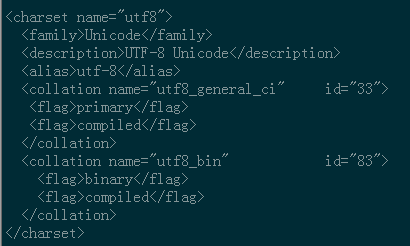
这里的字符编码必须和/usr/share/mysql/charsets/Index.xml中一致。
2、远程连接设置
把在所有数据库的所有表的所有权限赋值给位于所有IP地址的root用户。
mysql> grant all privileges on *.* to root@'%'identified by 'password';
如果是新用户而不是root,则要先新建用户
mysql>create user 'username'@'%' identified by 'password';
此时就可以进行远程连接了。
防火墙配置
防火墙设置一下,不然3306端口还是无法访问。
1 iptables -I INPUT -p tcp -m state --state NEW -m tcp --dport 3306 -j ACCEPT
设置完之后,查看一下是否能通过。
1 iptables -L -n

如果想要限制访问。
iptables -D INPUT -p tcp -m state --state NEW -m tcp --dport 3306 -j ACCEPT
OK,这样就可以远程访问了。
来源:https://www.cnblogs.com/starof/p/4680083.html
centos7 mysql-server 安装过程的更多相关文章
- 19.CentOS7下PostgreSQL安装过程
CentOS7下PostgreSQL安装过程 装包 sudo yum install postgresql-server postgresql-contrib 说明: 这种方式直接明了,其他方法也可以 ...
- CentOS7离线安装Mysql(详细安装过程)
Mysql安装 下载mysql离线安装包 https://cdn.mysql.com//Downloads/MySQL-5.7/mysql-5.7.27-1.el7.x86_64.rpm-bundle ...
- centos7 mysql的安装
本文记录centos7安装mysql的一些过程与遇到的一些坑 下载mysql的压缩包,直接从官网上面下载,链接:http://dev.mysql.com/downloads/mysql/ 选择 MyS ...
- centos7 mysql数据库安装和配置
一.系统环境 yum update升级以后的系统版本为 [root@yl-web yl]# cat /etc/redhat-release CentOS Linux release 7.1.1503 ...
- (转)linux下mysql的安装过程
最近在linux安装了mysql,根据网上收集的资料和个人的操作过程,大概做了个整理,以便以后进行参考回顾. 1.下载mysql-5.1.36.tar.gz,并且解压. tar -xzvf mysql ...
- centos7 mysql数据库安装和配置(转, 未验证)
一.系统环境 yum update升级以后的系统版本为 [root@yl-web yl]# cat /etc/redhat-release CentOS Linux release 7.1.1503 ...
- MySQL详细安装过程
目录 一.概述 二.MySQL安装 三.安装成功验证 四.NavicatforMySQL下载及使用 一.概述 MySQL版本:5.7.17 下载地址:http://rj.baidu.com/soft/ ...
- MySQL的安装过程
近期对MySQL做了一些研究. 曾经主要接触的是SQL SERVER.所以,今天对该安装过程做了一些总结以及使用过程中的一些心得.并分享给大家. 记得前面.分享过一篇关于数据库的几种连接方式.而 ...
- CentOS7 MySql数据库安装配置(单实例)
一. 安装mysql-server 官网下载安装 # wget http://dev.mysql.com/get/mysql-community-release-el7-5.noarch.rpm # ...
- 安装解压版本的MySQL,安装过程中的常见命令,检查windows系统错误日志的方式来检查MySQL启动错误,关于Fatal error: Can't open and lock privilege
以端口 port = 3306 # 设置mysql的安装目录 basedir=D://Installed//mysql-5.6.26-winx64//mysql-5.6.26-winx64 # ...
随机推荐
- 在delphi中生成GUID/自动获取临时表名......
什么是 GUID ? 全球唯一标识符 (GUID) 是一个字母数字标识符,用于指示产品的唯一性安装.在许多流行软件应用程序(例如 Web 浏览器和媒体播放器)中,都使用 GUID. GUID 的格式为 ...
- Python——POP3邮件协议
一.POP3协议用于收取邮件 二.POP3协议常用方法 user(login):想服务器发送登录名,并显示服务器的响应,表示服务器正在等待该用户的输入密码 pass_(passwd):在用户使用use ...
- 今日头条移动app广告激活数据API对接完整Java代码实现供大家参考》》》项目随记
这是自毕业后的第一篇博客,希望自己今后能养成写博客的一个好习惯.最近公司为了加速APP推广,采取在外部平台(如:今日头条)进行广告投放的方式,进行用户引流.因此我们需要对广告的激活数据进行一个检测,跟 ...
- form-layui
html <div id="formData"> <form class="layui-form formBtn" style="m ...
- Python字符串和列表的内置方法
一.字符串内置方法 1.strip() 删除开头和结尾的字符串 s.strip(rm) 删除s字符串中开头,结尾处,位于rm删除序列的字符串 s.lstrip(rm) 删除s字符串中开头位于rm删除 ...
- window文件过长无法删除的处理方式
解决方案: 如:aaa是要删除的文件夹,进入到要删除的文件夹下,新建一个test 1.以管理员身份打开CMD: 2 新建test空白目录: 3 执行命令,删除aaa文件夹:robocopy te ...
- 【XSY1537】五颜六色的幻想乡 数学 生成树计数 拉格朗日插值
题目大意 有一个\(n\)个点\(m\)条边的图,每条边有一种颜色\(c_i\in\{1,2,3\}\),求所有的包括\(i\)条颜色为\(1\)的边,\(j\)条颜色为\(2\)的边,\(k\) ...
- 【HDU - 4348】To the moon(主席树在线区间更新)
BUPT2017 wintertraining(15) #8G 题意 给一个数组a,有n个数,m次操作.\(N, M ≤ 10^5, |A i| ≤ 10^9, 1 ≤ l ≤ r ≤ N, |d| ...
- JLOI2016 简要题解
「JLOI2016」侦查守卫 题意 有一个 \(n\) 个点的树,有 \(m\) 个关键点需要被监视.可以在其中一些点上插眼,在 \(i\) 号点上放眼需要花费 \(w_i\) 的代价,可以监视距离 ...
- luogu3250 网络 (整体二分+树上差分+树状数组)
首先整体二分,问题变成是否存在经过一个点的满足条件的路径 那么我对于每个路径(a,b,lca),在树状数组的dfn[a]++,dfn[b]++,dfn[lca]--,dfn[fa[lca]--] 然后 ...