
Elasticsearch拼音分词和IK分词的安装及使用
一、Es插件配置及下载
1.IK分词器的下载安装
关于IK分词器的介绍不再多少,一言以蔽之,IK分词是目前使用非常广泛分词效果比较好的中文分词器。做ES开发的,中文分词十有八九使用的都是IK分词器。
下载地址:https://github.com/medcl/elasticsearch-analysis-ik
2.pinyin分词器的下载安装
可以在淘宝、京东的搜索框中输入pinyin就能查找到自己想要的结果,这就是拼音分词,拼音分词则是将中文分析成拼音格式,可以通过拼音分词分析出来的数据进行查找想要的结果。
下载地址:https://github.com/medcl/elasticsearch-analysis-pinyin
注:插件下载一定要和自己版本对应的Es版本一致,并且安装完插件后需重启Es,才能生效。
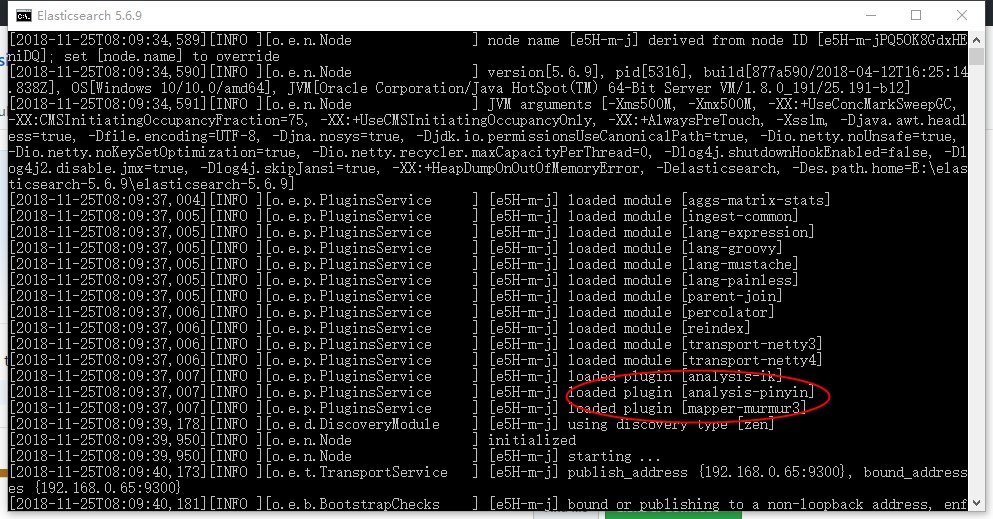
插件安装位置:(本人安装了三个插件,暂时先不介绍murmur3插件,可以暂时忽略)

插件配置成功,重启Es
二、拼音分词器和IK分词器的使用
1.IK中文分词器的使用
1.1 ik_smart: 会做最粗粒度的拆分
GET /_analyze

{

  "text":"中华人民共和国国徽",

  "analyzer":"ik_smart"

}

结果:

{

  "tokens": [

    {

      "token": "中华人民共和国",

      "start_offset": 0,

      "end_offset": 7,

      "type": "CN_WORD",

      "position": 0

    },

    {

      "token": "国徽",

      "start_offset": 7,

      "end_offset": 9,

      "type": "CN_WORD",

      "position": 1

    }

  ]

}
1.2 ik_max_word: 会将文本做最细粒度的拆分
GET /_analyze

{

  "text": "中华人民共和国国徽",

  "analyzer": "ik_max_word"

}

结果:

{

  "tokens": [

    {

      "token": "中华人民共和国",

      "start_offset": 0,

      "end_offset": 7,

      "type": "CN_WORD",

      "position": 0

    },

    {

      "token": "中华人民",

      "start_offset": 0,

      "end_offset": 4,

      "type": "CN_WORD",

      "position": 1

    },

    {

      "token": "中华",

      "start_offset": 0,

      "end_offset": 2,

      "type": "CN_WORD",

      "position": 2

    },

    {

      "token": "华人",

      "start_offset": 1,

      "end_offset": 3,

      "type": "CN_WORD",

      "position": 3

    },

    {

      "token": "人民共和国",

      "start_offset": 2,

      "end_offset": 7,

      "type": "CN_WORD",

      "position": 4

    },

    {

      "token": "人民",

      "start_offset": 2,

      "end_offset": 4,

      "type": "CN_WORD",

      "position": 5

    },

    {

      "token": "共和国",

      "start_offset": 4,

      "end_offset": 7,

      "type": "CN_WORD",

      "position": 6

    },

    {

      "token": "共和",

      "start_offset": 4,

      "end_offset": 6,

      "type": "CN_WORD",

      "position": 7

    },

    {

      "token": "国",

      "start_offset": 6,

      "end_offset": 7,

      "type": "CN_CHAR",

      "position": 8

    },

    {

      "token": "国徽",

      "start_offset": 7,

      "end_offset": 9,

      "type": "CN_WORD",

      "position": 9

    }

  ]

}
2.拼音分词器的使用
GET /_analyze

{

  "text":"刘德华",

  "analyzer": "pinyin"

}

结果:

{

  "tokens": [

    {

      "token": "liu",

      "start_offset": 0,

      "end_offset": 1,

      "type": "word",

      "position": 0

    },

    {

      "token": "ldh",

      "start_offset": 0,

      "end_offset": 3,

      "type": "word",

      "position": 0

    },

    {

      "token": "de",

      "start_offset": 1,

      "end_offset": 2,

      "type": "word",

      "position": 1

    },

    {

      "token": "hua",

      "start_offset": 2,

      "end_offset": 3,

      "type": "word",

      "position": 2

    }

  ]

}
注:不管是拼音分词器还是IK分词器,当深入搜索一条数据是时,必须是通过分词器分析的数据,才能被搜索到,否则搜索不到
三、IK分词和拼音分词的组合使用
当我们创建索引时可以自定义分词器,通过指定映射去匹配自定义分词器
PUT /my_index

{

  "settings": {

        "analysis": {

            "analyzer": {

                "ik_smart_pinyin": {

                    "type": "custom",

                    "tokenizer": "ik_smart",

                    "filter": ["my_pinyin", "word_delimiter"]

                },

                "ik_max_word_pinyin": {

                    "type": "custom",

                    "tokenizer": "ik_max_word",

                    "filter": ["my_pinyin", "word_delimiter"]

                }

            },

            "filter": {

                "my_pinyin": {

                    "type" : "pinyin",

                    "keep_separate_first_letter" : true,

                    "keep_full_pinyin" : true,

                    "keep_original" : true,

                    "limit_first_letter_length" : 16,

                    "lowercase" : true,

                    "remove_duplicated_term" : true

                }

            }

        }

  }

}
当我们建type时,需要在字段的analyzer属性填写自己的映射
PUT /my_index/my_type/_mapping

{

    "my_type":{

      "properties": {

        "id":{

          "type": "integer"

        },

        "name":{

          "type": "text",

          "analyzer": "ik_smart_pinyin"

        }

      }

    }

}
测试,让我们先添加几条数据
POST /my_index/my_type/_bulk

{ "index": { "_id":1}}

{ "name": "张三"}

{ "index": { "_id": 2}}

{ "name": "张四"}

{ "index": { "_id": 3}}

{ "name": "李四"}
IK分词查询
GET /my_index/my_type/_search

{

  "query": {

    "match": {

      "name": "李"

    }

  }

}

结果:

{

  "took": 3,

  "timed_out": false,

  "_shards": {

    "total": 5,

    "successful": 5,

    "skipped": 0,

    "failed": 0

  },

  "hits": {

    "total": 1,

    "max_score": 0.47160998,

    "hits": [

      {

        "_index": "my_index",

        "_type": "my_type",

        "_id": "3",

        "_score": 0.47160998,

        "_source": {

          "name": "李四"

        }

      }

    ]

  }

}
拼音分词查询:
GET /my_index/my_type/_search

{

  "query": {

    "match": {

      "name": "zhang"

    }

  }

}

结果:

{

  "took": 1,

  "timed_out": false,

  "_shards": {

    "total": 5,

    "successful": 5,

    "skipped": 0,

    "failed": 0

  },

  "hits": {

    "total": 2,

    "max_score": 0.3758317,

    "hits": [

      {

        "_index": "my_index",

        "_type": "my_type",

        "_id": "2",

        "_score": 0.3758317,

        "_source": {

          "name": "张四"

        }

      },

      {

        "_index": "my_index",

        "_type": "my_type",

        "_id": "1",

        "_score": 0.3758317,

        "_source": {

          "name": "张三"

        }

      }

    ]

  }

}
注:搜索时,先查看被搜索的词被分析成什么样的数据,如果你搜索该词输入没有被分析出的参数时,是查不到的!!!!
Elasticsearch拼音分词和IK分词的安装及使用的更多相关文章
- 使用Docker 安装Elasticsearch、Elasticsearch-head、IK分词器 和使用
原文:使用Docker 安装Elasticsearch.Elasticsearch-head.IK分词器 和使用 Elasticsearch的安装 一.elasticsearch的安装 1.镜像拉取 ...
- ElasticSearch已经配置好ik分词和mmseg分词(转)
ElasticSearch是一个基于Lucene构建的开源,分布式,RESTful搜索引擎.设计用于云计算中,能够达到实时搜索,稳定,可靠,快速,安装使用方便.支持通过HTTP使用JSON进行数据索引 ...
- Elasticsearch集群使用ik分词器
IK分词插件的安装 ES集群环境 VMWare下三台虚拟机Ubuntu 14.04.2 LTS JDK 1.8.0_66 Elasticsearch 2.3.1 elasticsearch-jdbc- ...
- ElasticSearch中文分词器-IK分词器的使用
IK分词器的使用 首先我们通过Postman发送GET请求查询分词效果 GET http://localhost:9200/_analyze { "text":"农业银行 ...
- ElasticSearch(六):IK分词器的安装与使用IK分词器创建索引
之前我们创建索引,查询数据,都是使用的默认的分词器,分词效果不太理想,会把text的字段分成一个一个汉字,然后搜索的时候也会把搜索的句子进行分词,所以这里就需要更加智能的分词器IK分词器了. 1. i ...
- Windows10安装Elasticsearch IK分词插件
安装插件 cmd切换到Elasticsearch安装目录下 C:\Users\Administrator>D: D:\>cd D:\Program Files\Elastic\Elasti ...
- Docker 下Elasticsearch 的安装 和ik分词器
(1)docker镜像下载 docker pull elasticsearch:5.6.8 (2)安装es容器 docker run -di --name=changgou_elasticsearch ...
- Elasticsearch拼音和ik分词器的结合应用
一.创建索引时,自定义拼音分词和ik分词 PUT /my_index { "index": { "analysis": { "analyzer&quo ...
- ElasticSearch 中文分词插件ik 的使用
下载 IK 的版本要与 Elasticsearch 的版本一致,因此下载 7.1.0 版本. 安装 1.中文分词插件下载地址:https://github.com/medcl/elasticsearc ...
随机推荐
- ES6躬行记(6)——Symbol
本节将会重点分析ES6引入的第6种基本类型:Symbol(符号).符号可以像字符串那样作为对象的属性名,只是它有唯一性的特点,可以避免属性名之间的冲突. 一.创建 符号没有字面量形式,只能通过Symb ...
- 【K8S】client-go、python-k8sclient开发K8S
0x01 client-go 1.简介 Client-go是kubernetes官方发布的调用K8S API的golang语言包,可以用来开发K8S的管理服务.监控服务,配合前端展示,就可以开发出一款 ...
- api网关揭秘--spring cloud gateway源码解析
要想了解spring cloud gateway的源码,要熟悉spring webflux,我的上篇文章介绍了spring webflux. 1.gateway 和zuul对比 I am the au ...
- flask中接收post传递数组方法
list = request.form.getlist("表单名")
- Spark提高篇——RDD/DataSet/DataFrame(二)
该部分分为两篇,分别介绍RDD与Dataset/DataFrame: 一.RDD 二.DataSet/DataFrame 该篇主要介绍DataSet与DataFrame. 一.生成DataFrame ...
- Python系列:五、异常处理-技术流ken
至今为止还没有进一步的谈论过错误信息,不过在你已经试验过的那些例子中,可能已经遇到过一些.Python 中(至少)有两种错误:语法错误和异常( syntax errors 和 exceptions ) ...
- springmvc和structs2的区别
1.从安全性角度分析spring mvc和struts2的区别: spring mvc:controller 1.spring mvc 默认controller是单实例(通过注解@Scope(“pro ...
- 如何用golang获取linux上文件的访问/创建/修改时间
在linux上想获取文件的元信息,我们需要使用系统调用lstat或者stat. 在golang的os包里已经把stat封装成了Stat函数,使用它比使用syscall要方便不少. 这是os.Stat的 ...
- .NET CORE 实践(3)--Visual Studio 2015 Update 3更新之后DotNetCore.1.0.1-VS2015Tools.Preview2.0.2.exe无法正确安装
打开 https://www.microsoft.com/net/core#windows,点击 https://go.microsoft.com/fwlink/?LinkId=691129下载vs2 ...
- PHP学习笔记(3)-Zend Studio安装和汉化
下载 因为FQ也慢,所以还是在百度软件中心下载快一些.地址:http://rj.baidu.com/soft/detail/15423.html?ald 因为下载不是最新版本,虽然因为强迫症FQ在官网 ...