
Lab 6-4
In this lab, we’ll analyze the malware found in the file Lab06-04.exe.
Questions and Short Answers
What is the difference between the calls made from the main method in Labs 6-3 and 6-4?
A: The function at 0x401000 is the check Internet connection method, 0x401040 is the parse HTML method, 0x4012B5 is printf, and 0x401150 is the switch statement.
What new code construct has been added to main?
A: A for loop has been added to the main method.
What is the difference between this lab’s parse HTML function and those of the previous labs?
A: The function at 0x401040 now takes a parameter and calls sprintf with the format string Internet Explorer 7.50/pma%d. It builds a User-Agent for use during HTTP communication using the argument passed in.
How long will this program run? (Assume that it is connected to the Internet.)
A: This program will run for 1440 minutes (24 hours).
Are there any new network-based indicators for this malware?
A: Yes, a new User-Agent is used. It takes the form Internet Explorer 7.50/
pma%d, where %d is the number of minutes the program has been running.What is the purpose of this malware?
A: First, the program checks for an active Internet connection. If none is found, the program terminates. Otherwise, the program will use a unique User-Agent to attempt to download a web page containing a counter that tracks the number of minutes the program has been running. The web page downloaded contains an embedded HTML comment starting with
<!--. The next character is parsed from this comment and used in a switch statement to determine the action to take on the local system. These are hard-coded actions, including deleting a file, creating a directory, setting a registry run key, copying a file, and sleeping for 100 seconds. This program will run for 24 hours before terminating.
Detailed Analysis
We begin by performing basic static analysis on the binary. We see one new string of interest that was not in Lab 6-3, as follows:
Internet Explorer 7.50/pma%d
It looks like this program may use a dynamically generated User-Agent. Looking at the imports, we don’t see any Windows API functions that were not in Lab 6-3. When performing dynamic analysis, we also notice this User-Agent change when we see Internet Explorer 7.50/pma0.

注:可参考 Lab 6-2 相应部分。
Next, we perform more in-depth analysis with disassembly. We load the executable into IDA Pro and look at the main method, which is clearly structurally different from main in Lab 6-3, although many of the same functions are called. We see the functions 0x401000 (check Internet connection method), 0x401040 (parse HTML method), 0x4012B5 as printf, and 0x401150 (the switch statement). You should rename these functions as such in IDA Pro to make them easier to analyze.
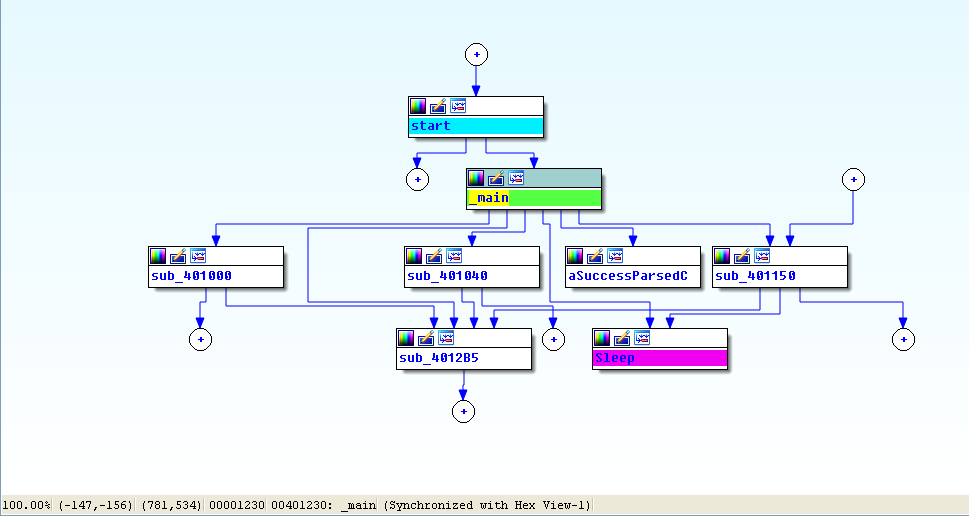
View -> Graphs -> Flow chart :
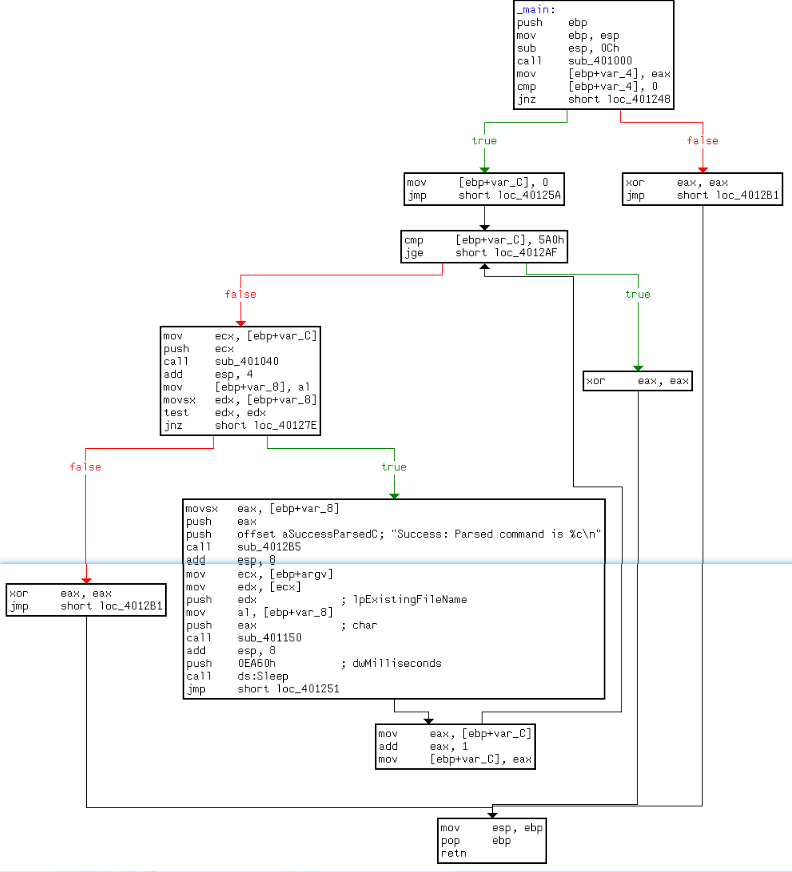
Looking at the main method in IDA Pro’s graphical view mode, we see an upward-facing arrow, which signifies looping. Listing 6-9L shows the loop structure.
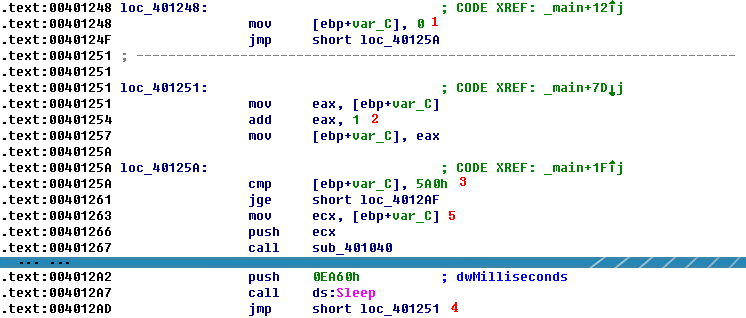
Listing 6-9L: The loop structure
The variable var_C is the local variable used for the loop counter. The counter is initialized to 0 at \({\color{red} 1 }\), jumps past the incrementing at \({\color{red} 2 }\), performs a check at \({\color{red} 3 }\), and loops back to the incrementor when it gets to \({\color{red} 4 }\). The presence of these four code sections tells us that we are looking at a for loop code construct. If the var_C (counter) is greater than or equal to 0x5A0 (1440), the loop will end. Otherwise, the code starting at \({\color{red} 5 }\) is executed. The code pushes var_C on the stack before calling 0x401040, and then sleeps for 1 minute before looping up at \({\color{red}4}\) and incrementing the counter by one. Therefore, this process will repeat for 1440 minutes, which is equal to 24 hours.
In previous labs, 0x401040 did not take a parameter, so we need to investigate this further. Listing 6-10L shows the start of 0x401040.
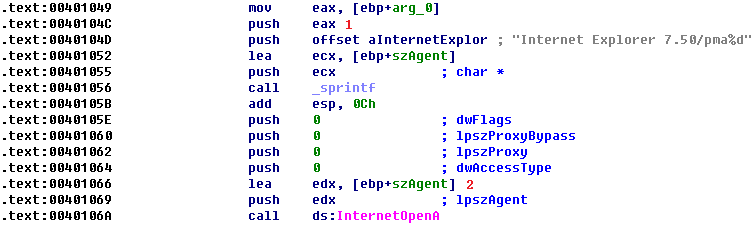
Listing 6-10L: The function at 0x401040
Here, arg_0 is the only parameter, and main is the only method calling 0x401040, so we conclude that arg_0 is always the counter (var_C) from the main method. Arg_0 is pushed on the stack at
Lab 6-4的更多相关文章
- MIT 6.828 JOS学习笔记18. Lab 3.2 Part B: Page Faults, Breakpoints Exceptions, and System Calls
现在你的操作系统内核已经具备一定的异常处理能力了,在这部分实验中,我们将会进一步完善它,使它能够处理不同类型的中断/异常. Handling Page Fault 缺页中断是一个非常重要的中断,因为我 ...
- MIT 6.828 JOS学习笔记17. Lab 3.1 Part A User Environments
Introduction 在这个实验中,我们将实现操作系统的一些基本功能,来实现用户环境下的进程的正常运行.你将会加强JOS内核的功能,为它增添一些重要的数据结构,用来记录用户进程环境的一些信息:创建 ...
- MIT 6.828 JOS学习笔记16. Lab 2.2
Part 3 Kernel Address Space JOS把32位线性地址虚拟空间划分成两个部分.其中用户环境(进程运行环境)通常占据低地址的那部分,叫用户地址空间.而操作系统内核总是占据高地址的 ...
- MIT 6.828 JOS学习笔记15. Lab 2.1
Lab 2: Memory Management lab2中多出来的几个文件: inc/memlayout.h kern/pmap.c kern/pmap.h kern/kclock.h kern/k ...
- MIT 6.828 JOS学习笔记10. Lab 1 Part 3: The kernel
Lab 1 Part 3: The kernel 现在我们将开始具体讨论一下JOS内核了.就像boot loader一样,内核开始的时候也是一些汇编语句,用于设置一些东西,来保证C语言的程序能够正确的 ...
- MIT 6.828 JOS学习笔记7. Lab 1 Part 2.2: The Boot Loader
Lab 1 Part 2 The Boot Loader Loading the Kernel 我们现在可以进一步的讨论一下boot loader中的C语言的部分,即boot/main.c.但是在我们 ...
- python opencv 利用Lab空间把春天的场景改为秋天
前一段时间实现了Reinhard颜色迁移算法,感觉挺有意思的,然后在代码上随意做了一些更改,有了一些发现,把Lab通道的a通道值改为127左右,可以将绿色改为黄色,而对其他颜色的改动非常小,因此可以将 ...
- Acadia Lab 228 + Lab 222
又是一对串烧实验,布好线后非常方便就可以一起完成. 连线方案一模一样: Lab 228 数码管骰子 核心代码如下: def loop() : global cnt global btn_read,se ...
- Acadia Lab 203 + Lab 231
在做完 Lab 6 之后,惊觉选做实验缺口很大,于是遍历了一遍夏任务,找到了一条最省力的路线. 做完 Lab 6 的连线不用拆,可以接下来做以下两个实验: Lab 203 网络时钟 核心代码如下: v ...
- GJM : 【技术干货】给The Lab Renderer for Unity中地形添加阴影
感谢您的阅读.喜欢的.有用的就请大哥大嫂们高抬贵手"推荐一下"吧!你的精神支持是博主强大的写作动力以及转载收藏动力.欢迎转载! 版权声明:本文原创发表于 [请点击连接前往] ,未经 ...
随机推荐
- 复习C++:VS2008中的宏干嘛用的
VS2008中有宏,可也进行编辑和设置. 好处: 1.快速生成代码,帮助开发. 2.个人定制化功能,IDE更合适自己用. 3.提升编程效率. 缺点: 使用VB开发,一开始用起来费事.不过有官方参考 ...
- iOS 线程安全--锁
一,前言 线程安全是iOS开发中避免了的话题,随着多线程的使用,对于资源的竞争以及数据的操作都可能存在风险,所以有必要在操作时保证线程安全. 二,为什么要使用锁? 由于一个进程中不可避免的存在多线程, ...
- layui上传文件前端报404,实际文件已经上传成功
原因:上传回调的方法接收的参数应该是json格式的,之前返回的是String,所以一直走异常的方法 第一种 在后台上加上@ResponseBody 第二种 @ResponseBody @Request ...
- nginx安装lua模块实现高并发
nginx安装lua扩展模块 1.下载安装LuaJIT-2.0.4.tar.gz wget -c http://luajit.org/download/LuaJIT-2.0.4.tar.gz tar ...
- js 获取时区
js的时区函数: 设datename为创建的一个Date对象 ====================datename.getTimezoneOffset()--取得当地时间和GMT时间(格林威治时间 ...
- Streaming从Spark2X迁移到Spark1.5 summary
配置文件的加载是一个难点,在local模式下非常容易,但是submit后一直报找不到文件,后来采用将properties文件放在加载类同一个package下,打包到同一个jar中解决. import ...
- NFC读写电子便签总结
编写NFC程序的基本步骤 1)设置权限,限制Android版本.安装的设备: 1 2 3 4 <uses-sdk android:minSdkVersion="14"/> ...
- MongoDB 之 你得知道MongoDB是个什么鬼 MongoDB - 1
最近有太多的同学向我提起MongoDB,想要学习MongoDB,还不知道MongoDB到底是什么鬼,或者说,知道是数据库,知道是文件型数据库,但是不知道怎么来用 那么好,所谓千呼万唤始出来,现在我就拉 ...
- QtQuick多页面切换、多页面切换动画、多个qml文件数据交互
一.QtQuick多页面切换方法 (1)“隐藏法” 前一个视图visible设为false或者透明度opacity设为0,相当于“隐藏”了,实际还存在: 要显示的视图visible设为true或者透明 ...
- 裸奔的bootloader单步调试
2011-03-01 23:25:22 目地:更清晰的了解bootloader的结构及功能.为移植U-boot打基础. 以前只知道大概,今天利用IAR调试工具,看着汇编代码,看着寄存器,看着内存.来单 ...