
RobotFramework - AppiumLibrary 之元素定位
一、介绍
AppiumLibrary 是 Robot Framework 的App测试库。
它使用Appium 与Android 和 iOS应用程序进行通信,类似于Selenium WebDriver与Web浏览器的对话。
AppiumLibrary是继承和引用appiumandroidlibrary,但重新实现使用appium 1.X技术,它完全支持Python 2.7,但对python 3.3+的支持仍然是实验性的。
二、定位控件
AppiumLibrary需要在应用程序中查找元素的所有关键字都使用参数locator。
当提供locator值时,它将与特定元素类型的键属性进行匹配。支持的定位器(locator)有:
| 定位器 | 格式 | 描述 |
| identifier | Click Element | identifier=my_element | 匹配 @id 或 @name 属性 |
| id | Click Element | id=my_element | 匹配 @id 属性 |
| name | Click Element | name=my_element | 匹配 @name 属性 |
| xpath | Click Element | xpath=//UIATableView/UIATableCell/UIAButton | 匹配 XPath |
| class | Click Element | class=UIAPickerWheel | 匹配 class name |
| accessibility_id | Click Element | accessibility_id=t | 匹配 辅助选项 |
| android | Click Element | android=new UiSelector().description('Apps') | 匹配 Android UI Automator |
| ios | Click Element | ios=.buttons().withName('Apps') | 匹配 iOS UI Automation |
| css | Click Element | css=.green_button | 匹配 css in webview |
三、定位工具
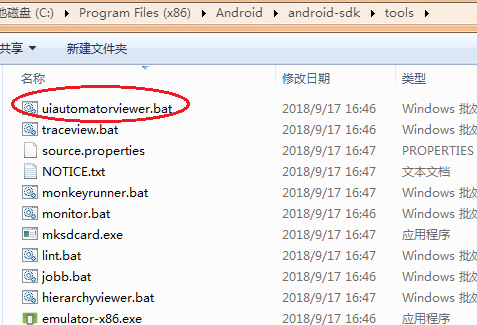
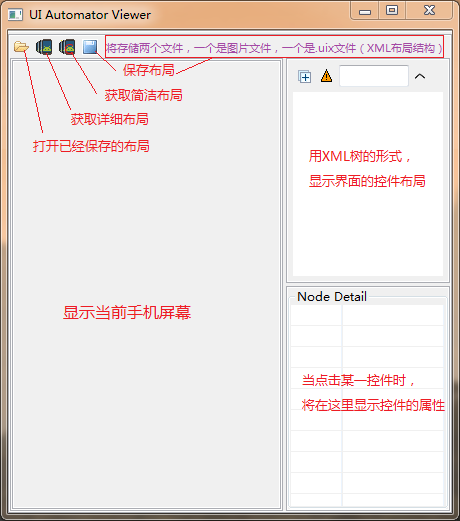
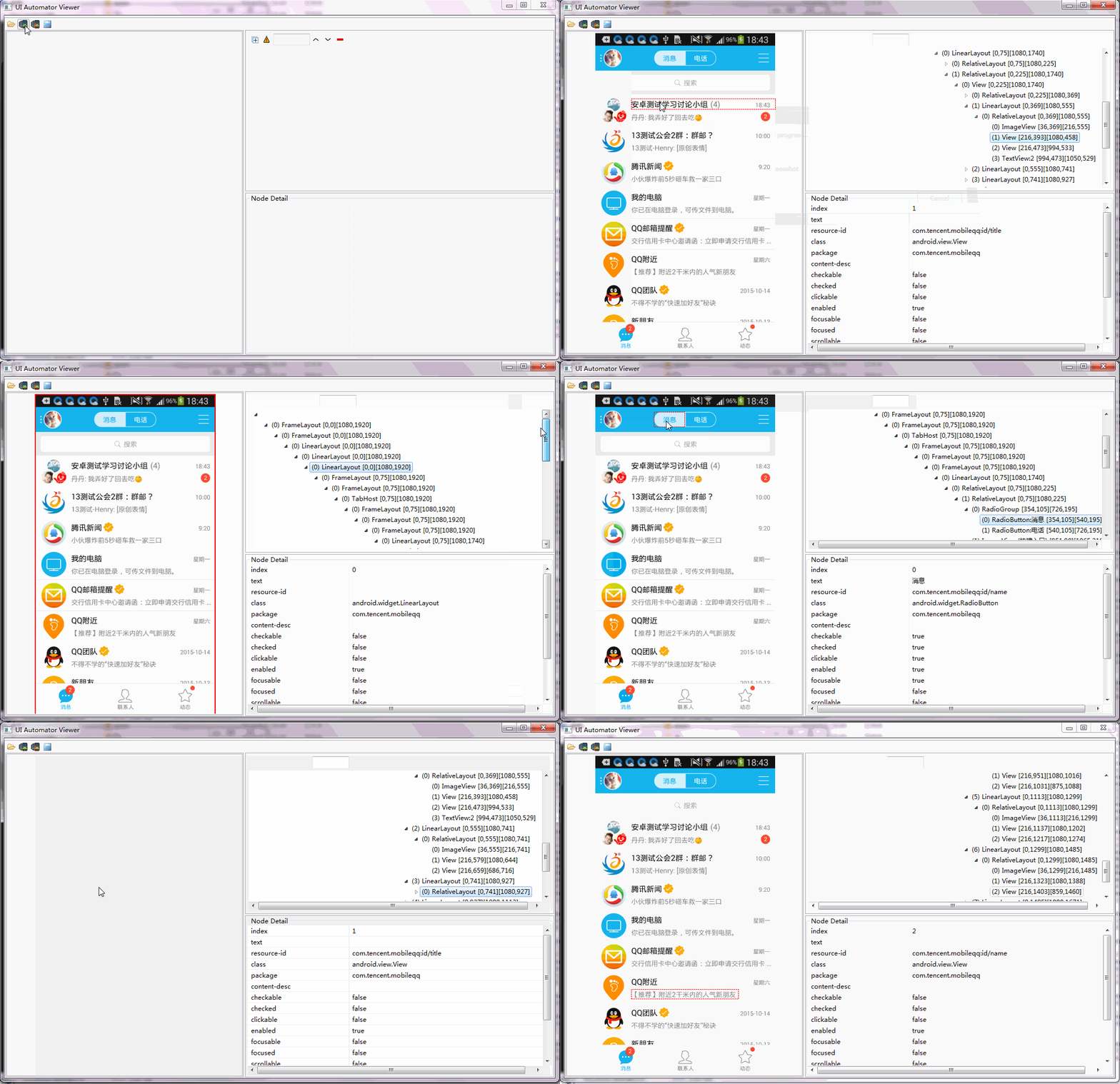
四、定位元素
1. identifier 定位
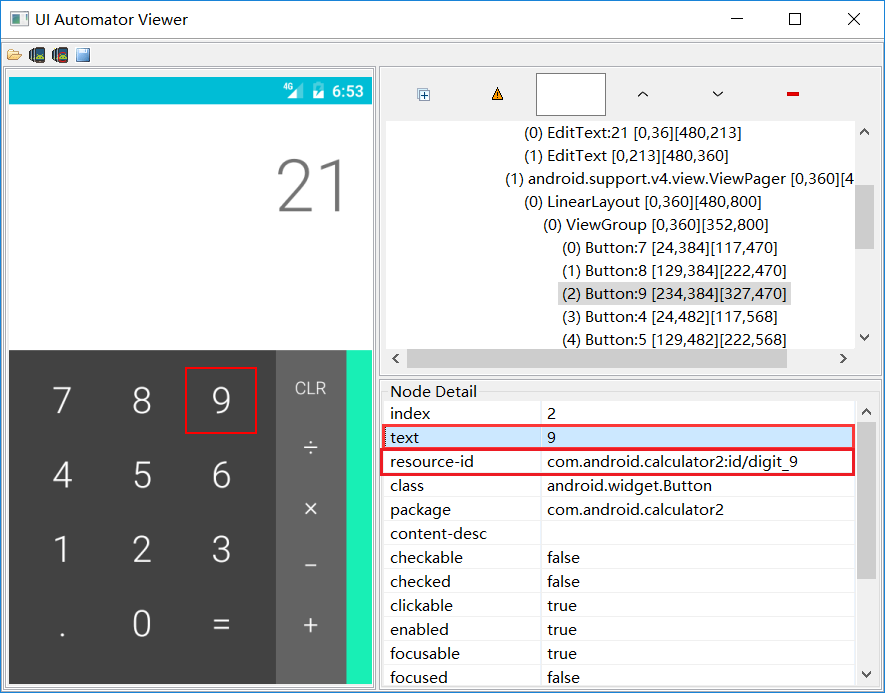
说明:匹配 @id 或 @name 属性,分别对应 resource-id 和 text 属性。
案例:点击计算器数字“ 9 ”,可以使用id定位,也可以使用name定位。
| Click Element | identifier=com.android.calculator2:id/digit_9 |
| Click Element | identifier=9 |
2. id 定位
说明:匹配 @id 属性,对应 resource-id 属性。
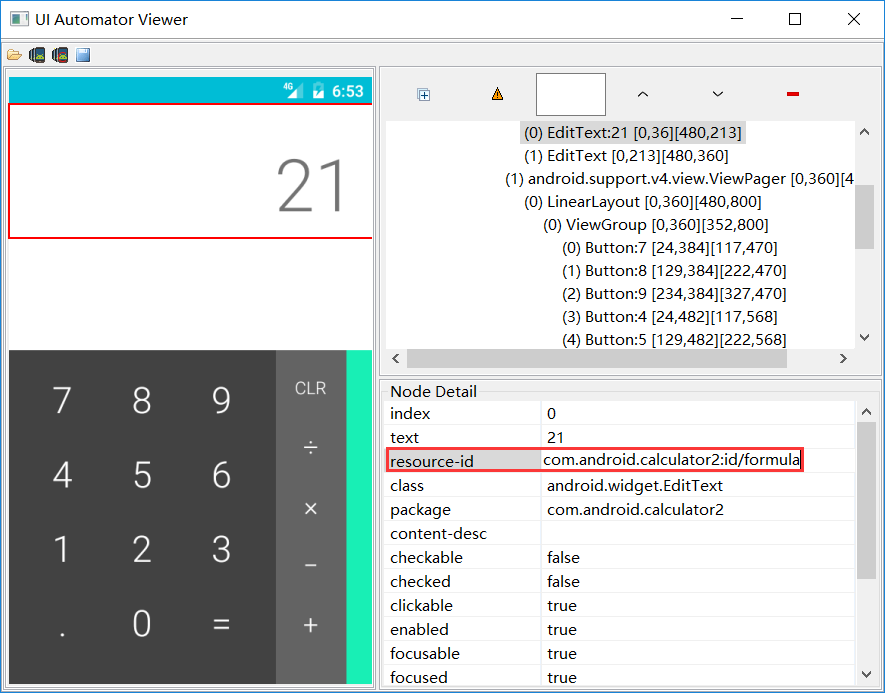
案例:点击计算器输入框,id可以指定也可以不指定,如果不指定策略,默认就是id定位。
| Click Element | id=com.android.calculator2:id/formula |
| Click Element | com.android.calculator2:id/formula |
3. name 定位
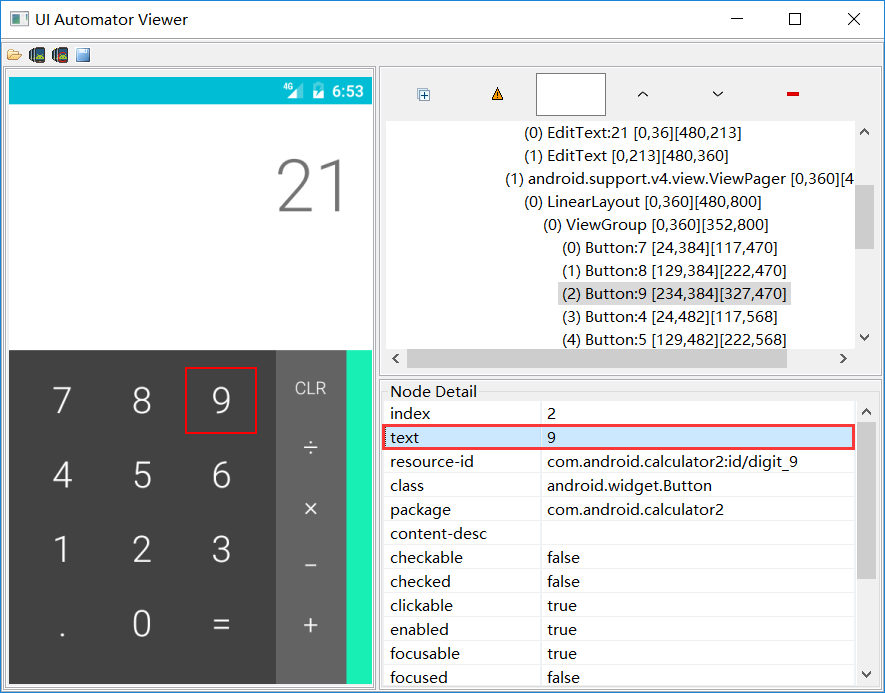
说明:匹配 @name 属性,对应 text 属性。
案例:点击计算器数字“ 9 ”。
| Click Element | name=9 |
4. xpath 定位
说明:匹配 Xpath ,这也是功能最强大的一种定位方式,不过通常用于web自动化。
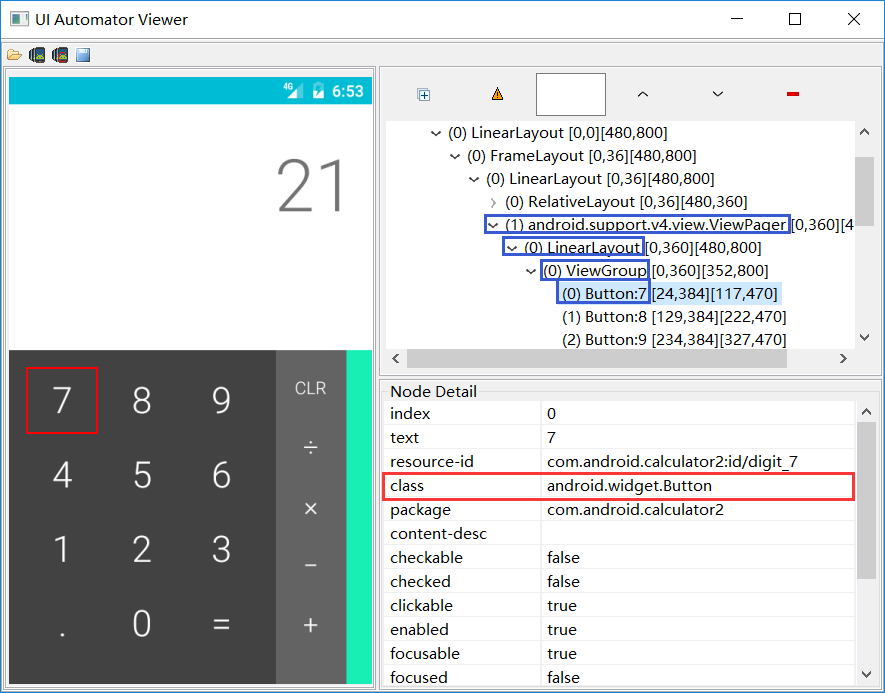
案例:点击计算器数字“ 7 ”。
| Click Element | xpath=//android.widget.Button[contains(@text,'7')] |
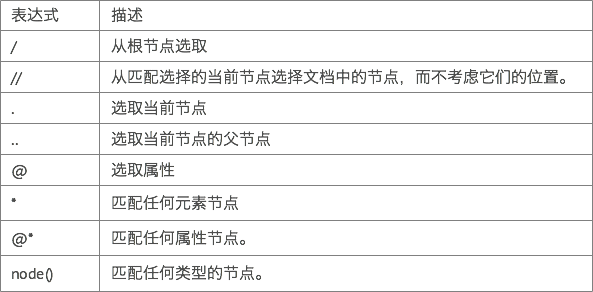
附加Xpath定位表达式说明:
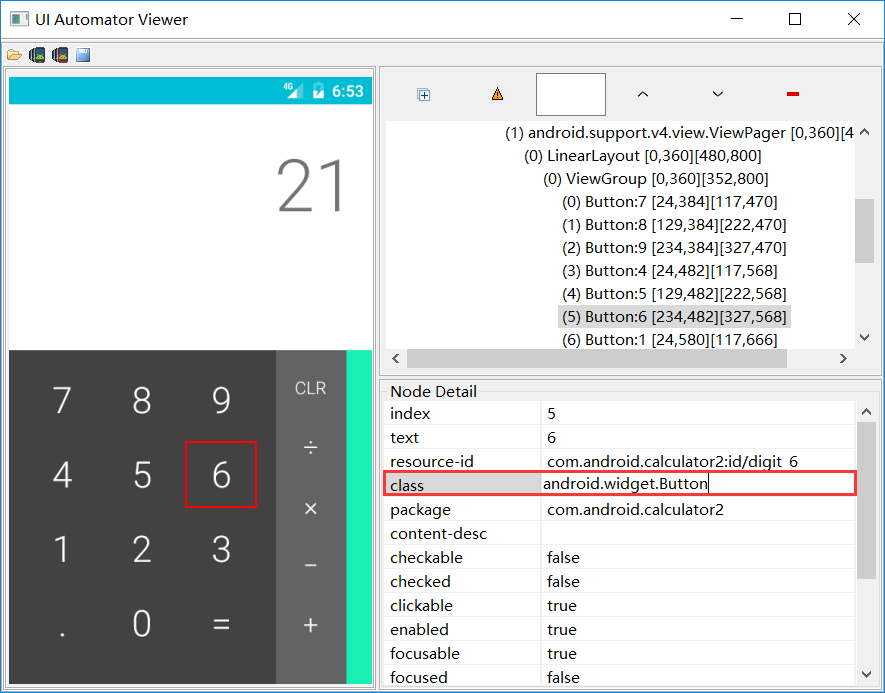
5. class 定位
说明:匹配 class name ,对应 class 属性,但通常class属性都不唯一。
案例:点击计算器数字“ 6 ”。
| Click Element | class=android.widget.Button |
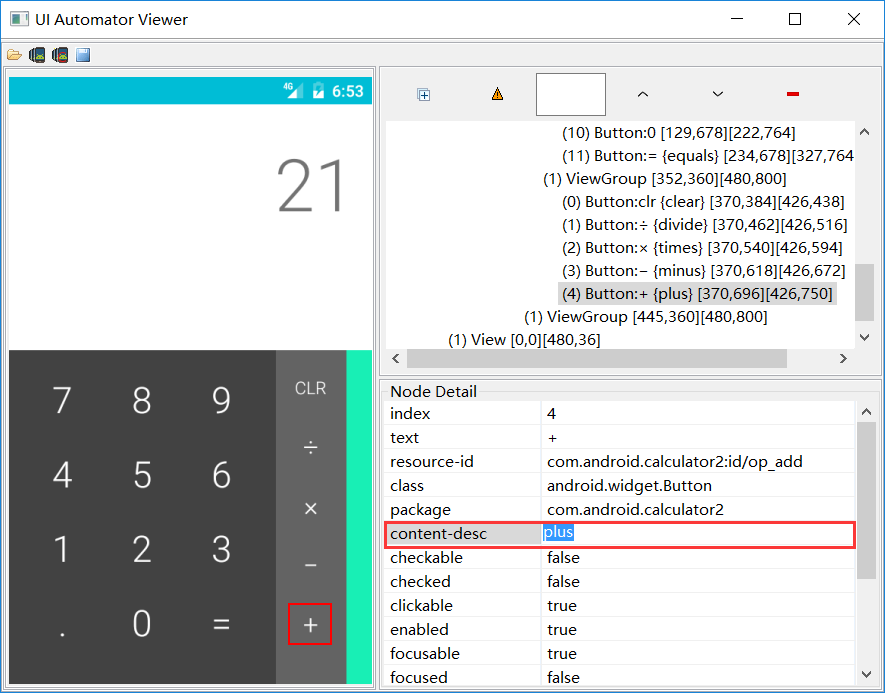
6. accessibility_id 定位
说明:匹配 辅助选项,这个方法属于Appium扩展的定位方法,主要就是content-desc属性。
案例:点击计算器加号“ + ”。
| Click Element | accessibility_id=plus |
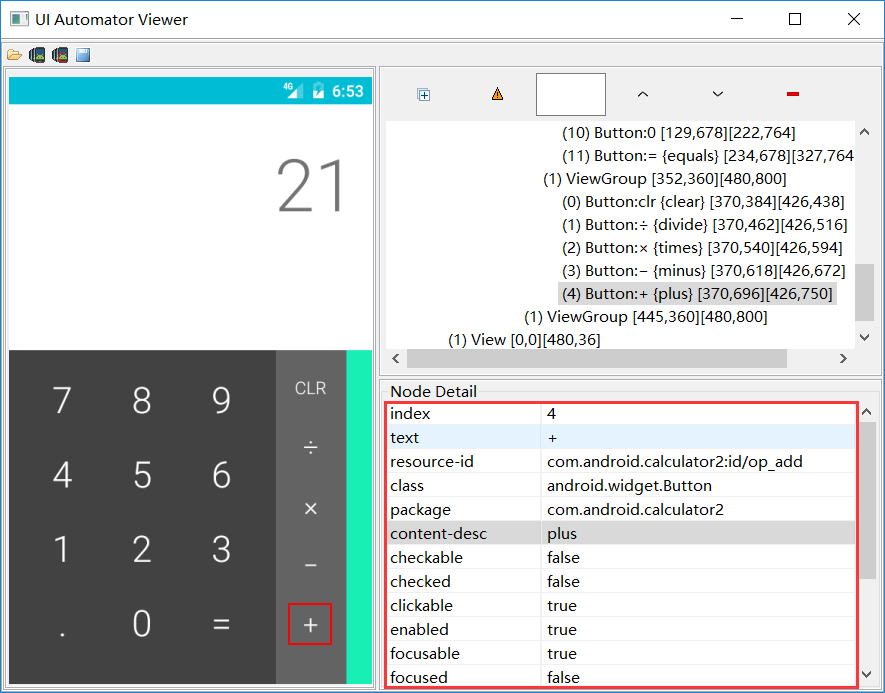
7. android 定位
说明:匹配 Android UI Automator。
案例:点击计算器加号“ + ”。
| Click Element | android=new UiSelector().description(\"plus\") |
8. css 定位
说明:匹配 css in webview,只适用于webview的html页面,继承自webdriver。
9. ios 定位
说明:匹配 iOS UI Automation,很显然只适用于ios系统。
以上就是笔者对RF框架Appium引用控件定位总结,个人感受比较好用的定位器是id、name、xpath、accessibility_id,
其他几个相对比较局限,用的不多,其中css、ios定位笔者还未使用过,读者有兴趣可以自己去发掘一下。
RobotFramework - AppiumLibrary 之元素定位的更多相关文章
- RobotFramework自动化测试之元素定位
前言:最近在做基于RF框架的Web自动化测试,其中涉及到元素的定位,主要用到id.name.xpath.css四中定位方法,尤其后面的两种方法特别有效,可以解决大部分的定位问题. id和name定位 ...
- robotframework使用之元素定位动态ID方法
转自: http://blog.csdn.net/u011757108/article/details/53418671 一个弹出框所有元素ID竟然的动态的,关闭后再打开,里面的ID又变! 如下图: ...
- Robotframework + Appium 之常用元素定位方法
任何自动化测试,其实手动测试也是一样的,元素定位(目标定位)是首要任务,这是最直接的测试对象呀! 好了,废话不多说,又到了元素定位啦,之前我们已经介绍过selenium及appium常用的定位方法,下 ...
- RobotFrameWork+APPIUM实现对安卓APK的自动化测试----第七篇【元素定位介绍】
http://blog.csdn.net/deadgrape/article/details/50628113 我想大家在玩自动化的时候最关心的一定是如何定位元素,因为元素定位不到后面的什么方法都实现 ...
- webview元素定位
genymotion 模拟器:android 5.0.0 python 2.7 appium 1.4.16.1 1.app原生元素定位(常用) driver.find_element_by_id(“ ...
- RobotFramework AppiumLibrary 用户关键字
RobotFramework AppiumLibrary 用户关键字 最近在用robotframework搞安卓app 的自动化,其中用到了 AppiumLlibrary 的关键字,我都映射成了用户关 ...
- [转]RF+Selenium2Library元素定位不到的问题
原文地址:http://m.blog.csdn.net/m0_37553368/article/details/78016729 在基于RobotFramework框架使用Selenium2Libra ...
- robot_framewok自动化测试--(8)SeleniumLibrary 库(selenium、元素定位、关键字和分层设计)
SeleniumLibrary 库 一.selenium 1.1.Selenium 介绍 Selenium 自动化测试工具,它主要是用于 Web 应用程序的自动化测试,但并不只局限于此,同时支持所有基 ...
- selenium元素定位篇
Selenium webdriver是完全模拟用户在对浏览器进行操作,所有用户都是在页面进行的单击.双击.输入.滚动等操作,而webdriver也是一样,所以需要我们指定元素让webdriver进行单 ...
随机推荐
- spoj mgame
题解: f[i][j]表示先后手最大差 g[i][j]表示在最大差的时候是否有后手没得走 代码: #include<bits/stdc++.h> using namespace std; ...
- 使用CURL进行模拟登录
在信息采集的时候,要采集的站点可能需要登录,这样使用简单的采集方式(例如file_get_contents)就无法做到了,我们可以利用PHP的CURL扩展库来进行模拟登录,下面给出代码示例: < ...
- python魔术方法(__init__,__call__,被双下划线包围的方法)
转载link:http://pycoders-weekly-chinese.readthedocs.io/en/latest/issue6/a-guide-to-pythons-magic-metho ...
- OC学习笔记
备注:这里只是个人的观点,有的地方也是copy,多多指教,个人笔记,有侵犯你们版权的地方还望海涵!!! ARC单例模式的实现 使用alloc方法初始化一个类的实例的时候,默认是调用了 allocWit ...
- `ifdef、`else、`endif 用法
一般情况下,Verilog HDL源程序中所有的行都参加编译.但是有时候希望对其中的一部份内容只有在条件满足的时候才进行编译,也就是对一部分内容指定编译的条件,这就是“条件编译”.有时,希望当满足条件 ...
- 关于itext生成pdf的新的demo(包含简单的提取txt文件的内容 和xml内容转化为pdf)
一.用的iText版本为7.0.2版本,maven的配置如下: <dependencies> <!-- always needed --> <dependency> ...
- IC卡热复位时序
热复位(warm reset):在时钟CLK和电源电压VCC处于激活状态的前提下,IC卡收到复位信号时产生的复位. 冷复位过程之后,如果收到的复位应答信号不满足规定,终端将启动热复位并从IC卡获得复位 ...
- 本地maven库导入架包
mvn install:install-file -DgroupId=com.alipay -DartifactId=sdk-java -Dversion=20170725114550 -Dpacka ...
- 我的代码-models
# coding: utf-8 # In[1]: import pandas as pdimport numpy as npfrom sklearn import treefrom sklearn.s ...
- jdk1.7安装和配置
jdk1.7 安装引用 https://jingyan.baidu.com/article/ff41162596a77912e4823716.html