
Displaying Speed and Direction Symbology from U and V vectors (转)
This blog shows you how to calculate and symbolize wind or current speed and direction when the underlying data is stored as U and V vectors. In order to capture the speed and direction of wind or a water current, anemometers or Doppler current profilers measure the velocity of the wind or water in two perpendicular directions, U and V. U is the velocity toward east and V is the velocity toward north. U is sometimes referred to as the zonal velocity and V the meridional velocity. Using U and V, both the speed and direction of the wind or water current can be calculated.
Storing information about the flow of wind or water as vectors provides flexibility in how we calculate direction. This is important because meteorologists and oceanographers describe the flow of wind differently. Oceanographers prefer to describe wind in terms of the “direction of mass flow” or in other words the direction towards which the wind is blowing. In the oceanographic convention, wind flowing from the south to the north is symbolized by an arrow pointing north. Meteorologists use an arrow or a special symbol called a wind barb to show the direction from which the wind is blowing. The head of the arrow or wind barb points in the direction from which the wind is blowing. In the meteorological convention, a wind blowing from west to east is symbolized by an arrow pointing west. Water currents are almost always symbolized using the oceanographic convention.
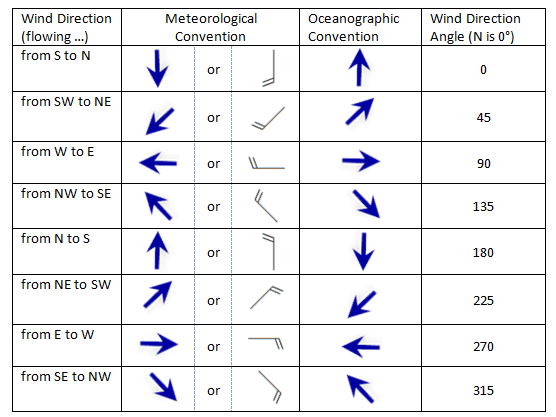
Displaying Direction
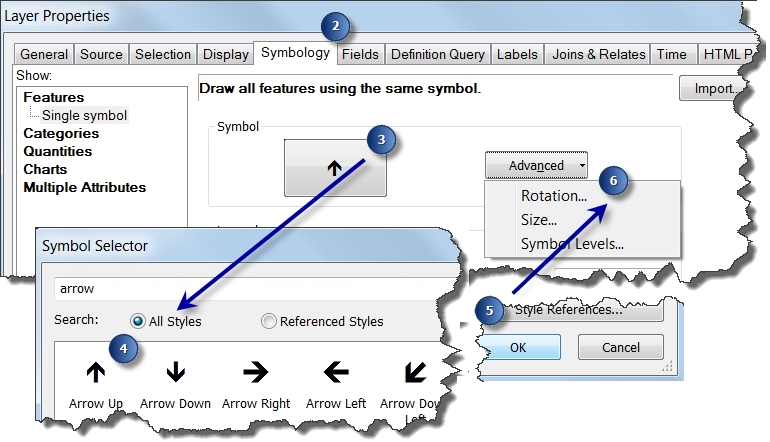
To correctly display wind or current direction in ArcMap, the U and V components must be converted to a symbol rotation angle. The steps below assume that you have a point feature class with the attribute fields u and v. To calculate the rotation, follow the steps below:
- Right-click the point layer in the table of contents.
- Click Properties and click the Symbology tab.
- Click the Symbol. The Symbol Selector dialog box opens.
- Choose an arrow or wind barb whose head is pointing north.
- Click OK to close the Symbol Selector dialog.
- Click Advanced and choose Rotation from the drop-down list. The Rotation dialog box opens.
- Choose <expression> in the drop-down list.
- Click the Expression Builder button to provide the expression to use for rotating the symbol.
- Specify one of the following expression:
- Oceanographic Convention: (180/3.14) * Atn2([u],[v])
- Meteorological Convention: (180/3.14) * Atn2([u],[v])+180
Note: The formulas above are correct only if U and V are measured relative to a grid where true north consistently points straight up (e.g. no rotation). Otherwise, a convergence angle correction must be applied based on the projection of the data.
- Click OK to close the Expression Builder dialog.
- Click Geographic for the Rotation Style.
- Click OK on all dialog boxes.
This image shows the Symbology tab and Symbol Selector with the steps marked to apply symbol rotation.
This image shows the Expression Builder dialog with the steps marked to apply symbol rotation.

Displaying Speed
Using a similar procedure, U and V components can be used to calculate and display wind or current speed in ArcMap.
- Right-click the point layer in the table of contents.
- Click Properties and click the Symbology tab.
- Click Advanced and choose Size from the drop-down list. The Size dialog box opens.
- Choose <expression> in the drop-down list.
- Click the Expression Builder button to provide the expression to use for the size of the symbols.
- Specify the following for the expression: Sqr([u]**2 + [v]**2)Tip: ArcMap assumes that the size of the symbol returned from the expression is in points (1/72 of an inch). If the wind or current speeds are relatively low in your data, the symbols may be too small and cartographically unpleasing. You can adjust the size of the symbols by including a scaling factor in the formula. For example, Sqr([u]**2 + [v]**2) * 10 will increase the size of the symbols by a factor of 10.
- Click OK to close the Expression Builder dialog.
- Click OK on all dialog boxes.
from : https://blogs.esri.com/esri/arcgis/2013/07/17/displaying-speed-and-direction-symbology-from-u-and-v-vectors/
Displaying Speed and Direction Symbology from U and V vectors (转)的更多相关文章
- Unity Glossary
https://docs.unity3d.com/2018.4/Documentation/Manual/Glossary.html 2D terms 2D Physics terms AI term ...
- 《Note --- Unreal 4 --- PersonaHowToMovement》
https://docs.unrealengine.com/latest/CHN/Gameplay/HowTo/CharacterMovement/index.html 这里的demo是按照一些per ...
- jquery-leonaScroll-1.3-自定义竖向自适应滚动条插件
下载链接地址:https://share.weiyun.com/9ac3ca3fb29648bb1aad1b83a76b123c (密码:4y9t)[含mini版] 欢迎使用leonaScroll-1 ...
- jquery-leonaScroll-1.2-自定义滚动条插件
leonaScroll-1.2.js 下载链接地址:http://share.weiyun.com/bb531dd6b1916c0023c176897182dc15 (密码:iZck)[内含压缩版] ...
- Unity3D 第一人称控制器 C#脚本
CharacterMotor.cs using UnityEngine; using System.Collections; /** * @Author : www.xuanyusong.com */ ...
- 利用Native Client OLEDB 11 高效率地对SQL SERVER 进行查询和插入操作
前言: 鄙司原始用的都是ADO来访问数据库,而我现在着手的项目是从我的GPS历史数据库中,取出历时数据的一个接口,一个DLL.用ADO写完之后,测试下来,平均4000条的数据,需要 180 毫秒左右. ...
- 弄个知乎的粒子动态背景_实践particles.js
好久没登录知乎,发现他们的登录页面粒子动态效果蛮炫的,查一下代码用了Particles.js基于Canvas画布创建粒子颗粒效果. 上图 上图: 感觉有比格,就照着弄了一个,玩玩. githu ...
- HDOJ 4717 The Moving Points
The Moving Points Time Limit: 6000/3000 MS (Java/Others) Memory Limit: 32768/32768 K (Java/Others ...
- GLSL语言基础
from http://www.kankanews.com/ICkengine/archives/120870.shtml 变量 GLSL的变量命名方式与C语言类似.变量的名称可以使用字母,数字以及下 ...
随机推荐
- Dedesql数据库类详解(二次开发必备教程)(转)
http://www.dedecms.com/help/development/2009/1028/1076.html 织梦DedeCMS的二次开发不仅仅是会写写织梦的标签,会制作织梦的模板.很多时候 ...
- sql for 存储过程格式
sql DELIMITER && CREATE PROCEDURE test2() BEGIN DECLARE i INT; ; DO ')); ; END WHILE; END; & ...
- Redis官方文档》持久化
原文链接 译者:Alexandar Mahone 这篇文章从技术层面描述了Redis持久化,建议所有读者阅读.如果希望更多了解Redis持久化和持久性保障,建议阅读Redis持久化揭秘. Redis ...
- 转: SQL中的where条件,在数据库中提取与应用浅析
SQL中的where条件,在数据库中提取与应用浅析 http://hedengcheng.com/?p=577 1问题描述 一条SQL,在数据库中是如何执行的呢?相信很多人都会对这个问题比较感兴趣.当 ...
- Visual C++中error spawning cl.exe解决方法
点击“Tools”,选择“选项”,选择“选项”中的“目录” 目录的目录下有四个选项 需要对它们设置正确的路径 我是按照默认路径安装的 可执行文件: C:\Program Files\Microsoft ...
- 【知识结构】最强Web认证知识体系
花了些时间总结了下Web认证,以及各种方式的利弊和使用,后续后继续更新.文章转载请注明出处:https://www.cnblogs.com/pengdai/p/9144843.html -----20 ...
- web表单disable问题
Web表单提交之disabled问题 例如,有如下表单 <form id="inputForm" action="shorttermrental.action&qu ...
- NODEJS网站
nodejs https://nodejs.org/en/ nodejs官网 http://nodeapi.ucdok.com/#/api/ nodejs手册 https://www.npmjs.co ...
- Linux常用基本命令 1
useradd 创建用户. password 修改密码. date 查看时间 man date 帮助文档.f往后翻 b往前翻 q退出.软修改 man hwclock 修改硬件时钟, cal 查看日历 ...
- mongo 修改器 $inc/$set/$unset/$pop/$push/$pull/$addToSet
mongo $inc 可以对集合里面的某些值是数字的增减.看代码 $set 可以进行修改,并且不存在的时候默认添加. 同时还能该变数据的类型. 还可以该变内嵌元素的值 用.调用 $unset 删除 ...