
人性化的Requests模块(响应与编码、header处理、cookie处理、重定向与历史记录、代理设置)
Requests库是第三方模块,需要额外进行安装。Requests是一个开源库
pip install requests- 去GitHub下载回来,进入解压文件,运行setup.py
比urllib2实现方式的代码量少,下面是POST请求:
import requests

postdata= {'key':'value'}

r = requests.post('http://www.cnblogs.com/login',data=postdata)

print(r.content)
- 下面是get请求,但有些get请求url包含参数,如:www.xxx.com?keyword=bolg;guguobao&pageindex=1,怎么简化url,requests提供其他方法:
payload = {'opt':1}

r = requests.get('https://i.cnblogs.com/EditPosts.aspx',params=payload)

print r.url
响应与编码
import requests

r = requests.get('http://www.baidu.com')

print 'content -- >'+ r.content

print 'text -- >'+ r.text

print 'encoding -- >'+ r.encoding

r.encoding='utf-8'

print 'new text-- >'+r.text
uploading-image-85581.png
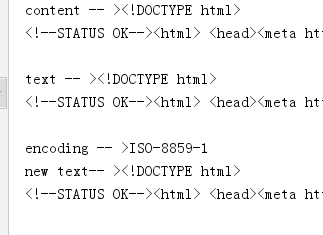
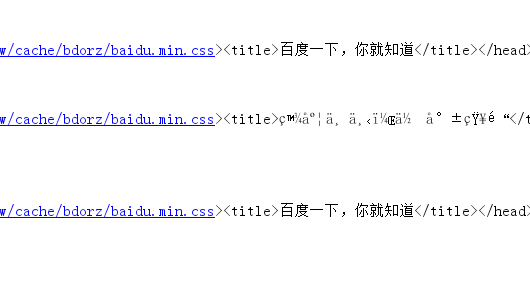
r.content 返回是字节,text返回文本形式
如果输出结果为encoding -->encoding -- >ISO-8859-1,则说明实际的编码格式是UTF-8,由于Requests猜测错误,导致解析文本出现乱码。Requests提供解决方案,可以自行设置编码格式,r.encoding='utf-8'设置成UTF-8之后,“new text -->”就不会出现乱码。但这种方法笨拙。因此就有了:chardet,优秀的字符串/文件编码检测模块。
安装
pip install chardet安装完成后,使用chardet.detect()返回字典,其中confidence是检测精确度,encoding是编码方式
import requests,chardet

r = requests.get('http://www.baidu.com')

print chardet.detect(r.content)

r.encoding = chardet.detect(r.content)['encoding']

print(r.text)
- 运行结果
C:\Python27\python.exe F:/python_scrapy/ch03/3.2.3_3.py

{'confidence': 0.99, 'language': '', 'encoding': 'utf-8'}

<!DOCTYPE html>

<!--STATUS OK--><html> <head><meta http-equiv=content-type content=text/html;charset=utf-8><meta http-equiv=X-UA-Compatible content=IE=Edge><meta content=always name=referrer><link rel=stylesheet type=text/css href=http://s1.bdstatic.com/r/www/cache/bdorz/baidu.min.css><title>百度一下,你就知道</title></head> <body link=#0000cc> <div id=wrapper> <div id=head> <div class=head_wrapper> <div ..

.................

Process finished with exit code 0
3 请求头header处理
- Requests对headers的处理和urllib2非常相似,在Requests的get函数添加headers参数
import requests

user_agent = 'Mozilla/4.0 (compatible; MSIE 5.5; Windows NT)'

headers={'User-Agent':user_agent}

r = requests.get('http://www.baidu.com',headers=headers)

print r.content
响应码code和响应头header处理
import requests

r = requests.get('http://www.baidu.com')

if r.status_code == requests.codes.ok:

    print r.status_code#响应码

    print r.headers#响应头

    print r.headers.get('content-type')#推荐使用这种获取方式,获取其中的某个字段

    print r.headers['content-type']#不推荐使用这种获取方式,因为不存在会抛出异常

else:

    r.raise_for_status()
cookie处理
- 如果响应包含cookie的值,可以如下方式取出:
import requests

user_agent = 'Mozilla/4.0 (compatible; MSIE 5.5; Windows NT)'

headers={'User-Agent':user_agent}

r = requests.get('http://www.baidu.com',headers=headers)

#遍历出所有的cookie字段的值

for cookie in r.cookies.keys():

    print cookie+':'+r.cookies.get(cookie)
- 如果想自定义cookie发出去,使用以下方式:
import requests

user_agent = 'Mozilla/4.0 (compatible; MSIE 5.5; Windows NT)'

headers={'User-Agent':user_agent}

cookies = dict(name='guguobao',age='10')

r = requests.get('http://www.baidu.com',headers=headers,cookies=cookies)

print r.text
- 还有一种更加高级,且能自动处理Cookie的方式,有时候我们不需要关心Cookie值是多少,只是希望每次访问的时候,程序都会自动把cookie带上。Requests提供一个session的概念,在连续登录网页,处理登录跳转特别方便,不需要关注具体细节
import requests

loginUrl= 'http://www.xxx.com/login'

s = requests.Session()

#首先访问登录界面,作为游客,服务器会先分配一个cookie

r = s.get(loginUrl,allow_redirects=True)

datas={'name':'guguobao','passwd':'guguobao'}

#向登录链接发送post请求,验证成功,游客权限转为会员权限

r =s.post(loginUrl,data=datas,allow_redirects=True)

print r.text
- 这种使用Session函数处理Cookie的方式很常见
重定向与历史记录
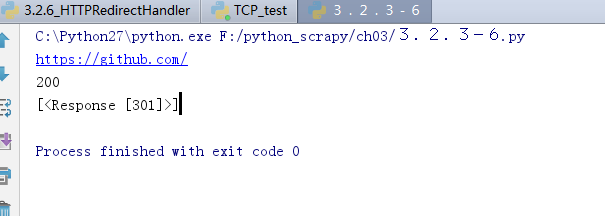
- r =requests.get('http://www.baidu.com/',allow_redirects=True),将allow_redirects设置为True,允许重定向,FALSE不允许。可以通过r.hisory字段查看历史成功访问请求跳转信息:
import requests

r = requests.get('http://github.com')

print r.url

print r.status_code

print r.history
7 超时设置
r = requests.get('http://github.com',timeout=2)
8 代理设置
import requests

proxies = {

  "http": "http://127.0.0.1:1080",

  "https": "http://127.0.0.1:1080",

}

r = requests.get("http://www.google.com", proxies=proxies)

print r.text
- 也可以通过环境变量HTTP_PROXY和HTTPS_PROXY来配置代理,但不常用。你的代理需要使用HTTP Basic Auth,可以使用http://user:password@host:端口
proxies = {

  "http": "http://user:password@127.0.0.1:1080",

]
人性化的Requests模块(响应与编码、header处理、cookie处理、重定向与历史记录、代理设置)的更多相关文章
- 03爬虫-requests模块基础(1)
requests模块基础 什么是requests模块 requests模块是python中原生基于网络模拟浏览器发送请求模块.功能强大,用法简洁高效. 为什么要是用requests模块 用以前的url ...
- python3使用requests模块完成get/post/代理/自定义header/自定义Cookie
一.背景说明 http请求的难易对一门语言来说是很重要的而且是越来越重要,但对于python一是urllib一些写法不太符合人的思维习惯文档也相当难看,二是在python2.x和python3.x中写 ...
- python基础-requests模块、异常处理、Django部署、内置函数、网络编程
网络编程 urllib的request模块可以非常方便地抓取URL内容,也就是发送一个GET请求到指定的页面,然后返回HTTP的响应. 校验返回值,进行接口测试: 编码:把一个Python对象编码转 ...
- Python—requests模块详解
1.模块说明 requests是使用Apache2 licensed 许可证的HTTP库. 用python编写. 比urllib2模块更简洁. Request支持HTTP连接保持和连接池,支持使用co ...
- 爬虫requests模块 1
让我们从一些简单的示例开始吧. 发送请求¶ 使用 Requests 发送网络请求非常简单. 一开始要导入 Requests 模块: >>> import requests 然后,尝试 ...
- Python requests模块学习笔记
目录 Requests模块说明 Requests模块安装 Requests模块简单入门 Requests示例 参考文档 1.Requests模块说明 Requests 是使用 Apache2 Li ...
- Python高手之路【八】python基础之requests模块
1.Requests模块说明 Requests 是使用 Apache2 Licensed 许可证的 HTTP 库.用 Python 编写,真正的为人类着想. Python 标准库中的 urllib2 ...
- 爬虫之requests模块
requests模块 什么是requests模块 requests模块是python中原生的基于网络请求的模块,其主要作用是用来模拟浏览器发起请求.功能强大,用法简洁高效.在爬虫领域中占据着半壁江山的 ...
- Python 爬虫二 requests模块
requests模块 Requests模块 get方法请求 整体演示一下: import requests response = requests.get("https://www.baid ...
随机推荐
- 从零开始实现一个简易的Java MVC框架(三)--实现IOC
Spring中的IOC IoC全称是Inversion of Control,就是控制反转,他其实不是spring独有的特性或者说也不是java的特性,他是一种设计思想.而DI(Dependency ...
- Python获取本机所有IP地址
import socket # 查看当前主机名 print('当前主机名称为 : ' + socket.gethostname()) # 根据主机名称获取当前IP print('当前主机的IP为: ' ...
- numpy常用矩阵操作
1.删除列 column_to_delete = [0, 1, 2] arr = np.delete(arr, [0, 1, 2], axis=1) 2.归一化 arr = normalize(arr ...
- 《深入理解java虚拟机》——读后笔记(一)(内存部分)
一.内存区域的划分(运行时数据区域) ①程序计数器:程序计数器是一块较小的内存区域,字节码解释器通过改变此计数器的值来选取下一条要执行的字节码指令,可以看成是当前线程执行字节码的行号指示器.线程执行时 ...
- 用jstl的if或when标签判断字符串是否为空
在jsp页面用到jstl的if或when标签判断字符串不为空的时候,书写格式: <c:when test="${not empty paramName}"> </ ...
- jquery scroll()方法 语法
jquery scroll()方法 语法 作用:当用户滚动指定的元素时,会发生 scroll 事件.scroll 事件适用于所有可滚动的元素和 window 对象(浏览器窗口).scroll() 方法 ...
- 二进制上的数位dpPOJ 3252
Round number POJ - 3252 题目大意:一个"round number" 数的定义是,将它转化成2进制后,0的个数大于等于1的个数,要求的就是在[s,f]范围内& ...
- 解决xshell无法连接virtualbox中的虚拟机(Ubuntu18.04)的问题
遇到这个问题第一反应是是否安装相应的组件: sudo apt-get install openssh-server 开启防火墙端口 firewall-cmd --zone=/tcp --permane ...
- Lock和synchronized的区别
总结来说,Lock和synchronized有以下几点不同: 1)Lock是一个接口,而synchronized是Java中的关键字,synchronized是内置的语言实现: 2)synchroni ...
- 简单快捷的方式从vps下载文件
安装setuptools 1) 最简单安装,假定在ubuntu下 sudo apt-get install python-setuptools SimpleHTTPServer 是单线程的临时服务,建 ...