
人性化的Requests模块(响应与编码、header处理、cookie处理、重定向与历史记录、代理设置)
Requests库是第三方模块,需要额外进行安装。Requests是一个开源库
pip install requests- 去GitHub下载回来,进入解压文件,运行setup.py
比urllib2实现方式的代码量少,下面是POST请求:
import requests

postdata= {'key':'value'}

r = requests.post('http://www.cnblogs.com/login',data=postdata)

print(r.content)
- 下面是get请求,但有些get请求url包含参数,如:www.xxx.com?keyword=bolg;guguobao&pageindex=1,怎么简化url,requests提供其他方法:
payload = {'opt':1}

r = requests.get('https://i.cnblogs.com/EditPosts.aspx',params=payload)

print r.url
响应与编码
import requests

r = requests.get('http://www.baidu.com')

print 'content -- >'+ r.content

print 'text -- >'+ r.text

print 'encoding -- >'+ r.encoding

r.encoding='utf-8'

print 'new text-- >'+r.text
uploading-image-85581.png
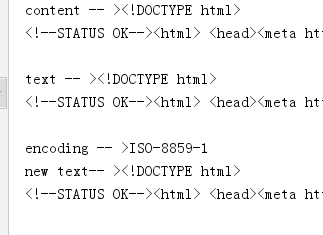
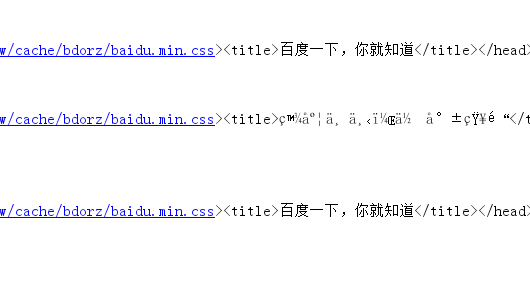
r.content 返回是字节,text返回文本形式
如果输出结果为encoding -->encoding -- >ISO-8859-1,则说明实际的编码格式是UTF-8,由于Requests猜测错误,导致解析文本出现乱码。Requests提供解决方案,可以自行设置编码格式,r.encoding='utf-8'设置成UTF-8之后,“new text -->”就不会出现乱码。但这种方法笨拙。因此就有了:chardet,优秀的字符串/文件编码检测模块。
安装
pip install chardet安装完成后,使用chardet.detect()返回字典,其中confidence是检测精确度,encoding是编码方式
import requests,chardet

r = requests.get('http://www.baidu.com')

print chardet.detect(r.content)

r.encoding = chardet.detect(r.content)['encoding']

print(r.text)
- 运行结果
C:\Python27\python.exe F:/python_scrapy/ch03/3.2.3_3.py

{'confidence': 0.99, 'language': '', 'encoding': 'utf-8'}

<!DOCTYPE html>

<!--STATUS OK--><html> <head><meta http-equiv=content-type content=text/html;charset=utf-8><meta http-equiv=X-UA-Compatible content=IE=Edge><meta content=always name=referrer><link rel=stylesheet type=text/css href=http://s1.bdstatic.com/r/www/cache/bdorz/baidu.min.css><title>百度一下,你就知道</title></head> <body link=#0000cc> <div id=wrapper> <div id=head> <div class=head_wrapper> <div ..

.................

Process finished with exit code 0
3 请求头header处理
- Requests对headers的处理和urllib2非常相似,在Requests的get函数添加headers参数
import requests

user_agent = 'Mozilla/4.0 (compatible; MSIE 5.5; Windows NT)'

headers={'User-Agent':user_agent}

r = requests.get('http://www.baidu.com',headers=headers)

print r.content
响应码code和响应头header处理
import requests

r = requests.get('http://www.baidu.com')

if r.status_code == requests.codes.ok:

    print r.status_code#响应码

    print r.headers#响应头

    print r.headers.get('content-type')#推荐使用这种获取方式,获取其中的某个字段

    print r.headers['content-type']#不推荐使用这种获取方式,因为不存在会抛出异常

else:

    r.raise_for_status()
cookie处理
- 如果响应包含cookie的值,可以如下方式取出:
import requests

user_agent = 'Mozilla/4.0 (compatible; MSIE 5.5; Windows NT)'

headers={'User-Agent':user_agent}

r = requests.get('http://www.baidu.com',headers=headers)

#遍历出所有的cookie字段的值

for cookie in r.cookies.keys():

    print cookie+':'+r.cookies.get(cookie)
- 如果想自定义cookie发出去,使用以下方式:
import requests

user_agent = 'Mozilla/4.0 (compatible; MSIE 5.5; Windows NT)'

headers={'User-Agent':user_agent}

cookies = dict(name='guguobao',age='10')

r = requests.get('http://www.baidu.com',headers=headers,cookies=cookies)

print r.text
- 还有一种更加高级,且能自动处理Cookie的方式,有时候我们不需要关心Cookie值是多少,只是希望每次访问的时候,程序都会自动把cookie带上。Requests提供一个session的概念,在连续登录网页,处理登录跳转特别方便,不需要关注具体细节
import requests

loginUrl= 'http://www.xxx.com/login'

s = requests.Session()

#首先访问登录界面,作为游客,服务器会先分配一个cookie

r = s.get(loginUrl,allow_redirects=True)

datas={'name':'guguobao','passwd':'guguobao'}

#向登录链接发送post请求,验证成功,游客权限转为会员权限

r =s.post(loginUrl,data=datas,allow_redirects=True)

print r.text
- 这种使用Session函数处理Cookie的方式很常见
重定向与历史记录
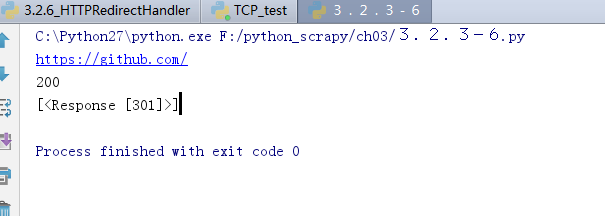
- r =requests.get('http://www.baidu.com/',allow_redirects=True),将allow_redirects设置为True,允许重定向,FALSE不允许。可以通过r.hisory字段查看历史成功访问请求跳转信息:
import requests

r = requests.get('http://github.com')

print r.url

print r.status_code

print r.history
7 超时设置
r = requests.get('http://github.com',timeout=2)
8 代理设置
import requests

proxies = {

  "http": "http://127.0.0.1:1080",

  "https": "http://127.0.0.1:1080",

}

r = requests.get("http://www.google.com", proxies=proxies)

print r.text
- 也可以通过环境变量HTTP_PROXY和HTTPS_PROXY来配置代理,但不常用。你的代理需要使用HTTP Basic Auth,可以使用http://user:password@host:端口
proxies = {

  "http": "http://user:password@127.0.0.1:1080",

]
人性化的Requests模块(响应与编码、header处理、cookie处理、重定向与历史记录、代理设置)的更多相关文章
- 03爬虫-requests模块基础(1)
requests模块基础 什么是requests模块 requests模块是python中原生基于网络模拟浏览器发送请求模块.功能强大,用法简洁高效. 为什么要是用requests模块 用以前的url ...
- python3使用requests模块完成get/post/代理/自定义header/自定义Cookie
一.背景说明 http请求的难易对一门语言来说是很重要的而且是越来越重要,但对于python一是urllib一些写法不太符合人的思维习惯文档也相当难看,二是在python2.x和python3.x中写 ...
- python基础-requests模块、异常处理、Django部署、内置函数、网络编程
网络编程 urllib的request模块可以非常方便地抓取URL内容,也就是发送一个GET请求到指定的页面,然后返回HTTP的响应. 校验返回值,进行接口测试: 编码:把一个Python对象编码转 ...
- Python—requests模块详解
1.模块说明 requests是使用Apache2 licensed 许可证的HTTP库. 用python编写. 比urllib2模块更简洁. Request支持HTTP连接保持和连接池,支持使用co ...
- 爬虫requests模块 1
让我们从一些简单的示例开始吧. 发送请求¶ 使用 Requests 发送网络请求非常简单. 一开始要导入 Requests 模块: >>> import requests 然后,尝试 ...
- Python requests模块学习笔记
目录 Requests模块说明 Requests模块安装 Requests模块简单入门 Requests示例 参考文档 1.Requests模块说明 Requests 是使用 Apache2 Li ...
- Python高手之路【八】python基础之requests模块
1.Requests模块说明 Requests 是使用 Apache2 Licensed 许可证的 HTTP 库.用 Python 编写,真正的为人类着想. Python 标准库中的 urllib2 ...
- 爬虫之requests模块
requests模块 什么是requests模块 requests模块是python中原生的基于网络请求的模块,其主要作用是用来模拟浏览器发起请求.功能强大,用法简洁高效.在爬虫领域中占据着半壁江山的 ...
- Python 爬虫二 requests模块
requests模块 Requests模块 get方法请求 整体演示一下: import requests response = requests.get("https://www.baid ...
随机推荐
- OpenGL相关文章
OpenGL之glMatrixMode函数的用法 gluOrtho2D和glViewport的作用&窗口与显示的关系 glViewport函数用法 纹理映射
- MySQL-InnoDB锁(一)
本文主要记录InnoDB存储引擎中锁的关键点,下篇文章通过实例确认加锁的范围. InnoDB中的锁 1. 锁提供数据完整性和一致性 2. InnoDB行级锁:共享锁(S)和排他锁(X). 为了支持多粒 ...
- Python SMTP发送邮件Ⅱ
使用Python发送HTML格式的邮件 Python发送HTML格式的邮件与https://www.xuanhe.net/weixiu/4271.html发送纯文本消息的邮件不同之处就是将MIMETe ...
- React Native 项目常用第三方组件汇总
React Native 项目常用第三方组件汇总 https://www.jianshu.com/p/d9cd9a868764?utm_campaign=maleskine&utm_conte ...
- java中子类继承父类时是否继承构造函数
来源:http://www.cnblogs.com/sunnychuh/archive/2011/09/09/2172131.html --------------------- java继承中对构造 ...
- luoguP1996 约瑟夫问题
P1996 约瑟夫问题 2.5K通过 4.7K提交 题目提供者 Timothy 标签 洛谷原创 云端 难度 普及- 时空限制 1s / 128MB 题目背景 约瑟夫是一个无聊的人!!! 题目描述 n个 ...
- Dijkstra算法和Floyd算法的正确性证明
说明: 本文仅提供关于两个算法的正确性的证明,不涉及对算法的过程描述和实现细节 本人算法菜鸟一枚,提供的证明仅是自己的思路,不保证正确,仅供参考,若有错误,欢迎拍砖指正 ------------- ...
- easyUI datagrid中checkbox选中事件以及行点击事件,翻页之后还可以选中
DataGrid其中与选择,勾选相关 DataGrid属性:singleSelect boolean 如果为true,则只允许选择一行. false ctrlSelect boolean 在启用多行选 ...
- sh_18_字符串文本对齐
sh_18_字符串文本对齐 # 假设:以下内容是从网络上抓取的 # 要求:顺序并且居中对齐输出以下内容 poem = ["\t\n登鹳雀楼", "王之涣", & ...
- ArrayList,LinkedList和String
import java.util.ArrayList; public class Demo{ public static void main(String[] args) throws Excepti ...