
Vue_(组件通讯)单项数据流
Vue单项数据流 传送门

单向数据流:父组件值的更新,会影响到子组件,反之则不行
修改子组件的值:
局部数据:在子组件中定义新的数据,将父组件传过来的值赋值给新定义的数据,之后操作这个新数据
如果对数据进行简单的操作,可以使用计算属性
修改子组件的prop,同步到父组件:
使用.sync修饰符
将要操作的数据封装成一个对象再操作
单单项数据流设计原则:
所有的 prop 都使得其父子 prop 之间形成了一个单向下行绑定:父级 prop 的更新会向下流动到子组件中,但是反过来则不行。这样会防止从子组件意外改变父级组件的状态,从而导致你的应用的数据流向难以理解。
额外的,每次父级组件发生更新时,子组件中所有的 prop 都将会刷新为最新的值。这意味着你不应该在一个子组件内部改变 prop。如果你这样做了,Vue 会在浏览器的控制台中发出警告。
Learn
一、单项数据流
二、单项数据流子组件数据同步到父组件
目录结构
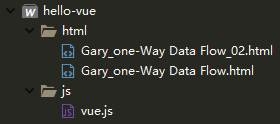
【每个demo下方都存有html源码】
一、单项数据流
实现父组件属性值刷新子组件属性值两种方法,在子组件"child-component" 下定义两个方法获取父组件的文本
              data(){

                                return {

                                    childName : this.name

                                }

                            },

                            computed : {

                                childUpperName(){

                                    return this.name.toString().toUpperCase();

                                }

                            }
<script type="text/javascript">

        new Vue({

            data : {

                msg : 'helloVue'

            },

            components : {

                "father-component" : {

                    data(){

                        return {

                            name : 'Gary'

                        }

                    },

                    props : ['msg'],

                    template :  "#father-template",

                    components : {

                        "child-component" : {

                            template : "#child-template",

                            props : ['name'],

                            data(){

                                return {

                                    childName : this.name

                                }

                            },

                            computed : {

                                childUpperName(){

                                    return this.name.toString().toUpperCase();

                                }

                            }

                        }

                    }

                }

            }

        }).$mount("#GaryId");

    </script>
Vue.js
在子组件中通过v-model绑定childUpperName方法将父组件的文本内容覆盖到子组件当中
this.name.toString().toUpperCase()中toUpperCase() 把字符串转换成大写
    <body>

        <div id="GaryId">

            <father-component ></father-component>

        </div>

    </body>

    <template id="father-template">

        <div>

            <h1>father component</h1>

            myData : <span>{{name}}</span><br />

            <input type="text" v-model="name"/><hr />

            <child-component :name="name"></child-component>

        </div>

    </template>

    <template id="child-template">

        <div>

            <h2>child component</h2>

            fatherData : <span>{{childUpperName}}</span><br />

            <input type="text" v-model="childUpperName"/><hr />

        </div>

    </template>
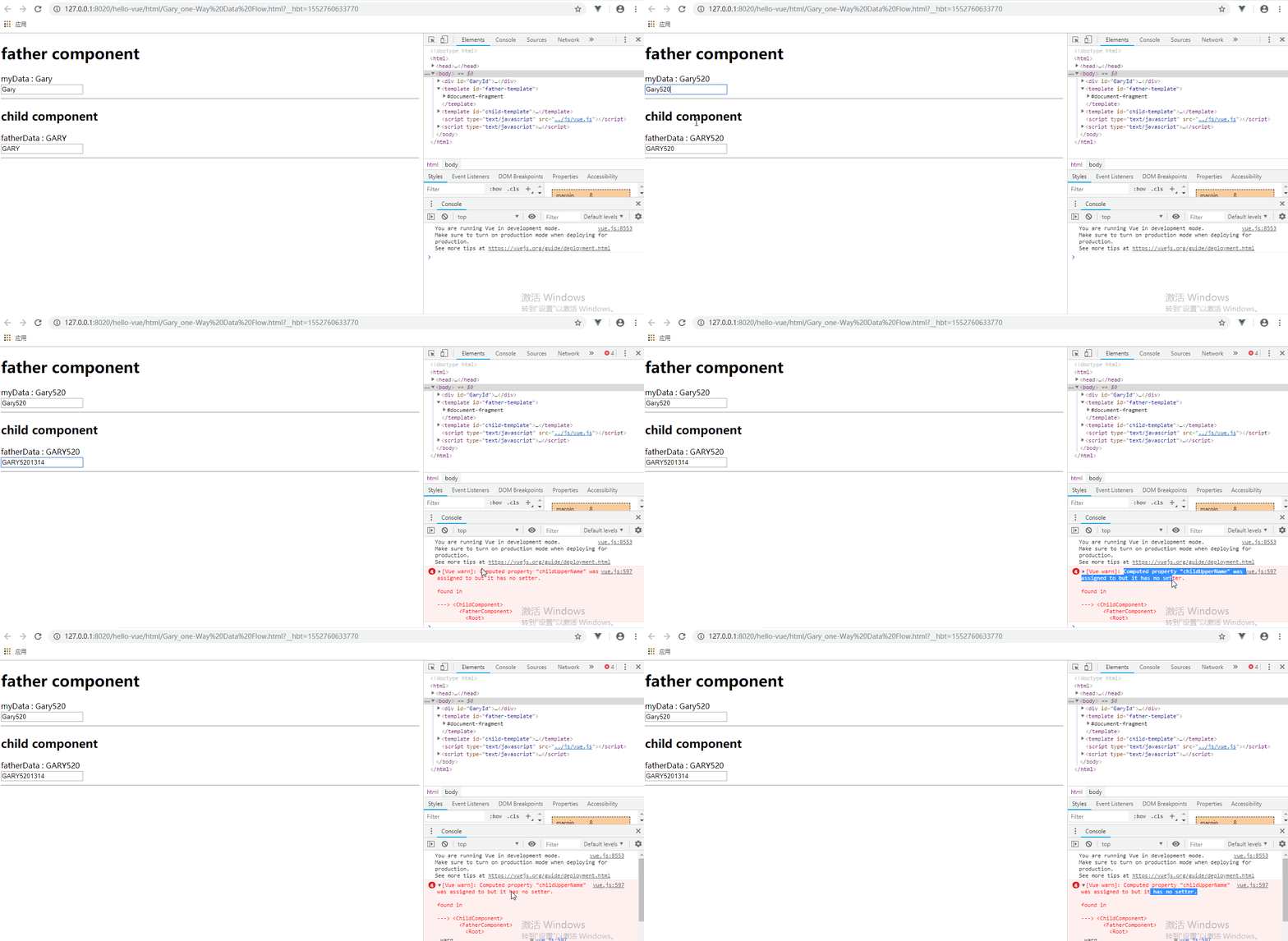
<!DOCTYPE html>

<html>

    <head>

        <meta charset="UTF-8">

        <title>Gary</title>

    </head>

    <body>

        <div id="GaryId">

            <father-component ></father-component>

        </div>

    </body>

    <template id="father-template">

        <div>

            <h1>father component</h1>

            myData : <span>{{name}}</span><br />

            <input type="text" v-model="name"/><hr />

            <child-component :name="name"></child-component>

        </div>

    </template>

    <template id="child-template">

        <div>

            <h2>child component</h2>

            fatherData : <span>{{childUpperName}}</span><br />

            <input type="text" v-model="childUpperName"/><hr />

        </div>

    </template>

    <script type="text/javascript" src="../js/vue.js" ></script>

    <script type="text/javascript">

        new Vue({

            data : {

                msg : 'helloVue'

            },

            components : {

                "father-component" : {

                    data(){

                        return {

                            name : 'Gary'

                        }

                    },

                    props : ['msg'],

                    template :  "#father-template",

                    components : {

                        "child-component" : {

                            template : "#child-template",

                            props : ['name'],

                            data(){

                                return {

                                    childName : this.name

                                }

                            },

                            computed : {

                                childUpperName(){

                                    return this.name.toString().toUpperCase();

                                }

                            }

                        }

                    }

                }

            }

        }).$mount("#GaryId");

    </script>

</html>
Gary_one-Way Data Flow.html
二、单项数据流子组件数据同步到父组件 .sync修饰符传送门
在<template id="father-template">中添加.sync修饰符
修改子组件中的数据将会同步到父组件
<child-component :name.sync="name" :user="user"></child-component>
<body>

        <div id="GaryId">

            <father-component ></father-component>

        </div>

    </body>

    <template id="father-template">

        <div>

            <h1>father component</h1>

            name : <span>{{name}}</span><br />

            <input type="text" v-model="name"/><br />

            userID : <span>{{user.id}}</span><br />

            <input type="text" v-model="user.id"/><br />

            <hr />

            <child-component :name.sync="name" :user="user"></child-component>

        </div>

    </template>

    <template id="child-template">

        <div>

            <h2>child component</h2>

            fatherData : <span>{{childName}}</span><br />

            <input type="text" v-model="childName"/><br />

            userID : <span>{{user.id}}</span><br />

            <input type="text" v-model="user.id"/><br />

            <hr />

        </div>

    </template>
在子组件的props中进行属性注册props : ['name', 'user']
new Vue({

            data : {

                msg : 'helloVue'

            },

            components : {

                "father-component" : {

                    data(){

                        return {

                            name : 'Gary',

                            user : {

                                id : 1

                            }

                        }

                    },

                    props : ['msg'],

                    template :  "#father-template",

                    components : {

                        "child-component" : {

                            template : "#child-template",

                            props : ['name', 'user'],

                            data(){

                                return {

                                    childName : this.name

                                }

                            },

                            computed : {

                                childUpperName(){

                                    return this.name.toString().toUpperCase();

                                }

                            },

                            updated(){

                                this.$emit('update:name', this.childName);

                            }

                        }

                    }

                }

            }

        }).$mount("#GaryId");
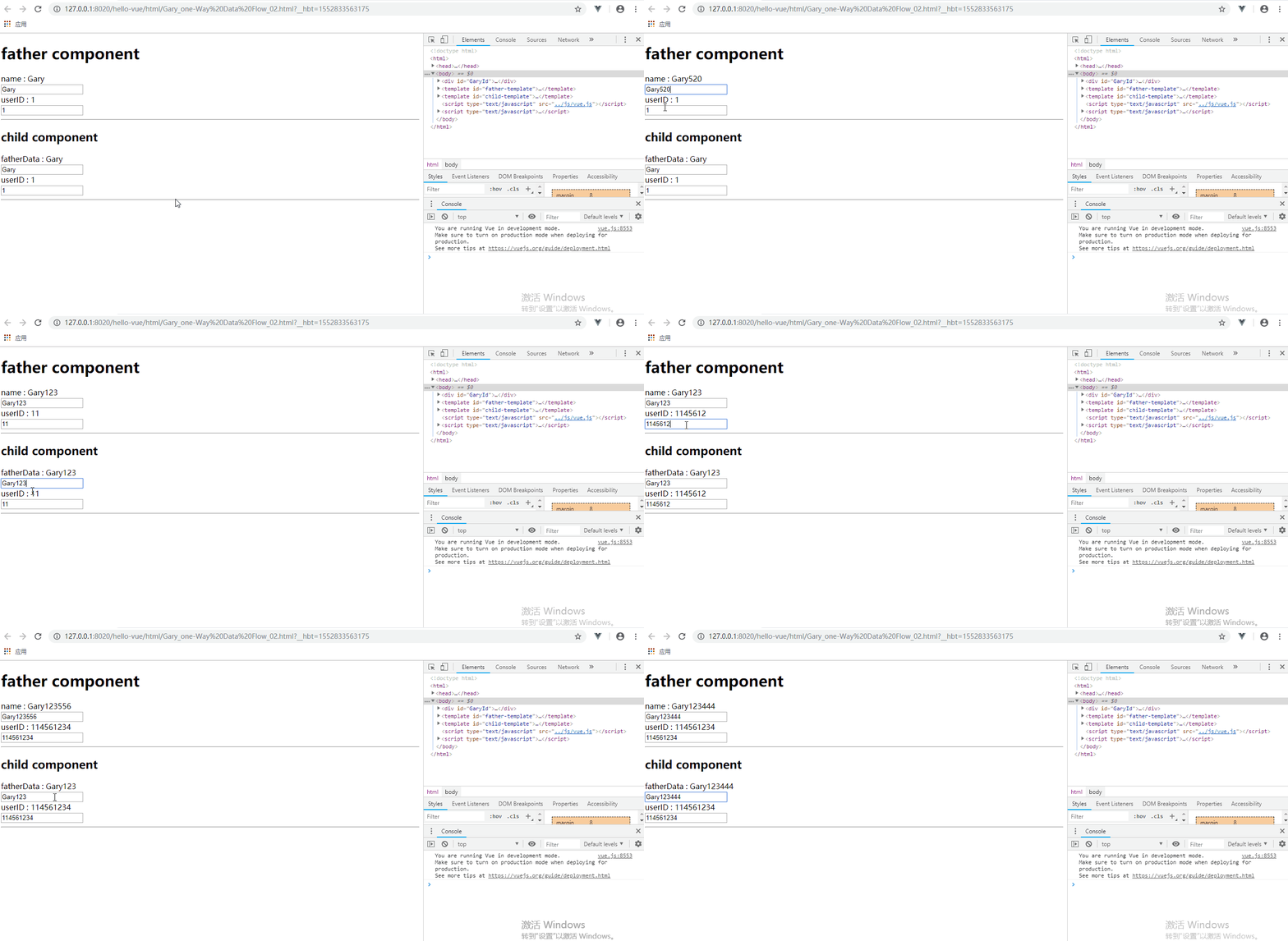
<!DOCTYPE html>

<html>

    <head>

        <meta charset="UTF-8">

        <title>Gary</title>

    </head>

    <body>

        <div id="GaryId">

            <father-component ></father-component>

        </div>

    </body>

    <template id="father-template">

        <div>

            <h1>father component</h1>

            name : <span>{{name}}</span><br />

            <input type="text" v-model="name"/><br />

            userID : <span>{{user.id}}</span><br />

            <input type="text" v-model="user.id"/><br />

            <hr />

            <child-component :name.sync="name" :user="user"></child-component>

        </div>

    </template>

    <template id="child-template">

        <div>

            <h2>child component</h2>

            fatherData : <span>{{childName}}</span><br />

            <input type="text" v-model="childName"/><br />

            userID : <span>{{user.id}}</span><br />

            <input type="text" v-model="user.id"/><br />

            <hr />

        </div>

    </template>

    <script type="text/javascript" src="../js/vue.js" ></script>

    <script type="text/javascript">

        new Vue({

            data : {

                msg : 'helloVue'

            },

            components : {

                "father-component" : {

                    data(){

                        return {

                            name : 'Gary',

                            user : {

                                id : 1

                            }

                        }

                    },

                    props : ['msg'],

                    template :  "#father-template",

                    components : {

                        "child-component" : {

                            template : "#child-template",

                            props : ['name', 'user'],

                            data(){

                                return {

                                    childName : this.name

                                }

                            },

                            computed : {

                                childUpperName(){

                                    return this.name.toString().toUpperCase();

                                }

                            },

                            updated(){

                                this.$emit('update:name', this.childName);

                            }

                        }

                    }

                }

            }

        }).$mount("#GaryId");

    </script>

</html>
Gary_one-Way Data Flow_02.html
Vue_(组件通讯)单项数据流的更多相关文章
- Vue_(组件通讯)非父子关系组件通信
Vue单项数据流 传送门 Vue中不同的组件,即使不存在父子关系也可以相互通信,我们称为非父子关系通信 我们需要借助一个空Vue实例,在不同的组件中,使用相同的Vue实例来发送/监听事件,达到数据通信 ...
- Vue_(组件通讯)使用solt分发内容
Vue特殊特性slot 传送门 有时候我们需要在自定义组件内书写一些内容,例如: <com-a> <h1>title</h1> </com-a> 如果想 ...
- Vue_(组件通讯)子组件向父组件传值
Vue组件 传送门 子组件向父组件传值:子组件通过$.emit()方法以事件形式向父组件发送消息传值: 使用步骤: 1.定义组件:现有自定义组件com-a.com-b,com-a是com-b的父组件: ...
- Vue_(组件通讯)父组件向子组件传值
Vue组件 传送门 父组件向子组件传值:父组件通过属性向下传值的方式和子组件通信: 使用步骤: 1.定义组件:现有自定义组件com-a.com-b,com-a是com-b的父组件 2.准备获取数据:c ...
- Vue_(组件通讯)父子组件简单关系
Vue组件 传送门 在Vue的组件内也可以定义组件,这种关系成为父子组件的关系 如果在一个Vue实例中定义了component-a,然后在component-a中定义了component-b,那他们的 ...
- Vue_(组件通讯)动态组件结合keep-alive
keep-alive 传送门 <keep-alive> 包裹动态组件时,会缓存不活动的组件实例,而不是销毁它们.和 <transition> 相似,<keep-alive ...
- Vue_(组件通讯)动态组件
动态组件 传送门 在一个元素上挂载多个组件,根据不同状态进行切换的时候,可以使用动态组件 动态组件的使用:需要使用内置组件<component></component>,根据 ...
- Vue_(组件通讯)组件
Vue组件 传送门 组件Component,可扩展HTML元素,封装可重用的代码.通俗的来说,组件将可重用的HTML元素封装成为标签方便复用: 组件的使用: 使用全局方法Vue.extend创建构造器 ...
- Vue组件中的单项数据流
当子组件中的input v-model 父组件的值时不能直接绑定props的值要使用计算属性,向下面的写法,因为props是单项数据流,子组件不能改变父组件的状态,直接绑定会报错. 还可以这样写:但是 ...
随机推荐
- app嵌套的vue项目更新后,页面没有更新
记录下解决过程 1.index.html增加下面meta标签 <meta http-equiv="pragram" content="no-cache"& ...
- 6 java 笔记
1 java的类通过构造器来创建该类的对象 2 java提供extends关键字来实现子类继承父类 3 初始化块总是在构造器调用之前被执行 4 可以吧java中的类当成一种自定义的类型 5 类定义的变 ...
- MYSQL 增加语句(数据)
增加数据 如果你失忆了,希望你能想起曾经为了追求梦想的你. 前一节我们学习了查询语句 SELECT,这节课,我们学习增加 INSERT INTO **** VALUES ****,基 ...
- element-ui 中日期控件限制时间跨度
支持点击今天及之前任意日期,前后跨度不超过31天,且不超过今天 <el-date-picker v-model="searchForm.dateRange" type=&qu ...
- XSS防御和绕过1
原理:对用户输入没做过滤和处理,是用户可以输入一些东西(例如js),控制输出达到一些攻击目的 1.DOM型 基于DOM的XSS有时也称为type0XSS.当用户能够通过交互修改浏览器页面中的DOM(D ...
- JCA-Java加密框架
转自:https://www.jianshu.com/p/a8194c237363 JCA是平台的一个主要部分,包含一个“Provider”体系结构和一组用于数字签名,消息摘要(哈希),证书和证书验证 ...
- Java高并发程序设计学习笔记(五):JDK并发包(各种同步控制工具的使用、并发容器及典型源码分析(Hashmap等))
转自:https://blog.csdn.net/dataiyangu/article/details/86491786#2__696 1. 各种同步控制工具的使用1.1. ReentrantLock ...
- 数据集:Introduction to Econometrics by Stock&Watson
James H. Stock and Mark W. Watson, Introduction to Econometrics: data sets 詹姆斯·H·斯托克 马克·W·沃森. 计量经济学. ...
- JavaJDBC【四、存储过程的使用】
Mysql还没学到存储过程,不过语法比较简单 此处不深究数据库中的存储过程怎么创建,后面在mysql的学习笔记里再做整理 今天只整理java中如何调用存储过程 语句 CallableStatement ...
- shell脚本作业
.判断/etc/inittab文件是否大于100行,如果大于,则显示”/etc/inittab is a big file.”否者显示”/etc/inittab is a small file.” # ...