
pandas 数据类型研究(一)数据转换
当利用pandas进行数据处理的时候,经常会遇到数据类型的问题,当拿到数据的时候,首先需要确定拿到的是正确类型的数据,一般通过数据类型的转化,这篇文章就介绍pandas里面的数据类型(data types也就是常用的dtyps),以及pandas与numpy之间的数据对应关系。
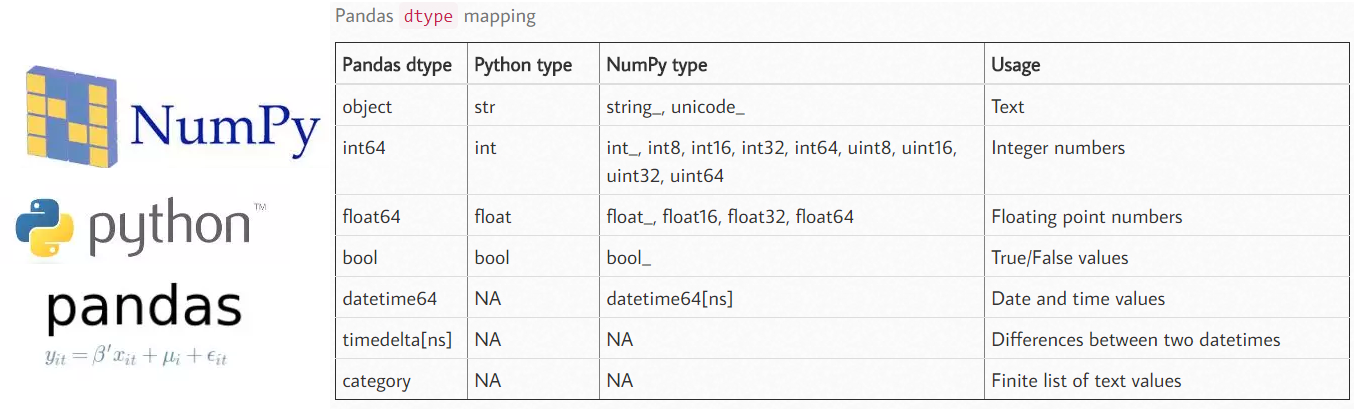
dataframe中的 object 类型来自于 Numpy, 他描述了每一个元素 在 ndarray 中的类型 (也就是Object类型)。而每一个元素在 ndarray 中 必须用同样大小的字节长度。 比如 int64 float64, 他们的长度都是固定的 8 字节。
但是对于string 来说,string 的长度是不固定的, 所以pandas 储存string时 使用 narray, 每一个object 是一个指针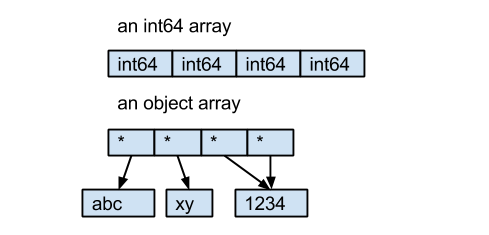
我们以官网案例作为解析,这样可以省去很多时间。
import pandas as pd

import numpy as np

df = pd.read_csv("https://github.com/chris1610/pbpython/blob/master/data/sales_data_types.csv?raw=True")
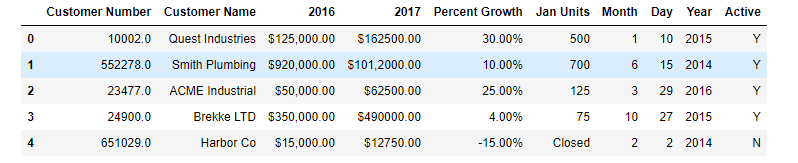
然后我们查看每个字段的数据类型:
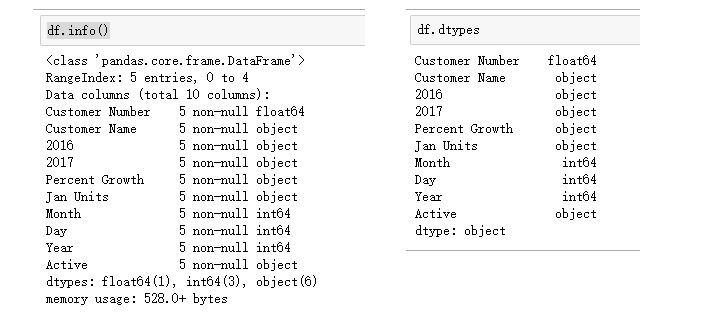
数据类型问题如下:
Customer number 应该是int64,不应该是float64
2016和2017两个字段是object字符串,但我们应该将其转换为float64或者int64
Percent Growth 应该是数字,但是这里是object字符串
Year、Month、Day 三个字段应该合并为一个datetime类型的日期数据
Active应该是bool型数据
数据类型转换的方法
转换数据类型的思路
使用astype()方法强制转化dtype
自定义一个数据转换函数函数
使用pandas内置的tonumeric()和todatetime()
导入数据时转换数据类型
1、使用astype()方法
处理pandas数据类型最简单的办法是astype()
df['Customer Number'].astype('int')
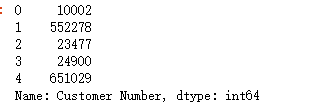
def astype(self, dtype, copy=True, errors='raise', **kwargs):

##############################################################

dtype : data type, or dict of column name -> data type

    Use a numpy.dtype or Python type to cast entire pandas object to

    the same type. Alternatively, use {col: dtype, ...}, where col is a

    column label and dtype is a numpy.dtype or Python type to cast one

    or more of the DataFrame's columns to column-specific types.

errors : {'raise', 'ignore'}, default 'raise'.

    Control raising of exceptions on invalid data for provided dtype.

    - ``raise`` : allow exceptions to be raised

    - ``ignore`` : suppress exceptions. On error return original object

raise_on_error : DEPRECATED use ``errors`` instead

kwargs : keyword arguments to pass on to the constructor

##############################################################
方法:
df["Customer Number"] = df['Customer Number'].astype('int')

df=df.astype({"Customer Number":'int64'})

df.dtypes
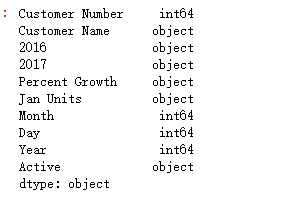
那么如何将2016、2017、PercentGrowth、JanUnits列 从 字符串 转化为 数字,很明显传统的astype的方法是不行的。
需要自定义类型转换方法。
2、自定义转换函数
自定义:
以 2016和2017列为例,在强制从字符串转为数字之前,我们需要先将 "$"、"."、"," 剔除掉,然后再转换。
def convert_currency(val):

    """

    Convert the string number value to a float

     - Remove $

     - Remove commas

     - Convert to float type

    """

    new_val = val.replace(',','').replace('$', '')

    return float(new_val)

df['']=df[''].apply(convert_currency)

df.dtypes

也可以使用lamda表达式
例如下面的
df['Percent Growth']=df['Percent Growth'].apply(lambda x: x.replace('%', '')).astype('float') / 100

df.dtypes

np.where()方法:
np.where(condition, do1, do2)
如果condition满足条件,执行do1,否则执行do2
import numpy  as np

df["Active"] = np.where(df["Active"] == "Y", True, False)

df
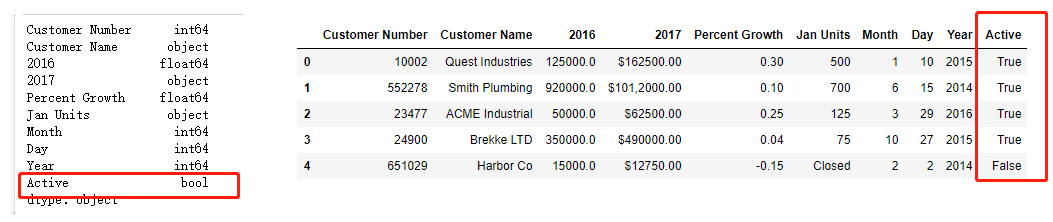
3、pandas内置的处理函数
pandas还有
pd.to_numeric(arg,errors='raise')

pd.to_datetime(arg,errors='raise')
函数帮助我们转为数据类型。
errors参数有:
raise, errors默认为raise
ignore 忽略错误,并把转化前的值直接返回
coerce 将错误数据标注为NaN
因为数据不一定是干净的,对于错误数据我们有三种处理措施。
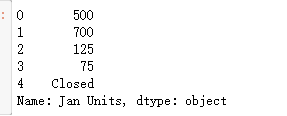
pd.to_numeric(df['Jan Units'], errors='coerce')
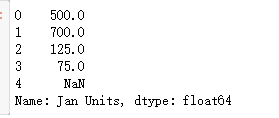
pd.to_numeric(df['Jan Units'], errors='ignore')
to_datetime
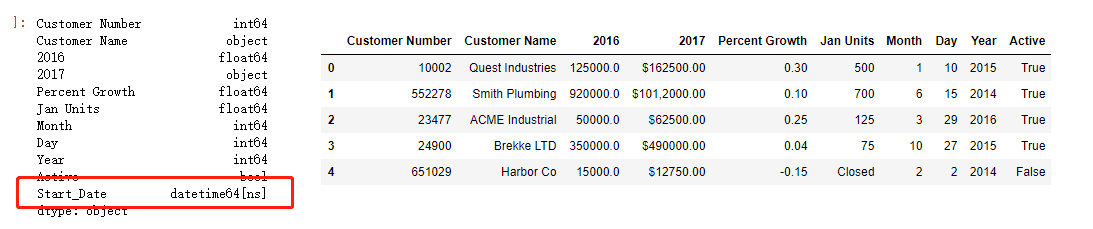
convert the separate month, day and year columns into a datetime . The pandas pd.to_datetime() function is quite configurable but also pretty smart by default.
he function combines the columns into a new series of the appropriate datateime64 dtype.
df["Start_Date"] = pd.to_datetime(df[['Month', 'Day', 'Year']])
四、导入数据时转换数据类型
除了上面的三种方法,实际上我们也可以在导入数据的时候就处理好。
def convert_currency(val):

    """

    Convert the string number value to a float

     - Remove $

     - Remove commas

     - Convert to float type

    """

    new_val = val.replace(',','').replace('$', '')

    return float(new_val)

df_2 = pd.read_csv("https://github.com/chris1610/pbpython/blob/master/data/sales_data_types.csv?raw=True",

                   dtype={'Customer Number': 'int'},

                   converters={'': convert_currency,

                               '': convert_currency,

                               'Percent Growth': lambda x: float(x.replace('%', '')) / 100,

                               'Jan Units': lambda x: pd.to_numeric(x, errors='coerce'),

                               'Active': lambda x: np.where(x == "Y", True, False)

                              })

这章内容参考博客见文档
pandas 数据类型研究(一)数据转换的更多相关文章
- pandas数据类型(二)与numpy的str和object类型之间的区别
现象: Numpy区分了str和object类型,其中dtype(‘S’)和dtype(‘O’)分别对应于str和object. 然而,pandas缺乏这种区别 str和object类型都对应dtyp ...
- Excel种的数据类型研究【原创】【精】
因为要做一个项目,开始研究Excel种的数据类型.发现偌大的一个cnblogs竟然没人写这个,自己研究以后记录下来. 在我们通常的认识中,Excel中的数据类型有这么几种 1.常规:2.数值:3.货币 ...
- Python数据分析与展示[第三周](pandas数据类型操作)
数据类型操作 如何改变Series/ DataFrame 对象 增加或重排:重新索引 删除:drop 重新索引 .reindex() reindex() 能够改变或重排Series和DataFrame ...
- Javascript判断object还是list/array的类型(包含javascript的数据类型研究)
前提:先研究javascript中的变量有几种,参考: http://www.w3school.com.cn/js/js_datatypes.asp http://glzaction.iteye.co ...
- pandas(九)数据转换
移除重复数据 dataframe中常常会出现重复行,DataFrame对象的duplicated方法返回一个布尔型的Series对象,可以表示各行是否是重复行.还有一个drop_duplicates方 ...
- pandas数据类型判断(三)数据判断
1.函数:空值判断 1)判断数值是否为空用 pd.isna,pd.isnull,np.isnan2)判断字符串是否为空用 pd.isna,pd.isnull:3)判断时间是否为空用 pd.isna,p ...
- AnsiString和各种数据类型间相互转换 [数据转换]
//Ansistring 转 char void __fastcall TForm1::Button1Click(TObject *Sender) { AnsiString Test = " ...
- float数据类型研究,发现其能显示的有效数字极为有限
1. 范围 float和double的范围是由指数的位数来决定的. float的指数位有8位,而double的指数位有11位,分布如下: float: 1bit(符号位) 8bits(指数位) ...
- pandas 实现rfm模型
import pandas as pd import numpy as np df = pd.read_csv('./zue_164466.csv') df['ptdate'] = pd.to_dat ...
随机推荐
- LeetCode 783. 二叉搜索树结点最小距离(Minimum Distance Between BST Nodes)
783. 二叉搜索树结点最小距离 LeetCode783. Minimum Distance Between BST Nodes 题目描述 给定一个二叉搜索树的根结点 root, 返回树中任意两节点的 ...
- LeetCode 896. 单调数列(Monotonic Array)
896. 单调数列 896. Monotonic Array 题目描述 如果数组是单调递增或单调递减的,那么它是单调的. 如果对于所有 i<=j,A[i]<=A[j],那么数组 A 是单调 ...
- [Nuget] - "Runtime error: Could not load file or assembly 'System.Web.WebPages.Razor, Version=3.0.0.0'" 问题之解决
环境 项目中使用了 System.Web.WebPages.Razor, Version=3.0.0.0,Nuget 还原缺失包后自动更新至 Version=3.2.5.0,编译成功,运行失败. 错误 ...
- Python19之函数和过程
一.函数和过程 函数和过程都是指一段实现特定功能的代码段,如果该代码段有返回值则称为函数,否则称为过程. 注:Python中只有函数而没有过程,就算是函数体内没有return语句返回一个值,Pytho ...
- 02 Python 函数的一些小笔记
函数的返回值 1.使用return可以返回多个值,如:return a,b 返回的数据类型是元组型2.接收返回的元组可以如:c,d=demo() (假设demo()返回a,b元组),需要注意的是,接收 ...
- 小白入门.有函数F(x)=(x+1)^2和G(x)=2x+1.输入x值计算F(G(x))。
#include<stdio.h> #include<math.h> void main() { float x,y; printf("Please input x\ ...
- 关于 false sharing
问题来源 在多线程操作中,每个线程对操作对象都会有单独的缓存,最后将缓存同步到内存上,不加锁的话会导致数据缺乏同步出现错误,如果只是简单地加锁,性能就会飞速下降 解法 spacing &&am ...
- 《程序是怎样跑起来的》读书笔记——第一章 对程序员来说CPU是什么
1 程序的运行流程 2 CPU的组成 3 寄存器的主要种类和功能 "程序计数器"--决定程序流程的 4 条件分支和循环机制 4.1 顺序执行 4.2 选择分支 5 函数的调用机制 ...
- php权限管理
首先权限管理肯定是需要登陆的,这里就简单的写一个登陆页面. 简单的登陆页面login.php <h1>登录页面</h1> <form action="login ...
- 2602978 - [How to] Content Synchronization between SLDs
http://47.101.174.212:52000/sld http://47.101.176.136:56000/sld Symptom As described in Planning Gui ...