
springboot笔记08——整合swagger2
Swagger是什么?
Swagger是一个RESTFUL 接口的文档在线自动生成和功能测试的框架。利用swagger2的注解可以快速的在项目中构建Api接口文档,并且提供了测试API的功能。
Springboot 整合Swagger2
创建Springboot项目,添加相关依赖
<dependencies>

    <dependency>

        <groupId>io.springfox</groupId>

        <artifactId>springfox-swagger2</artifactId>

        <version>2.7.0</version>

    </dependency>

    <dependency>

        <groupId>io.springfox</groupId>

        <artifactId>springfox-swagger-ui</artifactId>

        <version>2.7.0</version>

    </dependency>

    <dependency>

        <groupId>org.springframework.boot</groupId>

        <artifactId>spring-boot-starter</artifactId>

    </dependency>

    <dependency>

        <groupId>org.springframework.boot</groupId>

        <artifactId>spring-boot-starter-web</artifactId>

    </dependency>

</dependencies>
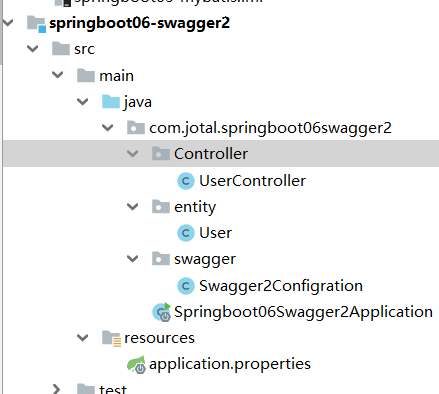
项目结构
Swagger2配置类
@Configuration

@EnableSwagger2

public class Swagger2Configration {

    /*

    * 创建api文档

    * */

    @Bean

    public Docket createRestApi(){

        return new Docket(DocumentationType.SWAGGER_2)

                .apiInfo(apiInfo())

                .select()             .apis(RequestHandlerSelectors.basePackage("com.jotal.springboot06swagger2.Controller")) //为该包下的类API文档

                .apis(RequestHandlerSelectors.withClassAnnotation(Api.class))//为有@Api注解的类生成API文档

            	.apis(RequestHandlerSelectors.withMethodAnnotation(ApiOperation.class)) //为有@ApiOperation注解的方法生成API文档

                .paths(PathSelectors.any())

                .build();

    }

    /*

    * api文档展示信息

    * */

    private ApiInfo apiInfo(){

        return new ApiInfoBuilder()

                .title("Jotal项目接口文档")

                .description("测试api文档")

                .contact(new Contact("jotal","jotalngu.github.io",null))

                .version("0.1")

                .build();

    }

}
@Configuration 标注该类为配置类
@EnableSwagger2 启用Swagger2
@Bean 将Docket的实例对象注入Spring ioc容器中
apis 为选择生成Api文档的范围,有三种方式:
- 生成指定包下面的类的API文档
- 生成有指定注解的类的API文档
- 生成有指定注解的方法的API文档
paths(PathSelectors.any()) 表示路径选择器匹配所有路径
实体类
package com.jotal.springboot06swagger2.entity;

import io.swagger.annotations.ApiModel;

import io.swagger.annotations.ApiModelProperty;

@ApiModel(value = "用户信息")

public class User {

    @ApiModelProperty(value ="年龄",name = "age")

    private int age;

    private String name;

    //getter、setter、toString和构造器

}
控制类
package com.jotal.springboot06swagger2.Controller;

import com.jotal.springboot06swagger2.entity.User;

import io.swagger.annotations.Api;

import io.swagger.annotations.ApiOperation;

import org.springframework.web.bind.annotation.GetMapping;

import org.springframework.web.bind.annotation.RequestMapping;

import org.springframework.web.bind.annotation.RestController;

import java.util.ArrayList;

import java.util.List;

@RestController

@RequestMapping("/testApi")

@Api(tags = "用户信息接口")

public class UserController {

    @GetMapping("/getAllUser")

    @ApiOperation(value="查询所有", notes="查询所有用户信息")

    public List<User> getAllUser(){

        List<User> userList = new ArrayList<>();

        for(int i=0;i<4;i++){

             User user = new User();

        	user.setAge(i);

        	userList.add(user);

        }

        return userList;

    }

}
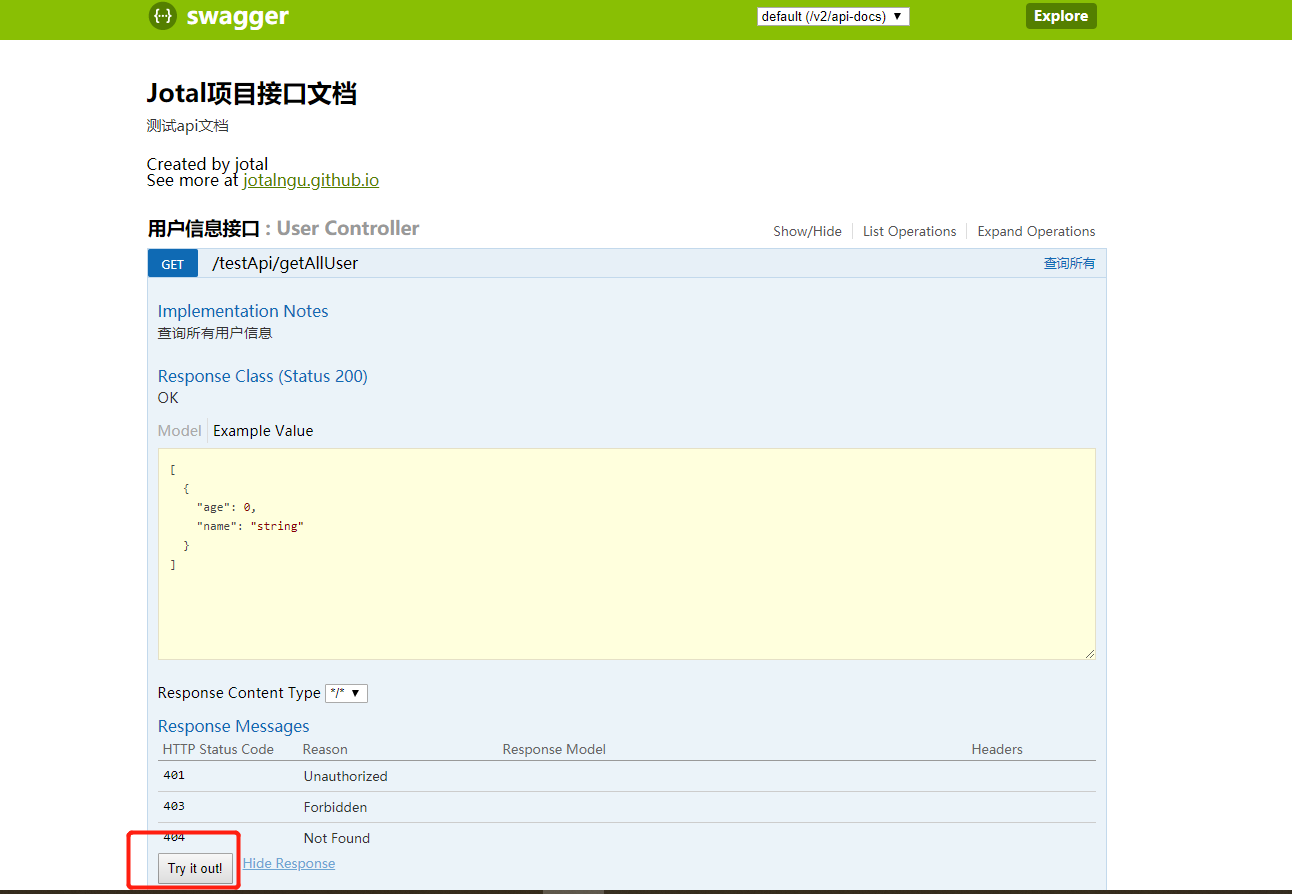
测试
http://localhost:8080/swagger-ui.html
点击Try it out! 就可以测试功能!
springboot笔记08——整合swagger2的更多相关文章
- springboot笔记07——整合MyBatis
前言 Springboot 整合 MyBatis 有两种方式,分别是:"全注解版" 和 "注解.xml混合版". 创建项目 创建Springboot项目,选择依 ...
- springboot笔记10——整合Redis
依赖 <dependencies> <!--web依赖--> <dependency> <groupId>org.springframework.boo ...
- Spring Boot 学习笔记(六) 整合 RESTful 参数传递
Spring Boot 学习笔记 源码地址 Spring Boot 学习笔记(一) hello world Spring Boot 学习笔记(二) 整合 log4j2 Spring Boot 学习笔记 ...
- SpringBoot整合Swagger2,再也不用维护接口文档了!
前后端分离后,维护接口文档基本上是必不可少的工作.一个理想的状态是设计好后,接口文档发给前端和后端,大伙按照既定的规则各自开发,开发好了对接上了就可以上线了.当然这是一种非常理想的状态,实际开发中却很 ...
- springBoot(12)---整合Swagger2
Spingboot整合Swagger2 随着互联网技术的发展,一般开发都是前后端分离,那么前端和后端的唯一联系,变成了API接口:API文档变成了前后端开发人员联系的纽带,变得越来越重要,没有API ...
- SpringBoot整合系列-整合Swagger2
原创作品,可以转载,但是请标注出处地址:https://www.cnblogs.com/V1haoge/p/9959844.html SpringBoot整合Swagger2 步骤 第一步:添加必要的 ...
- SpringBoot(七):SpringBoot整合Swagger2
原文地址:https://blog.csdn.net/saytime/article/details/74937664 手写Api文档的几个痛点: 文档需要更新的时候,需要再次发送一份给前端,也就是文 ...
- SpringBoot整合Swagger2
相信各位在公司写API文档数量应该不少,当然如果你还处在自己一个人开发前后台的年代,当我没说,如今为了前后台更好的对接,还是为了以后交接方便,都有要求写API文档. 手写Api文档的几个痛点: 文档需 ...
- springboot+cloud 学习(四)Zuul整合Swagger2
前言 在微服务架构下,服务是分散的,怎么把所有服务接口整合到一起是我们需要关注的. 下面举例用zuul作为分布式系统的网关,同时使用swagger生成文档,想把整个系统的文档整合在同一个页面上来说明. ...
随机推荐
- location 浅解析
https://www.baidu.com/s?ie=UTF-8&wd=sdasds location.href // 'https://www.baidu.com/s?ie=UTF-8&am ...
- 刷题记录:[BUUCTF 2018]Online Tool
目录 刷题记录:[BUUCTF 2018]Online Tool 一.知识点 1.escapeshellarg和escapeshellcmd使用不当导致rce 刷题记录:[BUUCTF 2018]On ...
- 作业——11 分布式并行计算MapReduce
作业的要求来自于:https://edu.cnblogs.com/campus/gzcc/GZCC-16SE2/homework/3319 1.用自己的话阐明Hadoop平台上HDFS和MapRedu ...
- pdfBox 解析 pdf文件
Spting boot 项目 1.添加依赖 <dependency> <groupId>org.apache.pdfbox</groupId> <artifa ...
- 【转】理解Docker容器网络之Linux Network Namespace
原文:理解Docker容器网络之Linux Network Namespace 由于2016年年中调换工作的原因,对容器网络的研究中断过一段时间.随着当前项目对Kubernetes应用的深入,我感觉之 ...
- PyTorch 实战:计算 Wasserstein 距离
PyTorch 实战:计算 Wasserstein 距离 2019-09-23 18:42:56 This blog is copied from: https://mp.weixin.qq.com/ ...
- 003 Vue动画
一: 0.说明 在进入/离开的过渡中,会有 6 个 class 切换. v-enter:定义进入过渡的开始状态.在元素被插入之前生效,在元素被插入之后的下一帧移除. v-enter-active:定义 ...
- Python3基础 yield 在无返回值的函数中的简单示例
Python : 3.7.3 OS : Ubuntu 18.04.2 LTS IDE : pycharm-community-2019.1.3 ...
- Python3基础 yield StopIteration.value获取函数的返回值
Python : 3.7.3 OS : Ubuntu 18.04.2 LTS IDE : pycharm-community-2019.1.3 ...
- .net程序反编译工具(ILSpy)
ILSpy是SharpDevelop小组的反编译工具,ILSPY这个开源工具的目的就是代替reflector的,它可以反编译出比reflector更好的C#代码. PC官方版 C#反编译工具ilspy ...