
CentOS 7 :Failed to start IPv4 firewall with iptables.
用iptables开启防火墙报错: Failed to start IPv4 firewall with iptables.
转载于:https://blog.csdn.net/ls1645/article/details/78750561
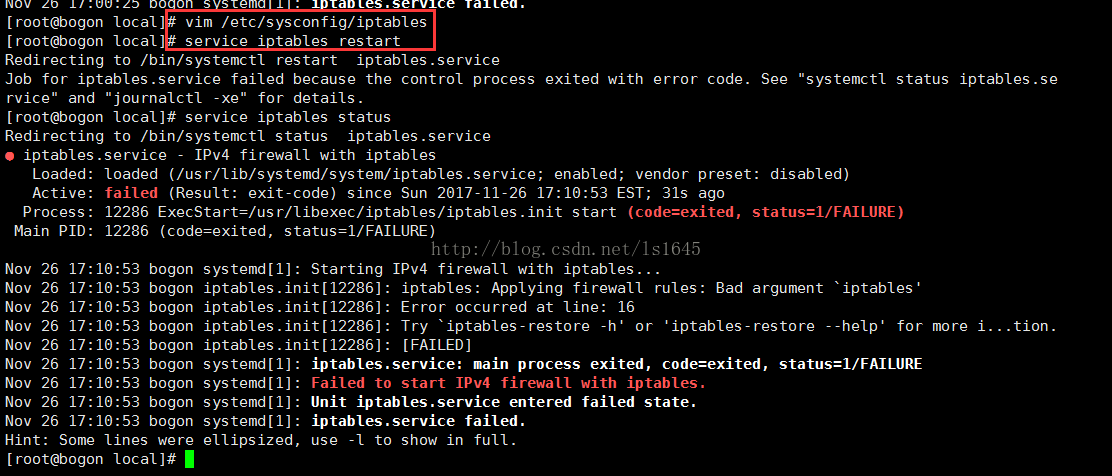
错误原因:因为centos7.0默认不是使用iptables方式管理,而是firewalld方式。CentOS6.0防火墙用iptables管理。
解决办法有两个:使用firewalld方式。或者关闭firewalld,然后安装iptables。
一、关闭firewalld,安装iptables过程:
停止并屏蔽firewalld:
systemctl stop firewalld
systemctl mask firewalld
安装iptables-services:
yum install iptables-services
设置开机启动:
systemctl enable iptables
停止/启动/重启 防火墙:
systemctl [stop|start|restart] iptables
#or
service iptables [stop|start|restart]
保存防火墙配置:
service iptables save
#or
/usr/libexec/iptables/iptables.init save
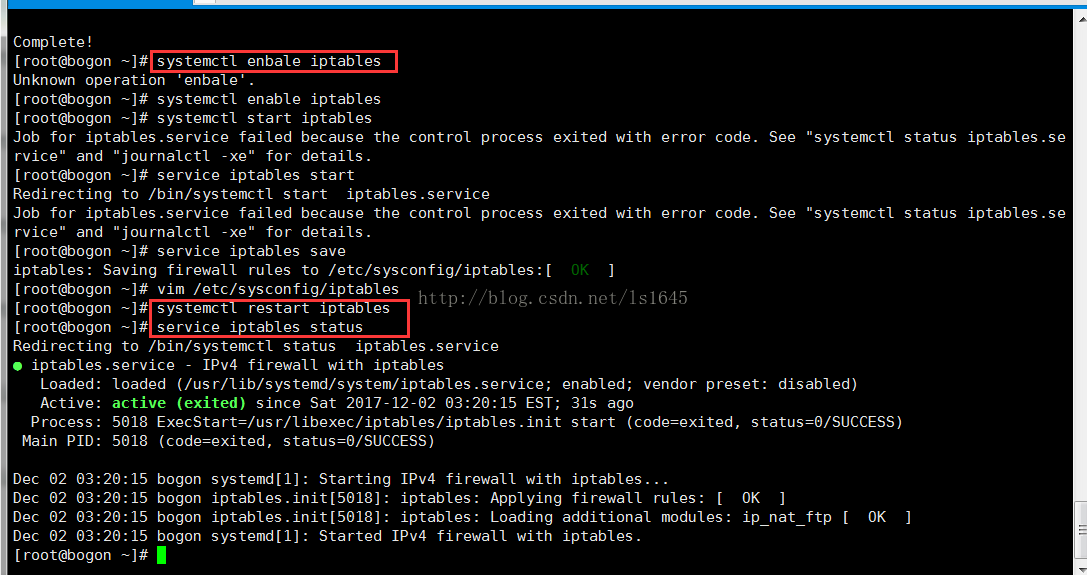
按照上述命令配置后的界面:
二、从iptables切换回firewalld
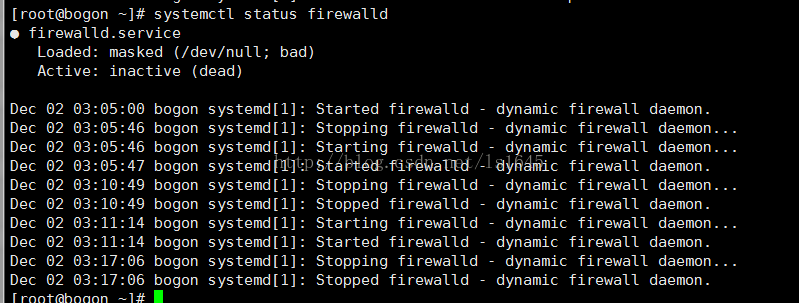
1、先看firewalld的状态:inactive
2、安装firewalld

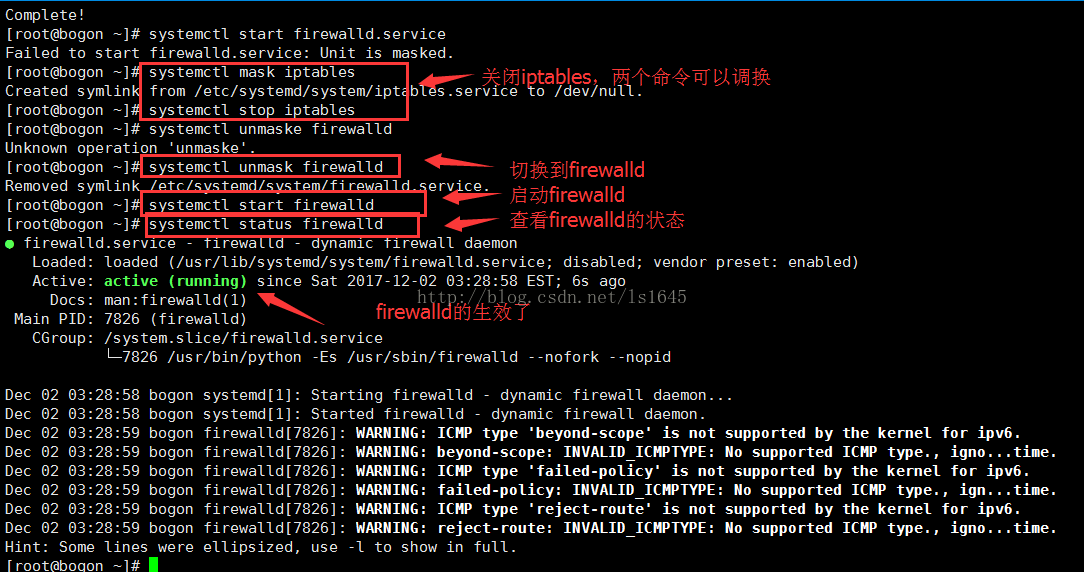
3、切换到firewalld,切换过程与切换iptables一样
/************下面是iptables的一些命令*******************************/
查询防火墙状态:
[root@localhost ~]# service iptables status
停止防火墙:
[root@localhost ~]# service iptables stop
启动防火墙:
[root@localhost ~]# service iptables start
重启防火墙:
[root@localhost ~]# service iptables restart
永久关闭防火墙:
[root@localhost ~]# chkconfig iptables off
永久关闭后启用:
[root@localhost ~]# chkconfig iptables on
开启端口:
[root@localhost ~]# vim/etc/sysconfig/iptables
/**********下面是firewalld的一些命令*****************************/
#systemctl statusfirewalld //查看状态,看电脑上是否已经安装firewalld
#yum installfirewalld //安装firewalld防火墙
#systemctl startfirewalld.service //开启防火墙
#systemctl stop firewalld.service //关闭防火墙
#systemctl enable firewalld.service //设置开机自动启动
#systemctl disable firewalld.service //设置关闭开机制动启动
#firewall-cmd--reload //在不改变状态的条件下重新加载防火墙
启用某个服务
#firewall-cmd --zone=public --add-service=https //临时
#firewall-cmd --permanent --zone=public --add-service=https //永久
开启某个端口
#firewall-cmd--permanent --zone=public --add-port=8080-8081/tcp //永久
#firewall-cmd --zone=public --add-port=8080-8081/tcp //临时
查看开启的端口和服务
#firewall-cmd--permanent --zone=public --list-services //服务空格隔开 例如 dhcpv6-client https ss
#firewall-cmd--permanent --zone=public --list-ports //端口空格隔开 例如 8080-8081/tcp 8388/tcp 80/tcp
#systemctl restartfirewalld.service //修改配置后需要重启服务使其生效
#firewall-cmd--zone=public --query-port=8080/tcp //查看服务是否生效(例:添加的端口为8080)
/**********下面是systemctl的一些命令*******************************/
观察iptables和firewalld使用的两组命令,发现三个常用的命令:service、chkconfig、systemctl。那么它们分别是做什么的呢?(去网上搜索了一下给出了答案)
systemctl命令是系统服务管理器指令,它实际上将 service 和 chkconfig 这两个命令组合到一起。
|
任务 |
旧指令 |
新指令 |
|
使某服务自动启动 |
chkconfig --level 3 httpd on |
systemctl enable httpd.service |
|
使某服务不自动启动 |
chkconfig --level 3 httpd off |
systemctl disable httpd.service |
|
检查服务状态 |
service httpd status |
systemctl status httpd.service(服务详细信息) systemctl is-active httpd.service(仅显示是否 Active) |
|
显示所有已启动的服务 |
chkconfig --list |
systemctl list-units --type=service |
|
启动某服务 |
service httpd start |
systemctl start httpd.service |
|
停止某服务 |
service httpd stop |
systemctl stop httpd.service |
|
重启某服务 |
service httpd restart |
systemctl restart httpd.service |
总结:
记是记不住的,实操才可以,熟能生巧。
抓住一个问题,深入去挖,往往能挖出一片,从而扫清一片盲点。深挖能出清泉。
参考文章:
https://www.vkilo.com/rhel-7-iptables-service.html
http://blog.csdn.net/Joe68227597/article/details/75207859
http://www.linuxidc.com/Linux/2012-06/63111.html
http://man.linuxde.net/systemctl
CentOS 7 :Failed to start IPv4 firewall with iptables.的更多相关文章
- CentOS 7.2:Failed to start IPv4 firewall with iptables
问题 系统是centos7.2,且已经安装了iptables服务,但是在执行启动命令后,却报了iptables服务无法正常启动的错误. 启动命令如下: systemctl start iptables ...
- Centos7启动防火墙时报错Failed to start IPv4 firewall with iptables
今天在虚拟机的Linux系统(centos7)里安装Redis,准备学习一下布隆过滤器呢,安装完后使用Windows本机访问不了虚拟机里的Redis,telnet不通能够ping通.于是就去看防火墙, ...
- 关于centos启动报错:Failed to start Crash recovery kernel arming的解决方案
在VMware中安装了centos,重启时报错:Failed to start Crash recovery kernel arming 本质是kdump服务启动失败 先来说一下,什么是kdump K ...
- 20190603 - CentOS 7 提示 Failed to load SELinux policy. Freezing 导致卡住不启动的解决办法
现象 最近 Windows 和两台 Mac 混用,将 Windows VirtualBox 中安装的 CentOS 7 拷贝到 Mac 上. 启动 CentOS 7 时,图形界面进度卡在最后,按 Es ...
- docker—tomcat 报错:Failed to get D-Bus connection: Operation not permitted
docker search centos 查系统镜像 docker pull docker.io/centos 进入容器 [root@git opt]# docker images REPOSIT ...
- centOS7中启动MySQL数据库提示: Failed to start mysqld.service: Unit not foundc
现象: 在centOS7中启动MySQL数据库提示: Failed to start mysqld.service: Unit not found [明明已经安装了,为什么提示不存在呢?] 原因: 在 ...
- 开发错误记录5:Failed to resolve: com
今在导入项目时报:Failed to resolve: com.android.support:appcompat-v7:23.1.1包! 一.按F12查看包引用情况 v7包版本不一样,环境中只有co ...
- 启动Eclipse弹出:Failed to load JavaHL Library 错误框的解决办法
一.问题背景描述: eclipse安装完svn插件以后,在启动时出现:Failed to load JavaHL Library. These are the errors that were en ...
- 编译java文件,出错:Failed to establish a connection with the target VM
helloword程序,所有java学习人员人生第一个程序,哎妈,基础太差,出错 public class Helloword{ public Helloword() { public static ...
随机推荐
- ctrl c 中文字符到 vnc 里,中文字符已经被转码
为了测试程序对多语言字符的支持情况,我找来一段中文和北欧的文字,希望把这些文字上传到elasticsearch,并能正确显示. 首先测试了北欧文字,一切OK. 但是中文复制到 VNC 客户端(Linu ...
- I - A/B
要求(A/B)%9973,但由于A很大,我们只给出n(n=A%9973)(我们给定的A必能被B整除,且gcd(B,9973) = 1). Input 数据的第一行是一个T,表示有T组数据. 每组数据有 ...
- solus 系统 - 怎么使用中文输入法?
系统默认使用 ibus 输入法框架. 可以安装 ibus-libpinyin $ sudo eopkg install ibus-libpinyin 安装好之后需要初始化 ibus-setup $ i ...
- process 多进程写法 multiprocessing
from multiprocessing import Process def f1(n):#普通 print(f1) if __name__ == '__main__': lst = [] fo ...
- 使用 Markdown 写技术博客,踩过的 6个坑
目录 Markdown 特性 Markdown 简介 常用语法 为什么流行 设计哲学 工具支持 版本演进 标准化之路 踩过了坑 平台帮助文档 语法差异 显示效果 我的最佳实践 摘要:本文记录我在使用 ...
- [No0000E2]Vmware虚拟机安装 苹果系统 mac OS 10.12
1.下载并安装Vmware:实验版本号:VMware-workstation-full-12.5.5-5234757:(忽略网上说的这个版本不行.可以装C盘,不过转C盘后后面都要用管理员权限运行其他软 ...
- debian设置软件源为阿里云
首先编辑sources.list这个文件 sudo vim /etc/apt/sources.list 把sources.list文件内容替换成如下 deb http://mirrors.aliyun ...
- English class 81:How Vulnerability can make our lives better?
1,can we come off as weak if we show imperfections? 2,The first thing I look for in you and the last ...
- 从urllib2的内存泄露看python的GC python引用计数 对象的引用数 循环引用
这里会发现上述代码是存在内存泄露,造成的原因就是lz与ow这两个变量存在循环引用,Python 不知道按照什么样的安全次序来调用对象的 __del__() 函数,导致对象始终存活在 gc.garbag ...
- Chap3:区块链的衍生技术[《区块链中文词典》维京&甲子]