
学习笔记之Visual Studio Code & Clang
Mac上XCode太占空间,卸载然后安装VSCode和Clang。在VSCode中再安装extension C/C++和Code Runner,配置Tasks: Configure Task,就可以开始Run C++ program了。
Visual Studio Code - Code Editing. Redefined
- https://code.visualstudio.com/
VS Code 最强插件指南 - CSDN
- https://mp.weixin.qq.com/s/MshppwwRFmbFx3aR7FVpEQ
Clang - Wikipedia
- https://en.wikipedia.org/wiki/Clang
- Clang/ˈklæŋ/[5] is a compiler front end for the C, C++, Objective-C and Objective-C++ programming languages, as well as the OpenMP,[6] OpenCL, RenderScript and CUDAframeworks. It uses the LLVM compiler infrastructure as its back end and has been part of the LLVM release cycle since LLVM 2.6.
- It is designed to act as a drop-in replacement for the GNU Compiler Collection (GCC), supporting most of its compilation flags and unofficial language extensions.[7][8] Its contributors include Apple, Microsoft, Google, ARM, Sony, Intel and Advanced Micro Devices (AMD). It is open-source software,[9] with source code released under the University of Illinois/NCSA License, a permissive free software licence.
- The Clang project includes the Clang front end, a static analyzer and several code analysis tools.[10]
Comparing Clang to other open source compilers
- https://clang.llvm.org/comparison.html
Clang C/C++ Download and Installation Instructions
- https://www.ics.uci.edu/~pattis/common/handouts/macclion/clang.html
在用VSCode? 看完这篇文章, 开发效率翻倍!最后一条厉害了~
- https://mp.weixin.qq.com/s/XiT6uNQPIPGvkLbUcPnRqw
VS Code 神器插件:代码一键运行,支持超过 40 种语言 - CSDN
- https://mp.weixin.qq.com/s/bND98wd2mjdQXFWnRzskiw
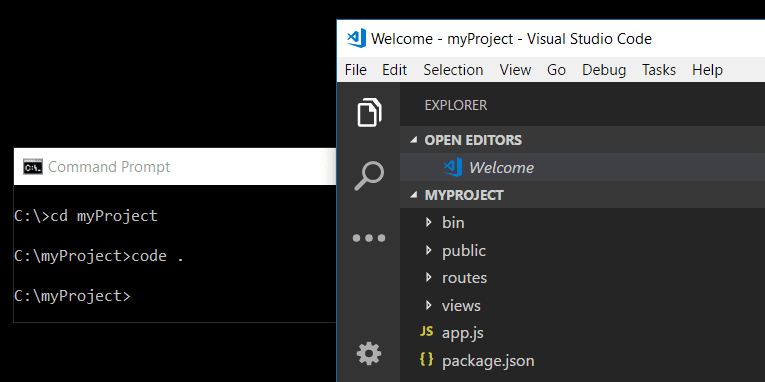
How to change the launched folder ?
- Navigate to your project folder and type
code . - The Visual Studio Code Command Line Options
- https://code.visualstudio.com/docs/editor/command-line#_launching-from-command-line
学习笔记之Visual Studio Code & Clang的更多相关文章
- 学习笔记之Visual Studio Team Services
VSTS and TFS Documentation | Microsoft Docs https://docs.microsoft.com/en-us/vsts/index?view=vsts#pi ...
- Go学习笔记(二)搭建Visual Studio Code调试环境
上一篇 Go学习笔记(一)安装Go语言环境 安装Visual Studio Code 这是目前我觉得最好用的文本编辑器了, https://code.visualstudio.com/ 中间有几部确认 ...
- 使用Visual Studio Code开发Asp.Net Core WebApi学习笔记(十)-- 发布(Windows)
本篇将在这个系列演示的例子上继续记录Asp.Net Core在Windows上发布的过程. Asp.Net Core在Windows上可以采用两种运行方式.一种是自托管运行,另一种是发布到IIS托管运 ...
- 使用Visual Studio Code开发Asp.Net Core WebApi学习笔记(八)-- 多环境开发
本篇将演示Asp.Net Core如何在多环境下进行开发适配. 在一个正规的开发流程里,软件开发部署将要经过三个阶段:开发.测试.上线,对应了三个环境:开发.测试.生产.在不同的环境里,需要编写不同的 ...
- 使用Visual Studio Code开发Asp.Net Core WebApi学习笔记(一)-- 起步
本文记录了在Windows环境下安装Visual Studio Code开发工具..Net Core 1.0 SDK和开发一个简单的Web-Demo网站的全过程. 一.安装Visual Studio ...
- Visual Studio Code 学习记录
Visual Studio Code的官方文档可以学到很多知识,不只是vs code的用法,包括一些语言的入门 和一些概念等等.很好的文档. ※,user.settings.json中的一些配置说明: ...
- Visual Studio Code 学习.net core初体验
一,安装 最近在用 Visual Studio Code 学习.net core ,记录下学习的过程,首先去官网下载最新的.net core2.1安装包,有windows 和mac,根据自己的开发环境 ...
- Visual Studio Code 配置 gcc
作者:谭九鼎链接:https://www.zhihu.com/question/30315894/answer/154979413来源:知乎著作权归作者所有.商业转载请联系作者获得授权,非商业转载请注 ...
- Visual Studio Code 配置C/C++环境
0. 前言 VS Code 是微软发布一款跨平台的源代码编辑器,其拥有强大的功能和丰富的扩展,使之能适合编写许多语言. 本文面向初学者(但不是纯小白),分享一点我配置C/C++的经验. 本文所有内容均 ...
随机推荐
- UVALive-6540 Fibonacci Tree
#include<bits/stdc++.h> using namespace std; int n,m; struct edge { int x; int y; int len; }ed ...
- Redis(三)源source编译
背景: 自己电脑是win7 32bit的,而想要Redis4.0的版本,但是在网上没找到,所以自己干脆download源source,自己build,安装. 最后,目前达到的状态是,windows下s ...
- LG4781 【模板】拉格朗日插值
题意 题目描述 由小学知识可知,$n$个点$(x_i,y_i)$可以唯一地确定一个多项式 现在,给定$n$个点,请你确定这个多项式,并将$k$代入求值 求出的值对$998244353$取模 输入输出格 ...
- doubleclick adx note
1, cid . is billing_id from Main.html#PRETARGETING otherwise creative id will not upload to creati ...
- MySQL Innodb Engine -- 文件格式(innodb_file_format)
======================================================== 在InnoDB 1.0.x版本之前,InnoDB 存储引擎提供了 Compact 和 ...
- Hive GenericUDF2
再来看一个分数统计的小例子. 在Hive中存在如下一张表: hive> describe tb_test2; OK name string score_list array<map ...
- fork和exec
fork pid_t fork(void); 它在调用进程(成为父进程)中返回一次,返回值为新派生进程(成为子进程)的进程ID号 在子进程中又返回一次,返回值为0.因此,返回值本身告知当前进程是子进程 ...
- Git SVN Clone 旧项目迁移到 Git 上
Git SVN Clone 旧项目迁移到 Git 上 很久使用的是 SVN,但由于项目重启,想改为 Git. 之前的 SVN 仓库是本地,所以在 git svn clone 一直不成功. 正确的方式: ...
- Golang 端口复用测试
先给出结论: 同一个进程,使用一个端口,然后连接关闭,大约需要30s后才可再次使用这个端口. 测试 首先使用端口9001连接服务端,发送数据,然后关闭连接,接着再次使用端口9001连接服务端,如果连接 ...
- Spark任务提交jar包依赖解决方案
转载自:http://blog.csdn.net/wzq294328238/article/details/48054525 通常我们将Spark任务编写后打包成 ...