
How to install Maven on Windows
To install Apache Maven on Windows, you just need to download the Maven’s zip file, and Unzip it to the directory you wish to install, and configure the Windows environment variables.
Tools Used :
- JDK 1.7
- Maven 3.2.2
- Windows 8
Note
Maven 3.2 requires JDK 1.6 or above, while Maven 3.0/3.1 requires JDK 1.5 or above
1. JDK and JAVA_HOME
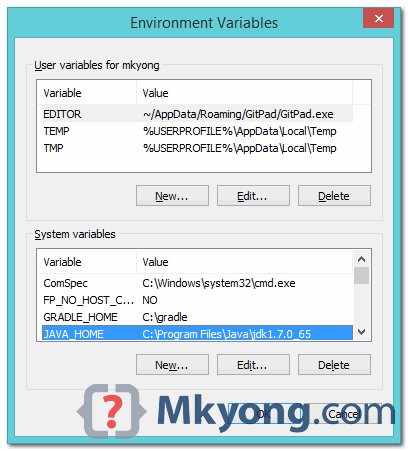
Make sure JDK is installed, and “JAVA_HOME” variable is added as Windows environment variable.
2. Download Apache Maven
Visit Maven official website, download the Maven zip file, for example : apache-maven-3.2.2-bin.zip. Unzip it to the folder you want to install Maven.
Assume you unzip to this folder – C:\Program Files\Apache\maven
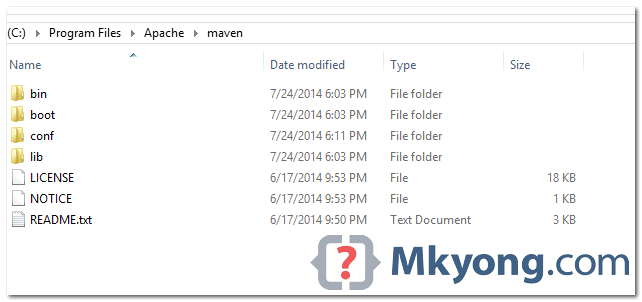
That’s all, just folders and files, installation is NOT required.
3. Add M2_HOME and MAVEN_HOME
Add both M2_HOME and MAVEN_HOME variables in the Windows environment, and point it to your Maven folder.
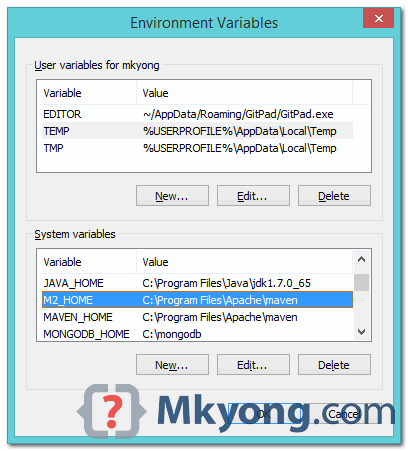
Maven document said add M2_HOME only, but some programs still reference Maven folder with MAVEN_HOME, so, it’s safer to add both.
4. Add To PATH
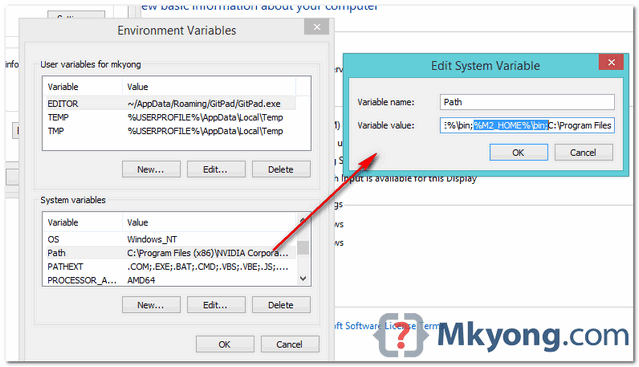
Update PATH variable, append Maven bin folder – %M2_HOME%\bin, so that you can run the Maven’s command everywhere.
5. Verification
Done, to verify it, run mvn –version in the command prompt.
C:\Users\mkyong>mvn -version

Apache Maven 3.2.2 (45f7c06d68e745d05611f7fd14efb6594181933e; 2014-06-17T21:51:42+08:00)

Maven home: C:\Program Files\Apache\maven

Java version: 1.7.0_65, vendor: Oracle Corporation

Java home: C:\Program Files\Java\jdk1.7.0_65\jre

Default locale: en_US, platform encoding: Cp1252

OS name: "windows 8.1", version: "6.3", arch: "amd64", family: "windows"

C:\Users\mkyong>
If you see a similar message, means the Apache Maven is installed successfully on Windows.
How to install Maven on Windows的更多相关文章
- maven在windows环境下加载settings.xml文件
今天发现maven在windows环境下加载的settings.xml文件是c:下的,就算修改conf下的settings.xml里的<localRepository>给他明确指向也没用.
- Install MongoDB on Windows (Windows下安装MongoDB)
Install MongoDB on Windows Overview Use this tutorial to install MongoDB on a Windows systems. PLATF ...
- Maven在Windows中的配置以及IDE中的项目创建
Maven在Windows下的配置 1.Maven下载地址:http://maven.apache.org/download.cgi,下载红框里的版本即可. 2.解压到D盘: 3.修改配置文件sett ...
- maven在windows及linux环境下安装
maven下载 下载地址:https://maven.apache.org/download.cgi maven在windows下安装 解压到D盘 修改配置文件 进入conf,打开settings.x ...
- 【Linux】-NO.7.Linux.3.Maven.1.001-【CentOS 7 Install Maven 3.5】-
1.0.0 Summary Tittle:[Linux]-NO.7.Linux.3.Maven.1.001-[CentOS 7 Install Maven 3.5]- Style:Linux Seri ...
- IntelliJ IDEA教程之如何clean或者install Maven项目
一.前言 Eclipse中如果我们想clean或者install工程,我们只需要右键工程,然后找到run->Maven install 或者run->Maven clean就可以了,但是I ...
- Install Terraform on Windows, Linux and Mac OS
Step-by-step tutorial of how to download and install Terraform on Windows, Linux and Mac OS. Terrafo ...
- Install ADDS on Windows Server 2012 R2 with PowerShell
Install ADDS on Windows Server 2012 R2 with PowerShell Posted by ethernuno on 20/04/2014 In this tut ...
- How To Install OpenSSL on Windows
转自 https://tecadmin.net/install-openssl-on-windows/ OpenSSL is a full-featured toolkit for the Trans ...
随机推荐
- gulp打包公共部分
安装gulp cnpm install gulp -g 输入gulp -v看到版本号说明安装成功了 安装gulp-file-include:npm install gulp-file-include ...
- InstallShield2015制作安装包----------卸载前结束执行中的进程
方法一:InstallShiel直接调用cmd命令来杀掉进程. //更新或卸载时先关闭应用程序 sCmdLine=" /c taskkill /f /im \"Frs.exe\&q ...
- DoTween
dotween最原始的用法 using System.Collections; using System.Collections.Generic; using UnityEngine; using D ...
- jar包的读取
昨天在做项目插件的时候,因为会用到jar包中的一个文件来初始化程序.并且以后还是会访问这个文件,所以就想到干脆吧文件拷贝到指定目录.在拷贝的时候也费了好一会时间,这里涉及到了jar文件的操作,在这里记 ...
- gispro发布vectortile笔记
1.https://www.cnblogs.com/escage/p/6387529.html 矢量切片的作用.对于地图中的基础数据图层,或者数据量比较大的矢量图层,只是作渲染用.则需要制作矢量切片, ...
- HTML转义符
空格的替代符号有以下几种: 名称 编号 描述 &#; 不断行的空白(1个字符宽度) &#; 半个空白(1个字符宽度) &#; 一个空白(2个字符宽度) & ...
- shell 编程每日100行
xiluhua@localhost ~/tscripts $ echo "hello world !" -bash: !": event not found xiluhu ...
- 接口作为方法的参数或返回值——List接口
接口作为方法的参数或返回值,源码可知,List为一个接口,ArraryList是的它的实现类: 其中,addNames方法中,入参和返回值都List接口,入参是多态的,编译看左,运行看右(访问成员方法 ...
- Linux服务器---流量监控webalizer
webalize webzlizer是一个免费的web server分析工具,它能够分析apache.ftp等日志,将结果以html形式展示. 1.安装一些依赖软件 [root@localhost b ...
- 深入剖析Kubernetes k8s
深入剖析Kubernetes k8s 毫无疑问,Kubernetes 已经成为容器领域当之无愧的事实标准.除了 Google.Microsoft 等技术巨擘们在容器领域里多年的博弈外,国内的 BAT. ...