
Linux mysql 5.6: ERROR 1045 (28000): Access denied for user 'root'@'localhost' (using password: NO)
案例环境:
操作系统 :Red Hat Enterprise Linux Server release 5.7 (Tikanga) 64 bit
数据库版本 : Mysql 5.6.19 64 bit
案例介绍:
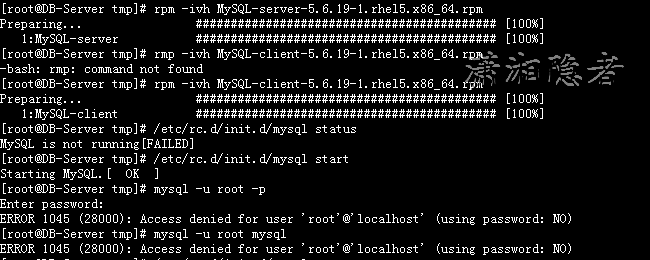
今天开始学习mysql,遂先安装了Mysql 5.6.19 64bit 版本的数据库,结果安装成功了,但是使用root登录时遇到了ERROR 1045 (28000): Access denied for user 'root'@'localhost' (using password: NO)错误. 如下所示
[root@DB-Server tmp]# rpm -ivh MySQL-server-5.6.19-1.rhel5.x86_64.rpm
Preparing... ########################################### [100%]
1:MySQL-server ########################################### [100%]
[root@DB-Server tmp]# rmp -ivh MySQL-client-5.6.19-1.rhel5.x86_64.rpm
-bash: rmp: command not found
[root@DB-Server tmp]# rpm -ivh MySQL-client-5.6.19-1.rhel5.x86_64.rpm
Preparing... ########################################### [100%]
1:MySQL-client ########################################### [100%]
[root@DB-Server tmp]# /etc/rc.d/init.d/mysql status
MySQL is not running[FAILED]
[root@DB-Server tmp]# /etc/rc.d/init.d/mysql start
Starting MySQL.[ OK ]
[root@DB-Server tmp]# mysql -u root -p
Enter password:
ERROR 1045 (28000): Access denied for user 'root'@'localhost' (using password: NO)
[root@DB-Server tmp]# mysql -u root mysql
ERROR 1045 (28000): Access denied for user 'root'@'localhost' (using password: NO)
安装过程中没有设置过root密码,不清楚root密码,搜索了网上一些资料,大致有下面一些情况:
1:有些博客说root的随机密码位于/root/.mysql_secret中,但是我这个版本根本没有/root/.mysql_secret文件。搜索到一篇文章,大意如下所示(没有确认)。到现在也没有明白,我这个版本为什么没有生成这个文件?
ERROR 1045 (28000): Access denied for user 'root'@'localhost' (using password: NO) :表示没有生成root的临时密码
ERROR 1045 (28000): Access denied for user 'root'@'localhost' (using password: YES) :表示生成了root的临时密码。
2:有些资料说root的默认密码为空,经过确认那是以前的老版本,Mysql 5.6及以后版本出处于安全考虑,root密码已经不为空了。
另外,我在官网论坛居然发现有很多人遇到类似问题ERROR 1045 (28000): Access denied for user 'root'@'localhost' (using password: NO)
解决方法:
首先停掉mysql服务器
[root@DB-Server init.d]# /etc/rc.d/init.d/mysql stop
Shutting down MySQL..[ OK ]
然后使用mysqld_safe命令在启动mysql,更新root账号的密码
--skip-grant-tables:不启动grant-tables(授权表),跳过权限控制。
--skip-networking :跳过TCP/IP协议,只在本机访问(从网上有些资料看,这个选项不是必须的。可以不用)
[root@DB-Server init.d]# mysqld_safe --user=mysql --skip-grant-tables --skip-networking &
[2] 9396
[root@DB-Server init.d]# 140722 14:59:46 mysqld_safe Logging to '/var/lib/mysql/DB-Server.err'.
140722 14:59:46 mysqld_safe Starting mysqld daemon with databases from /var/lib/mysql
执行上面命令后,此会话窗口会出现无反应的状态,需要使用CTRL+C中断会话,检查/var/lib/mysql/DB-Server.err日志,发现也无其它异常信息。没有弄明白该会话窗口为啥会出现无响应状态。
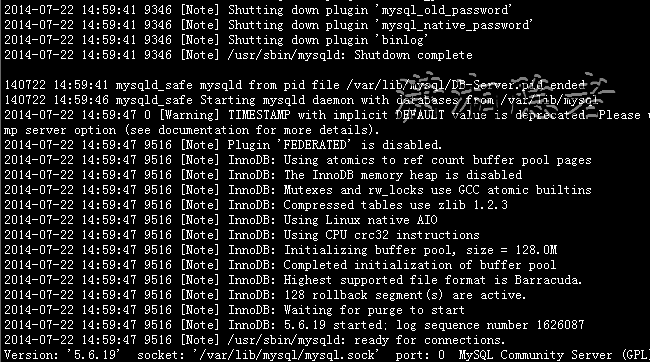
tail -200 /var/lib/mysql/DB-Server.err | more
2014-07-22 14:59:41 9346 [Note] Shutting down plugin 'binlog'
2014-07-22 14:59:41 9346 [Note] /usr/sbin/mysqld: Shutdown complete
140722 14:59:41 mysqld_safe mysqld from pid file /var/lib/mysql/DB-Server.pid ended
140722 14:59:46 mysqld_safe Starting mysqld daemon with databases from /var/lib/mysql
2014-07-22 14:59:47 0 [Warning] TIMESTAMP with implicit DEFAULT value is deprecated. Please use --explicit_defaults_for_timesta
mp server option (see documentation for more details).
2014-07-22 14:59:47 9516 [Note] Plugin 'FEDERATED' is disabled.
2014-07-22 14:59:47 9516 [Note] InnoDB: Using atomics to ref count buffer pool pages
2014-07-22 14:59:47 9516 [Note] InnoDB: The InnoDB memory heap is disabled
2014-07-22 14:59:47 9516 [Note] InnoDB: Mutexes and rw_locks use GCC atomic builtins
2014-07-22 14:59:47 9516 [Note] InnoDB: Compressed tables use zlib 1.2.3
2014-07-22 14:59:47 9516 [Note] InnoDB: Using Linux native AIO
2014-07-22 14:59:47 9516 [Note] InnoDB: Using CPU crc32 instructions
2014-07-22 14:59:47 9516 [Note] InnoDB: Initializing buffer pool, size = 128.0M
2014-07-22 14:59:47 9516 [Note] InnoDB: Completed initialization of buffer pool
2014-07-22 14:59:47 9516 [Note] InnoDB: Highest supported file format is Barracuda.
2014-07-22 14:59:47 9516 [Note] InnoDB: 128 rollback segment(s) are active.
2014-07-22 14:59:47 9516 [Note] InnoDB: Waiting for purge to start
2014-07-22 14:59:47 9516 [Note] InnoDB: 5.6.19 started; log sequence number 1626087
2014-07-22 14:59:47 9516 [Note] /usr/sbin/mysqld: ready for connections.
Version: '5.6.19' socket: '/var/lib/mysql/mysql.sock' port: 0 MySQL Community Server (GPL)
[root@DB-Server init.d]# mysql -u root mysql
Reading table information for completion of table and column names
You can turn off this feature to get a quicker startup with -A
Welcome to the MySQL monitor. Commands end with ; or \g.
Your MySQL connection id is 1
Server version: 5.6.19 MySQL Community Server (GPL)
Copyright (c) 2000, 2014, Oracle and/or its affiliates. All rights reserved.
Oracle is a registered trademark of Oracle Corporation and/or its
affiliates. Other names may be trademarks of their respective
owners.
Type 'help;' or '\h' for help. Type '\c' to clear the current input statement.
mysql> select Host, User, Password,password_expired
-> from user
-> where user='root' and host='root' or host='localhost';
+-----------+------+-------------------------------------------+------------------+
| Host | User | Password | password_expired |
+-----------+------+-------------------------------------------+------------------+
| localhost | root | *A848DE7CCD839E924921BEE41711991DDA0D529E | Y |
+-----------+------+-------------------------------------------+------------------+
1 row in set (0.00 sec)
mysql> update user set password=PASSWORD('p12#456')
-> where user='root' and host='root' or host='localhost';
Query OK, 1 row affected (0.00 sec)
Rows matched: 1 Changed: 1 Warnings: 0
新设置用户或更改密码后需用flush privileges刷新MySQL的系统权限相关表,否则会出现拒绝访问,还有一种方法,就是重新启动mysql服务器,来使新设置生效。
mysql> flush privileges;
Query OK, 0 rows affected (0.00 sec)
mysql> quit
Bye
[root@DB-Server init.d]# /etc/rc.d/init.d/mysql restart
Shutting down MySQL..140722 15:02:27 mysqld_safe mysqld from pid file /var/lib/mysql/DB-Server.pid ended
[ OK ]
Starting MySQL.[ OK ]
[2]- Done mysqld_safe --user=mysql --skip-grant-tables --skip-networking
[root@DB-Server init.d]# mysql -u root p
ERROR 1045 (28000): Access denied for user 'root'@'localhost' (using password: NO)
[root@DB-Server init.d]# mysql -u root -p
Enter password:
Welcome to the MySQL monitor. Commands end with ; or \g.
Your MySQL connection id is 2
Server version: 5.6.19
Copyright (c) 2000, 2014, Oracle and/or its affiliates. All rights reserved.
Oracle is a registered trademark of Oracle Corporation and/or its
affiliates. Other names may be trademarks of their respective
owners.
Type 'help;' or '\h' for help. Type '\c' to clear the current input statement.
mysql>
另外,如果登录mysql数据库后执行脚本遭遇 ERROR 1820 (HY000): You must SET PASSWORD before executing this statement,可以使用重新设置一次密码即可解决问题.
mysql>set password = password('p12#456');
至此问题解决,但是还有不少地方有些疑惑,为啥出现这个错误? 其实这么多资料都只是说了解决方法,但是都回避了问题的原因。
参考资料:
http://huangyifa163.blog.163.com/blog/static/262875752011127102215790/
http://sundful.iteye.com/blog/704337
http://wenku.baidu.com/view/735ffa41be1e650e52ea995a.html
http://www.cnblogs.com/sunson/articles/2172086.html
http://blog.163.com/eric1945@126/blog/static/164934572201081494343373/
http://www.cnblogs.com/likai198981/archive/2013/04/06/3002518.html
Linux mysql 5.6: ERROR 1045 (28000): Access denied for user 'root'@'localhost' (using password: NO)的更多相关文章
- Ubuntu下MySQL报错:ERROR 1045 (28000): Access denied for user 'root'@'localhost' (using password: YES)
在Ubuntu下 想要登录mysql数据库 root@JD:~# mysql -uroot -p 报错 ERROR 1045 (28000): Access denied for user 'root ...
- MySQL报错:ERROR 1045 (28000): Access denied for user 'root'@'localhost' (using password:NO)
1.关闭mysql # service mysqld stop2.屏蔽权限 # mysqld_safe --skip-grant-table 屏幕出现: Starting demo fro ...
- MAC使用mysql报错:ERROR 1045 (28000): Access denied for user 'root'@'localhost' (using password: YES)
遇到这种错误,需要重置密码. Step1:停止mysql,命令如下: $ sudo service mysql stop 或者是 $ sudo /usr/local/mysql/support-fil ...
- Mysql:ERROR 1045 (28000): Access denied for user 'root'@'localhost' (using password: YES)
Mysql:ERROR 1045 (28000): Access denied for user 'root'@'localhost' (using password: YES) Linux: MyS ...
- mysql登录报错:ERROR 1045 (28000): Access denied for user 'root'@'localhost' (using password: YES)
在MySQL登录时出现Access denied for user 'root'@'localhost' (using password: YES) 拒绝访问 对于出现拒绝访问root用户的解决方案错 ...
- mysql 安装完毕后登陆不了mysql的 shell 即mysql>遇到:ERROR 1045 (28000): Access denied for user 'root'@'localhost‘
[root@hzswtb2-mpc ~]# mysql ERROR 1045 (28000): Access denied for user 'root'@'localhost' (using pas ...
- 解决mysql:ERROR 1045 (28000): Access denied for user 'root'@'localhost' (using password: NO/YES)
一.问题 有时候我们登录Mysql输入密码的时候,会出现这种情况 mysql -u root -p Enter Password > '密码' 错误:ERROR 1045 (28000): Ac ...
- win10连接mysql提示:ERROR 1045 (28000): Access denied for user 'root'@'localhost' (using password: YES)
win10中cmd连接mysql提示:ERROR 1045 (28000): Access denied for user 'root'@'localhost' (using password: YE ...
- mysql 链接失败(ERROR 1045 (28000): Access denied for user 'root'@'localhost' (using password: YES))
mysql链接失败(ERROR 1045 (28000): Access denied for user 'root'@'localhost' (using password: YES)) 修改: # ...
随机推荐
- geotrellis使用(十一)实现空间数据库栅格化以及根据属性字段进行赋值
Geotrellis系列文章链接地址http://www.cnblogs.com/shoufengwei/p/5619419.html 目录 前言 安装空间数据库 空间数据库栅格化 根据属性字段进行赋 ...
- 响应式web布局中iframe的自适应
困境 在响应式布局中,我们应该小心对待iframe元素,iframe元素的width和height属性设置了其宽度和高度,但是当包含块的宽度或高度小于iframe的宽度或高度时,会出现iframe元素 ...
- 1Z0-053 争议题目解析330
1Z0-053 争议题目解析330 考试科目:1Z0-053 题库版本:V13.02 题库中原题为: 330.What will be the end result of this set of RM ...
- struts2学习笔记--struts.xml配置文件详解
这一节主要讲解struts2里面的struts.xml的常用标签及作用: 解决乱码问题 <constant name="struts.i18n.encoding" value ...
- flex布局示例
来自:授权地址 作者:水牛01248 几个横排元素在竖直方向上居中 display: flex; flex-direction: row;//横向排列 align-items: center;//垂直 ...
- Josephus环问题
约瑟夫环问题 问题描述: Josephus问题可以描述为如下的一个游戏:N个人编号从1到N,围坐成一个圆圈,从1号开始传递一个热土豆,经过M次传递后拿着土豆的人离开圈子,由坐在离开的人的后面的人拿起热 ...
- Android开发中的menu菜单
复写onCreateOptionsMenu方法,当点击menu菜单时,调用该方法. @Override public boolean onCreateOptionsMenu(Menu menu) { ...
- 通过SQL Server自定义数据类型实现导入数据
写在前面 在看同事写的代码时看到了SQL Server中可以自定义数据类型,而且定义的是DataTable类型的数据类型. 后我想起了以前我们导入数据时要么是循环insert写入,要么是SqlBulk ...
- 基于Treeview控件遍历本地磁盘
一.前言 Treeview控件常用于遍历本地文件信息,通常与Datagridview与ImageList搭配.ImageList控件用于提供小图片给TreeView控件,DatagridView通常显 ...
- XML 动态 插入 父类标示 子类标示
由于第一次写博客,写的不好的地方,还请各位大神多多指点, 讲解一下:xml动态插入数据并保存,写这个时候费了我不少劲,最后终于皇天不负有心人让我搞出来了,特意分享给大家,写的不完美的地方还请大家多多指 ...