
React react-redux props或state更新视图无法重新渲染问题
记录学习React时自己是如何挖坑把自己埋了的过程:children以及其它props被修改时相关组件无法重新渲染(做了两天)
父组件代码:
class UserHome extends Component<Props, State> implements IUserHome {

  public name: string | undefined;

  public readonly state: State = initialState;

  public handlerClick() {

    store.dispatch(sendAction());

  }

  /**

   * DOM挂载完成后执行

   */

  public componentDidMount() {

    store.subscribe(this.subscribe)

  }

  public render() {

    return (

      <HomeBackground url={BackgroundImg}>

        <HomeScreenHeightBox width={1400} background='rgba(246, 248, 249, .92)'>

          <button onClick={() => {

            this.props.setCount(10)

            // console.log(this.state.count)

          }}> 点我</button>

          <HomeNavigationBar height={this.state.count} />

        </HomeScreenHeightBox>

      </HomeBackground>

    )

  }

}

const mapDispatchToProps = (dispatch: Function): mapDispatchToPropsInterface => {

  return {

    sendAction() {

      dispatch({

        type: 'send_action',

        value: "UpYou of blog"

      })

    },

    setCount(sun) {

      dispatch({

        type: 'set_count',

        count: sun

      })

    }

  }

}

const mapStateToProps = (state: StateInferface) => {

  // console.log(state)

  return state;

}

export default connect(mapStateToProps, mapDispatchToProps)(UserHome)
readux层
const initialState: StateInferface = {

  value: "HELLO WORLD",

  count: 50,

  height: 50

}

const reducer = (state = initialState, action: ActionInterface): any => {

  switch (action.type) {

    case "send_action":

      return Object.assign({ ...state }, action);

    case "set_count":

      return Object.assign({ ...state }, {  count: state.count + 10});

    default:

      return state;

  }

}

export default reducer;
现需求是点击“点我”按钮改变HomeNavigationBar组件height属性,HomeNavigationBar代码(这个组件实际上是将height再传给另一个容器组件NavigationBar,一下省略了中间调用代码):
/**

 * 首页导航栏容器

 */

export default class HomeNavigationBar extends PureComponent<Props, object> implements IHomeNavigationBar {

  // 设置默认Props

  static defaultProps = {

    height: 50,

    backColor: "#3a3f51"

  }

  private height?: number = this.props.height; // 导航栏高度

  private backColor?: string = this.props.backColor; // 背景颜色

  private children?: ReactNode = this.props.children; // 插槽

  render() {

    const homeNavigationBarStyles = {

      height: `${this.height}px`,

      backgroundColor: `${this.backColor}`

    }

    return (

      <div id='HomeNavigationBar' style={homeNavigationBarStyles}>

        {this.props.height}

        <div className="flex-1">

          {this.children}

        </div>

      </div>

    );

  }

}
在NavigationBar中有几段代码导致无法动态改变、重新渲染组件
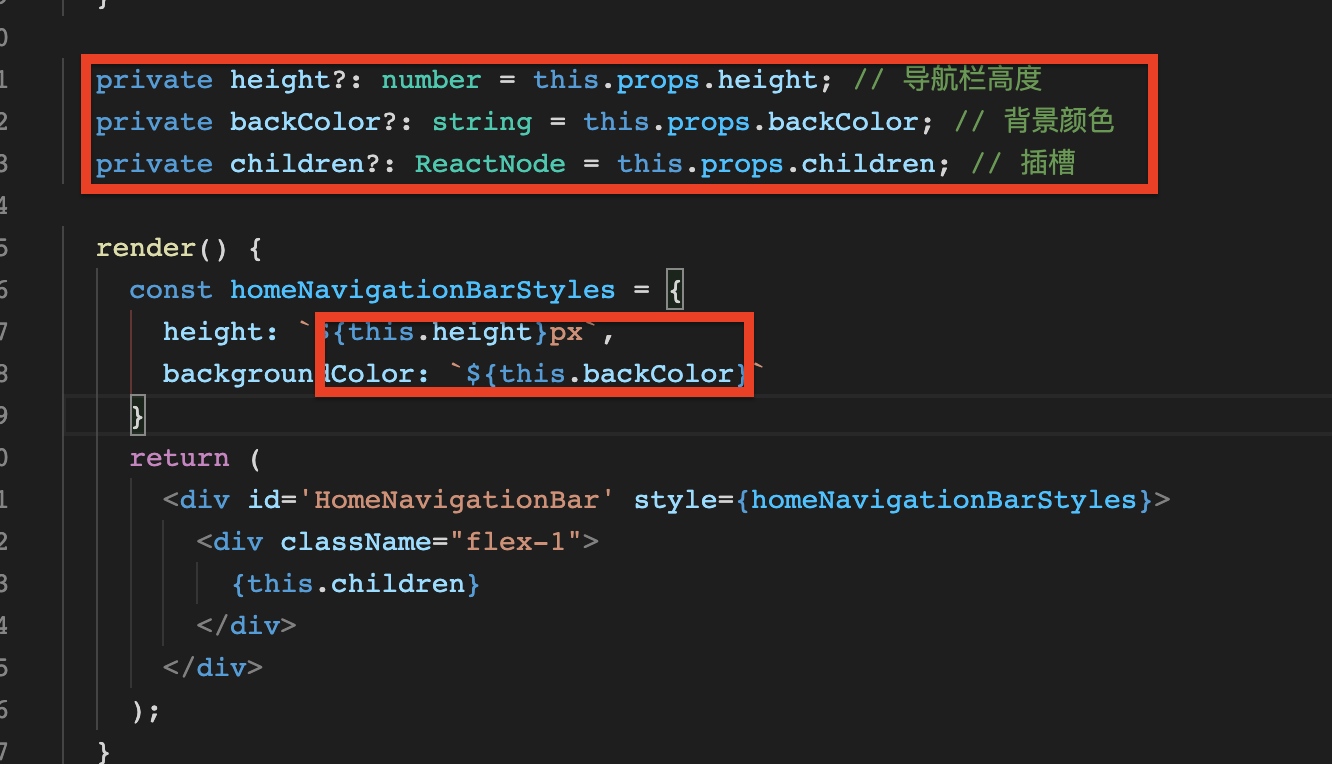
为了方便直接将props中的值给到height字段,来简单验证一下图中圈起部分代码的可行性:
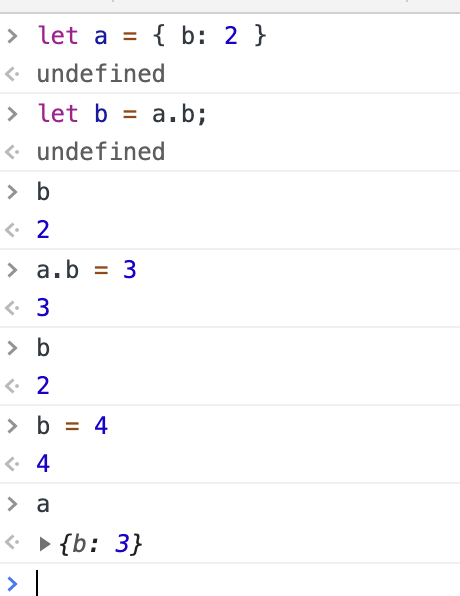
上图证明无法对基础数据类型的数据进行修改,而是直接将当前变量中的内存地址替换:
let a = 0x213; // 例如等于3

a = 2;// 0x645 改变a的值,实际上改变的是内存地址
所以当props改变时height数据没变化就是这个原因,需要将style中的this.height改为this.props.height,声明的其它变量作废...
由于react中state或props改变时就会触发render方法重新渲染DOM,可以在render中定义height等字段const { children, height, backColor } = this.props;
render() {

    const { children, height, backColor } = this.props;

    const homeNavigationBarStyles = {

      height: `${height}px`,

      backgroundColor: `${backColor}`

    }

    return (

      <div id='HomeNavigationBar' style={homeNavigationBarStyles}>

        <div className="flex-1">

          {children}

        </div>

      </div>

    );

  }
React react-redux props或state更新视图无法重新渲染问题的更多相关文章
- A Bite Of React(2) Component, Props and State
component component:用户自己定义的元素 const element = <Welcome name="Sara" />; class Welcome ...
- React 深入系列3:Props 和 State
文:徐超,<React进阶之路>作者 授权发布,转载请注明作者及出处 React 深入系列3:Props 和 State React 深入系列,深入讲解了React中的重点概念.特性和模式 ...
- React中Props 和 State用法
React中Props 和 State用法 1.本质 一句话概括,props 是组件对外的接口,state 是组件对内的接口.组件内可以引用其他组件,组件之间的引用形成了一个树状结构(组件树),如果下 ...
- 前端(十一):props、state及redux关系梳理
所谓状态机,是一种抽象的数据模型,是“事物发展的趋势”,其原理是事件驱动.广泛地讲,世界万物都是状态机. 一.状态机是一种抽象的数据模型 在react中,props和state都可以用来传递数据.这里 ...
- react native中对props和state的理解
最近使用react native这个新的技术做完一个项目,所以赶紧写个博客巩固一下. 今天我想说的是props和state,当然这是我个人的理解,如果有什么不对的地方,望指正. 首先我先说说props ...
- react~props和state的介绍与使用
props是参数的传递,从上层模块向下层模块进行拿传递:而state是提局域变量,一般在本模块内使用,props是不能改变的,而state可以通过setState去修改自身的值. props Reac ...
- React中props和state相同点和不同点
朋友们,我想死你们了,最近这几天忙着和病魔作斗争所以没怎么写博客,今天感觉好点了,赶紧来写一波,就是这木敬业. 今天我们来讨论讨论props和state相同点和不同点 首先我来概要说明一下这两者 pr ...
- React Native 快速入门之认识Props和State
眼下React Native(以后简称RN)越来越火,我也要投入到学习当中.对于一个前端来说,还是有些难度.因为本人觉得这是一个App开发的领域,自然是不同.编写本文的时候,RN的版本为0.21.0. ...
- React Native中组件的props和state
一.组件的属性(props)和状态(state) 1.属性(props) 它是组件的不可变属性(组件自己不可以自己修改props). 组件自身定义了一组props作为对外提供的接口,展示一个组件时只需 ...
随机推荐
- 别人写的很好Arduino教材
原文来自:https://www.arduino.cn/thread-31720-1-1.html 上一篇:Arduino教程--通过 库管理器 添加库 http://www.arduino.cn/t ...
- Example Code for a TMP102 I2c Thermometer————Arduino
参考:https://playground.arduino.cc/Code/TMP102/ Example Code for a TMP102 I2c Thermometer I've fairly ...
- 下载 Oracle Database XE 11gR2
操作系统:Windows 10 x64 第一节:下载 Oracle Database XE 11gR2 第二节:安装.验证安装 Oracle Database XE 11gR2 第三节:Oracle ...
- Java防止文件被篡改之文件校验和
Java防止文件被篡改之文件校验和转载:请注明出处,谢谢! 1.为什么要防止文件被篡改? 答案是显然的,为了保证版权,系统安全性等.之前公司开发一个系统,技术核心是一个科学院院士的研究成果,作为一款 ...
- thinkphp6.0.x 反序列化详记(一)
前言 这几天算是进阶到框架类漏洞的学习了,首当其冲想到是thinkphp,先拿thinkphp6.0.x来学习一下,体验一下寻找pop链的快乐. 在此感谢楷师傅的帮忙~ 环境配置 用composer指 ...
- OpenCV Java Tutorials- Camera Calibration
2020-10-10原文地址:https://opencv-java-tutorials.readthedocs.io/en/latest/09-camera-calibration.html#id1 ...
- 跨境 TCP 传输优化实录 — 使用 BBR 解决 LFN 问题
背景 近期开通了一条访问美国机房的 1G 专线,用于提供行情数据备源,并基于 TCP 建立了一套数据传输服务.上线后发现一个严重的问题:应用程序发送队列中的数据大量积压,最终导致程序 OOM Kill ...
- MATLAB利用solve函数解多元一次方程组
matlab求解多元方程组示例: syms k1 k2 k3; [k1 k2 k3] = solve(-3-k3==6, 2-k1-k2+2*k3==11, 2*k1+k2-k3+1==6)或者用[k ...
- 【9】进大厂必须掌握的面试题-DevOps面试
Q1.DevOps和Agile之间的根本区别是什么? 下表中列出了两者之间的差异. 特征 DevOps--开发运维 Agile--敏捷 敏捷 开发和运营中的敏捷性 只有发展才能敏捷 流程/实践 涉及C ...
- PostgreSQL查询表名称及表结构
1. 查询表名称 在psql状态下查询表名称 \dt SQL方式查看表名称 SELECT viewname FROM pg_views WHERE schemaname ='public' Postg ...