
05_ActiveMQ的selectors
【 JMS Selectors 】
JMS Selectors用于在订阅中,基于消息属性对消息进行过滤。
以下是个Selectors的例子:Java代码
consumer = session.createConsumer(destination, "JMSType = 'car' AND weight > 2500");
在JMS Selectors表达式中,可以使用IN、NOT IN、LIKE等,
例如: LIKE '12%3' ('123' true,'12993' true,'1234' false) LIKE 'l_se' ('lose' true,'loose' false) LIKE '\_%' ESCAPE '\' ('_foo' true,'foo' false)
需要注意的是,JMS Selectors表达式中的日期和时间需要使用标准的long型毫秒值。
另外表达式中的属性不会自动进行类型转换,例如:Java代码myMessage.setStringProperty("NumberOfOrders", "2");"NumberOfOrders > 1" 求值结果是false。
关于JMS Selectors的详细文档请参考javax.jms.Message的javadoc。 上一小节介绍的Message Groups虽然可以保证具有相同message group的消息被唯一的consumer顺序处理,但是却不能确定被哪个consumer处理。在某些情况下,Message Groups可以和JMS Selector一起工作,例如: 设想有三个consumers分别是A、B和C。你可以在producer中为消息设置三个message groups分别是"A"、"B"和"C"。然后令consumer A使用"JMXGroupID = 'A'"作为selector。B和C也同理。这样就可以保证message group A的消息只被consumer A处理。需要注意的是,这种做法有以下缺点:• producer必须知道当前正在运行的consumers,也就是说producer和consumer被耦合到一起。• 如果某个consumer失效,那么应该被这个consumer消费的消息将会一直被积压在broker上。
【消息过滤实例】
【生产者】
package test2.activemq.demo;

import javax.jms.Connection;

import javax.jms.ConnectionFactory;

import javax.jms.DeliveryMode;

import javax.jms.Destination;

import javax.jms.JMSException;

import javax.jms.MapMessage;

import javax.jms.MessageProducer;

import javax.jms.Session;

import javax.jms.TextMessage;

import org.apache.activemq.ActiveMQConnectionFactory;

public class Producer {

    //1.连接工厂

    private ConnectionFactory connectionFactory;

    //2.连接对象

    private Connection connection;

    //3.Session对象

    private Session session;

    //4.生产者

    private MessageProducer messageProducer;

    public Producer(){

        try{

            this.connectionFactory = new ActiveMQConnectionFactory(

                    ActiveMQConnectionFactory.DEFAULT_USER,

                    ActiveMQConnectionFactory.DEFAULT_PASSWORD,

                    "tcp://localhost:61616");

            this.connection=  this.connectionFactory.createConnection();

            this.connection.start();

            this.session = this.connection.createSession(Boolean.FALSE,Session.AUTO_ACKNOWLEDGE);

            this.messageProducer = this.session.createProducer(null);

        }catch(JMSException e){

            e.printStackTrace();

        }

    }

    public Session getSession(){

        return this.session;

    }

    public void sendMapMessage(){

        try{

            Destination destination = this.session.createQueue("bestQueue");

            MapMessage msg1 = this.session.createMapMessage();

            msg1.setString("name", "Higgin");

            msg1.setString("age", "");            //这个格式不属于过滤的格式

            msg1.setIntProperty("money", );      //这个格式次才是能过滤的格式

            msg1.setStringProperty("color", "blue");

            MapMessage msg2 = this.session.createMapMessage();

            msg2.setString("name", "Higgin2");

            msg2.setString("age", "");

            msg2.setIntProperty("money", );

            msg2.setStringProperty("color", "yellow");

            MapMessage msg3 = this.session.createMapMessage();

            msg3.setString("name", "Zhansan");

            msg3.setString("age", "");

            msg3.setIntProperty("money", );

            msg3.setStringProperty("color", "red");

            MapMessage msg4 = this.session.createMapMessage();

            msg4.setString("name", "Lisi");

            msg4.setString("age", "");

            msg4.setIntProperty("money", );

            msg4.setStringProperty("color", "blue");

            MapMessage msg5 = this.session.createMapMessage();

            msg5.setString("name", "Wangwu");

            msg5.setString("age", "");

            msg5.setIntProperty("money", );

            msg5.setStringProperty("color", "blue");

            this.messageProducer.send(destination,msg1,DeliveryMode.NON_PERSISTENT,,**10L);  //消息有效时间10分钟

            this.messageProducer.send(destination,msg2,DeliveryMode.NON_PERSISTENT,,**10L);

            this.messageProducer.send(destination,msg3,DeliveryMode.NON_PERSISTENT,,**10L);

            this.messageProducer.send(destination,msg4,DeliveryMode.NON_PERSISTENT,,**10L);

            this.messageProducer.send(destination,msg5,DeliveryMode.NON_PERSISTENT,,**10L);

        }catch(JMSException e){

            e.printStackTrace();

        }

    }

    public void sendTextMessage(){

        try{

            Destination destination = this.session.createQueue("bestQueue");

            TextMessage textMessage = this.session.createTextMessage("text Message Ha Ha Ha");

            this.messageProducer.send(destination,textMessage,DeliveryMode.NON_PERSISTENT,,**10L);

        }catch(JMSException e){

            e.printStackTrace();

        }

    }

    public static void main(String[] args) {

        Producer p = new Producer();

        p.sendMapMessage();

    }

}
【消费者】
package test2.activemq.demo;

import javax.jms.Connection;

import javax.jms.ConnectionFactory;

import javax.jms.Destination;

import javax.jms.JMSException;

import javax.jms.MapMessage;

import javax.jms.Message;

import javax.jms.MessageConsumer;

import javax.jms.MessageListener;

import javax.jms.MessageProducer;

import javax.jms.Session;

import org.apache.activemq.ActiveMQConnectionFactory;

public class Consumer {

    //错误的条件,因为producer是使用setString()方法添加的属性,只有setIntProperty或setStringProperty这种格式的才能满足过滤条件

    public final String SELECTOR_0 = "age = 25";

    public final String SELECTOR_1 = "color = 'blue'";

    public final String SELECTOR_2 = "color = 'blue' AND money > 100 ";

    public final String SELECTOR_3 = "receiver = 'A'";

    //1.连接工厂

    private ConnectionFactory connectionFactory;

    //2.连接对象

    private Connection connection;

    //3.Session对象

    private Session session;

    //4.生产者

    private MessageConsumer messageConsumer;

    //5.队列

    private Destination destination;

    public Consumer(){

        try{

            this.connectionFactory = new ActiveMQConnectionFactory(

                    ActiveMQConnectionFactory.DEFAULT_USER,

                    ActiveMQConnectionFactory.DEFAULT_PASSWORD,

                    "tcp://localhost:61616");

            this.connection=  this.connectionFactory.createConnection();

            this.connection.start();

            this.session = this.connection.createSession(Boolean.FALSE,Session.AUTO_ACKNOWLEDGE);

            this.destination = this.session.createQueue("bestQueue");

            //创建消费者的时候,除了增加队列信息,还可以添加一个过滤器

            this.messageConsumer = this.session.createConsumer(this.destination,this.SELECTOR_1);

        }catch(JMSException e){

            e.printStackTrace();

        }

    }

    public void receiver(){

        try{

            this.messageConsumer.setMessageListener(new Listener());

        }catch(JMSException e){

            e.printStackTrace();

        }

    }

    class Listener implements MessageListener{

        @Override

        public void onMessage(Message msg) {

            try{

                if(msg instanceof MapMessage){

                    MapMessage result =(MapMessage)msg;

                    System.out.println(result.toString());

                    System.out.println("被消费的消息:"+result.getString("name")+"--"+result.getString("age")+"--"+result.getStringProperty("color"));

                }

            }catch(Exception e){

                e.printStackTrace();

            }

        }

    }

    public static void main(String[] args) {

        Consumer c = new Consumer();

        c.receiver();

    }

}
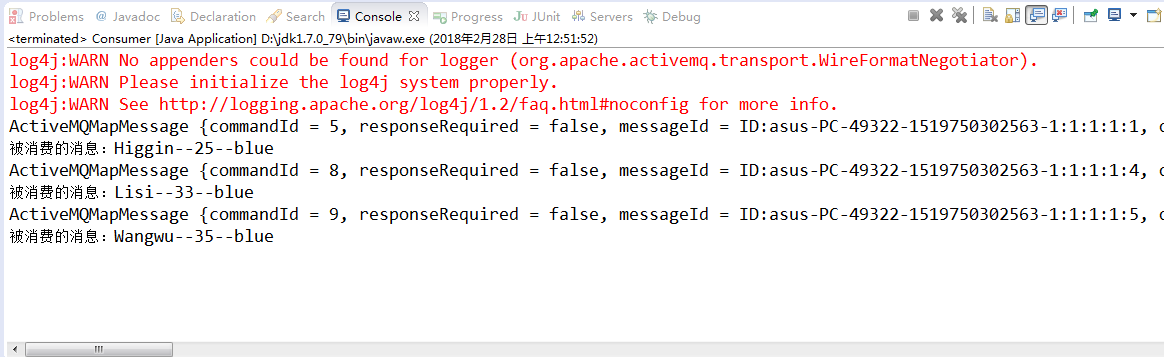
【消费者SELECT_1的运行结果】
05_ActiveMQ的selectors的更多相关文章
- DOM扩展-Selectors API(选择符 API)、元素遍历
DOM扩展 对DOM的两个主要扩展是SelectorsAPI(选择符API)和HTML5 SelectorsAPI(选择符API)是由W3C发起制定的一个标准,致力于浏览器原生支持CSS查询,Sele ...
- BeautifulSoup高级应用 之 CSS selectors /CSS 选择器
BeautifulSoup支持最常用的CSS selectors,这是将字符串转化为Tag对象或者BeautifulSoup自身的.select()方法. 本篇所使用的html为: html_doc ...
- CSS 笔记六(Image/Attribute Selectors)
Image Opacity / Transparency The CSS opacity property is a part of the CSS3 recommendation. Example ...
- CSS 笔记一(Selectors/ Backgrounds/ Borders/ Margins/ Padding/ Height and Width)
Selectors/ Backgrounds/ Borders/ Margins/ Padding/ Height and Width CSS Introduction: CSS stands for ...
- DOM扩展之Selectors API
jQuery的核心就是通过CSS选择符查询DOM文档取得元素的引用,从而抛开了getElementById()和getElementsByTagName(). Selectors API致力于让浏览器 ...
- 转:SELENIUM TIPS: CSS SELECTORS
This page will show you some CSS rules and pseudo-classes that will help you move your XPATH locator ...
- selectors实现高并发
1. 下面的例子,客户端给服务端发送消息,服务端把消息返回 server #!/usr/bin/env python import selectors import socket import tim ...
- 【CSS3】Advanced3:Universal, Child, and Adjacent Selectors
1.Universal selectors eg:#target*{ } 2.Child selectors < something immediately nested within some ...
- 【CSS】Intermediate1:Class and ID Selectors
1.html tag = css selector 2.Define your own selectors in the form of class and ID selectors 3. .clas ...
随机推荐
- [原创]SpringBoot上传图片踩的坑
最近项目里面有个需求,要上传图片到阿里云的OSS服务.所以需要写个上传图片的接口给前端. 这个简单的接口本来就给分配了1个工时,感觉也蛮简单的.但编码过程中遇到了好几个问题,现在一一记录下来,避免再次 ...
- 2019年华南理工大学程序设计竞赛(春季赛) B 修仙时在做什么?有没有空?可以来炼丹吗?(思维建图搜索)
https://ac.nowcoder.com/acm/contest/625/B 分析: 全部的状态只有1<<18 个 , 所以我们可以预处理 f[u][j] , 然后建立出全部的u可以 ...
- SPOJ - COT 路径构造主席树
题意:给出一个带权树,多次询问路径\((u,v)\)的第k小权值 这是主席树往区间扩展到树上的套路题 由于是按路径查询,我们无法使用dfs序,但可利用主席树对父亲扩展的方法构造出链 因此要用dfs构造 ...
- AWS S3
Amazon Simple Storage Service (Amazon S3) Amazon S3 提供了一个简单 Web 服务接口,可用于随时在 Web 上的任何位置存储和检索任何数量的数据.此 ...
- CentOS&.NET Core初试-4-安装守护服务(Supervisor)
系列目录 CentOS的安装和网卡的配置 安装.NET Core SDK和发布网站 Nginx的安装和配置 安装守护服务(Supervisor) Supervisor是什么? Supervisor 是 ...
- vue 路由传参 、接收参数
传参组件 一. <router-link :to='"/main/course?navName=" +item.columnName + "&id=&quo ...
- jstack Dump 日志文件中的线程状态(转)
jstack Dump 日志文件中的线程状态 dump 文件里,值得关注的线程状态有: 死锁,Deadlock(重点关注) 执行中,Runnable 等待资源,Waiting on conditio ...
- List与IList的区别
在我看一个源程序的时候看到这个例子使用了IList<T>返回类型,因为上午刚刚总结过List<T>的详细用法,突然出现了IList<T>,感觉很奇怪,于是上网搜集了 ...
- FileUpload.PostedFile 为null异常 NullReferenceException
FileUpload控件PostedFile属性总是为null,提示有异常NullReferenceException.我的程序中加了UpdatePannel控件.把UpdatePannel去掉之后就 ...
- Jmeter测试计划中的元素
测试计划中的元素(elements of a test plan) 本节描述测试计划不同的部分. 最小测试将包括测试计划.线程组和一个或多个采样器. 1 测试计划(Test Plan) 测试计划对象有 ...