
Unreal 输入系统 解析
前言
- 输入系统,输入某个键,响应到GamePlay层做对应的事。例如 点击鼠标,前进还是开枪之类,是如何响应的。这里只说应用层逻辑,硬件层逻辑不讲述。
详解
1.问题来源
先看下面一个例子:跳跃的事件响应堆栈
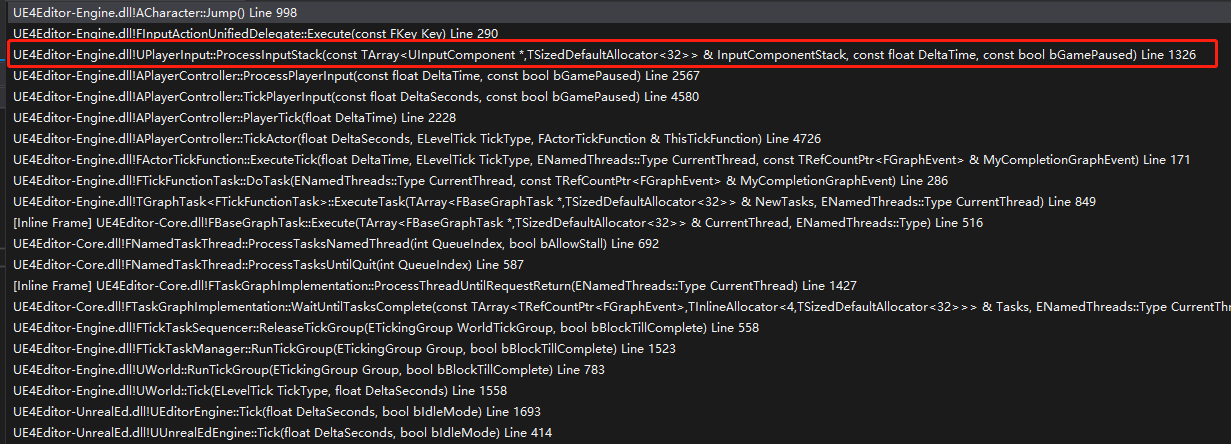
从上述堆栈我们不难发现,疑惑点主要集中于 APlayerController::ProcessPlayerInput 和 UPlayerInput::ProcessInputStack.
(APlayerController::PlayerTick之前的堆栈可以忽略)
2.简要分析
先查看 APlayerController::ProcessPlayerInput 源码
void APlayerController::ProcessPlayerInput(const float DeltaTime, const bool bGamePaused)

{

	static TArray<UInputComponent*> InputStack;

	// must be called non-recursively and on the game thread

	check(IsInGameThread() && !InputStack.Num());

	// process all input components in the stack, top down

	{

		SCOPE_CYCLE_COUNTER(STAT_PC_BuildInputStack);

		BuildInputStack(InputStack);

	}

	// process the desired components

	{

		SCOPE_CYCLE_COUNTER(STAT_PC_ProcessInputStack);

		PlayerInput->ProcessInputStack(InputStack, DeltaTime, bGamePaused);

	}

	InputStack.Reset();

}
查看上述BuildInputStack的源码也比较简单,这里不贴了,大概的意思是把当前PlayerPawn的InputComponent组件和当前地图的InputComponent和PlayerController栈上的InputComponent组件。总之,大概意思就是把当前世界的所有打开的InputComponent全部获取。
传入到PlayerInput处理。
也就是说问题,只要弄明白UPlayerInput::ProcessInputStack即可。
3.UPlayerInput::ProcessInputStack 解析
因为源码过大,为了不影响阅读,下方给出的均是伪代码,对于一些次要的的特殊逻辑也抛除了。主要是围绕一个普通按键的逻辑代码。
I.TArray<TPair<FKey, FKeyState*>> KeysWithEvents;
	ConditionalBuildKeyMappings();

	static TArray<FDelegateDispatchDetails> NonAxisDelegates;

	static TArray<FKey> KeysToConsume;

	static TArray<FDelegateDispatchDetails> FoundChords;

	static TArray<TPair<FKey, FKeyState*>> KeysWithEvents;

	static TArray<TSharedPtr<FInputActionBinding>> PotentialActions;

	// copy data from accumulators to the real values

	for (TMap<FKey,FKeyState>::TIterator It(KeyStateMap); It; ++It)

	{

		bool bKeyHasEvents = false;

		FKeyState* const KeyState = &It.Value();

		const FKey& Key = It.Key();

		for (uint8 EventIndex = 0; EventIndex < IE_MAX; ++EventIndex)

		{

			KeyState->EventCounts[EventIndex].Reset();

			Exchange(KeyState->EventCounts[EventIndex], KeyState->EventAccumulator[EventIndex]);

			if (!bKeyHasEvents && KeyState->EventCounts[EventIndex].Num() > 0)

			{

				KeysWithEvents.Emplace(Key, KeyState);

				bKeyHasEvents = true;

			}

		}

	}
从源码最上方查看,ConditionalBuildKeyMappings,这个比较简单,就是检测是否需要把ProjectSetting->Engine->Input中预先绑定的值初始化到PlayerInput.
然后主要是根据KeyStateMap的数据转换成KeysWithEvents。KeyStateMap 即会记录当前局内按下的键位的状态,KeysWithEvents就是当前哪些键需要处理。为什么KeyStateMap不是直接的一个Key的结构,而是Map,因为后面会说到,存在一个键按了,后面的按键是响应还是不响应,出于满足这种需求的原因。
II.核心逻辑
下述伪代码中文是我给出的解释,英文是源码注释。
	int32 StackIndex = InputComponentStack.Num()-1;

	for ( ; StackIndex >= 0; --StackIndex)

	{

		UInputComponent* const IC = InputComponentStack[StackIndex];

		if (IC)

		{

			for (const TPair<FKey,FKeyState*>& KeyWithEvent : KeysWithEvents)

			{

				if (!KeyWithEvent.Value->bConsumed)//被Consume的按键,不会被响应

				{

					FGetActionsBoundToKey::Get(IC, this, KeyWithEvent.Key, PotentialActions);

					//根据Key找出当前InputComponent中所需要响应的事件集合 PotentialActions(就是通过BindAction绑定的那些事件)

				}

			}

			for (const TSharedPtr<FInputActionBinding>& ActionBinding : PotentialActions)

			{

				GetChordsForAction(*ActionBinding.Get(), bGamePaused, FoundChords, KeysToConsume);

				//根据KeyState 检测该键是否是组合键,是否需要按Alt/Ctrl/Shift...,如果达成组合键则返回FoundChords

				//PS:这边代码写的有点烂,写死的组合键判断

			}

			PotentialActions.Reset();

			for (int32 ChordIndex=0; ChordIndex < FoundChords.Num(); ++ChordIndex)

			{

				const FDelegateDispatchDetails& FoundChord = FoundChords[ChordIndex];

				bool bFireDelegate = true;

				// If this is a paired action (implements both pressed and released) then we ensure that only one chord is

				// handling the pairing

				if (FoundChord.SourceAction && FoundChord.SourceAction->IsPaired())

				{

					FActionKeyDetails& KeyDetails = ActionKeyMap.FindChecked(FoundChord.SourceAction->GetActionName());

					if (!KeyDetails.CapturingChord.Key.IsValid() || KeyDetails.CapturingChord == FoundChord.Chord || !IsPressed(KeyDetails.CapturingChord.Key))

					{

						if (FoundChord.SourceAction->KeyEvent == IE_Pressed)

						{

							KeyDetails.CapturingChord = FoundChord.Chord;

						}

						else

						{

							KeyDetails.CapturingChord.Key = EKeys::Invalid;

						}

					}

					else

					{

						bFireDelegate = false;

					}

				}

				if (bFireDelegate && FoundChords[ChordIndex].ActionDelegate.IsBound())

				{

					FoundChords[ChordIndex].FoundIndex = NonAxisDelegates.Num();

					NonAxisDelegates.Add(FoundChords[ChordIndex]);

				}

			}

			//上述这段,就是判断是否是成对出现的事件,如果是成对出现的,只会被添加一条进NonAxisDelegates.

			if (IC->bBlockInput)

			{

				// stop traversing the stack, all input has been consumed by this InputComponent

				--StackIndex;

				KeysToConsume.Reset();

				FoundChords.Reset();

				break;

			}

			//上述这段,是判断是否bBlockInput,如果这个为true,则这个之后的InputComponent都会被吃掉,就是不会执行。

			// we do this after finishing the whole component, so we don't consume a key while there might be more bindings to it

			for (int32 KeyIndex=0; KeyIndex<KeysToConsume.Num(); ++KeyIndex)

			{

				ConsumeKey(KeysToConsume[KeyIndex]);

			}

			//上述这段,最为重要,根据当前InputComponent中的KeysToConsume,对KeyStateMap中的键Consume掉,这样在之后的InputComponent的键,可以被吃掉,不会被执行。

			KeysToConsume.Reset();

			FoundChords.Reset();

		}

	}
总结
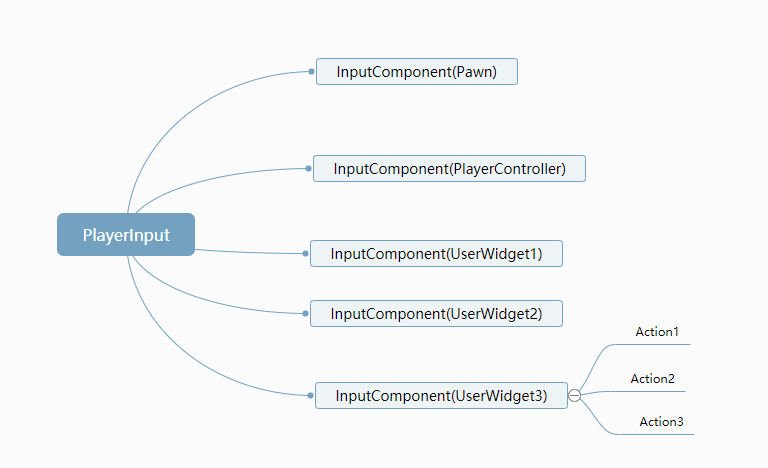
一个PlayerInput在Tick中不断执行,这个PlayerInput中存了一个包含当前世界所拥的InputComponent的栈。根据传来的当前响应的键,在这个栈中依次进行计算。根据Consume这个字段来判断之后的InputComonent中的相同的键是否被吃掉。每个InputComponent根据bBlockInput 这个字段来决定之后的InputComponent所有键被吃掉。这个一般应用搭配层级,低于这个层级的InputComponent被吃掉。
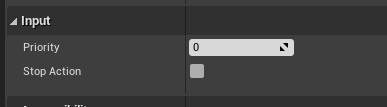
- 如果想实现只在某个UI中响应输入,其他界面,或者PlayerController中的都不响应,可以使用bBlockInput搭配Priority实现。也就是对应UserWidget中的常见的
缺陷
- 不能自定义组合键。
- 对同一个Action注册了多个事件,顺序不能自定义。
- 同一个InputComponent的多个相同的键注册的Action不能被吃掉。
- Unreal 中 ListenForInputAction 接口,每个UserWidget生成一个新的InputComponent,而玩家的PlayerController用的是一个InputComponent。有些浪费。
Unreal 输入系统 解析的更多相关文章
- Android系统--输入系统(十)Reader线程_核心类及配置文件深入分析
Android系统--输入系统(十)Reader线程_核心类及配置文件深入分析 0. 前言 个人认为该知识点阅读Android源代码会不仅容易走进死胡同,并且效果并不好,前脚看完后脚忘记,故进行总结, ...
- Android系统--输入系统(十四)Dispatcher线程情景分析_dispatch前处理
Android系统--输入系统(十四)Dispatcher线程情景分析_dispatch前处理 1. 回顾 我们知道Android输入系统是Reader线程通过驱动程序得到上报的输入事件,还要经过处理 ...
- 推文《阿里凑单算法首次公开!基于Graph Embedding的打包购商品挖掘系统解析》笔记
推文<阿里凑单算法首次公开!基于Graph Embedding的打包购商品挖掘系统解析>笔记 从17年5月份开始接触Graph Embedding,学术论文读了很多,但是一直不清楚这技术是 ...
- I/O输入系统
I/O输入系统 计算机有两个主要任务:I/O操作与计算处理.在许多情况下,主要任务是I/O操作.而计算处理只是附带的. 操作系统在计算机I/O方面的作用是管理和控制I/O操作和I/O设备. 概述 对与 ...
- Android核心分析之十五Android输入系统之输入路径详解
Android用户事件输入路径 1 输入路径的一般原理 按键,鼠标消息从收集到最终将发送到焦点窗口,要经历怎样的路径,是Android GWES设计方案中需要详细考虑的问题.按键,鼠标等用户消息 ...
- Android核心分析之十四Android GWES之输入系统
Android输入系统 依照惯例,在研究Android输入系统之前给出输入系统的本质描述:从哲学的观点来看,输入系统就是解决从哪里来又将到哪里去问题.输入的本质上的工作就是收集用户输入信息 ...
- [Android] 输入系统(一)
Android输入系统是人与机器交互最主要的手段.我们通过按键或者触碰屏幕,会先经由linux产生中断,进行统一的处理过后,转换成Android能识别的事件信息,然后Android的输入系统去获取事件 ...
- Android系统--输入系统(五)输入系统框架
Android系统--输入系统(五)输入系统框架 1. Android设备使用场景: 假设一个Android平板,APP功能.系统功能(开机关机.调节音量).外接设备功能(键盘.触摸屏.USB外接键盘 ...
- Android系统--输入系统(六)模拟输入驱动程序
Android系统--输入系统(六)模拟输入驱动程序 1. 回顾输入子系统 简单字符设备驱动:应用程序通过调用驱动所实现的函数使能硬件. 输入子系统:由于有多个应用程序使用输入子系统,故肯定使用的是早 ...
随机推荐
- jQuery--基本过滤选择器
1.基本过滤选择器介绍 基本过滤器: :first 获取数组中第一个元素 :last 获取数组中最后一个 :eq(selector) 获取指定索引 :gt(index) 大于 ...
- Elasticsearch 在部署时,对 Linux 的设置有哪些优化方法 ?
1.关闭缓存 swap; 2.堆内存设置为:Min(节点内存/2, 32GB); 3.设置最大文件句柄数: 4.线程池+队列大小根据业务需要做调整: 5.磁盘存储 raid 方式--存储有条件使用 R ...
- SpringBoot 自定义配置文件不会自动提示问题
参阅:https://www.jianshu.com/p/ec3f0b0371e6
- Tomcat安装流程(无图简易)
笔记:web->3小结
- html 不常用标签介绍
文本元素 <wbr> 如果单词太长,或者您担心浏览器会在错误的位置换行,那么您可以使用 <wbr> 元素来添加 Word Break Opportunity(单词换行时机).英 ...
- 单例模式的实现Singleton和MonoSingleton
using System.Collections; using System.Collections.Generic; using UnityEngine; /// <summary> / ...
- git概述
学习资料来源-人家写得比我好 #视频教程: https://www.bilibili.com/video/BV1vy4y1s7k6?spm_id_from=pageDriver #文档教程 https ...
- JavaScript学习总结3-函数
JS如果没能完return,等函数完全执行完毕也会返回NaN(undefined) 因为JS高度自由性,不像C.C++.Java等,函数传参有较严格的限制,JS可以完函数内传任意数量个参数,也可以不传 ...
- JavaScript学习总结6-apply
JS中的apply方法可以控制this指向 任何JS支持的类型都可以转化为JSON JS对象是键值对型的,JSON是字符串型的 原型对象:__proto__ JS万物皆对象,ES6开始提供了对后端开发 ...
- hutool工具类常用API整理
0.官网学习地址 https://www.hutool.cn/ 1.依赖 <dependency> <groupId>cn.hutool</groupId> < ...