
CentOs5.8下安装Oracle12C
12C安装向导:
http://docs.oracle.com/database/121/LTDQI/toc.htm
12C下载地址:
http://www.oracle.com/technetwork/database/enterprise-edition/downloads/index.html
1.安装Oracle依赖包
使用yum安装Oracle12C依赖,标注32 bit不需安装。没有yum环境的这些包可以在操作系统安装介质中查找。这些需要的安装依赖包可以在Oracle提供的12C在线安装文档中找到。操作系统版本不同,所需要的依赖包略有差别。
binutils-2.17.50.0.

compat-libstdc++--3.2.

compat-libstdc++--3.2. ( bit)

gcc-4.1.

gcc-c++-4.1.

glibc-2.5-

glibc-2.5- ( bit)

glibc-devel-2.5-

glibc-devel-2.5- ( bit)

ksh

libaio-0.3.

libaio-0.3. ( bit)

libaio-devel-0.3.

libaio-devel-0.3. ( bit)

libgcc-4.1.

libgcc-4.1. ( bit)

libstdc++-4.1.

libstdc++-4.1. ( bit)

libstdc++-devel 4.1.

libXext-1.0.

libXext-1.0. ( bit)

libXtst-1.0.

libXtst-1.0. ( bit)

libX11-1.0.

libX11-1.0. ( bit)

libXau-1.0.

libXau-1.0. ( bit)

libXi-1.0.

libXi-1.0. ( bit)

make-3.81

sysstat-7.0.
2. 创建用户及组
[root@edu ~]# groupadd oinstall

[root@edu ~]# groupadd dba

[root@edu ~]# useradd -g oinstall -G dba oracle

[root@edu ~]# passwd oracle

Changing password for user oracle.

New UNIX password:

BAD PASSWORD: it is based on a dictionary word

Retype new UNIX password:

passwd: all authentication tokens updated successfully.
3.修改系统内核参数
使用vi命令修改配置文件/etc/sysctl.conf,使用/sbin/sysctl –p命令使内核配置生效。
fs.aio-max-nr =

fs.file-max =

kernel.shmall =

kernel.shmmax =

kernel.shmmni =

kernel.sem =

net.ipv4.ip_local_port_range =

net.core.rmem_default =

net.core.rmem_max =

net.core.wmem_default =

net.core.wmem_max =
4.修改用户资源限制
使用vi命令修改配置文件/etc/security/limits.conf
oracle soft nofile

oracle hard nofile

oracle soft nproc

oracle hard nproc

oracle stack nproc
5.创建安装目录
[root@edu ~]# mkdir -p /u01/app

[root@edu ~]# chown -R oracle:oinstall /u01

[root@edu ~]# chmod -R  /u01

[root@edu ~]# ls -ld /u01/app/

drwxrwxr-x  oracle oinstall  Jan  : /u01/app/

[root@edu ~]#
6.配置Oracle用户环境变量
修改Oracle下的.bash_profile文件,不同的shell名称会有区别。source .bash_profile使修改生效。
ORACLE_BASE=/u01/app;export ORACLE_BASE

ORACLE_HOME=$ORACLE_BASE/product/12.1./dbhome_1     export ORACLE_HOME

ORACLE_SID=ORCL;export ORACLE_SID

TMP=/tmp;export TMP

TMPDIR=/tmp;export TMPDIR

PATH=$PATH:$ORACLE_HOME/bin;export PATH

DISPLAY=:0.0;export DISPLAY
7. 解压执行安装Oracle12C软件


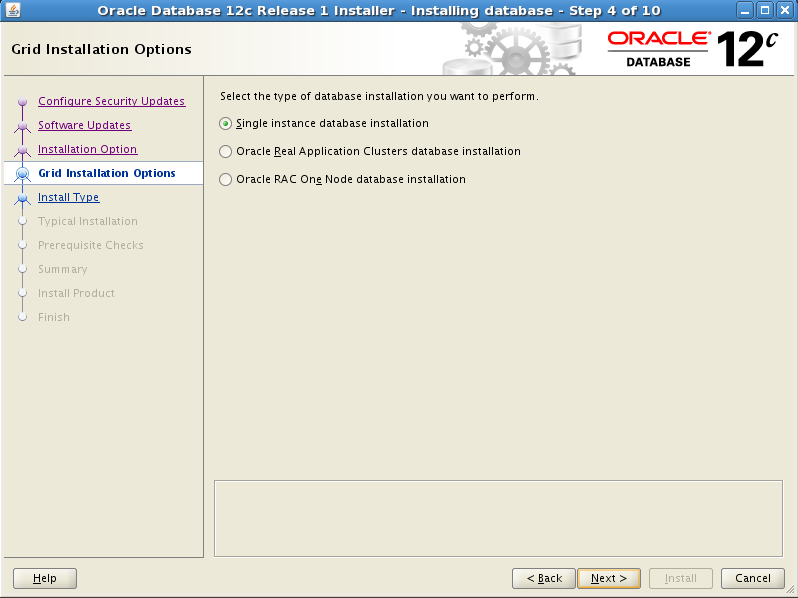


按照提示以root身份执行以下脚本:
[root@edu /]# /u01/oraInventory/orainstRoot.sh

Changing permissions of /u01/oraInventory.

Adding read,write permissions for group.

Removing read,write,execute permissions for world.

Changing groupname of /u01/oraInventory to oinstall.

The execution of the script is complete.
[root@edu /]# /u01/app/product/12.1./dbhome_1/root.sh

Performing root user operation for Oracle 12c

The following environment variables are set as:

    ORACLE_OWNER= oracle

    ORACLE_HOME=  /u01/app/product/12.1./dbhome_1

Enter the full pathname of the local bin directory: [/usr/local/bin]:

   Copying dbhome to /usr/local/bin ...

   Copying oraenv to /usr/local/bin ...

   Copying coraenv to /usr/local/bin ...

Creating /etc/oratab file...

Entries will be added to the /etc/oratab file as needed by

Database Configuration Assistant when a database is created

Finished running generic part of root script.

Now product-specific root actions will be performed.

8.使用dbca创建数据库
在Oracle用户下直接执行dbca命令:


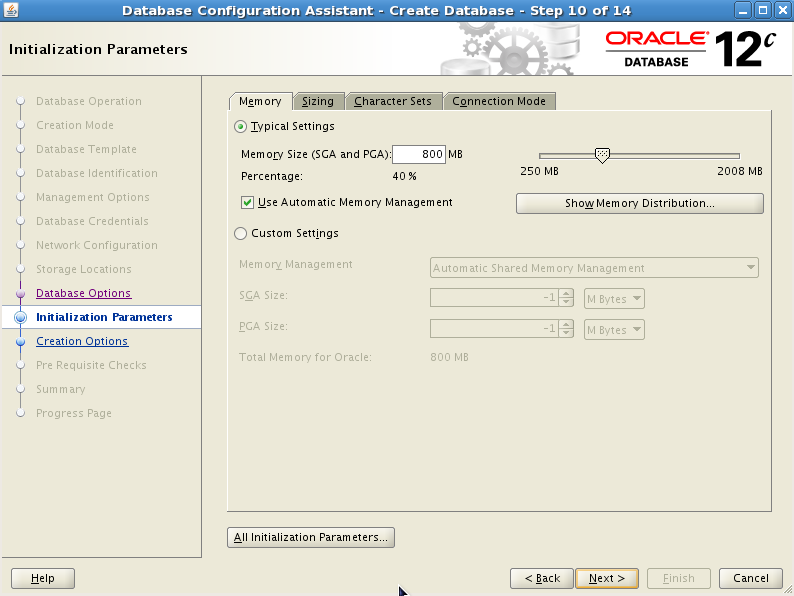


9.使用netca创建监听


10.验证数据库及监听安装
[oracle@edu database]$ sqlplus '/as sysdba'

SQL*Plus: Release 12.1.0.1. Production on Fri Jan  ::

Copyright (c) , , Oracle.  All rights reserved.

Connected to:

Oracle Database 12c Enterprise Edition Release 12.1.0.1. - 64bit Production

With the Partitioning, OLAP, Advanced Analytics and Real Application Testing options

SQL> select banner from v$version;

BANNER

----------------------------------------------------------------------------

Oracle Database 12c Enterprise Edition Release 12.1.0.1. - 64bit Production

PL/SQL Release 12.1.0.1. - Production

CORE    12.1.0.1.    Production

TNS for Linux: Version 12.1.0.1. - Production

NLSRTL Version 12.1.0.1. – Production
[oracle@edu database]$ lsnrctl status

LSNRCTL for Linux: Version 12.1.0.1. - Production on -JAN- ::

Copyright (c) , , Oracle.  All rights reserved.

Connecting to (DESCRIPTION=(ADDRESS=(PROTOCOL=TCP)(HOST=edu.localdomain)(PORT=)))

STATUS of the LISTENER

------------------------

Alias                     LISTENER

Version                   TNSLSNR for Linux: Version 12.1.0.1. - Production

Start Date                -JAN- ::

Uptime                     days  hr.  min.  sec

Trace Level               off

Security                  ON: Local OS Authentication

SNMP                      OFF

Listener Parameter File   /u01/app/product/12.1./dbhome_1/network/admin/listener.ora

Listener Log File         /u01/app/diag/tnslsnr/edu/listener/alert/log.xml

Listening Endpoints Summary...

  (DESCRIPTION=(ADDRESS=(PROTOCOL=tcp)(HOST=edu.localdomain)(PORT=)))

  (DESCRIPTION=(ADDRESS=(PROTOCOL=ipc)(KEY=EXTPROC1521)))

  (DESCRIPTION=(ADDRESS=(PROTOCOL=tcps)(HOST=edu.localdomain)(PORT=))(Security=(my_wallet_directory=/u01/app/admin/ORCL/xdb_wallet))(Presentation=HTTP)(Session=RAW))

Services Summary...

Service "ORCL" has  instance(s).

  Instance "ORCL", status READY, has  handler(s) for this service...

Service "ORCLXDB" has  instance(s).

  Instance "ORCL", status READY, has  handler(s) for this service...

The command completed successfully
至此我们的Oracle12c数据库安装成功!
CentOs5.8下安装Oracle12C的更多相关文章
- CentOS5.6下安装Oracle10G软件 【保留报错经验】
CentOS5.6下安装Oracle10G ****************************************************************************** ...
- Windows下安装Oracle12C(二)
一.安装Oracle 参考 Windows下安装Oracle12C(一) 二.新建用户 1. 安装完成后,启动SQLPlus,然后输入内置的用户名和密码 用户名:sys 密码:as sysdba ...
- CentOS5.4下安装codeblocks 12.11
centos6.3下安装codeblock简单多了,这些开源的软件也都在不断进步.原来装过codeblocks10.05,忘了,这次安装又花了我半天时间,最后总算搞定. 先是安装了wxGTK-2.8. ...
- 64位Win8系统下安装Oracle12c
经过3个小时的折腾,终于在64位win8系统下成功安装了Oracle 12c.这篇文章主要把安装过程中遇到的一些问题总结一下,以便帮助后来人参考. 首先我把我的机器的主要配制情况列举出来: 1. 系统 ...
- Centos下安装Oracle12c
总结一次安装oracle的折腾血泪史环境准备 centos7 虚拟机VMware Workstation Pro14 IP:192.168.245.128(根据实际情况) 4G物理内存,8G虚拟内存, ...
- CentOS5.5下安装Ant
从yum源直接下ant: [root@master local]$ yum install ant 运行ant,发现报错: java.lang.NoClassDefFoundError: org/ap ...
- 在Linux下安装Oracle12c
其实,对于oracle数据库和oracle实例的安装,借用图形化安装还是比较容易的,只是有个别地方需要特别注意外,其余的默认安装即可: 1.安装前的准备: 启动SSH工具: 先启动倒数第三个(想用图像 ...
- Windows下安装Oracle12C(一)
1,在官网上下载oracle的压缩文件,两个都要下载. 并两个同时选中解压在一个文件夹里面. 2,解压之后,如下图,点击setup.exe稍等一会儿 ,3,开始安装: 不选点击下一步,或者直接点击下一 ...
- Centos5.5下安装cacti
系统环境OS:CentOSDataBase:MySQL5.0PHP Apachenet-snmp部署CentOS cacti配置需要的环境安装MySQLyum -y install mysqlyum ...
随机推荐
- 常用meta标签举例说明
本文是作者从百度百科和其他从网页中搜索到的资料,经综合整理,把常用meta标签列举并示例说明,仅供参考. 1.<meta charset="UTF-8"> --- ch ...
- poj 2774 Long Long Message 后缀数组基础题
Time Limit: 4000MS Memory Limit: 131072K Total Submissions: 24756 Accepted: 10130 Case Time Limi ...
- EBay .Net SDK Api 实践
1.请求流程介绍 提供SOA地址:https://api.ebay.com/wsapi WSDL生成的代码在WebService.cs文件当中. ApiCall封装了所有的RPC, ...
- EF框架step by step(4)—DBcontext应用于已存在数据库
EF4.1有三种方式来进行数据操作及持久化.分别是Database-First,Model-First,Code-first,前面都已经简单介绍过了.下面简单小结一下:1.Database First ...
- The StringFormat property
As we saw in the previous chapters, the way to manipulate the output of a binding before is shown is ...
- ural 2069. Hard Rock
2069. Hard Rock Time limit: 1.0 secondMemory limit: 64 MB Ilya is a frontman of the most famous rock ...
- Android开发环境变量配置总结
每次重装系统或者拿到一台新电脑都得重配Android的环境变量,每次都得上网查,索性就记在这儿吧. “系统属性->高级系统设置->环境变量” 打开环境变量配置窗口. JDK配置: 新建JA ...
- 【Oracle】Oracle 11g 64位安装完后,ora-12541错误和ora-12514错误的解决
问题描述: 干净的windows2008 64位服务器上安装 oracle 11g R2 64bit服务端,安装完后,NetManager中默认的主机名为localhost,可以测试通过.但是无法在别 ...
- BZOJ 1053 & 反素数
题意: 反素数,膜一篇GOD's Blog...http://blog.csdn.net/ACdreamers/article/details/25049767 此文一出,无与争锋... CODE: ...
- [Java] java.util.Arrays 中使用的 sort 采用的算法 (转)
http://book.douban.com/annotation/15154366/Q: java.util.Arrays 中使用的 sort 采用的是什么算法? A: java中Arrays. ...