
QtGui.QComboBox
The QtGui.QComboBox is a widget that allows a user to choose from a list of options.
#!/usr/bin/python

# -*- coding: utf-8 -*-

"""

ZetCode PyQt4 tutorial

This example shows

how to use QtGui.QComboBox widget.

author: Jan Bodnar

website: zetcode.com

last edited: September 2011

"""

import sys

from PyQt4 import QtGui, QtCore

class Example(QtGui.QWidget):

    def __init__(self):

        super(Example, self).__init__()

        self.initUI()

    def initUI(self):

        self.lbl = QtGui.QLabel("Ubuntu", self)

        combo = QtGui.QComboBox(self)

        combo.addItem("Ubuntu")

        combo.addItem("Mandriva")

        combo.addItem("Fedora")

        combo.addItem("Red Hat")

        combo.addItem("Gentoo")

        combo.move(50, 50)

        self.lbl.move(50, 150)

        combo.activated[str].connect(self.onActivated)

        self.setGeometry(300, 300, 300, 200)

        self.setWindowTitle('QtGui.QComboBox')

        self.show()

    def onActivated(self, text):

        self.lbl.setText(text)

        self.lbl.adjustSize()

def main():

    app = QtGui.QApplication(sys.argv)

    ex = Example()

    sys.exit(app.exec_())

if __name__ == '__main__':

    main()
The example shows a QtGui.QComboBox and a QtGui.QLabel. The combo box has a list of five options. These are the names of Linux distros. The label widget displays the selected option from the combo box.
combo = QtGui.QComboBox(self)

combo.addItem("Ubuntu")

combo.addItem("Mandriva")

combo.addItem("Fedora")

combo.addItem("Red Hat")

combo.addItem("Gentoo")
We create a QtGui.QComboBox widget with five options.
combo.activated[str].connect(self.onActivated)
Upon an item selection, we call the onActivated() method.
def onActivated(self, text):

    self.lbl.setText(text)

    self.lbl.adjustSize()
Inside the method, we set the text of the chosen item to the label widget. We adjust the size of the label.
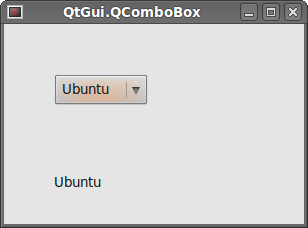 Figure: QtGui.QComboBox
QtGui.QComboBox的更多相关文章
- Pyqt QComboBox 省市区县联动效果
在Qt中, QComboBox方法窗口组件允许用户从列表清单中选择,在web中就是select标签,下拉选项. 省市区县的联动就是currentIndexChanged 获取当前的Index,通过这个 ...
- Pyqt Smtplib实现Qthread多线程发送邮件
一. smtplib 的介绍 smtplib.SMTP([host[, port[, local_hostname[, timeout]]]]) SMTP类构造函数,表示与SMTP服务器之间的连接 ...
- Pyqt QSystemTrayIcon 实现托盘效果
pyqt的托盘效果很好实现,在Pyqt的demo中有个例子 路径:PyQt4\examples\desktop\systray.py 今天我就仿这个Tray效果做效果 一. 创建UI trayicon ...
- Qt4升级Qt5注意问题
Qt4升级Qt5注意问题 Qt4过渡到Qt5的项目一开始就受阻,记录一下遇到的下面的问题 --->编译遇到类似错误: error: QCalendarWidget: No such file o ...
- pyqt记录内容(音乐播放器)
#这是UI文件 # -*- coding: utf-8 -*- # Form implementation generated from reading ui file 'AudioPlayerDia ...
- PYQT4 : QSystemTrayIcon练习
照着demo自己做了一遍,练练手 import sys from PyQt4 import QtGui from PyQt4 import QtCore class SysTray(QtGui.QDi ...
- pyqt4_应用例子(计算器,对话框,进度条,日历等等)
sklearn实战-乳腺癌细胞数据挖掘(博客主亲自录制视频教程) https://study.163.com/course/introduction.htm?courseId=1005269003&a ...
- PYQT控件使用
QtGui.QComboBox .addItem(string)#添加字符串项到Item.addItems(list)#添加列表或元组元素到Item.clear()#清除所有Item.clearEdi ...
- ZetCode PyQt4 tutorial widgets II
#!/usr/bin/python # -*- coding: utf-8 -*- """ ZetCode PyQt4 tutorial In this example, ...
随机推荐
- luoguP4284 [SHOI2014]概率充电器 概率期望树形DP
这是一道告诉我概率没有想象中那么难的题..... 首先,用期望的线性性质,那么答案为所有点有电的概率和 发现一个点的有电的概率来源形成了一个"或"关系,在概率中,这并不好计算... ...
- [BZOJ4784][ZJOI2017]仙人掌(树形DP)
4784: [Zjoi2017]仙人掌 Time Limit: 10 Sec Memory Limit: 512 MBSubmit: 312 Solved: 181[Submit][Status] ...
- 【SDOI2017】树点染色【线段树+LCT】
本来只是想练练LCT,没想到是个线段树 对于操作1:诶新的颜色?这不是access吗? 也就是说,我们用一棵splay来表示一种颜色 操作2直接在LCT上乱搞-- 不对啊,操作3要查子树 诶好像是静态 ...
- CodeForces - 1017C The Phone Number
题面在这里! 一开始有一种构造猜想,可以把答案降到 sqrt(N) 级别. 考虑把 {1,2,...,n} 分成 sqrt(N) 段,每一段是连续的sqrt(N)个数.然后我们倒着把每一段数放上. 比 ...
- Python字典树实现
class Trie: # word_end = -1 def __init__(self): """ Initialize your data structure he ...
- 新浪微博API的使用Python
本文记录了用新浪微博官方Python SDK调用API进行开发的流程. 准备工作 申请成为开发者并创建一个应用: 首先要有一个新浪微博的账号,然后去新浪微博开放平台(http://open.weibo ...
- poj 3261 求可重叠的k次最长重复子串
题意:求可重叠的k次最长重复子串的长度 链接:点我 和poj1743差不多 #include<cstdio> #include<iostream> #include<al ...
- 【BZOJ】4709: [Jsoi2011]柠檬
4709: [Jsoi2011]柠檬 Time Limit: 10 Sec Memory Limit: 128 MBSubmit: 779 Solved: 310[Submit][Status][ ...
- 使用SQL语句将数据库中的两个表合并成一张表
select * into 新表名 from (select * from T1 union all select * from T2) 这个语句可以实现将合并的数据追加到一个新表中. 不合并重复数 ...
- Educational Codeforces Round 12 B. Shopping 暴力
B. Shopping 题目连接: http://www.codeforces.com/contest/665/problem/B Description Ayush is a cashier at ...