
centos 安装配置LAMP平台
实验环境:
[root@nmserver-7 html]# cat  /etc/redhat-release

CentOS release 7.3.1611 (AltArch)

[root@nmserver-7 html]# uname -a

Linux nmserver-7.test.com 3.10.0-514.el7.centos.plus.i686 #1 SMP Wed Jan 25 12:55:04 UTC 2017 i686 i686 i386 GNU/Linux
1、安装apache
1.1 安装apache
[root@nmserver-7 ~]# yum install httpd httpd-devel
1.2 启动apache服务
[root@nmserver-7 ~]# systemctl start httpd
1.3 设置httpd服务开机启动
[root@nmserver-7 ~]# systemctl enable  httpd

Created symlink from /etc/systemd/system/multi-user.target.wants/httpd.service to /usr/lib/systemd/system/httpd.service.
1.4 查看服务状态

[root@nmserver-7 ~]# systemctl status httpd

● httpd.service - The Apache HTTP Server

   Loaded: loaded (/usr/lib/systemd/system/httpd.service; enabled; vendor preset: disabled)

   Active: active (running) since 五 2017-07-21 17:21:37 CST; 6min ago

     Docs: man:httpd(8)

           man:apachectl(8)

 Main PID: 2449 (httpd)

   Status: "Total requests: 11; Current requests/sec: 0; Current traffic:   0 B/sec"

   CGroup: /system.slice/httpd.service

           ├─2449 /usr/sbin/httpd -DFOREGROUND

           ├─2450 /usr/sbin/httpd -DFOREGROUND

           ├─2451 /usr/sbin/httpd -DFOREGROUND

           ├─2452 /usr/sbin/httpd -DFOREGROUND

           ├─2453 /usr/sbin/httpd -DFOREGROUND

           ├─2454 /usr/sbin/httpd -DFOREGROUND

           ├─2493 /usr/sbin/httpd -DFOREGROUND

           ├─2494 /usr/sbin/httpd -DFOREGROUND

           └─2495 /usr/sbin/httpd -DFOREGROUND

7月 21 17:21:35 nmserver-7.test.com systemd[1]: Starting The Apache HTTP Server...

7月 21 17:21:36 nmserver-7.test.com httpd[2449]: AH00558: httpd: Could not reliably determine the server's fully q...ssage

7月 21 17:21:37 nmserver-7.test.com systemd[1]: Started The Apache HTTP Server.

Hint: Some lines were ellipsized, use -l to show in full.
1.5 防火墙设置开启80端口
[root@nmserver-7 ~]# firewall-cmd --permanent --zone=public  --add-service=http

success

[root@nmserver-7 ~]# firewall-cmd --permanent --zone=public  --add-service=https

success

[root@nmserver-7 ~]# firewall-cmd --reload

success
1.6确认80端口监听中
[root@nmserver-7 ~]# netstat -tulp

Active Internet connections (only servers)

Proto Recv-Q Send-Q Local Address           Foreign Address         State       PID/Program name

tcp        0      0 0.0.0.0:ssh             0.0.0.0:*               LISTEN      1084/sshd

tcp        0      0 localhost:smtp          0.0.0.0:*               LISTEN      1486/master

tcp6       0      0 [::]:ssh                [::]:*                  LISTEN      1084/sshd

tcp6       0      0 localhost:smtp          [::]:*                  LISTEN      1486/master

tcp6       0      0 [::]:http               [::]:*                  LISTEN      2449/httpd

udp        0      0 localhost:323           0.0.0.0:*                           592/chronyd

udp6       0      0 localhost:323           [::]:*                              592/chronyd
1.8 查服务器IP
[root@nmserver-7 ~]# ip addr

1: lo: <LOOPBACK,UP,LOWER_UP> mtu 65536 qdisc noqueue state UNKNOWN qlen 1

    link/loopback 00:00:00:00:00:00 brd 00:00:00:00:00:00

    inet 127.0.0.1/8 scope host lo

       valid_lft forever preferred_lft forever

    inet6 ::1/128 scope host

       valid_lft forever preferred_lft forever

2: ens33: <BROADCAST,MULTICAST,UP,LOWER_UP> mtu 1500 qdisc pfifo_fast state UP qlen 1000

    link/ether 00:0c:29:56:bc:cf brd ff:ff:ff:ff:ff:ff

    inet 192.168.8.9/24 brd 192.168.8.255 scope global ens33

       valid_lft forever preferred_lft forever

    inet6 fe80::20c:29ff:fe56:bccf/64 scope link

       valid_lft forever preferred_lft forever

3: bridge0: <NO-CARRIER,BROADCAST,MULTICAST,UP> mtu 1500 qdisc noqueue state DOWN qlen 1000

    link/ether ea:89:d5:c7:32:73 brd ff:ff:ff:ff:ff:ff
1.9 浏览器登陆
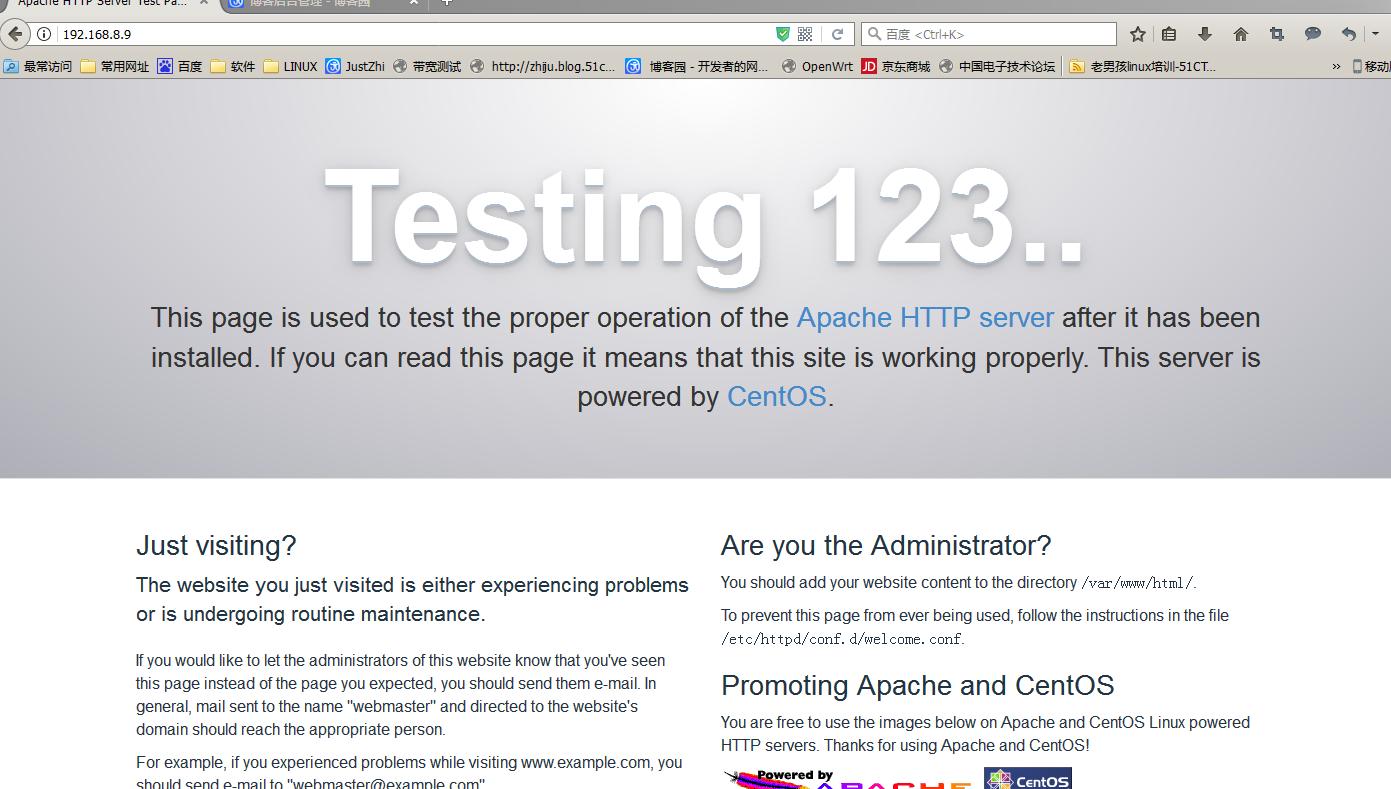
2、安装mysql
2.1安装mysql
[root@nmserver-7 ~]# yum install mariadb mariadb-server mariadb-libs mariadb-devel
root@nmserver-7 ~]# rpm -qa |grep maria

mariadb-libs-5.5.52-1.el7.i686

mariadb-5.5.52-1.el7.i686

mariadb-server-5.5.52-1.el7.i686

mariadb-devel-5.5.52-1.el7.i686
2.2 开启mysql服务,并设置开机启动,检查mysql状态
[root@nmserver-7 ~]# systemctl start  mariadb

[root@nmserver-7 ~]# systemctl enable  mariadb

Created symlink from /etc/systemd/system/multi-user.target.wants/mariadb.service to /usr/lib/systemd/system/mariadb.service.

[root@nmserver-7 ~]# systemctl status  mariadb

● mariadb.service - MariaDB database server

   Loaded: loaded (/usr/lib/systemd/system/mariadb.service; enabled; vendor preset: disabled)

   Active: active (running) since 六 2017-07-22 21:19:20 CST; 21s ago

 Main PID: 9603 (mysqld_safe)

   CGroup: /system.slice/mariadb.service

           ├─9603 /bin/sh /usr/bin/mysqld_safe --basedir=/usr

           └─9760 /usr/libexec/mysqld --basedir=/usr --datadir=/v...

7月 22 21:19:15 nmserver-7.test.com mariadb-prepare-db-dir[9524]: ...

7月 22 21:19:15 nmserver-7.test.com mariadb-prepare-db-dir[9524]: ...

7月 22 21:19:15 nmserver-7.test.com mariadb-prepare-db-dir[9524]: ...

7月 22 21:19:15 nmserver-7.test.com mariadb-prepare-db-dir[9524]: ...

7月 22 21:19:15 nmserver-7.test.com mariadb-prepare-db-dir[9524]: ...

7月 22 21:19:15 nmserver-7.test.com mariadb-prepare-db-dir[9524]: ...

7月 22 21:19:15 nmserver-7.test.com mariadb-prepare-db-dir[9524]: ...

7月 22 21:19:16 nmserver-7.test.com mysqld_safe[9603]: 170722 21...

7月 22 21:19:16 nmserver-7.test.com mysqld_safe[9603]: 170722 21...

7月 22 21:19:20 nmserver-7.test.com systemd[1]: Started MariaDB ...
[root@nmserver-7 ~]# netstat -tulp

Active Internet connections (only servers)

Proto Recv-Q Send-Q Local Address           Foreign Address         State       PID/Program name

tcp        0      0 0.0.0.0:ssh             0.0.0.0:*               LISTEN      1084/sshd

tcp        0      0 0.0.0.0:mysql           0.0.0.0:*               LISTEN      9760/mysqld

tcp6       0      0 [::]:ssh                [::]:*                  LISTEN      1084/sshd

tcp6       0      0 [::]:http               [::]:*                  LISTEN      2449/httpd

udp        0      0 localhost:323           0.0.0.0:*                           592/chronyd

udp6       0      0 localhost:323           [::]:*                              592/chronyd
2.3 数据库安全设置
[root@nmserver-7 ~]# mysql_secure_installation

NOTE: RUNNING ALL PARTS OF THIS SCRIPT IS RECOMMENDED FOR ALL MariaDB

      SERVERS IN PRODUCTION USE!  PLEASE READ EACH STEP CAREFULLY!

In order to log into MariaDB to secure it, we'll need the current

password for the root user.  If you've just installed MariaDB, and

you haven't set the root password yet, the password will be blank,

so you should just press enter here.

Enter current password for root (enter for none):

OK, successfully used password, moving on...

Setting the root password ensures that nobody can log into the MariaDB

root user without the proper authorisation.

Set root password? [Y/n] y

New password:

Re-enter new password:

Password updated successfully!

Reloading privilege tables..

 ... Success!

By default, a MariaDB installation has an anonymous user, allowing anyone

to log into MariaDB without having to have a user account created for

them.  This is intended only for testing, and to make the installation

go a bit smoother.  You should remove them before moving into a

production environment.

Remove anonymous users? [Y/n] y

 ... Success!

Normally, root should only be allowed to connect from 'localhost'.  This

ensures that someone cannot guess at the root password from the network.

Disallow root login remotely? [Y/n] n

 ... skipping.

By default, MariaDB comes with a database named 'test' that anyone can

access.  This is also intended only for testing, and should be removed

before moving into a production environment.

Remove test database and access to it? [Y/n] y

 - Dropping test database...

 ... Success!

 - Removing privileges on test database...

 ... Success!

Reloading the privilege tables will ensure that all changes made so far

will take effect immediately.

Reload privilege tables now? [Y/n] y

 ... Success!

Cleaning up...

All done!  If you've completed all of the above steps, your MariaDB

installation should now be secure.

Thanks for using MariaDB!
2.4 登陆数据库测试
[root@nmserver-7 ~]# mysql -uroot -p

Enter password:

Welcome to the MariaDB monitor.  Commands end with ; or \g.

Your MariaDB connection id is 11

Server version: 5.5.52-MariaDB MariaDB Server

Copyright (c) 2000, 2016, Oracle, MariaDB Corporation Ab and others.

Type 'help;' or '\h' for help. Type '\c' to clear the current input statement.

MariaDB [(none)]> show databases;

+--------------------+

| Database           |

+--------------------+

| information_schema |

| mysql              |

| performance_schema |

+--------------------+

3 rows in set (0.02 sec)

MariaDB [(none)]>
3、安装PHP
3.1 安装php
[root@nmserver-7 ~]# yum -y install php
[root@nmserver-7 ~]# rpm -ql php

/etc/httpd/conf.d/php.conf

/etc/httpd/conf.modules.d/10-php.conf

/usr/lib/httpd/modules/libphp5.so

/usr/share/httpd/icons/php.gif

/var/lib/php/session
3.2 将php与mysql关联起来
[root@nmserver-7 ~]# yum install php-mysql

[root@nmserver-7 ~]# rpm -ql php-mysql

/etc/php.d/mysql.ini

/etc/php.d/mysqli.ini

/etc/php.d/pdo_mysql.ini

/usr/lib/php/modules/mysql.so

/usr/lib/php/modules/mysqli.so

/usr/lib/php/modules/pdo_mysql.so
3.3 安装常用PHP模块
[root@nmserver-7 ~]# yum install -y php-gd php-ldap php-odbc php-pear php-xml php-xmlrpc php-mbstring php-snmp php-soap curl curl-devel php-bcmath
3.4 测试PHP
[root@nmserver-7 ~]# cd  /var/www/html/
[root@nmserver-7 html]# ls
[root@nmserver-7 html]# pwd
/var/www/html
[root@nmserver-7 html]# vi info.php

<?php
        phpinfo();
?>
~
~
~
~
~
~
~
~

:wq
3.5重启apache服务器
[root@nmserver-7 html]# systemctl restart http
3.6测试PHP
在自己电脑浏览器输入 192.168.8.9/info.php,你可以看到已经安装的模块;
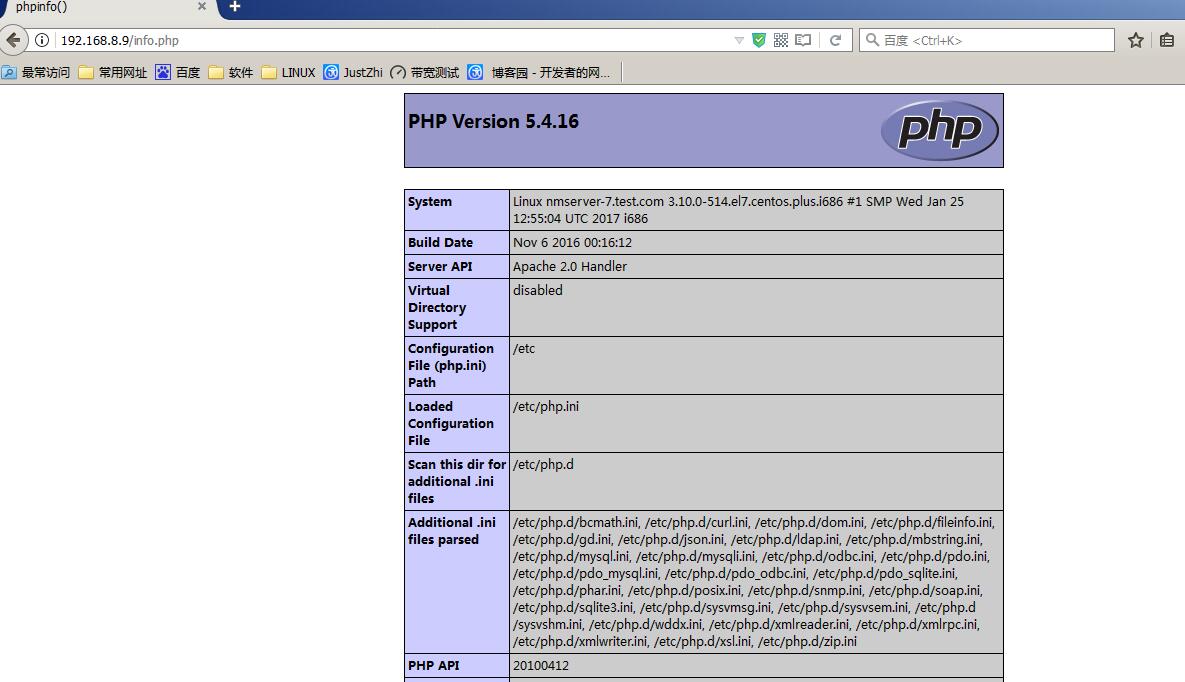
至此,CentOS7下LAMP环境搭建好了!下一步可以安装zabbix了!
centos 安装配置LAMP平台的更多相关文章
- centos安装配置LAMP,https,fastcgi
Centos7 配置LAMP+fastcgi(Centos7.2+php7.0+mariadb+httpd) 环境:阿里云centos7.3 一.安装并配置数据库 1.安装数据库 #yum ins ...
- CentOS 6.3安装配置LAMP服务器(Linux+Apache+MySQL+PHP5)
服务器系统环境:CentOS 6.3 客户端系统环境:Windows 7 ultimate(x86)sp1 简体中文旗舰版 ※ 本文档描述了如何在Linux服务器配置Apache.Mysql.PHP ...
- CentOS 6.6安装配置LAMP服务器(Apache+PHP5+MySQL)
准备篇: CentOS 6.6系统安装配置图解教程 http://www.osyunwei.com/archives/8398.html 1.配置防火墙,开启80端口.3306端口 vi /etc/s ...
- CentOS 6.4安装配置LAMP服务器(Apache+PHP5+MySQL)
这篇文章主要介绍了CentOS 6.4安装配置LAMP服务器(Apache+PHP5+MySQL)的方法,需要的朋友可以参考下 文章写的不错,很详细:IDO转载自网络: 准备篇: 1.配置防火墙,开启 ...
- CentOS 7.0安装配置LAMP服务器(Apache+PHP+MariaDB)
CentOS 7.0默认使用的是firewall作为防火墙,这里改为iptables防火墙. 1.关闭firewall: systemctl stop firewalld.service #停止fir ...
- 阿里云服务器CentOS 5.7(64位)安装配置LAMP服务器(Apache+PHP5+MySQL)
一.快速安装Apache+PHP5+MySql ----------------------------------------------------- 补充:由于163的yum源上只有php5.1 ...
- Centos下安装配置LAMP(Linux+Apache+MySQL+PHP)
Centos下安装配置LAMP(Linux+Apache+MySQL+PHP) 关于LAMP的各种知识,还请大家自行百度谷歌,在这里就不详细的介绍了,今天主要是介绍一下在Centos下安装,搭建一 ...
- CentOS 6.3安装配置LAMP服务器(Apache+PHP5+MySQL)
准备篇: 1.配置防火墙,开启80端口.3306端口 vi /etc/sysconfig/iptables -A INPUT -m state --state NEW -m tcp -p tcp -- ...
- CentOS 7.0 安装配置LAMP服务器方法(Apache+PHP+MariaDB)(转)
转自:http://www.jb51.net/os/188488.html 作者:佚名 字体:[增加 减小] 来源:osyunwei 准备篇: CentOS 7.0系统安装配置图解教程 http:/ ...
随机推荐
- Unity3D_(游戏)甜品消消乐03_游戏UI设计
甜品消消乐01_游戏基础界面 传送门 甜品消消乐02_游戏核心算法 传送门 甜品消消乐03_游戏UI设计 传送门 (源码在文章最下面~) 实现过程 游戏界面UI 分数与时间的UI显示 有关游戏U ...
- [BZOJ3611][Heoi2014]大工程(虚树上DP)
3611: [Heoi2014]大工程 Time Limit: 60 Sec Memory Limit: 512 MBSubmit: 2464 Solved: 1104[Submit][Statu ...
- 泛型中的<Object>并不是像以前那样有继承关系的,也就是说List<Object>和List<String>是毫无关系的
泛型中的<Object>并不是像以前那样有继承关系的,也就是说List<Object>和List<String>是毫无关系的
- js手写笔记
1.document.write(); 2.document.getElementById("").style.color="red";//sytle.font ...
- WIN10下命令行禁用编辑模式
在开发的时候 控制台输出信息 点一下右键就进入编辑模式了,WIN7没有这个问题.网上搜了一下 说是要 禁用编辑模式,下面是代码VS2005可用 { #ifndef ENABLE_EXTENDED_FL ...
- 2019.7.9 校内交流测试(T 3 待更完)
T1_挖地雷(提交文件bomp.cpp) 递推大法好啊 题解 递推高级题目 这个题就是按照扫雷的思路解决 相邻的三个格子上的雷数和加起来正好等于中间格子上的数 所以当我们确定了第一个格子周围的雷,其余 ...
- shell初级-----处理用户输入
命令行参数 读取参数 位置参数变量是标准的数字:$0是程序名,$1是第一个参数,$2,是第二个参数,直到第九个参数$9. 特殊的变量:$#表示参数个数,$?表示最后运行的命令的结束代码(返回值) 每个 ...
- win 10 系统激活
win10企业版永久激活方法?win10企业版是针对企业用户推出的版本,随着win10系统的不断完善,现在越来越多的人选择升级win10,升级完系统就需要激活它.那么今天就为大家分享一下怎么永久激活w ...
- harbor无法上传镜像解决
报错:[root@bogon harbor]# docker login 192.168.43.65:5000Username (admin): Password: Login Succeeded [ ...
- java:Hibernate框架2(关联映射(多对一,一对多,一对多双向,一对一主键,一对一唯一外键,多对多双向))
hibernate.cfg.xml: <?xml version="1.0" encoding="UTF-8"?> <!DOCTYPE h ...