
App内切换语言
转载请注明出处 http://www.cnblogs.com/cnwutianhao/p/6746981.html
前几天客户提需求,对App增加一个功能,这个功能目前市面上已经很常见,那就是应用内切换语言。啥意思,就是 英、中、法、德、日。。。语言随意切换。
(本案例采用Data-Bingding模式,麻麻再也不用担心我findViewBy不到Id了哈哈,开个玩笑)
先上示例图:
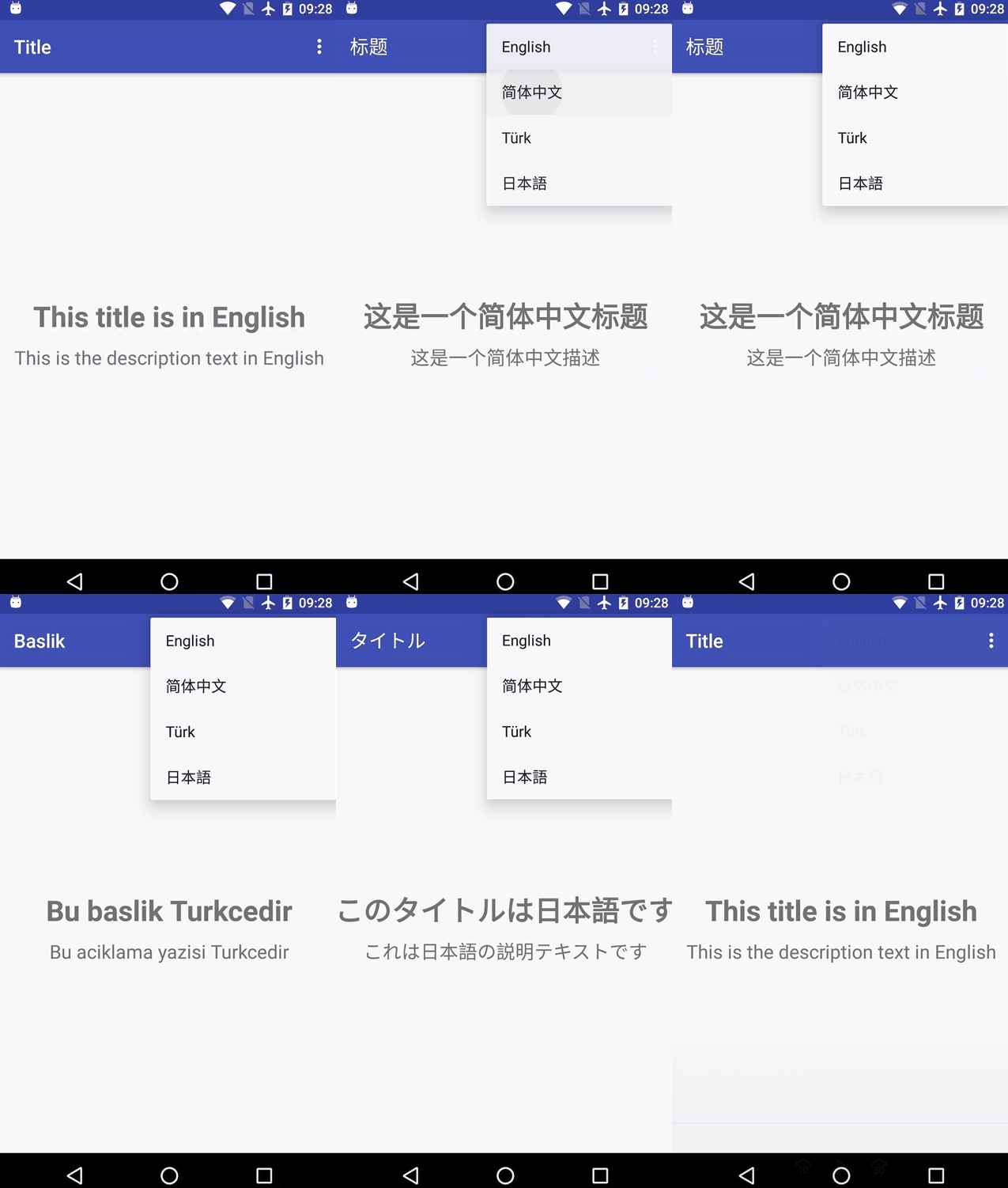
代码实现:
布局文件(Data-Binding模式),很简单就是两行文字
<?xml version="1.0" encoding="utf-8"?>

<layout xmlns:android="http://schemas.android.com/apk/res/android">

    <RelativeLayout xmlns:tools="http://schemas.android.com/tools"

        android:layout_width="match_parent"

        android:layout_height="match_parent"

        tools:context="com.tnnowu.android.switchlanguage.MainActivity">

        <TextView

            android:id="@+id/titleTextView"

            android:layout_width="wrap_content"

            android:layout_height="wrap_content"

            android:layout_centerInParent="true"

            android:text="@string/title"

            android:textSize="30sp"

            android:textStyle="bold" />

        <TextView

            android:id="@+id/descTextView"

            android:layout_width="wrap_content"

            android:layout_height="wrap_content"

            android:layout_below="@+id/titleTextView"

            android:layout_centerHorizontal="true"

            android:layout_marginTop="10dp"

            android:text="@string/desc"

            android:textSize="20sp" />

    </RelativeLayout>

</layout>
从实例中我们可以看到右上角是有Menu
<?xml version="1.0" encoding="utf-8"?>

<menu xmlns:android="http://schemas.android.com/apk/res/android"

    xmlns:tools="http://schemas.android.com/tools"

    tools:context=".MainActivity">

    <item

        android:id="@+id/language_english"

        android:orderInCategory="100"

        android:title="@string/menu_english" />

    <item

        android:id="@+id/language_simplified_chinese"

        android:orderInCategory="100"

        android:title="@string/menu_simplified_chinese" />

    <item

        android:id="@+id/language_turkish"

        android:orderInCategory="100"

        android:title="@string/menu_turkish" />

    <item

        android:id="@+id/language_japanese"

        android:orderInCategory="100"

        android:title="@string/menu_japanese" />

</menu>
(既然是多语言,所以就要有N个strings)
 ,本案例我创建了4种语言。
好的,Menu的布局写完了,接下来就是实现Menu功能,记住实现Menu就两套代码,一个 onCreateOptionsMenu , 另一个是 onOptionsItemSelected 。
@Override

public boolean onCreateOptionsMenu(Menu menu) {

    getMenuInflater().inflate(R.menu.menu, menu);

    return true;

}
@Override

public boolean onOptionsItemSelected(MenuItem item) {

    int id = item.getItemId();

    if (id == R.id.language_english) {

        updateViews("en");

    } else if (id == R.id.language_simplified_chinese) {

        updateViews("zh");

    } else if (id == R.id.language_turkish) {

        updateViews("tr");

    } else if (id == R.id.language_japanese) {

        updateViews("ja");

    }

    return super.onOptionsItemSelected(item);

}
在这里,可以看到,我们自定义一个 updateViews() 方法,用来实现切换预言时界面的改变
private void updateViews(String languageCode) {

    Context context = LocaleHelper.setLocale(this, languageCode);

    Resources resources = context.getResources();

    mBinding.titleTextView.setText(resources.getString(R.string.title));

    mBinding.descTextView.setText(resources.getString(R.string.desc));

    setTitle(resources.getString(R.string.toolbar_title));

}
公布一个 语言判断的类 LocaleHelper
public class LocaleHelper {

    private static final String SELECTED_LANGUAGE = "Locale.Helper.Selected.Language";

    public static Context onAttach(Context context) {

        String lang = getPersistedData(context, Locale.getDefault().getLanguage());

        return setLocale(context, lang);

    }

    public static Context onAttach(Context context, String defaultLanguage) {

        String lang = getPersistedData(context, defaultLanguage);

        return setLocale(context, lang);

    }

    public static String getLanguage(Context context) {

        return getPersistedData(context, Locale.getDefault().getLanguage());

    }

    public static Context setLocale(Context context, String language) {

        persist(context, language);

        if (Build.VERSION.SDK_INT >= Build.VERSION_CODES.N) {

            return updateResources(context, language);

        }

        return updateResourcesLegacy(context, language);

    }

    private static String getPersistedData(Context context, String defaultLanguage) {

        SharedPreferences preferences = PreferenceManager.getDefaultSharedPreferences(context);

        return preferences.getString(SELECTED_LANGUAGE, defaultLanguage);

    }

    private static void persist(Context context, String language) {

        SharedPreferences preferences = PreferenceManager.getDefaultSharedPreferences(context);

        SharedPreferences.Editor editor = preferences.edit();

        editor.putString(SELECTED_LANGUAGE, language);

        editor.apply();

    }

    @TargetApi(Build.VERSION_CODES.N)

    private static Context updateResources(Context context, String language) {

        Locale locale = new Locale(language);

        Locale.setDefault(locale);

        Configuration configuration = context.getResources().getConfiguration();

        configuration.setLocale(locale);

        return context.createConfigurationContext(configuration);

    }

    @SuppressWarnings("deprecation")

    private static Context updateResourcesLegacy(Context context, String language) {

        Locale locale = new Locale(language);

        Locale.setDefault(locale);

        Resources resources = context.getResources();

        Configuration configuration = resources.getConfiguration();

        configuration.locale = locale;

        resources.updateConfiguration(configuration, resources.getDisplayMetrics());

        return context;

    }

}
最后还要做的操作就是,自定义一个Application类,用来设定App的默认语言(当然了,要将这个Application应用到Manifest中)
public class BaseApplication extends Application {

    @Override

    protected void attachBaseContext(Context base) {

        super.attachBaseContext(LocaleHelper.onAttach(base, "en"));

    }

}
本案例实现App内语言切换代码量不大,通俗易懂,无垃圾代码。
示例代码下载地址:App内切换语言
关注我的新浪微博,请认准黄V认证,获取最新安卓开发资讯。
关注科技评论家,领略科技、创新、教育以及最大化人类智慧与想象力!
App内切换语言的更多相关文章
- 解决Android 7.0 App内切换语言不生效的问题
Android7.0及以前版本,Configuration中的语言相当于是App的全局设置: public static void changeAppLanguage(Context context, ...
- IOS APP 国际化 程序内切换语言实现 不重新启动系统(支持项目中stroyboard 、xib 混用。完美解决方案)
上篇 IOS APP 国际化(实现不跟随系统语言,不用重启应用,代码切换stroyboard ,xib ,图片,其他资源 介绍了纯代码刷新 实现程序内切换语言. 但效率底下,也存在一些问题.暂放弃. ...
- Android 应用内切换语言
extends :http://bbs.51cto.com/thread-1075165-1.html,http://www.cnblogs.com/loulijun/p/3164746.html 1 ...
- iOS开发--应用国际化,应用内切换语言
1.前言 自己负责的项目需要做国际化,并且要求应用内部切换语言.这个是可以做到的,也并不难,可以直接戳Github看一下 https://github.com/leo90821/Localiztion ...
- iOS APP语言国际化之应用内切换语言环境
最近接了一个项目,需求是要做一款应用的英文版本,客户并不清楚,以为要另做一个APP.沟通后告诉他们在之前应用基础上加个国际化功能就好,把之前的语言国际化重新梳理记录一下. 一般设置更改本地语言环境后, ...
- android 多语言(在APP里面内切换语言)
创建SharedPreferences的管理类 public class PreferenceUtil { private static SharedPreferences mSharedPrefer ...
- iOS多语言(国际化)开发(尾随系统 + APP内手动设置)
一:尾随系统切换语言 1>创建好项目project后, 新建一个多语言文件: 2>加入要设置的语言类型: 3>加入成功 细心的朋友可能会发如今English后面写的是3 Files ...
- iOS开发——iOS国际化 APP内语言切换
最近一个一直在迭代的老项目收到一份新的开发需求,项目需要做国际化适配,简体中文+英文.由于项目中采用了storyboard和纯代码两种布局方式,所以国际化也要同时实现.上网查了些资料,实现了更改系统语 ...
- Android应用内部实现多语言,一键切换语言,国际化适配
1.首先提供多语言对应的string值 如en对应英语, fr对应法语 两个文件中包含同样的key, 对应不同的语言的value 2.java代码相应用户切换语言动作 private static v ...
随机推荐
- 关于百度地图js api的getCurrentPosition定位不准确的解决方法
很久之前帮大叔解决了一个gps坐标转换为百度地图坐标的问题.今天大叔又给我讲百度地图定位不准.我查了一下api,用了官方给出的这样一组函数. //创建查询对象 var geolocation = ne ...
- php简单分页
<?php //详情联系QQ:1195989301 自己引用数据库类文件 $c = $db->get_one("select count(*) from `{$DT_PRE}br ...
- JavaWeb---javabean
1.javabean 1.1--javabean的创建方法 1.2-javabean可以使用跟java一样的方法创建javabean实例 创建一个普通类Users(1.共有类 2.私有属性 3.无参构 ...
- Python中闭包、装饰器的概念
1.闭包(Closure)的概念: 内部函数中对enclosing作用域的变量进行引用 1 passline = 60 2 def func(val): 3 print('%x' % id(val)) ...
- 10分钟精通SharePoint - SharePoint升级
类型: b2b(安装更新)和v2v(跨版本升级) 内容:二进制文件和数据库 过程: 升级前检查 - 检查场内数据,配置和自定义等等 升级准备和计划 - 根据需要和升级检查制定相应计划和准备工作 ...
- Java实现读取文章中重复出现的中文字符串
在上个星期阿里巴巴一面的时候,最后面试官问我如何把一篇文章中重复出现的词或者句子找出来,当时太紧张,答的不是很好.今天有时间再来亲手实现一遍.其实说白了也就是字符串的处理,所以难度并不是很大. 以下是 ...
- 部署Cloudera Management for centos 7
hadoop生态圈框架工具甚多,自己整合起来很是繁琐,特别是oozie以及hue结合来实现hive.mr.spark等定时依赖任务更是一步一个坑,为了减少踩坑,只好从apache hadoop,转向C ...
- python中的列表list
序列是Python中最基本的数据结构.序列中的每个元素都分配一个数字 - 它的位置,或索引,第一个索引是0,第二个索引是1,依此类推. Python有6个序列的内置类型,但最常见的是列表和元组. 序列 ...
- ioS开发之CoreLocation(GPS定位)
1.概述 在iOS开发中,要想加入地图和定位功能这2大功能,必须基于2个框架进行开发 (1)Map Kit :用于地图展示 (2)Core Location :用于地理定位 2个热门专业术语: LBS ...
- ASP.NET Web服务(ASMX)学习和代理生成
第一步:按照http://www.c-sharpcorner.com/article/getting-started-with-asp-net-web-services-part-one/ 建立项目和 ...