
使用JavaScript实现单向链表
一、实现功能
1、链表元素头部插入 this.unShift = function(data) {}
2、链表元素尾部插入 this.append= function(data) {} //返回boolean
3、链表元素按位置插入 this.insert= function(position, data) {} //返回boolean
4、链表元素头部删除 this.shift= function() {} //返回boolean
5、链表元素尾部删除 this.pop = function() {} //返回boolean
6、链表按元素删除 this.removeData = function(data) {} //返回boolean
7、链表按下标删除 this.removePos = function(position) {} //返回boolean
8、链表是否为空 this.isEmpty= function() {} //返回boolean
9、链表元素组成的字符串 this.toString= function() {} //返回 string
10、链表的长度 this.length= function() {} //返回number
11、链表查找元素 this.searchData= function(data) {} //返回obj={index:,data:}
二、节点声明
function Node(data) {

	this.data = data  //数据

	this.next = null  //指向

}
三、完整功能代码
function List() {

	let length = 0

	let head = null

	this.append = (data) => { // 向链表末尾添加元素

		let node = new Node(data)

		let current

		if(head === null) {

			head = node

		}

		else {

			current = head

			while(current.next) {

				current = current.next

			}

			current.next = node

		}

		length ++

		return true

	}

	this.insert = (position, data) => { // 向链表指定位置添加元素

	    if (position >= 0 && position <= length) { //检查是否越界

	        let node = new Node(data),

	            current = head,

	            previous,

	            index = 0

	        if (position === 0) { //在第一个位置添加

	            node.next = current

	            head = node

	        }else {

	            while (index ++ < position) {

	                previous = current

	                current = current.next

	            }

	            //通过改变指针,将node链接在previous和current之间

	            node.next = current

	            previous.next = node

	        }

	        length ++

	        return true

	    }else {

	        return false

	    }

	}

	this.removeData = (data) => { // 通过数据删除链表元素

		let previous,

			current,

			index = 0

		if (head === null) {

			return false

		}

		current = head

		while(index ++ < length && current.data !== data) {

			previous = current

			current = current.next

		}

		if(index > length) {

			return false

		}else {

			current.next = current.next

			length --

			return true

		}

	}

	this.removePos = (position) => { // 通过位置删除链表元素

		if( position >= -1 && position < length) {

			let previous,

				current = head,

				index = 0

			if (position === 0) {

				head = current.next

			}else {

				while(index ++ < position) {

					previous = current

					current = current.next

				}

				previous.next = current.next

			}

			length --

			return true

		}else {

			return false

		}

	}

	this.unShift = (data) => {  //向链表首插入元素

		let node = new Node(data),

			current = head

		node.next = current

		head = node

		length ++

		return true

	}

	this.shift = () => {  //删除链表首元素

		let current = head

		if(head === null) {

			return false

		}

		else {

			head = current.next

			length --

			return true

		}

	}

	this.pop = () => { // 删除链表尾元素

		let current,

			previous

		if (head === null){

			return false

		}

		current = head

		while(current) {

			previous = current

			current = current.next

		}

		previous = null

		length --

		return true

	}

	this.isEmpty = () => {

		return length === 0

	}

	this.length = () => {

		return length

	}

	this.searchData = (data) => { //查找元素

		let current,

			index = 0,

			obj = {}

		if( head === null ) {

			return false

		}

		current = head

		while(index ++ < length && current.data !== data) {

			current = current.next

		}

		obj = {

			index: index,

			data: current.data

		}

		return obj

	}

	this.toString = () => { //输出数据组成的字符串

		let resultStr = "",

			current,

			index = length

		if (head === null) {

			return ""

		}

		current = head

		while(index -- > 0) {

			resultStr += "," + current.data

			current = current.next

		}

		return resultStr.slice(1)

	}

}
四、测试代码及结果
1、测试代码
<!DOCTYPE html>

<html>

<head>

	<title>test</title>

	<script type="text/javascript" src="./singleList.js"></script>

</head>

<body>

	<script type="text/javascript">

		let singleList = new List()

		console.log(singleList.append("1"))

		console.log(singleList.toString())

		console.log(singleList.append("2"))

		console.log(singleList.toString())

		console.log(singleList.append("3"))

		console.log(singleList.toString())

		console.log(singleList.unShift(0))

		console.log(singleList.toString())

		console.log(singleList.insert(2,"4"))

		console.log(singleList.toString())

		console.log(singleList.shift())

		console.log(singleList.toString())

		console.log(singleList.pop())

		console.log(singleList.toString())

		console.log(singleList.searchData("1"))

		console.log(singleList.removePos(1))

		console.log(singleList.toString())

		console.log(singleList.removeData("1"))

		console.log(singleList.toString())

		console.log(singleList.isEmpty())

	</script>

</body>

</html>
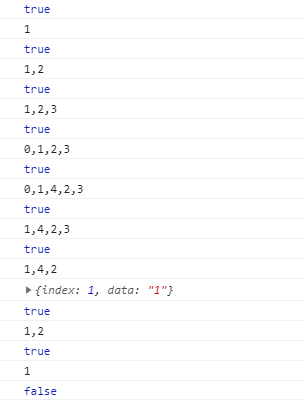
2、测试结果
使用JavaScript实现单向链表的更多相关文章
- JavaScript实现单向链表
JavaScript 本身提供了十分好用的数据类型,以满足大家的日常使用.单靠 Array 和 Object 也的确足够应付日常的绝大部分需求,这也导致了很多前端er对数据结构这一块不是十分的了解. ...
- JavaScript实现单向链表结构
参考资料 一.什么是链表结构? 1.1.简介 链表和数组一样, 可以用于存储一系列的元素, 但是链表和数组的实现机制完全不同,链表中的元素在内存不是连续的空间,链表的每个元素由一个存储元素本身(数据) ...
- 学习javascript数据结构(二)——链表
前言 人生总是直向前行走,从不留下什么. 原文地址:学习javascript数据结构(二)--链表 博主博客地址:Damonare的个人博客 正文 链表简介 上一篇博客-学习javascript数据结 ...
- Reverse Linked List II 单向链表逆序(部分逆序)
0 问题描述 原题点击这里. 将单向链表第m个位置到第n个位置倒序连接.例如, 原链表:1->2->3->4->5, m=2, n =4 新链表:1->4->3-& ...
- 【编程题目】输入一个单向链表,输出该链表中倒数第 k 个结点
第 13 题(链表):题目:输入一个单向链表,输出该链表中倒数第 k 个结点.链表的倒数第 0 个结点为链表的尾指针.链表结点定义如下: struct ListNode {int m_nKey;Lis ...
- 输出单向链表中倒数第k个结点
描述 输入一个单向链表,输出该链表中倒数第k个结点,链表的倒数第0个结点为链表的尾指针. 链表结点定义如下: struct ListNode { int m_nKey; ListNode* ...
- Linus:利用二级指针删除单向链表
Linus大神在slashdot上回答一些编程爱好者的提问,其中一个人问他什么样的代码是他所喜好的,大婶表述了自己一些观点之后,举了一个指针的例子,解释了什么才是core low-level codi ...
- 【转】Linus:利用二级指针删除单向链表
原文作者:陈皓 原文链接:http://coolshell.cn/articles/8990.html 感谢网友full_of_bull投递此文(注:此文最初发表在这个这里,我对原文后半段修改了许多, ...
- C语言实现单向链表及其各种排序(含快排,选择,插入,冒泡)
#include<stdio.h> #include<malloc.h> #define LEN sizeof(struct Student) struct Student / ...
随机推荐
- java中的try-catch-finally异常处理(学习笔记)
一.异常概述 异常:Exception,是在运行发生的不正常情况. 原始异常处理: if(条件) { 处理办法1 处理办法2 处理办法3 } if(条件) { 处理办法4 处理办法5 处理办法6 } ...
- java集合性能
https://www.cnblogs.com/xyhuangjinfu/p/5429644.html
- Beta(5/7)
鐵鍋燉腯鱻 项目:小鱼记账 团队成员 项目燃尽图 冲刺情况描述 站立式会议照片 各成员情况 团队成员 学号 姓名 git地址 博客地址 031602240 许郁杨 (组长) https://githu ...
- django——视图层
1. 视图函数 一个视图函数,简称视图,是一个简单的Python 函数,它接受Web请求并且返回Web响应.响应可以是一张网页的HTML内容,一个重定向,一个404错误,一个XML文档,或者一张图片. ...
- angular.isString()
<!DOCTYPE html> <html> <head> <meta charset="UTF-8"> <title> ...
- 【搜索1】P1605 迷宫
题目背景 迷宫 [问题描述] 给定一个N*M方格的迷宫,迷宫里有T处障碍,障碍处不可通过.给定起点坐标和 终点坐标,问: 每个方格最多经过1次,有多少种从起点坐标到终点坐标的方案.在迷宫 中移动有上下 ...
- oracle 表 库实例 空间
地址 http://blog.csdn.net/g15738290530/article/details/51859048 1:个人理解 数据库可以有多个实例,其中 orcl 为默认 一般情况下,一个 ...
- Unity 和android 交互 记录
参考文章 http://www.jianshu.com/p/c06063a403c6 趟坑如下 icon 冲突问题: 设置不了unity icon,显示的是默认的 android 小人 解决方法: 在 ...
- connection reset by peer
connection reset by peer https 请求返回下面的内容 {"msg":"connection reset by peer"," ...
- Sublime Text 3 使用心得
1.Ctrl + Shift + P : package control install package == > ConvertToUTF82.列模式: 苹果:OS X -鼠标左键+Optio ...