
python 抓取alexa数据
要抓取http://www.alexa.cn/rank/baidu.com网站的排名信息:例如抓取以下信息:

需要微信扫描登录
因为这个网站抓取数据是收费,所以就利用网站提供API服务获取json信息:
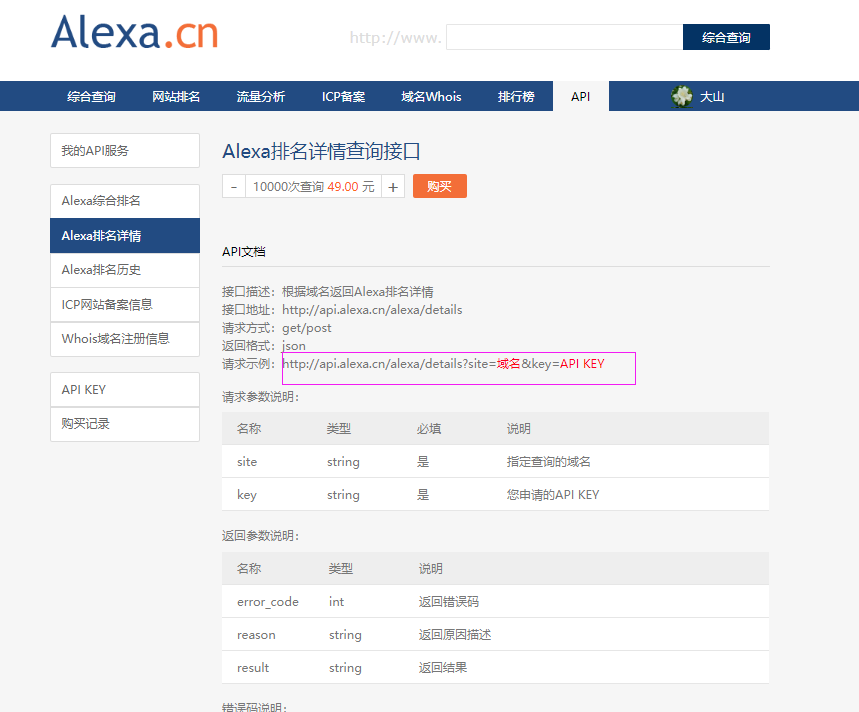
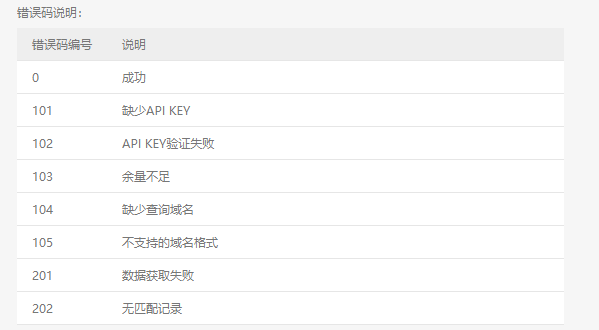

上面的API KEY值需要花钱买的(注意开通会员的方式不行,必须以10000次查询 49.00 元这种方式,比较坑爹啊)
具体python代码
# coding=utf-8

import json

import httplib2

import json

import xlrd

import xlwt

import os

import datetime

import time

class alexa:

    def __init__(self,key="7Z4ddd6ywaQuo6RkKfI3SzGeKn8Mavde"):

        self.key = key

    def WriteLog(self, message,date):

        fileName = os.path.join(os.getcwd(), 'alexa/' + date  +   '.txt')

        with open(fileName, 'a') as f:

            f.write(message)

    def WriteSheetRow(self,sheet, rowValueList, rowIndex, isBold):

        i = 0

        style = xlwt.easyxf('font: bold 1')

        # style = xlwt.easyxf('font: bold 0, color red;')#红色字体

        style2 = xlwt.easyxf('pattern: pattern solid, fore_colour yellow; font: bold on;') # 设置Excel单元格的背景色为黄色,字体为粗体

        for svalue in rowValueList:

            if isBold:

                sheet.write(rowIndex, i, svalue, style2)

            else:

                sheet.write(rowIndex, i, svalue)

            i = i + 1

    def save_Excel(self,headList,valuelist,fileName):

        wbk = xlwt.Workbook()

        sheet = wbk.add_sheet('sheet1', cell_overwrite_ok=True)

        # headList = ['周期', '全球网站排名', '变化趋势', '日均UV']

        rowIndex = 0

        self.WriteSheetRow(sheet, headList, rowIndex, True)

        for lst in valuelist:

            rowIndex+=1

            self.WriteSheetRow(sheet, lst, rowIndex, False)

        wbk.save(fileName)

    def getAlexaData(self,domain):

        url="http://api.alexa.cn/alexa/details?site=%s&key=%s"%(domain,self.key)

        try:

            h = httplib2.Http(".cache")

            (resp_headers, content) = h.request(url, "GET")

            data = json.loads(content.decode('utf8'))

            self.parserData(data)

            # print(data)

        except Exception as e1:

            error = "ex"

    def parserData(self,data):

        # f = open("alexa.txt", "r")

        # txt = f.read()

        # data = json.loads(txt)

        traffic_dict = data["result"]["traffic_data"]

        day = traffic_dict["day"]

        week = traffic_dict["week"]

        month = traffic_dict["month"]

        three_month = traffic_dict["three_month"]

        trafic_headList = ['周期', '全球网站排名', '变化趋势', '日均UV', '日均PV']

        traffic_data_list =[]

        day_list = ["当日"]

        week_list = ["周平均"]

        month_list = ["月平均"]

        three_month_list = ["三月平均"]

        trafic = ["time_range", "traffic_rank", "traffic_rank_delta", "avg_daily_uv", "avg_daily_pv"]

        length = len(trafic)

        for i in range(1,length):

            day_list.append(day[trafic[i]])

            week_list.append(week[trafic[i]])

            month_list.append(month[trafic[i]])

            three_month_list.append(three_month[trafic[i]])

        traffic_data_list.append(day_list)

        traffic_data_list.append(week_list)

        traffic_data_list.append(month_list)

        traffic_data_list.append(three_month_list)

        fileName = datetime.datetime.now().strftime('%Y-%m-%d')+"_traffic.xlsx"

        fileName = os.path.join(os.getcwd(),fileName)

        self.save_Excel(trafic_headList,traffic_data_list,fileName)

        country_headList = ['国家/地区名称', '国家/地区代码', '国家/地区排名', '网站访问比例', '页面浏览比例']

        country_data_list = []

        country_data = data["result"]["country_data"]

        col_list = ["country","code","rank","per_users","per_pageviews"]

        length = len(col_list)

        for item in country_data:

            lst =[]

            for i in range(0,length):

                lst.append(item[col_list[i]])

            country_data_list.append(lst)

        fileName = datetime.datetime.now().strftime('%Y-%m-%d') + "_country.xlsx"

        fileName = os.path.join(os.getcwd(), fileName)

        self.save_Excel(country_headList, country_data_list, fileName)

        subdomains_headList = ['被访问网址', '近月网站访问比例', '近月页面访问比例', '人均页面浏览量']

        subdomains_data_list = []

        subdomains_data = data["result"]["subdomains_data"]

        sub_col_list = ["subdomain", "reach_percentage", "pageviews_percentage", "pageviews_peruser"]

        length = len(sub_col_list)

        for item in subdomains_data:

            lst = []

            for i in range(0, length):

                lst.append(item[sub_col_list[i]])

            subdomains_data_list.append(lst)

        fileName = datetime.datetime.now().strftime('%Y-%m-%d') + "_subdomains.xlsx"

        fileName = os.path.join(os.getcwd(), fileName)

        self.save_Excel(subdomains_headList, subdomains_data_list, fileName)

        # print(("%s,%s,%s,%s,%s") % (day[trafic[0]], day[trafic[1]], day[trafic[2]], day[trafic[3]], day[trafic[4]]))

        # print(("%s,%s,%s,%s,%s") % (week[trafic[0]], week[trafic[1]], week[trafic[2]], week[trafic[3]], week[trafic[4]]))

        # print(("%s,%s,%s,%s,%s") % (month[trafic[0]], month[trafic[1]], month[trafic[2]], month[trafic[3]], month[trafic[4]]))

        # print(("%s,%s,%s,%s,%s") % (three_month[trafic[0]], three_month[trafic[1]], three_month[trafic[2]], three_month[trafic[3]], three_month[trafic[4]]))

        # print("\n")

        # print("country_data")

        # country_data =  data["result"]["country_data"]

        # for item in country_data:

        #     print(("%s,%s,%s,%s,%s") % (item["country"], item["code"], item["rank"], item["per_users"], item["per_pageviews"]))

        #

        # print("\n")

        # print("subdomains_data")

        # subdomains_data = data["result"]["subdomains_data"]

        # for item in subdomains_data:

        #     print(("%s,%s,%s,%s") % (item["subdomain"], item["reach_percentage"], item["pageviews_percentage"], item["pageviews_peruser"]))

obj = alexa()

obj.getAlexaData("baidu.com")

# obj.parserData("")
python 抓取alexa数据的更多相关文章
- python 抓取金融数据,pandas进行数据分析并可视化系列 (一)
终于盼来了不是前言部分的前言,相当于杂谈,算得上闲扯,我觉得很多东西都是在闲扯中感悟的,比如需求这东西,一个人只有跟自己沟通好了,总结出某些东西了,才能更好的和别人去聊,去说. 今天这篇写的是明白需求 ...
- 利用python抓取页面数据
1.首先是安装python(注意python3.X和python2.X是不兼容的,我们最好用python3.X) 安装方法:安装python 2.安装成功后,再进行我们需要的插件安装.(这里我们需要用 ...
- 记录使用jQuery和Python抓取采集数据的一个实例
从现成的网站上抓取汽车品牌,型号,车系的数据库记录. 先看成果,大概4w条车款记录 一共建了四张表,分别存储品牌,车系,车型和车款 大概过程: 使用jQuery获取页面中呈现的大批内容 能通过页面一次 ...
- 使用python抓取App数据
App接口爬取数据过程使用抓包工具手机使用代理,app所有请求通过抓包工具获得接口,分析接口反编译apk获取key突破反爬限制需要的工具:夜神模拟器FiddlerPycharm实现过程首先下载夜神模拟 ...
- 网络爬虫-使用Python抓取网页数据
搬自大神boyXiong的干货! 闲来无事,看看了Python,发现这东西挺爽的,废话少说,就是干 准备搭建环境 因为是MAC电脑,所以自动安装了Python 2.7的版本 添加一个 库 Beauti ...
- Python抓取双色球数据
数据来源网站http://baidu.lecai.com/lottery/draw/list/50?d=2013-01-01 HTML解析器http://pythonhosted.org/pyquer ...
- 使用 Python 抓取欧洲足球联赛数据
Web Scraping在大数据时代,一切都要用数据来说话,大数据处理的过程一般需要经过以下的几个步骤 数据的采集和获取 数据的清洗,抽取,变形和装载 数据的分析,探索和预测 ...
- 如何用python抓取js生成的数据 - SegmentFault
如何用python抓取js生成的数据 - SegmentFault 如何用python抓取js生成的数据 1赞 踩 收藏 想写一个爬虫,但是需要抓去的的数据是js生成的,在源代码里看不到,要怎么才能抓 ...
- Python抓取百度百科数据
前言 本文整理自慕课网<Python开发简单爬虫>,将会记录爬取百度百科"python"词条相关页面的整个过程. 抓取策略 确定目标:确定抓取哪个网站的哪些页面的哪部分 ...
随机推荐
- Centos7 如何减少/home分区,扩大/root分区
把/home内容备份,然后将/home文件系统所在的逻辑卷删除,扩大/root文件系统,新建/home:tar cvf /tmp/home.tar /home #备份/home umount /hom ...
- WinForm 数据库无限填充树目录 treeView
我自己想的是处理数据库每一条数据,然后来插入子节点的子节点. 奈何没有插入子节点的子节点的办法,百度来百度去,一看全都是递归. 本来我是绝望的, 但是没办法,老板的需求不能驳回啊,于是就来ctrl c ...
- BZOJ.3498.[PA2009]Cakes(三元环 枚举)
题目链接 感觉我可能学的假的(复杂度没问题,但是常数巨大). 一个比较真的说明见这儿:https://czyhe.me/blog/algorithm/3-mem-ring/3-mem-ring/. \ ...
- [CC-CHEFINV]Chef and Swaps
[CC-CHEFINV]Chef and Swaps 题目大意: 长度为\(n(n\le2\times10^5)\)的数列,\(q(q\le2\times10^5)\)次询问,每次问交换\(A_x\) ...
- hdu 5308 (2015多校第二场第9题)脑洞模拟题,无语
题目链接:http://acm.hdu.edu.cn/listproblem.php?vol=44 题意:给你n个n,如果能在n-1次运算之后(加减乘除)结果为24的输出n-1次运算的过程,如果不能输 ...
- Lunix/Mac下根据最后修改时间复制文件和文件夹,保持原有的目录结构
度娘知道:http://zhidao.baidu.com/link?url=DD47jm6qDgT7yxsnz9e-NC4Fqd33oRoiIwcGLkw5TL4cbf50VKY2IONbHKH0IE ...
- ASP.NET MVC HttpVerbs.Delete/Put Routes not firing
原文地址: https://weblog.west-wind.com/posts/2015/Apr/09/ASPNET-MVC-HttpVerbsDeletePut-Routes-not-firing ...
- iOS录音后播放声音小,AudioSessionInitialize failed,AudioQueueStart failed (-50)
方法1: UInt32 audioRoute = kAudioSessionOverrideAudioRoute_Speaker; AudioSessionSetProperty(kAudioSess ...
- hihocoder1322希尔伯特曲线(163周)
hihocoder1322 : 希尔伯特曲线(163周) 题目链接 思路: 看图,对每个Hn迭代到H(n-1) 直到迭代到1就ok,判断在哪个区间就好了.一定一定要注意数据的范围!! ac代码: // ...
- Python学习笔记(三):随机生成函数方法
本文是在Python2下总结! Python中的random模块用于生成随机数,如果想生成随机数需要先导入random的模块然后才能使用其中的方法,下面简单介绍一下常用的结果函数方法: 1·.rand ...