
Android之QQ登录界面
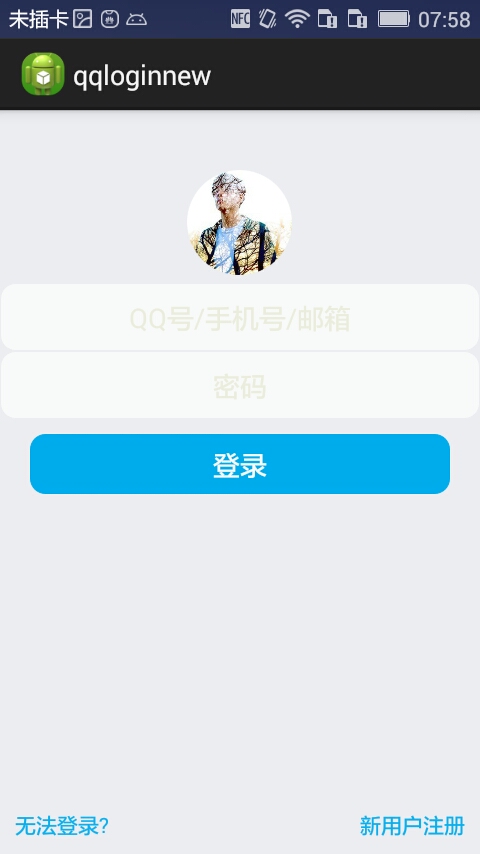
首先过程中碰到的几个问题:
1、对 EditText 进行自定义背景
2、运行时自动 EditText 自动获得焦点
3、在获得焦点时即清空 hint ,而不是输入后清空
4、清空按钮的出现时机(在得到焦点并且有输入内容时)
.........
--- 这些问题都有一一解决 ---
以下是代码:
布局 fragment_main(问题2)
 <!-- android:focusable="true"

      android:focusableInTouchMode="true"

       把EditText默认的行为截断了! -->

 <RelativeLayout xmlns:android="http://schemas.android.com/apk/res/android"

     xmlns:tools="http://schemas.android.com/tools"

     android:layout_width="match_parent"

     android:layout_height="match_parent"

     android:background="#ECEDF1"

     android:focusable="true"

     android:focusableInTouchMode="true"

     tools:context="com.dragon.android.qqlogin.MainActivity$PlaceholderFragment" >

     <ImageView

         android:id="@+id/imageView1"

         android:layout_width="70dp"

         android:layout_height="70dp"

         android:layout_centerHorizontal="true"

         android:layout_marginBottom="5dp"

         android:layout_marginTop="40dp"

         android:src="@drawable/a" />

     <EditText

         android:id="@+id/editText1"

         android:layout_width="match_parent"

         android:layout_height="wrap_content"

         android:layout_below="@id/imageView1"

         android:ems="10"

         android:background="@drawable/bg_edittext"

         android:inputType="textPersonName"

         android:gravity="center"

         android:textColor="#6A6A6C"

         android:hint="@string/inaccount"

         android:textColorHint="#ECEDDD">

     </EditText>

     <EditText

         android:id="@+id/editText2"

         android:layout_width="match_parent"

         android:layout_height="wrap_content"

         android:layout_below="@id/editText1"

         android:ems="10"

         android:background="@drawable/bg_edittext"

         android:inputType="textPassword"

         android:gravity="center"

         android:textColor="#6A6A6C"

         android:hint="@string/inpwd"

         android:textColorHint="#ECEDDD" >

     </EditText>

     <Button

         android:id="@+id/button1"

         android:layout_width="match_parent"

         android:layout_height="40dp"

         android:layout_below="@id/editText2"

         android:layout_marginLeft="20dp"

         android:layout_marginRight="20dp"

         android:layout_marginTop="10dp"

         android:background="@drawable/bg_button"

         android:text="@string/button"

         android:gravity="center"

         android:textColor="#F9FAFB" />

     <LinearLayout

         android:layout_width="match_parent"

         android:layout_height="wrap_content"

         android:layout_alignParentBottom="true"

         android:padding="10dp" >

         <TextView

             android:id="@+id/textView2"

             android:layout_width="wrap_content"

             android:layout_height="wrap_content"

             android:gravity="center"

             android:text="@string/faillogin"

             android:textColor="#0EB1EF" />

         <TextView

             android:id="@+id/textView3"

             android:layout_width="match_parent"

             android:layout_height="wrap_content"

             android:gravity="right"

             android:text="@string/regist"

             android:textColor="#0EB1EF" />

     </LinearLayout>

     <Button

         android:id="@+id/button2"

         android:layout_width="16dp"

         android:layout_height="16dp"

         android:layout_alignTop="@id/editText1"

         android:layout_marginTop="15dp"

         android:layout_alignParentRight="true"

         android:layout_marginRight="10dp"

         android:background="@drawable/clear"

         android:visibility="invisible" />

     <Button

         android:id="@+id/button3"

         android:layout_width="16dp"

         android:layout_height="16dp"

         android:layout_alignTop="@id/editText2"

         android:layout_marginTop="15dp"

         android:layout_alignLeft="@+id/button2"

         android:background="@drawable/clear"

         android:visibility="invisible" />

 </RelativeLayout>
fragment_main
Button 和 EditText 的背景(问题1)
 <?xml version="1.0" encoding="utf-8"?>

 <shape xmlns:android="http://schemas.android.com/apk/res/android" >

     <stroke android:width="1px" android:color="#00ACED" />

     <solid android:color="#00ACED" />

     <corners android:radius="10dp" />

 </shape>
bg_button
 <?xml version="1.0" encoding="utf-8"?>

 <shape xmlns:android="http://schemas.android.com/apk/res/android" >

     <stroke android:width="1px" android:color="#ECEDF1" />

     <solid android:color="#F9FAFB" />

     <corners android:radius="10dp" />

     <padding

         android:top="10dp"

         android:bottom="10dp"/>

 </shape>
bg_edittext
strings
 <?xml version="1.0" encoding="utf-8"?>

 <resources>

     <string name="app_name">qqloginnew</string>

     <string name="action_settings">Settings</string>

     <string name="button">登录</string>

     <string name="faillogin">无法登录?</string>

     <string name="regist">新用户注册</string>

     <string name="inaccount">QQ号/手机号/邮箱</string>

     <string name="inpwd">密码</string>

     <string name="sucess">登录成功</string>

 </resources>
strings
MainActivity (问题3、4.....)
 package com.dragon.android.qqloginnew;

 import android.app.Activity;

 import android.os.Bundle;

 import android.text.Editable;

 import android.text.TextWatcher;

 import android.view.View;

 import android.view.View.OnClickListener;

 import android.view.View.OnFocusChangeListener;

 import android.widget.Button;

 import android.widget.EditText;

 public class MainActivity extends Activity {

     private EditText editText1;

     private EditText editText2;

     // private Button button;

     private Button clearButton1;

     private Button clearButton2;

     // 得到strings中的属性

     // private String string2 = getResources().getString(R.string.inaccount);

     @Override

     protected void onCreate(Bundle savedInstanceState) {

         super.onCreate(savedInstanceState);

         setContentView(R.layout.fragment_main);

         editText1 = (EditText) findViewById(R.id.editText1);

         editText2 = (EditText) findViewById(R.id.editText2);

         // button = (Button) findViewById(R.id.button1);

         clearButton1 = (Button) findViewById(R.id.button2);

         clearButton2 = (Button) findViewById(R.id.button3);

         // 对EditText进行焦点变更监听

         editText1.setOnFocusChangeListener(new EditTextListener(clearButton1));

         editText2.setOnFocusChangeListener(new EditTextListener(clearButton2));

         // 对清空按钮进行点击监听

         clearButton1.setOnClickListener(new ClearButtonListener());

         clearButton2.setOnClickListener(new ClearButtonListener());

         // 对EditText进行编辑监听

         editText1.addTextChangedListener(new MyEditTextWatcher(editText1));

         editText2.addTextChangedListener(new MyEditTextWatcher(editText2));

     }

     /**

      * 对EditText的内容进行实时监控

      *

      * @author Auser

      *

      */

     class MyEditTextWatcher implements TextWatcher {

         private CharSequence temp;

         private EditText editText;

         public MyEditTextWatcher(EditText editText) {

             this.editText = editText;

         }

         @Override

         // int start开始的位置, int count被改变的旧内容数, int after改变后的内容数量

         public void beforeTextChanged(CharSequence s, int start, int count,

                 int after) {

             // 这里的s表示改变之前的内容,通常start和count组合,可以在s中读取本次改变字段中被改变的内容。而after表示改变后新的内容的数量。

         }

         @Override

         // int start开始的位置, int before改变前的内容数量, int count新增量

         public void onTextChanged(CharSequence s, int start, int before,

                 int count) {

             // 这里的s表示改变之后的内容,通常start和count组合,可以在s中读取本次改变字段中新的内容。而before表示被改变的内容的数量。

             temp = s;

         }

         @Override

         // 表示最终内容

         public void afterTextChanged(Editable s) {

             if (temp.length() > 0) {

                 // 设置清空按钮为可见

                 if (editText == editText1) {

                     clearButton1.setVisibility(View.VISIBLE);

                 } else if (editText == editText2) {

                     clearButton2.setVisibility(View.VISIBLE);

                 }

             } else {

                 // 设置清空按钮不可见

                 if (editText == editText1) {

                     clearButton1.setVisibility(View.INVISIBLE);

                 } else if (editText == editText2) {

                     clearButton2.setVisibility(View.INVISIBLE);

                 }

             }

         }

     }

     /**

      * 清空按钮点击事件

      *

      * @author

      *

      */

     class ClearButtonListener implements OnClickListener {

         @Override

         public void onClick(View view) {

             if (view == clearButton1) {

                 editText1.setText("");

             } else if (view == clearButton2) {

                 editText2.setText("");

             }

         }

     }

     /**

      * 焦点变更事件

      *

      * @author Auser

      *

      */

     class EditTextListener implements OnFocusChangeListener {

         private Button clear;

         public EditTextListener(Button clear) {

             this.clear = clear;

         }

         @Override

         public void onFocusChange(View v, boolean hasFocus) {

             EditText textView = (EditText) v;

             String hint;

             if (hasFocus) {

                 // 当获取焦点时如果内容不为空则清空按钮可见

                 if (!textView.getText().toString().equals("")) {

                     clear.setVisibility(View.VISIBLE);

                 }

                 // if (textView == editText2) {

                 // // 设置输入格式为不可见的密码格式

                 // textView.setInputType(InputType.TYPE_CLASS_TEXT

                 // | InputType.TYPE_TEXT_VARIATION_PASSWORD);

                 // }

                 hint = textView.getHint().toString();

                 // 给TextView添加额外的数据

                 textView.setTag(hint);

                 textView.setHint("");

             } else {

                 // 当失去焦点时清空按钮不可见

                 clear.setVisibility(View.INVISIBLE);

                 // if (textView == editText2) {

                 // // 设置输入格式为可见的密码格式

                 // textView.setInputType(InputType.TYPE_CLASS_TEXT

                 // | InputType.TYPE_TEXT_VARIATION_VISIBLE_PASSWORD);

                 // }

                 // 取出之前添加的额外数据

                 hint = textView.getTag().toString();

                 textView.setHint(hint);

             }

         }

     }

 }
图片素材
a.png clear.png
-------------------------一个初步的登录界面------------------------
Android之QQ登录界面的更多相关文章
- Android菜鸟的成长笔记(3)——给QQ登录界面说So Easy
原文:Android菜鸟的成长笔记(3)--给QQ登录界面说So Easy 上一篇:Android菜鸟的成长笔记(2)--第一个Android应用 我们前面已经做了第一个Android应用程序,虽然有 ...
- [转]Android:布局实例之模仿QQ登录界面
Android:布局实例之模仿QQ登录界面 预览图: 准备: 1.找到模仿对象 QQ登陆界面UI下载>>>>> 2.导入工程 3.查看布局结构和使用控件 其对应效果图分布 ...
- QQ登录界面布局
简单的qq登录界面布局 <?xml version="1.0" encoding="utf-8"?> <RelativeLayout xmln ...
- 界面编程模仿篇(QQ登录界面逼真篇)
写了好多天的爬虫,偷空前前后后用了两天的时间(排除吃饭睡觉)写完了这个QQ登录界面,看起来还凑和着吧,如果是的大神的,莫见笑,纯属业余作品,废话先不多说,截图如下,其中第二幅图片中的红色方框部份有待完 ...
- 零基础~仿qq登录界面
html代码: <!DOCTYPE html> <html> <head> <meta charset="utf-8"> <t ...
- WPF开发实例——仿QQ登录界面
原文:WPF开发实例--仿QQ登录界面 版权声明:本文为博主原创文章,如需转载请标明转载地址 http://blog.csdn.net/u013981858 https://blog.csdn.net ...
- JavaSwing仿QQ登录界面,注释完善,适合新手学习
使用说明: 这是一个java做的仿制QQ登录界面,界面仅使用一个类, JDK版本为jdk-11 素材包的名字为:素材(下载)请在项目中新建一个名字为“素材”的文件夹. 素材: https://pan. ...
- swing实现QQ登录界面1.0( 实现了同一张图片只加载一次)、(以及实现简单的布局面板添加背景图片控件的标签控件和添加一个关闭按钮控件)
swing实现QQ登录界面1.0( 实现了同一张图片只加载一次).(以及实现简单的布局面板添加背景图片控件的标签控件和添加一个关闭按钮控件) 代码思路分析: 1.(同一张图片仅仅需要加载一次就够了,下 ...
- 编写Java程序,使用Swing布局管理器和常用控件,实现仿QQ登录界面
返回本章节 返回作业目录 需求说明: 使用Swing布局管理器和常用控件,实现仿QQ登录界面 实现思路: 创建登录界面的类QQLogin,该类继承父类JFrame,在该类中创建无参数的构造方法,在构造 ...
随机推荐
- Linux开源系统对比Windows闭源系统的优势解析
当我们听到linux的时候是不是觉得高大上的感觉呢?在我刚上大学的时候,听着学长们给我讲他们的大学的学习经历,先学习C语言.单片机.然后做一些项目,现在正学习linux操作系统,当我听到linux操作 ...
- JS常用正则表达式和JS控制输入框输入限制(数字、汉字、字符)
验证数字:^[0-9]*$验证n位的数字:^\d{n}$验证至少n位数字:^\d{n,}$验证m-n位的数字:^\d{m,n}$验证零和非零开头的数字:^(0|[1-9][0-9]*)$验证有两位小数 ...
- 破解Google Gmail的https新思路
最近,Google针对gmail被攻击事件,全面默认启用了始终以https访问Gmail的方式了.但是,对于可以动用整个国家力量的黑客来说,从网络通讯数据中(在此不讨论对用户电脑种木马破解https的 ...
- 【 2013 Multi-University Training Contest 1 】
HDU 4602 Partition f[i]表示和为i的方案数.已知f[i]=2i-1. dp[i]表示和为i,k有多少个.那么dp[i]=dp[1]+dp[2]+...+dp[i-1]+f[i-k ...
- 如何理解和熟练运用js中的call及apply?
改变this指向 要先明白存在call和apply的原因,才能记得牢一点: 在javascript OOP中,我们经常会这样定义: function cat(){ } cat.prototype={ ...
- 在Ubuntu环境把PPT和Word转换为swf文件
项目需要一个在线浏览文档的功能,于是参照网上的代码写了一份利用Microsoft Office 2010和swftools-2013-04-09-1007.exe转换的程序 思路:调用电脑本机的off ...
- Websocket 协议解析
WebSocket protocol 是HTML5一种新的协议.它是实现了浏览器与服务器全双工通信(full-duplex). 现 很多网站为了实现即时通讯,所用的技术都是轮询(po ...
- AngularJs的UI组件ui-Bootstrap分享(十三)——Progressbar
进度条控件有两种指令,第一种是uib-progressbar指令,表示单一颜色和进度的一个进度条.第二种是uib-bar和uib-progress指令,表示多种颜色和多个进度组合而成的一个进度条. 这 ...
- 第五篇——C++实现四则运算
写一个能自动生成小学四则运算题目的命令行 “软件”, 分别满足下面的各种需求.下面这些需求都可以用命令行参数的形式来指定: a) 除了整数以外,还要支持真分数的四则运算. (例如: 1/6 + 1/8 ...
- 《C++primer》v5 第5章 语句 读书笔记 习题答案
5.1 空语句只有一个";".如果什么也不想做可以使用空语句. 5.2 用花括号{}括起来的叫块,也叫复合语句.有多条语句作用在同一个作用域时,需要用花括号括起来. 5.3 降低了 ...