
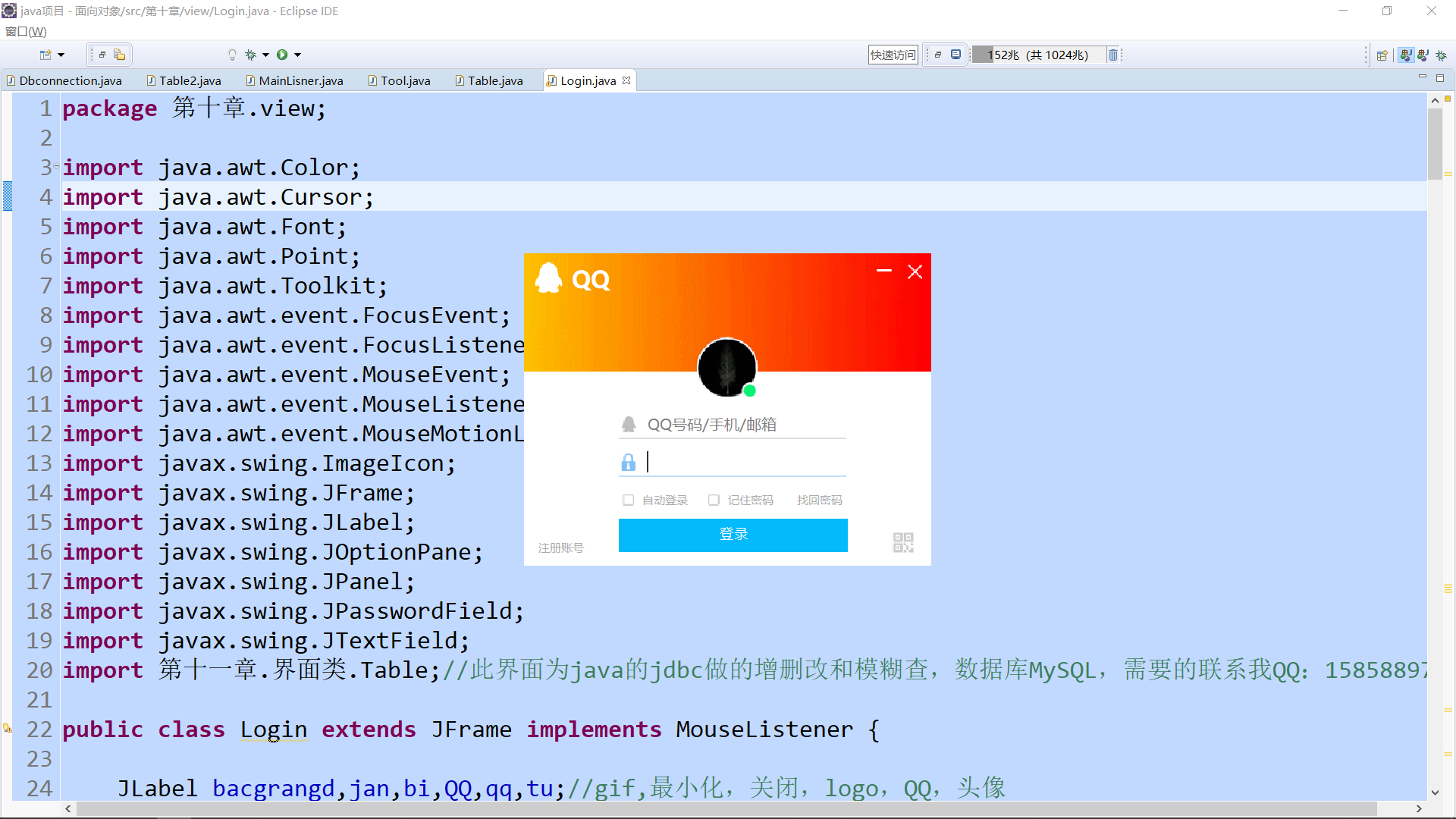
JavaSwing仿QQ登录界面,注释完善,适合新手学习
使用说明:
- 这是一个java做的仿制QQ登录界面,界面仅使用一个类,
- JDK版本为jdk-11
- 素材包的名字为:素材(下载)请在项目中新建一个名字为“素材”的文件夹。
- 素材: https://pan.baidu.com/s/1XoXlU4ITi621GLEkuDkSAA 提取码: 1234
- 适合新手学习java Swing使用,如有任何运行问题,请联系QQ:1585889713 我尽量秒回
- 注释很完善,句句都写的明明白白的。
package 第十章.view;
import java.awt.Color;
import java.awt.Cursor;
import java.awt.Font;
import java.awt.Point;
import java.awt.Toolkit;
import java.awt.event.FocusEvent;
import java.awt.event.FocusListener;
import java.awt.event.MouseEvent;
import java.awt.event.MouseListener;
import java.awt.event.MouseMotionListener;
import javax.swing.ImageIcon;
import javax.swing.JFrame;
import javax.swing.JLabel;
import javax.swing.JOptionPane;
import javax.swing.JPanel;
import javax.swing.JPasswordField;
import javax.swing.JTextField;
import 第十一章.界面类.Table;//此界面为java的jdbc做的增删改和模糊查,数据库MySQL,需要的联系我QQ:1585889713
public class Login extends JFrame implements MouseListener {
JLabel bacgrangd,jan,bi,QQ,qq,tu;//gif,最小化,关闭,logo,QQ,头像
JLabel an1,an2,lie1,lie2;//暗色块|线
JTextField user;//账号
JPasswordField pass;//密码
JPanel bgcolor;//白
JLabel su1,mi1,ku1,ku2,gou1,gou2;//缩略图
JLabel text1,text2,text3,text4,text5;//自动登录,记住密码,找回密码,注册账号,登录
static Point origin = new Point();//变量,用于可拖动窗体
int a=0,b=0,c=0,d=0;//控制线
int f=0,g=0,h=0,j=0;//控制√
JLabel submit,ma;//背景
public Login() {
//实例化
bacgrangd = new JLabel(new ImageIcon("素材//1.gif"));
jan = new JLabel(new ImageIcon("素材//最小化.png"));
bi = new JLabel(new ImageIcon("素材//关闭.png"));
QQ = new JLabel(new ImageIcon("素材//qq.png"));
qq = new JLabel("QQ");
an1 = new JLabel();an2 = new JLabel();//暗调
tu = new JLabel(new ImageIcon("素材//头像.png"));
user = new JTextField();
pass = new JPasswordField();
su1 = new JLabel(new ImageIcon("素材//qq (1).png"));
mi1 = new JLabel(new ImageIcon("素材//密码.png"));
lie1 = new JLabel(new ImageIcon("素材//直线2.png"));
lie2 = new JLabel(new ImageIcon("素材//直线2.png"));
bgcolor = new JPanel();
ku1 = new JLabel(new ImageIcon("素材//框框.png"));
ku2 = new JLabel(new ImageIcon("素材//框框.png"));
gou1 = new JLabel(new ImageIcon("素材//对勾.png"));
gou2 = new JLabel(new ImageIcon("素材//对勾.png"));
text1 = new JLabel("自动登录");
text2 = new JLabel("记住密码");
text3 = new JLabel("找回密码");
text4 = new JLabel("注册账号");
text5 = new JLabel("登录");
submit = new JLabel();
ma = new JLabel(new ImageIcon("素材//二维码.png"));
//位置
bacgrangd.setBounds(-35, -123, 500, 250);
jan.setBounds(364, 2, 32, 32);
bi.setBounds(396, 3, 32, 32);
QQ.setBounds(10, 10, 32, 32);
qq.setBounds(50, 5, 45, 45);
an1.setBounds(361, 0, 35, 35);
an2.setBounds(395, 0, 35, 35);
tu.setBounds(170, 80, 90, 85);
user.setBounds(130, 160, 180, 40);
pass.setBounds(130, 200, 180, 40);
su1.setBounds(100, 170, 20, 20);
mi1.setBounds(100, 210, 20, 20);
lie1.setBounds(100, 190, 240, 10);
lie2.setBounds(100, 230, 240, 10);
bgcolor.setBounds(0, 125, 500, 300);
ku1.setBounds(100, 250, 20, 20);
ku2.setBounds(190, 250, 20, 20);
gou1.setBounds(106, 255, 10, 10);
gou2.setBounds(196, 255, 10, 10);
text1.setBounds(125, 250, 80, 20);
text2.setBounds(215, 250, 80, 20);
text3.setBounds(288, 250, 80, 20);
text4.setBounds(15, 300, 80, 20);
text5.setBounds(206, 285, 80, 20);
submit.setBounds(100, 280, 242, 35);
ma.setBounds(385, 290, 30, 30);
//属性
qq.setFont(new Font("微软雅黑", 1, 25));
qq.setForeground(Color.white);
an1.setBackground(new Color(0,0,0,0.3f));
an2.setBackground(new Color(0,0,0,0.3f));
bgcolor.setBackground(new Color(255, 255, 255));
user.setForeground(Color.gray);
user.setText("QQ号码/手机/邮箱");
user.setOpaque(false);//透明背景
user.setBorder(null);//去掉边框
user.setFont(new Font("微软雅黑", Font.PLAIN, 16));//框内文字样式
pass.setFont(new Font("微软雅黑", Font.PLAIN, 16));//框内文字样式
pass.setBorder(null);//去掉边框
pass.setOpaque(false);//透明背景
pass.setForeground(Color.gray);
pass.setText("密码");
pass.setEchoChar((char)0);//让密码显示出来
text1.setFont(new Font("微软雅黑", 0, 12));
text2.setFont(new Font("微软雅黑", 0, 12));
text3.setFont(new Font("微软雅黑", 0, 12));
text4.setFont(new Font("微软雅黑", 0, 12));
text5.setFont(new Font("微软雅黑", 0, 15));
text1.setForeground(new Color(170, 170, 170));
text2.setForeground(new Color(170, 170, 170));
text3.setForeground(new Color(170, 170, 170));
text4.setForeground(new Color(170, 170, 170));
text5.setForeground(Color.white);
gou1.setVisible(false);
gou2.setVisible(false);
submit.setBackground(new Color(5, 186, 251));
submit.setOpaque(true);
text3.setCursor(Cursor.getPredefinedCursor(Cursor.HAND_CURSOR));
text4.setCursor(Cursor.getPredefinedCursor(Cursor.HAND_CURSOR));
//事件区域
jan.addMouseListener(this);
bi.addMouseListener(this);
user.addMouseListener(this);
pass.addMouseListener(this);
text1.addMouseListener(this);
text2.addMouseListener(this);
text3.addMouseListener(this);
text4.addMouseListener(this);
ku1.addMouseListener(this);
ku2.addMouseListener(this);
submit.addMouseListener(this);
ma.addMouseListener(this);
this.addMouseListener(this);
this.addMouseMotionListener(new MouseMotionListener() {//窗体拖动事件
public void mouseMoved(MouseEvent e) {
}
public void mouseDragged(MouseEvent e) {
Point p = getLocation();
setLocation(p.x + e.getX() - origin.x, p.y + e.getY()- origin.y);
}
});
user.addFocusListener(new FocusListener() {
public void focusLost(FocusEvent e) {//失去焦点
su1.setIcon(new javax.swing.ImageIcon("素材//qq (1).png"));
lie1.setIcon(new javax.swing.ImageIcon("素材//直线2.png"));
c=0;
if(user.getText().isEmpty()) {//判断是否为空(为了设置默认提示语)
user.setForeground(Color.gray);
user.setText("QQ号码/手机/邮箱");
}
}
public void focusGained(FocusEvent e) {//得到焦点
user.setForeground(Color.black);
lie1.setIcon(new javax.swing.ImageIcon("素材//直线3.png"));
a=1;c=1;b=0;
su1.setIcon(new javax.swing.ImageIcon("素材//qq (2).png"));
if(user.getText().equals("QQ号码/手机/邮箱")) {
user.setText("");
}else {
user.setText(user.getText());
user.selectAll();
}
}
});
pass.addFocusListener(new FocusListener() {
public void focusLost(FocusEvent e) {//失去焦点
lie2.setIcon(new javax.swing.ImageIcon("素材//直线2.png"));//失去焦点换图片
mi1.setIcon(new javax.swing.ImageIcon("素材//密码.png"));
d=0;
if(pass.getText().isEmpty()) {
pass.setForeground(Color.gray);
pass.setText("密码");
pass.setEchoChar((char)0);//让密码显示出来
}
}
public void focusGained(FocusEvent e) {//得到焦点
mi1.setIcon(new javax.swing.ImageIcon("素材//密码 (1).png"));
lie2.setIcon(new javax.swing.ImageIcon("素材//直线3.png"));
b=1;a=0;d=1;
pass.setForeground(Color.black);
pass.setEchoChar('*');//让用户输入看不见
if(pass.getText().equals("密码")) {
pass.setText("");
}else {
pass.setText(pass.getText());
}
}
});
this.setLayout(null);//布局
this.add(jan);
this.add(bi);
this.add(qq);
this.add(QQ);
this.add(an1);
this.add(an2);
this.add(tu);
this.add(lie1);
this.add(lie2);
this.add(user);
this.add(pass);
this.add(su1);
this.add(mi1);
this.add(gou1);
this.add(gou2);
this.add(ku1);
this.add(ku2);
this.add(text1);
this.add(text2);
this.add(text3);
this.add(text4);
this.add(text5);
this.add(submit);
this.add(ma);
this.add(bgcolor);
this.add(bacgrangd);
this.setSize(430, 330);
this.setIconImage(Toolkit.getDefaultToolkit().createImage("素材\\透明照片.png"));//窗体图标
this.setLocationRelativeTo(null);//保持居中
this.setUndecorated(true);//去顶部
this.setFocusable(true);//面板首先获得焦点
this.setBackground(new Color(255,255,255));//背景颜色
this.setDefaultCloseOperation(this.EXIT_ON_CLOSE);
this.setAlwaysOnTop(true);//最顶层
this.setVisible(true);//显示
}
public static void main(String[] args) {
new Login();
}
public void mouseClicked(MouseEvent e) {//点击不恢复
}
public void mousePressed(MouseEvent e) {//点击后
if (e.getSource() == jan) {
setExtendedState(JFrame.ICONIFIED);
}else if(e.getSource()== this) {
origin.x = e.getX();
origin.y = e.getY();
}else if(e.getSource()==bi) {
System.exit(0);
}else if(e.getSource()==ku1||e.getSource()==text1) {
if(f==0) {
gou1.setVisible(true);
g=1;f=1;
}else if(g==1) {
gou1.setVisible(false);
f=0;g=0;
}
}else if(e.getSource()==ku2||e.getSource()==text2) {
if(h==0) {
gou2.setVisible(true);
j=1;h=1;
}else if(j==1) {
gou2.setVisible(false);
h=0;j=0;
}
}else if(e.getSource()==submit||e.getSource()==text5) {
text5.setFont(new Font("微软雅黑", 0, 14));
dispose();
String users = user.getText();
String password = pass.getText();
if(users.equals("向家康")&&password.equals("666666")) {
//new Table();//打开新的主界面如果要关闭登录界面可以写 dispose();
}else {
JOptionPane.showMessageDialog(null, "用户名:向家康,密码:666666,您并未设置打开界面!");
new Login();
}
}
}
public void mouseReleased(MouseEvent e) {//点击时
if(e.getSource()==submit||e.getSource()==text5) {
text5.setFont(new Font("微软雅黑", 0, 15));
}
}
public void mouseEntered(MouseEvent e) {//悬停
if (e.getSource() == jan) {
an1.setOpaque(true);
}else if(e.getSource()==bi) {
an2.setOpaque(true);
}else if(e.getSource()==user) {
if(a==0&&c==0) {
lie1.setIcon(new javax.swing.ImageIcon("素材//直线4.png"));
}
}else if(e.getSource()==pass) {
if(b==0&&d==0) {
lie2.setIcon(new javax.swing.ImageIcon("素材//直线4.png"));
}
}else if(e.getSource()==text3) {
text3.setForeground(Color.GRAY);
}else if(e.getSource()==text4) {
text4.setForeground(Color.GRAY);
}else if(e.getSource()==ma) {
ma.setIcon(new javax.swing.ImageIcon("素材//二维码2.png"));
}
}
public void mouseExited(MouseEvent e) {//悬停后
if (e.getSource() == jan) {
an1.setOpaque(false);
}else if(e.getSource()==bi) {
an2.setOpaque(false);
}else if(e.getSource()==user) {
if(a==0) {
lie1.setIcon(new javax.swing.ImageIcon("素材//直线2.png"));
}
}else if(e.getSource()==pass) {
if(b==0) {
lie2.setIcon(new javax.swing.ImageIcon("素材//直线2.png"));
}
}else if(e.getSource()==text3) {
text3.setForeground(new Color(170, 170, 170));
}else if(e.getSource()==text4) {
text4.setForeground(new Color(170, 170, 170));
}else if(e.getSource()==ma) {
ma.setIcon(new javax.swing.ImageIcon("素材//二维码.png"));
}
}
}
//登录界面背景是 动态的!欢迎大家来挑刺。。。最好是来学习,哈哈哈。
JavaSwing仿QQ登录界面,注释完善,适合新手学习的更多相关文章
- WPF开发实例——仿QQ登录界面
原文:WPF开发实例--仿QQ登录界面 版权声明:本文为博主原创文章,如需转载请标明转载地址 http://blog.csdn.net/u013981858 https://blog.csdn.net ...
- 编写Java程序,使用Swing布局管理器和常用控件,实现仿QQ登录界面
返回本章节 返回作业目录 需求说明: 使用Swing布局管理器和常用控件,实现仿QQ登录界面 实现思路: 创建登录界面的类QQLogin,该类继承父类JFrame,在该类中创建无参数的构造方法,在构造 ...
- 零基础~仿qq登录界面
html代码: <!DOCTYPE html> <html> <head> <meta charset="utf-8"> <t ...
- 32.qt quick-模仿QQ登录界面实现3D旋转(Rotation、Flipable)
要想模仿QQ登录界面的3D旋转,我们需要学习Rotation和Flipable.由于没找到QQ的资源图,所以我们以两个图片为例模仿QQ的3D旋转,如下图所示: 最终效果如下所示: 1.Rotation ...
- 界面编程模仿篇(QQ登录界面逼真篇)
写了好多天的爬虫,偷空前前后后用了两天的时间(排除吃饭睡觉)写完了这个QQ登录界面,看起来还凑和着吧,如果是的大神的,莫见笑,纯属业余作品,废话先不多说,截图如下,其中第二幅图片中的红色方框部份有待完 ...
- 高仿qq聊天界面
高仿qq聊天界面,给有需要的人,界面效果如下: 真心觉得做界面非常痛苦,给有需要的朋友. chat.xml <?xml version="1.0" encoding=&quo ...
- Android菜鸟的成长笔记(3)——给QQ登录界面说So Easy
原文:Android菜鸟的成长笔记(3)--给QQ登录界面说So Easy 上一篇:Android菜鸟的成长笔记(2)--第一个Android应用 我们前面已经做了第一个Android应用程序,虽然有 ...
- QQ登录界面布局
简单的qq登录界面布局 <?xml version="1.0" encoding="utf-8"?> <RelativeLayout xmln ...
- [转]Android:布局实例之模仿QQ登录界面
Android:布局实例之模仿QQ登录界面 预览图: 准备: 1.找到模仿对象 QQ登陆界面UI下载>>>>> 2.导入工程 3.查看布局结构和使用控件 其对应效果图分布 ...
随机推荐
- POJ:1961-Period(寻找字符串循环节)
Period Time Limit: 3000MS Memory Limit: 30000K Description For each prefix of a given string S with ...
- hdu 1011 Starship Troopers(树形背包)
Starship Troopers Time Limit: 10000/5000 MS (Java/Others) Memory Limit: 65536/32768 K (Java/Other ...
- HDU 5614 Baby Ming and Matrix tree 树链剖分
题意: 给出一棵树,每个顶点上有个\(2 \times 2\)的矩阵,矩阵有两种操作: 顺时针旋转90°,花费是2 将一种矩阵替换为另一种矩阵,花费是10 树上有一种操作,将一条路经上的所有矩阵都变为 ...
- 线程中更新ui方法汇总
一.为何写作此文 你是不是经常看到很多书籍中说:不能在子线程中操作ui,不然会报错.你是不是也遇到了如下的疑惑(见下面的代码): @Override protected void onCreate ...
- luogu3383 【模板】线性筛素数
如果prime[i]是k的因子,那么[k * (在prime[i]以后的质数)]等于[prime[i]*(k/prime[i])*(这个质数)],一定被筛过了,所以这里可以break. #includ ...
- Mark Down 简单标记语言
MarkDown介绍=============== ## 1.标题分级介绍 #一级标题###三级标题######六级标题 一级标题============== 二级标题---------------- ...
- phpcms调用一个指定的栏目
很多初学者在学习phpcms的时候在模板中都是静态的写导航的url,那样在后期维护的时候可是个巨大的工程啊,所以我在学的时候就想起织梦是能指定调用栏目的url,借鉴了这一想法, {$CATEGORY[ ...
- SQL中,WHERE HAVING的区别
WHERE是约束声明,是用来约束选数据库中储存的值的,其是在查询返回结果集之前起作用,其必须作用于数据库中存在的值,因此不能用聚合函数(avg,sum,count等,因为这些函数返回的值并非数据库中储 ...
- POJ #1025 Department
模拟题. 这题第一个障碍是现在少见的循环电梯 ('pater-noster' elevator) "The building has `pater-noster' elevator, i.e ...
- ACM程序设计选修课——1024: 末位零(求末尾0的方法+可有可无的快速幂)
1024: 末位零 Time Limit: 1 Sec Memory Limit: 32 MB Submit: 60 Solved: 11 [Submit][Status][Web Board] ...