
Webserivce简单安全验证
最近新接了一个需要调用第三方WebService的项目,看到这个第三方WebService被调用的时候,需要授权用户名和密码,于是自己也想对WebService的安全授权这个方面进行了一下研究,以前调用的WebService大部分都是局域网内部调用,几乎没有什么权限需要增加的,今天借此机会,深入研究了一下,发现实现起来还是挺容易的。
基本原理就是利用SoapHeader 类,继承该类,然后在我们公布的方法上加上对应的标签,呵呵。现在做一个Demo程序,进行验证。我们首先衍生一个自己的子类,暂命名为SecurityHeader ,在该类中需要增加一个公共属性,详看如下代码
public class SecurityHeader : SoapHeader
    {

        public string SecurityKey

        {

            get;

            set;

        }

    }
在WebService 中对该SoapHeader 的调用实现,也是比较容易理解的,详看一下代码就可以很好的理解了,代码中只需对SoapHeader进行验证就可以了。如果我们不增加SoapHeader,其实质就是普通的Public 类型的WebService 。调用的时候完全的公开的,不需要任何的验证信息。
 /// <summary>

    /// Summary description for Integration

    /// </summary>

    [WebService(Namespace = "http://tempuri.org/")]

    [WebServiceBinding(ConformsTo = WsiProfiles.BasicProfile1_1)]

    [System.ComponentModel.ToolboxItem(false)]

    // To allow this Web Service to be called from script, using ASP.NET AJAX, uncomment the following line.

    // [System.Web.Script.Services.ScriptService]

    public class Integration : System.Web.Services.WebService

    {

        public SecurityHeader securityKey = new SecurityHeader();

        [WebMethod]

        [SoapHeader("securityKey")]

        public string HelloWorld(string show)

        {

            if (securityKey.SecurityKey.Equals("850"))

            {

                return "This is security webservice " + show;

            }

            else

            {

                return "Sorry,You didn't permissions!";

            }

        }

        [WebMethod]

        public string HelloPanda(string show)

        {

            return "This is public webservice  " + show;

        }

    }
验证程序代码如下:
 class Program

    {

        static void Main(string[] args)

        {

            PandaRGIntegration.SecurityHeader header = new PandaRG.Listrak.PandaRGIntegration.SecurityHeader();

            header.SecurityKey = "850";

            PandaRGIntegration.IntegrationSoapClient client = new PandaRG.Listrak.PandaRGIntegration.IntegrationSoapClient();

            System.Console.WriteLine(client.HelloWorld(header,"Vincent"));

            System.Console.WriteLine(client.HelloPanda("Vincent"));

            System.Console.Read();

        }

    }
调用结果:
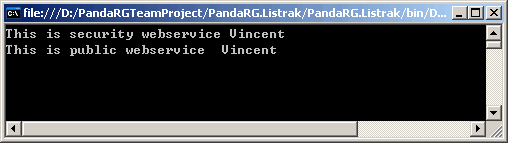
当我们修改 header.SecurityKey = "8500"时结果

整个完整例子到此实验完毕。感性趣的,也可以自己试验一下。
Webserivce简单安全验证的更多相关文章
- 【ADO.NET】2、各种版本的 简单登录验证
一.简单登录验证(防SQL注入) GetString(序号) 返回某一列的值(当用户不记得列名序号时,可使用GetOrdinal()获取到序号)GetInt32(序号) 针对的是 int 字段,返回i ...
- WebService 简单安全验证
原文:WebService 简单安全验证 最近新接了一个需要调用第三方WebService的项目,看到这个第三方WebService被调用的时候,需要授权用户名和密码,于是自己也想对WebServic ...
- 比特币区块结构Merkle树及简单支付验证分析
在比特币网络中,不是每个节点都有能力储存完整的区块链数据,受限于存储空间的的限制,很多节点是以SPV(Simplified Payment Verification简单支付验证)钱包接入比特币网络,通 ...
- 01_11_Strtus2简单数据验证
01_11_Strtus2简单数据验证 1. 引入struts标签 <%@taglib uri="/struts-tags" prefix="s" %&g ...
- angularjs中$http、$location、$watch及双向数据绑定学习实现简单登陆验证
使用$http.$location.$watch及双向数据绑定等实现简单的用户登陆验证,记录备忘: 1.$http模拟从后台获取json格式的数据: 2.$watch实时监控数据变化: 3.$loca ...
- jQuery简单邮箱验证
function chekmail() { var szReg = /^([a-zA-Z0-9_\.\-])+\@(([a-zA-Z0-9\-])+\.)+([a-zA-Z0-9]{2,4})+$/; ...
- struts2属性Struts2中属性接收参数中文问题和简单数据验证
PS:今天上午,非常郁闷,有很多简单基础的问题搞得我有些迷茫,哎,代码几天不写就忘.目前又不当COO,还是得用心记代码哦! 一:如果表单提交数据中有中文时,尽量应用post方式. 需要在Struts. ...
- MVC+三层+ASP.NET简单登录验证
通过制作一个登录小案例来搭建MVC简单三层 在View --Shared下创建一个母版页: <!DOCTYPE html> <html> <head> <me ...
- 在属性property做一些简单的验证
开发C#的程序,写到属性property时,我们可以在Set方法中做一些简单的规则验证: 如下面,Insus.NET写一个Age属性,只允许用户输入10以内的数字: class AA { privat ...
随机推荐
- CF 316E3 Summer Homework(斐波那契矩阵+线段树)
题目链接:http://codeforces.com/problemset/problem/316/E3 题意:一个数列A三种操作:(1)1 x y将x位置的数字修改为y:(2)2 x y求[x,y] ...
- Python3基础 逻辑运算 and or not 示例
Python : 3.7.0 OS : Ubuntu 18.04.1 LTS IDE : PyCharm 2018.2.4 Conda ...
- Qt Designer中文入门教程
Qt Designer窗口布局Layouts提供了四种布局方法,他们是: Vertical Layout 纵向布局Horizontal Layout 横向布局Grid Layout 栅格布局Form ...
- openwrt的编译系统是如何生成squashfs文件系统的
答:请看include/image.mk中的以下定义: define Image/mkfs/squashfs $(STAGING_DIR_HOST)/bin/mksquashfs4 $(call mk ...
- 08_Flume_Selector实践
实践一:replicating selector 1.目标场景 selector将event复制,分发给所有下游节点 2.Flume Agent配置 Agent配置 # Name the compon ...
- hdu 5652 India and China Origins 并查集+二分
India and China Origins Time Limit: 2000/2000 MS (Java/Others) Memory Limit: 65536/65536 K (Java/ ...
- git 代码冲突处理
在使用git pull代码时,经常会碰到有冲突的情况,提示如下信息: error: Your local changes to 'c/environ.c' would be overwritten b ...
- Linux进程内存布局(翻译)
Anatomy of a Program in Memory 在一个多任务OS中,每个进程都运行在它自己的内存沙箱中.这个沙箱就是虚拟地址空间,在32位下就是一块容量为4GB的内存地址.内核将这些虚拟 ...
- UI 自动化测试 Macaca测试框架 安装时遇到的log
https://macacajs.github.io/zh/environment-setup macaca run -d ./macaca-test/desktop-browser-sample.t ...
- vs2010的VCVARS32.BAT所在位置
1. C:\Program Files (x86)\Microsoft Visual Studio 10.0\VC\bin\vcvars32.bat 2. ZC:vs08 和 vs2010 安装好后, ...