
[转]SpringBoot系列——花里胡哨的banner.txt
Creating ASCII Text Banners from the Linux Command Line
In Ubuntu, Debian, Linux Mint etc.
$ sudo apt-get install figlet
In CentOS, RHEL, Fedora etc.
$ yum install figlet
Generate ASCII Text Banners
To use FIGlet with its default settings, simply type:
$ figlet "Shell Hacks"

 ____  _          _ _   _   _            _

/ ___|| |__   ___| | | | | | | __ _  ___| | _____

\___ \| '_ \ / _ \ | | | |_| |/ _` |/ __| |/ / __|

 ___) | | | |  __/ | | |  _  | (_| | (__|   <\__ \

|____/|_| |_|\___|_|_| |_| |_|\__,_|\___|_|\_\___/
List FIGlet Fonts
Print a list of available FIGlet fonts:
$ showfigfonts
To change the font, use the -f option, for example:
$ figlet -f small "Shell Hacks"
___ _ _ _ _ _ _
/ __| |_ ___| | | | || |__ _ __| |__ ___
\__ \ ' \/ -_) | | | __ / _` / _| / /(_-<
|___/_||_\___|_|_| |_||_\__,_\__|_\_\/__/
$ figlet -f digital "Shell Hacks"
+-+-+-+-+-+ +-+-+-+-+-+
|S|h|e|l|l| |H|a|c|k|s|
+-+-+-+-+-+ +-+-+-+-+-+
SpringBoot系列——花里胡哨的banner.txt
Spring Boot自定义Banner
banner.txt
这里有几个定制banner的网站,文字、图片都可以秀起来,怎么秀就看你的骚操作了
http://patorjk.com/software/taag
http://www.network-science.de/ascii/
http://www.degraeve.com/img2txt.php
${AnsiColor.BRIGHT_YELLOW}

////////////////////////////////////////////////////////////////////

//                          _ooOoo_                               //

//                         o8888888o                              //

//                         88" . "88                              //

//                         (| ^_^ |)                              //

//                         O\  =  /O                              //

//                      ____/`---'\____                           //

//                    .'  \\|     |//  `.                         //

//                   /  \\|||  :  |||//  \                        //

//                  /  _||||| -:- |||||-  \                       //

//                  |   | \\\  -  /// |   |                       //

//                  | \_|  ''\---/''  |   |                       //

//                  \  .-\__  `-`  ___/-. /                       //

//                ___`. .'  /--.--\  `. . ___                     //

//              ."" '<  `.___\_<|>_/___.'  >'"".                  //

//            | | :  `- \`.;`\ _ /`;.`/ - ` : | |                 //

//            \  \ `-.   \_ __\ /__ _/   .-` /  /                 //

//      ========`-.____`-.___\_____/___.-`____.-'========         //

//                           `=---='                              //

//      ^^^^^^^^^^^^^^^^^^^^^^^^^^^^^^^^^^^^^^^^^^^^^^^^^^        //

//            佛祖保佑       永不宕机      永无BUG                //

////////////////////////////////////////////////////////////////////
banner.txt配置
https://docs.spring.io/spring-boot/docs/2.1.0.RELEASE/reference/htmlsingle/#boot-features-banner
${AnsiColor.BRIGHT_RED}:设置控制台中输出内容的颜色
${application.version}:用来获取MANIFEST.MF文件中的版本号
${application.formatted-version}:格式化后的${application.version}版本信息
${spring-boot.version}:Spring Boot的版本号
${spring-boot.formatted-version}:格式化后的${spring-boot.version}版本信息
# BANNER

spring.banner.charset=UTF-8 # Banner file encoding.

spring.banner.location=classpath:banner.txt # Banner text resource location.

spring.banner.image.location=classpath:banner.gif # Banner image file location (jpg or png can also be used).

spring.banner.image.width=76 # Width of the banner image in chars.

spring.banner.image.height= # Height of the banner image in chars (default based on image height).

spring.banner.image.margin=2 # Left hand image margin in chars.

spring.banner.image.invert=false # Whether images should be inverted for dark terminal themes.
结束语
秀儿,是你吗?
banner默认开启,如果不想让它打印怎么办?
方法1,在main的run方法设置
/**

 * 启动主类,springboot的入口

 * springboot 默认扫描的类是在启动类的当前包和下级包

 */

@SpringBootApplication

public class SpringbootWebsocketSpringdataJpaApplication {

    public static void main(String[] args) {

        SpringApplication springApplication = new SpringApplication(SpringbootWebsocketSpringdataJpaApplication.class);

        //Banner.Mode.OFF 关闭

        springApplication.setBannerMode(Banner.Mode.OFF);

        springApplication.run(args);

    }

}
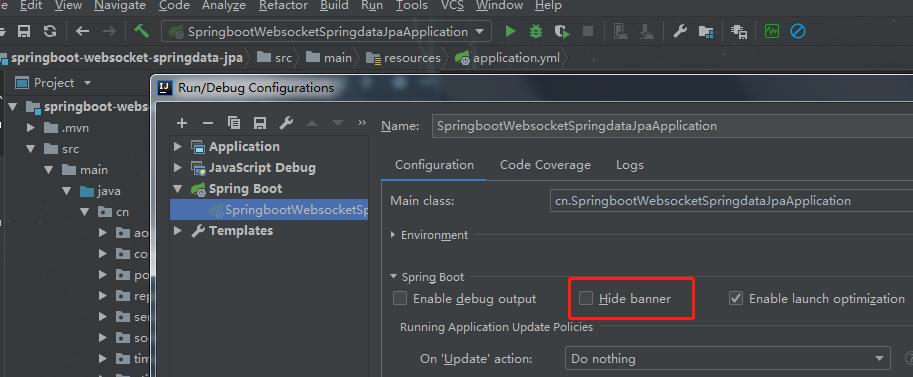
方法2,Edit Configurations --> 勾选Hide banner
代码开源
代码已经开源、托管到我的GitHub、码云:
GitHub:https://github.com/huanzi-qch/springBoot
码云:https://gitee.com/huanzi-qch/springBoot
[转]SpringBoot系列——花里胡哨的banner.txt的更多相关文章
- SpringBoot系列——花里胡哨的banner.txt
前言 我们注意到springboot项目启动时,控制台会打印自带的banner,然后对于部分IT骚年来说,太单调太普通太一般了:所以,是时候表演真正的技术了 项目结构 我们只需要在springboot ...
- Springboot 系列(八)动态Banner与图片转字符图案的手动实现
使用过 Springboot 的对上面这个图案肯定不会陌生,Springboot 启动的同时会打印上面的图案,并带有版本号.查看官方文档可以找到关于 banner 的描述 The banner tha ...
- 32. Springboot 系列(八)动态Banner与图片转字符图案的手动实现
使用过 Springboot 的对上面这个图案肯定不会陌生,Springboot 启动的同时会打印上面的图案,并带有版本号.查看官方文档可以找到关于 banner 的描述 The banner tha ...
- 【Java】SpringBoot 佛祖保佑banner.txt
最新写代码有点多,拜拜佛祖,代码不出bug. 在springboot项目的resources文件夹下面创建一个banner.txt文件,springboot启动的时候默认会加载这个文件 ${AnsiC ...
- (28)SpringBoot启动时的Banner设置【从零开始学Spring Boot】
对于使用过Spring Boot的开发者来说,程序启动的时候输出的由字符组成的Spring符号并不陌生.这个是Spring Boot为自己设计的Banner: 1. . ____ ...
- springboot系列之02-需要了解的宏观知识点
未经允许,不得转载 原作者:字母哥博客 本文完整系列出自:springboot深入浅出系列 一.Spring Boot . Spring MVC .Spring对比 首先你需要明白一件事情:Sprin ...
- SpringBoot系列(二)入门知识
SpringBoot系列(二)入门知识 往期推荐 SpringBoot系列(一)idea新建springboot项目 引言 本来新建springboot项目应该放在入门知识这一章的,但是由于新建spr ...
- 【springBoot】之定制Banner
springboot启动时控制台打印图案如下: 1.假如我们不想看到这个图案 public static void main(String[] args) { SpringApplication ap ...
- springboot 修改和设置 banner
springboot 修改和设置 banner 先上图 修改步骤 1.在src/main/resources下新建一个banner.txt文档 2.通过http://patorjk.com/softw ...
随机推荐
- java数据类型和类型得转换
java数据类型 强类型语言 Java是一种强类型得语言,严格要求变量要符合规定,所有变量都必须先定义再使用 java得数据类型分为两大类 值得注意得是String并不是一个数据类型,它是一个类 ...
- 040_Spring注解开发
目录 Spring注解开发 bean注册到Spring容器中 applicationContext.xml添加包扫描注解 实体类添加注解@Component 属性注入 属性添加注解@Value(&qu ...
- 文件流FileStream技术出现的理由漫谈
输入输出的重要性: 输入和输出功能是Java对程序处理数据能力的提高,Java以流的形式处理数据.流是一组有序的数据序列,根据操作的类型,分为输入流和输出流. 程序从输入流读取数据,向输出流 ...
- windows中抓取hash小结(上)
我上篇随笔说到了内网中横向移动的几种姿势,横向移动的前提是获取了具有某些权限的用户的明文密码或hash,正愁不知道写点啥,那就来整理一下这个"前提"-----如何在windows系 ...
- 007 GMII、SGMII和SerDes的区别和联系
一.GMII和SGMII的区别和联系 GMII和SGMII区别,上一篇已经介绍了,这一篇重点介绍SGMII和SerDes区别. GMII和SGMII GMII 在MII接口基础上提升了数据位宽和Clo ...
- [1.6W字]浏览器跨域请求的原理, 以及解决方法(可以纯前端实现) #flight.Archives011
Title/ 浏览器跨域(CrossOrigin)请求的原理, 以及解决方案详细指南 #flight.Archives011 序: 最近看到又有一波新的创作活动了, 官方给出的话题中有一个" ...
- SpringBoot集成Druid
maven <dependency> <groupId>com.alibaba</groupId> <artifactId>druid-spring-b ...
- kafka查看Topic列表及消费状态等常用命令
环境 本文中的操作均基于kafka_1.3.3.0,且所有命令经过实际验证. 常用工具 新建Topic ./kafka-topics --zookeeper 166.188.xx.xx --creat ...
- WPF 自己做一个颜色选择器
程序开发过程中,经常会遇到需要支持动态配置主题颜色的问题,通常,一个程序会有多种不同的颜色风格主题供选 有时候,更细致一些的地方,会需要支持自己配置颜色,这样我们就需要一个颜色选择器啦,下面是我自己开 ...
- 定位API的原理
参考:0Day 安全 所有的win_32程序都会加载ntdll.dll和kerner32.dll这两个最基础的动态链接库.如果想要在win_32平台下定位kernel32.dll中的API地址 1,首 ...