
SpringBoot系列——花里胡哨的banner.txt
前言
我们注意到springboot项目启动时,控制台会打印自带的banner,然后对于部分IT骚年来说,太单调太普通太一般了;所以,是时候表演真正的技术了
项目结构
我们只需要在springboot项目的resources文件夹下面创建一个banner.txt文件,springboot启动的时候会去加载这个文件,项目结构:
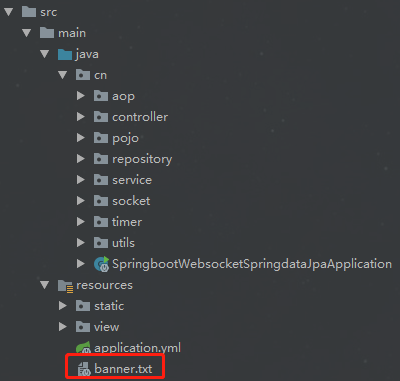
banner.txt
这里有几个定制banner的网站,文字、图片都可以秀起来,怎么秀就看你的骚操作了
http://patorjk.com/software/taag
http://www.network-science.de/ascii/
http://www.degraeve.com/img2txt.php
banner.txt的内容:
${AnsiColor.BRIGHT_YELLOW}
////////////////////////////////////////////////////////////////////
//                          _ooOoo_                               //
//                         o8888888o                              //
//                         88" . "88                              //
//                         (| ^_^ |)                              //
//                         O\  =  /O                              //
//                      ____/`---'\____                           //
//                    .'  \\|     |//  `.                         //
//                   /  \\|||  :  |||//  \                        //
//                  /  _||||| -:- |||||-  \                       //
//                  |   | \\\  -  /// |   |                       //
//                  | \_|  ''\---/''  |   |                       //
//                  \  .-\__  `-`  ___/-. /                       //
//                ___`. .'  /--.--\  `. . ___                     //
//              ."" '<  `.___\_<|>_/___.'  >'"".                  //
//            | | :  `- \`.;`\ _ /`;.`/ - ` : | |                 //
//            \  \ `-.   \_ __\ /__ _/   .-` /  /                 //
//      ========`-.____`-.___\_____/___.-`____.-'========         //
//                           `=---='                              //
//      ^^^^^^^^^^^^^^^^^^^^^^^^^^^^^^^^^^^^^^^^^^^^^^^^^^        //
//            佛祖保佑       永不宕机      永无BUG                  //
////////////////////////////////////////////////////////////////////
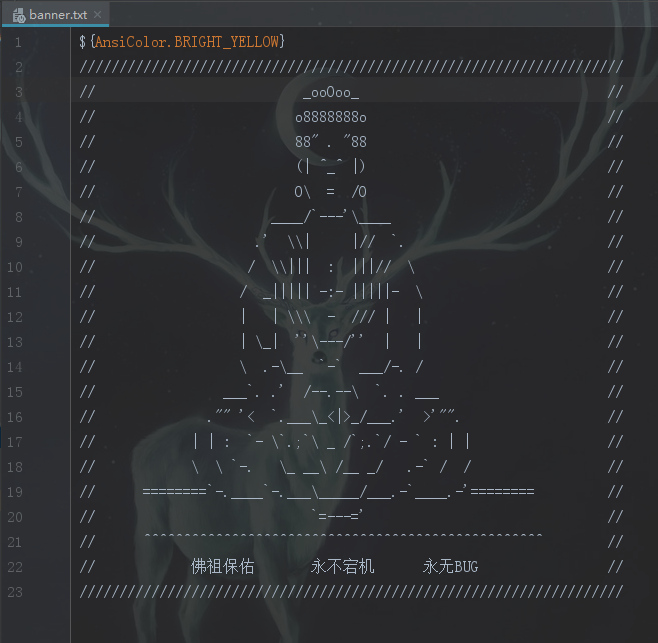
banner.txt配置
${AnsiColor.BRIGHT_RED}:设置控制台中输出内容的颜色
${application.version}:用来获取MANIFEST.MF文件中的版本号
${application.formatted-version}:格式化后的${application.version}版本信息
${spring-boot.version}:Spring Boot的版本号
${spring-boot.formatted-version}:格式化后的${spring-boot.version}版本信息
spring对banner的配置,来自springboot参考手册,Common application properties:https://docs.spring.io/spring-boot/docs/2.1.0.RELEASE/reference/htmlsingle/#common-application-properties
# BANNER

spring.banner.charset=UTF- # Banner file encoding.

spring.banner.location=classpath:banner.txt # Banner text resource location.

spring.banner.image.location=classpath:banner.gif # Banner image file location (jpg or png can also be used).

spring.banner.image.width= # Width of the banner image in chars.

spring.banner.image.height= # Height of the banner image in chars (default based on image height).

spring.banner.image.margin= # Left hand image margin in chars.

spring.banner.image.invert=false # Whether images should be inverted for dark terminal themes.
效果

结束语
秀儿,是你吗?
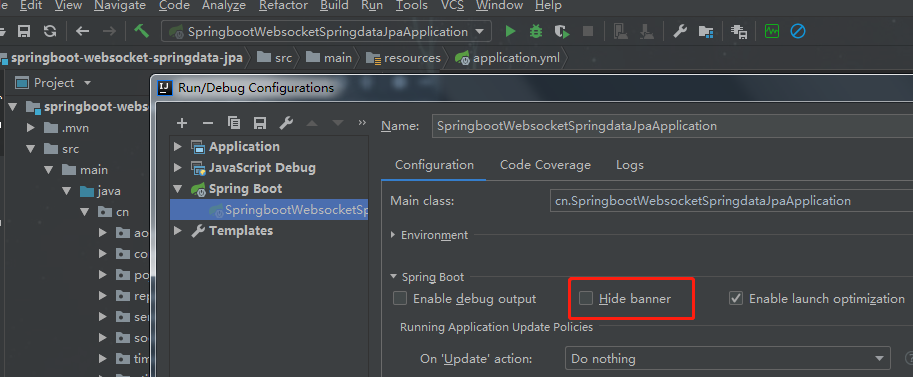
banner默认开启,如果不想让它打印怎么办?
方法1,在main的run方法设置
/**

 * 启动主类,springboot的入口

 * springboot 默认扫描的类是在启动类的当前包和下级包

 */

@SpringBootApplication

public class SpringbootWebsocketSpringdataJpaApplication {

    public static void main(String[] args) {

        SpringApplication springApplication = new SpringApplication(SpringbootWebsocketSpringdataJpaApplication.class);

        //Banner.Mode.OFF 关闭

        springApplication.setBannerMode(Banner.Mode.OFF);

        springApplication.run(args);

    }

}
方法2,Edit Configurations --> 勾选Hide banner
代码开源
代码已经开源、托管到我的GitHub、码云:
GitHub:https://github.com/huanzi-qch/springBoot
码云:https://gitee.com/huanzi-qch/springBoot
SpringBoot系列——花里胡哨的banner.txt的更多相关文章
- [转]SpringBoot系列——花里胡哨的banner.txt
Creating ASCII Text Banners from the Linux Command Line In Ubuntu, Debian, Linux Mint etc. $ sudo ap ...
- Springboot 系列(八)动态Banner与图片转字符图案的手动实现
使用过 Springboot 的对上面这个图案肯定不会陌生,Springboot 启动的同时会打印上面的图案,并带有版本号.查看官方文档可以找到关于 banner 的描述 The banner tha ...
- 32. Springboot 系列(八)动态Banner与图片转字符图案的手动实现
使用过 Springboot 的对上面这个图案肯定不会陌生,Springboot 启动的同时会打印上面的图案,并带有版本号.查看官方文档可以找到关于 banner 的描述 The banner tha ...
- 【Java】SpringBoot 佛祖保佑banner.txt
最新写代码有点多,拜拜佛祖,代码不出bug. 在springboot项目的resources文件夹下面创建一个banner.txt文件,springboot启动的时候默认会加载这个文件 ${AnsiC ...
- (28)SpringBoot启动时的Banner设置【从零开始学Spring Boot】
对于使用过Spring Boot的开发者来说,程序启动的时候输出的由字符组成的Spring符号并不陌生.这个是Spring Boot为自己设计的Banner: 1. . ____ ...
- springboot系列之02-需要了解的宏观知识点
未经允许,不得转载 原作者:字母哥博客 本文完整系列出自:springboot深入浅出系列 一.Spring Boot . Spring MVC .Spring对比 首先你需要明白一件事情:Sprin ...
- SpringBoot系列(二)入门知识
SpringBoot系列(二)入门知识 往期推荐 SpringBoot系列(一)idea新建springboot项目 引言 本来新建springboot项目应该放在入门知识这一章的,但是由于新建spr ...
- 【springBoot】之定制Banner
springboot启动时控制台打印图案如下: 1.假如我们不想看到这个图案 public static void main(String[] args) { SpringApplication ap ...
- springboot 修改和设置 banner
springboot 修改和设置 banner 先上图 修改步骤 1.在src/main/resources下新建一个banner.txt文档 2.通过http://patorjk.com/softw ...
随机推荐
- Solidity: ParserError: Expected pragma, import directive or contract/interface/library definition.
第一行忘记加分号 pragma solidity ^0.4.0;
- div+css+position实现简单的纵向导航栏
完成效果: 这应该是很简单的纵向导航栏了. OK,进入正题 首先,我们看上面的效果图可以分析得出,要实现这个效果需要用到的技术点 1.hover 2.position 3.布局 我认为在这个效果的实现 ...
- hive on spark 参数设置
; ; set spark.executor.memory=5G;
- [转]Rapidly detecting large flows, sFlow vs. NetFlow/IPFIX
Figure 1: Low latency software defined networking control loop The articles SDN and delay and Delay ...
- C#轻量级通通讯组件StriveEngine —— C/S通信开源demo(2) —— 使用二进制协议 (附源码)
前段时间,有几个研究ESFramework通信框架的朋友对我说,ESFramework有点庞大,对于他们目前的项目来说有点“杀鸡用牛刀”的意思,因为他们的项目不需要文件传送.不需要P2P.不存在好友关 ...
- MySQL优化技巧
目录 MySQL的特点 数据类型优化 整型类型 小数类型 字符串类型 时间类型 主键类型的选择 特殊类型的数据 索引优化 一个使用Hash值创建索引的技巧 前缀索引 多列索引 聚簇索引 覆盖索引 重复 ...
- 在Apache上http强制跳转到https
https已经配置完成,也可以正常使用,但输入域名或http加域名时也一样可以打开网站,于是想强制使用https 大概百度了一下方法,感觉与之前设置二级域名绑定二级目录时差不多 首先,修改httpd. ...
- php--isset()、is_null() 、empty()
开发中经常会遇到验证某个参数是否是null或者是否为空. 一.isset().is_null() .empty() : isset():检测变量是否设置,并且不是 NULL.如果变量没有赋值 或者 变 ...
- Oracle创建表空间、用户管理、角色管理
内容:Oracle创建表空间.用户管理.角色管理 1.用系统用户登录Oracle 默认的系统用户: sys/system.sysman.scott sys:权限最大,超级用户,可以完成所有任务, 默认 ...
- java中最常见的几种运行时异常,你get了吗?
NullPointerException (空指针异常) ClassCastException (类型强制转换异常) NumberFormatException (数字格式异常) NegativeAr ...