
【Azure 存储服务】代码版 Azure Storage Blob 生成 SAS (Shared Access Signature: 共享访问签名)
问题描述
在使用Azure存储服务,为了有效的保护Storage的Access Keys。可以使用另一种授权方式访问资源(Shared Access Signature: 共享访问签名), 它的好处可以控制允许访问的IP,过期时间,权限 和 服务 等。Azure门户上提供了对Account级,Container级,Blob级的SAS生成服务。
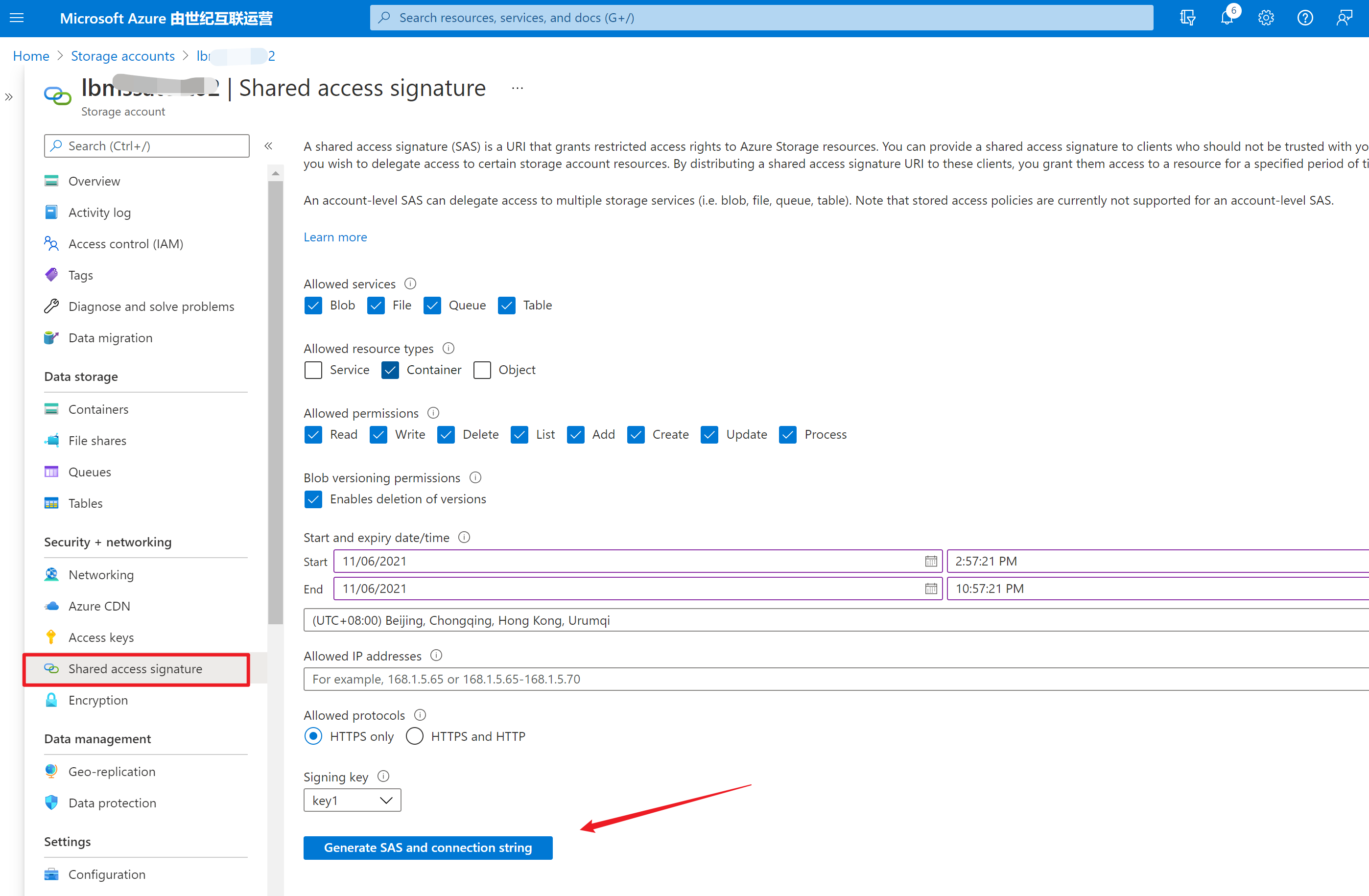
那么使用代码如何来生成呢?
问题回答
以最常见的两种代码作为示例:.NET 和 Java
.NET
Blob SAS 将使用帐户访问密钥(Storage Account Key1 or Key2)进行签名。 使用 StorageSharedKeyCredential 类创建用于为 SAS 签名的凭据。 新建 BlobSasBuilder 对象,并调用 ToSasQueryParameters 以获取 SAS 令牌字符串。官方文档(https://docs.azure.cn/zh-cn/storage/blobs/sas-service-create?tabs=dotnet)中进行了详细介绍,直接使用以下部分代码即可生成Blob的SAS URL。
private static Uri GetServiceSasUriForBlob(BlobClient blobClient,

    string storedPolicyName = null)

{

    // Check whether this BlobClient object has been authorized with Shared Key.

    if (blobClient.CanGenerateSasUri)

    {

        // Create a SAS token that's valid for one hour.

        BlobSasBuilder sasBuilder = new BlobSasBuilder()

        {

            BlobContainerName = blobClient.GetParentBlobContainerClient().Name,

            BlobName = blobClient.Name,

            Resource = "b"

        };

        if (storedPolicyName == null)

        {

            sasBuilder.ExpiresOn = DateTimeOffset.UtcNow.AddHours(1);

            sasBuilder.SetPermissions(BlobSasPermissions.Read |

                BlobSasPermissions.Write);

        }

        else

        {

            sasBuilder.Identifier = storedPolicyName;

        }

        Uri sasUri = blobClient.GenerateSasUri(sasBuilder);

        Console.WriteLine("SAS URI for blob is: {0}", sasUri);

        Console.WriteLine();

        return sasUri;

    }

    else

    {

        Console.WriteLine(@"BlobClient must be authorized with Shared Key

                          credentials to create a service SAS.");

        return null;

    }

}
JAVA
而Java的示例代码在官网中并没有介绍,所以本文就Java生成SAS的代码进行讲解。
从Java新版的SDK(azure-storage-blob)中 ,可以发现 BlobServiceClient,BlobContainerClient ,BlobClient 对象中都包含 generateAccountSas 或 generateSas 方法来实现对Account, Container,Blob进行SAS Token生成,只需要根据它所需要的参数对
    public static void GenerateSASstring(BlobServiceClient blobServiceClient, BlobContainerClient blobContainerClient,

            BlobClient blobClient) {

        /*

         * Generate an account sas. Other samples in this file will demonstrate how to

         * create a client with the sas token.

         */

        // Configure the sas parameters. This is the minimal set.

        OffsetDateTime startTime = OffsetDateTime.now();

        OffsetDateTime expiryTime = OffsetDateTime.now().plusDays(1);

        AccountSasService services = new AccountSasService().setBlobAccess(true);

        AccountSasResourceType resourceTypes = new AccountSasResourceType().setObject(true);

        SasProtocol protocol = SasProtocol.HTTPS_ONLY;

        SasIpRange sasIpRange = SasIpRange.parse("167.220.255.73");

        // Generate the account sas.

        AccountSasPermission accountSasPermission = new AccountSasPermission().setReadPermission(true);

        AccountSasSignatureValues accountSasValues = new AccountSasSignatureValues(expiryTime, accountSasPermission,

                services, resourceTypes);

        accountSasValues.setStartTime(startTime);

        accountSasValues.setProtocol(protocol);

        accountSasValues.setSasIpRange(sasIpRange);

        String accountSasToken = blobServiceClient.generateAccountSas(accountSasValues);

        System.out.println("\nGenerate the account sas & url is :::: \n\t" + accountSasToken + "\n\t"

                + blobServiceClient.getAccountUrl() + "?" + accountSasToken);

        // Generate a sas using a container client

        BlobContainerSasPermission containerSasPermission = new BlobContainerSasPermission().setCreatePermission(true);

        BlobServiceSasSignatureValues serviceSasValues = new BlobServiceSasSignatureValues(expiryTime,

                containerSasPermission);

        serviceSasValues.setStartTime(startTime);

        serviceSasValues.setProtocol(protocol);

        serviceSasValues.setSasIpRange(sasIpRange);

        String containerSasToken = blobContainerClient.generateSas(serviceSasValues);

        System.out.println("\nGenerate the Container sas & url is :::: \n\t" + containerSasToken + "\n\t"

                + blobContainerClient.getBlobContainerUrl() + "?" + containerSasToken);

        // Generate a sas using a blob client

        BlobSasPermission blobSasPermission = new BlobSasPermission().setReadPermission(true);

        serviceSasValues = new BlobServiceSasSignatureValues(expiryTime, blobSasPermission);

        serviceSasValues.setStartTime(startTime);

        serviceSasValues.setProtocol(protocol);

        serviceSasValues.setSasIpRange(sasIpRange);

        String blobSasToken = blobClient.generateSas(serviceSasValues);

        System.out.println("\nGenerate the Blob sas & url is :::: \n\t" + blobSasToken + "\n\t"

                + blobClient.getBlobUrl() + "?" + blobSasToken);

    }
在pom.xml 中所需要加载的依赖项:
    <dependency>

      <groupId>com.azure</groupId>

      <artifactId>azure-storage-blob</artifactId>

      <version>12.13.0</version>

    </dependency>
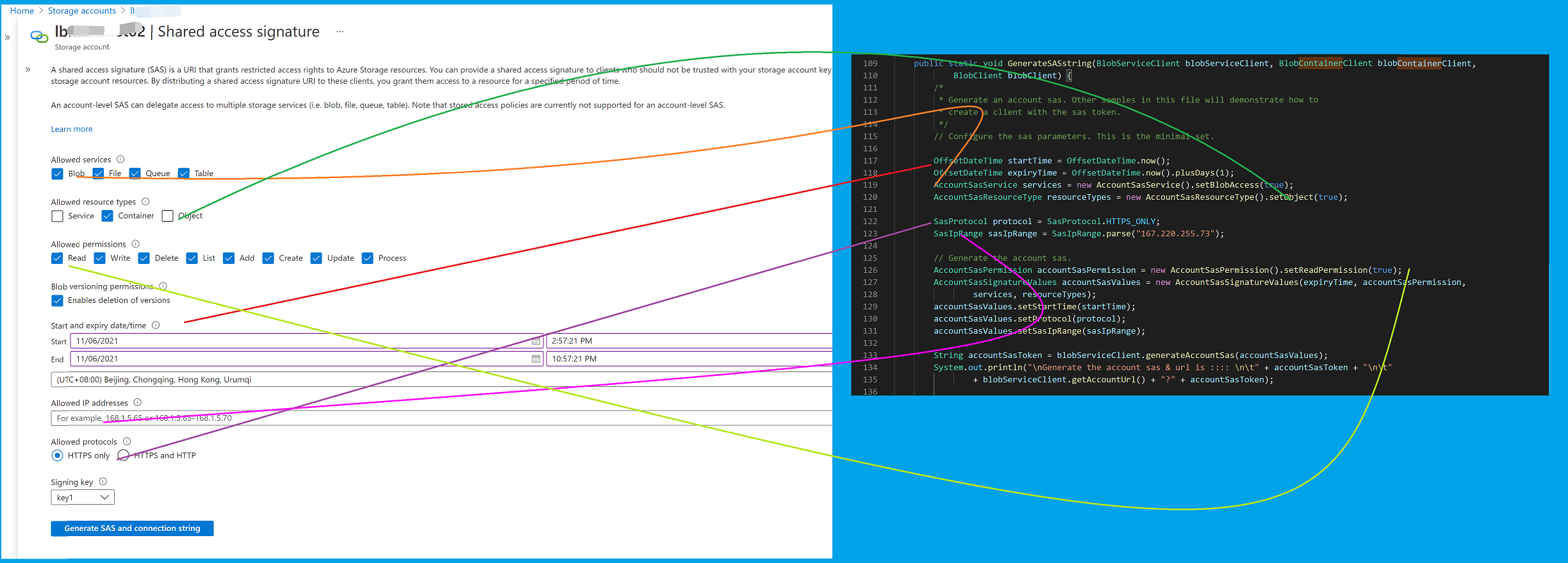
以上代码中的各部分设置项 与 Azure门户上设置项的对应关系如下图:
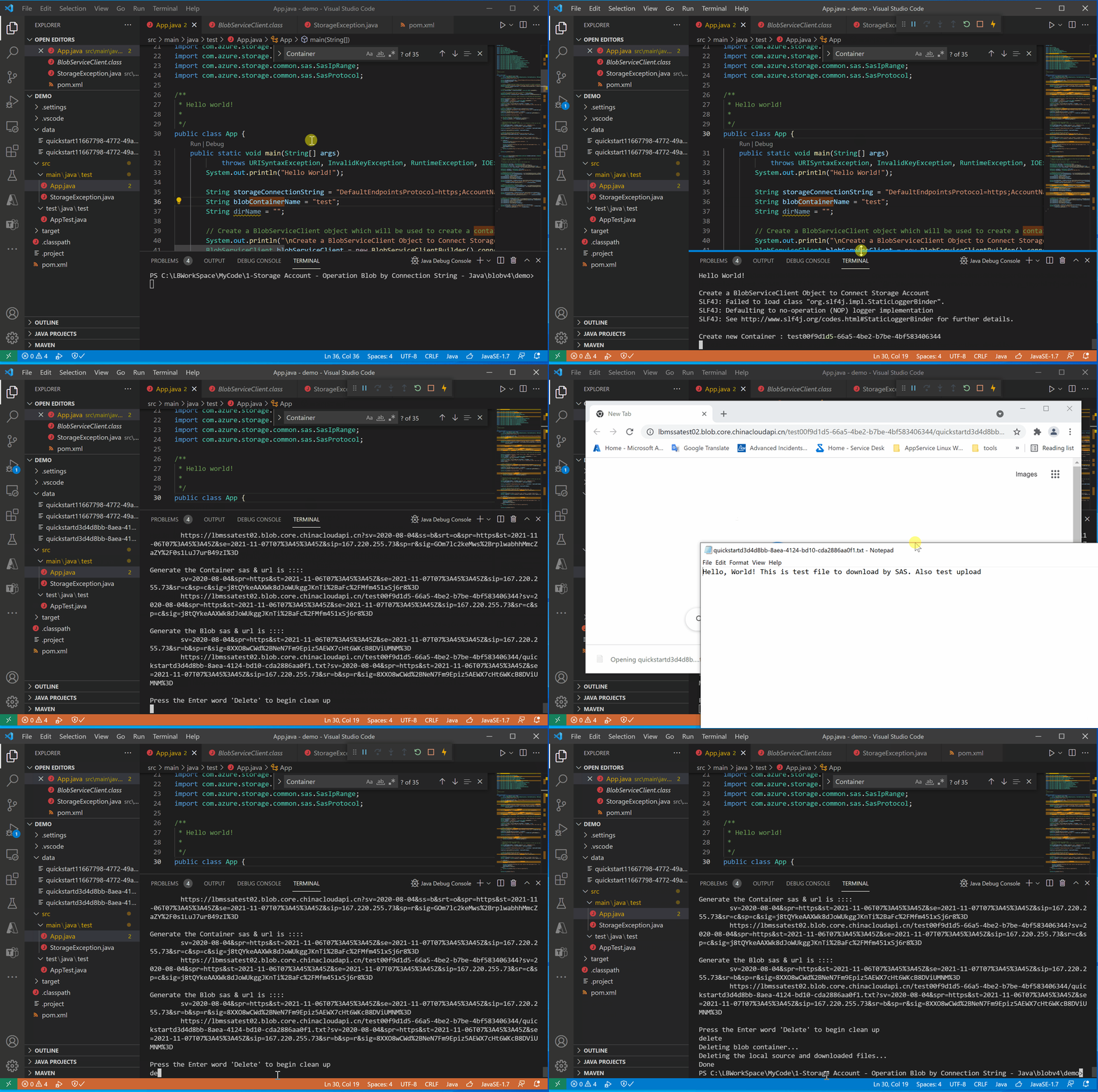
运行效果图
附录一:Java Main函数全部代码:
package test;

import java.io.File;

import java.io.FileWriter;

import java.io.IOException;

import java.net.URISyntaxException;

import java.security.InvalidKeyException;

import java.time.OffsetDateTime;

import java.util.Iterator;

import com.azure.storage.blob.BlobClient;

import com.azure.storage.blob.BlobContainerClient;

import com.azure.storage.blob.BlobServiceClient;

import com.azure.storage.blob.BlobServiceClientBuilder;

import com.azure.storage.blob.models.BlobItem;

import com.azure.storage.blob.sas.BlobContainerSasPermission;

import com.azure.storage.blob.sas.BlobSasPermission;

import com.azure.storage.blob.sas.BlobServiceSasSignatureValues;

import com.azure.storage.common.sas.AccountSasPermission;

import com.azure.storage.common.sas.AccountSasResourceType;

import com.azure.storage.common.sas.AccountSasService;

import com.azure.storage.common.sas.AccountSasSignatureValues;

import com.azure.storage.common.sas.SasIpRange;

import com.azure.storage.common.sas.SasProtocol;

/**

 * Hello world!

 *

 */

public class App {

    public static void main(String[] args)

            throws URISyntaxException, InvalidKeyException, RuntimeException, IOException {

        System.out.println("Hello World!");

        String storageConnectionString = "DefaultEndpointsProtocol=https;AccountName=<your storage account name>;AccountKey=**************************;EndpointSuffix=core.chinacloudapi.cn";

        String blobContainerName = "test";

        String dirName = "";

        // Create a BlobServiceClient object which will be used to create a container

        System.out.println("\nCreate a BlobServiceClient Object to Connect Storage Account");

        BlobServiceClient blobServiceClient = new BlobServiceClientBuilder().connectionString(storageConnectionString)

                .buildClient();

        // Create a unique name for the container

        String containerName = blobContainerName + java.util.UUID.randomUUID();

        // Create the container and return a container client object

        System.out.println("\nCreate new Container : " + containerName);

        BlobContainerClient containerClient = blobServiceClient.createBlobContainer(containerName);

        // Create a local file in the ./data/ directory for uploading and downloading

        System.out.println("\nCreate a local file in the ./data/ directory for uploading and downloading");

        String localPath = "./data/";

        String fileName = "quickstart" + java.util.UUID.randomUUID() + ".txt";

        File localFile = new File(localPath + fileName);

        // Write text to the file

        FileWriter writer = new FileWriter(localPath + fileName, true);

        writer.write("Hello, World! This is test file to download by SAS. Also test upload");

        writer.close();

        // Get a reference to a blob

        BlobClient blobClient = containerClient.getBlobClient(fileName);

        System.out.println("\nUploading to Blob storage as blob:\n\t" + blobClient.getBlobUrl());

        // Upload the blob

        blobClient.uploadFromFile(localPath + fileName);

        System.out.println("\nUpload blob completed : " + blobClient.getBlobName());

        System.out.println("\nListing blobs...");

        // List the blob(s) in the container.

        for (BlobItem blobItem : containerClient.listBlobs()) {

            System.out.println("\t" + blobItem.getName());

        }

        // Download the blob to a local file

        // Append the string "DOWNLOAD" before the .txt extension so that you can see

        // both files.

        String downloadFileName = fileName.replace(".txt", "DOWNLOAD.txt");

        File downloadedFile = new File(localPath + downloadFileName);

        System.out.println("\nDownloading blob to\n\t " + localPath + downloadFileName);

        blobClient.downloadToFile(localPath + downloadFileName);

        // Generate SAS String for blob user..

        System.out.println("\nGenerate SAS String for blob user..");

        GenerateSASstring(blobServiceClient, containerClient, blobClient);

        // Clean up

        System.out.println("\nPress the Enter word 'Delete' to begin clean up");

        boolean isDelete = System.console().readLine().toLowerCase().trim().equals("delete");

        if (isDelete) {

            System.out.println("Deleting blob container...");

            containerClient.delete();

            System.out.println("Deleting the local source and downloaded files...");

            localFile.delete();

            downloadedFile.delete();

        } else {

            System.out.println("Skip to Clean up operation");

        }

        System.out.println("Done");

    }

    public static void GenerateSASstring(BlobServiceClient blobServiceClient, BlobContainerClient blobContainerClient,

            BlobClient blobClient) {

        /*

         * Generate an account sas. Other samples in this file will demonstrate how to

         * create a client with the sas token.

         */

        // Configure the sas parameters. This is the minimal set.

        OffsetDateTime startTime = OffsetDateTime.now();

        OffsetDateTime expiryTime = OffsetDateTime.now().plusDays(1);

        AccountSasService services = new AccountSasService().setBlobAccess(true);

        AccountSasResourceType resourceTypes = new AccountSasResourceType().setObject(true);

        SasProtocol protocol = SasProtocol.HTTPS_ONLY;

        SasIpRange sasIpRange = SasIpRange.parse("167.220.255.73");

        // Generate the account sas.

        AccountSasPermission accountSasPermission = new AccountSasPermission().setReadPermission(true);

        AccountSasSignatureValues accountSasValues = new AccountSasSignatureValues(expiryTime, accountSasPermission,

                services, resourceTypes);

        accountSasValues.setStartTime(startTime);

        accountSasValues.setProtocol(protocol);

        accountSasValues.setSasIpRange(sasIpRange);

        String accountSasToken = blobServiceClient.generateAccountSas(accountSasValues);

        System.out.println("\nGenerate the account sas & url is :::: \n\t" + accountSasToken + "\n\t"

                + blobServiceClient.getAccountUrl() + "?" + accountSasToken);

        // Generate a sas using a container client

        BlobContainerSasPermission containerSasPermission = new BlobContainerSasPermission().setCreatePermission(true);

        BlobServiceSasSignatureValues serviceSasValues = new BlobServiceSasSignatureValues(expiryTime,

                containerSasPermission);

        serviceSasValues.setStartTime(startTime);

        serviceSasValues.setProtocol(protocol);

        serviceSasValues.setSasIpRange(sasIpRange);

        String containerSasToken = blobContainerClient.generateSas(serviceSasValues);

        System.out.println("\nGenerate the Container sas & url is :::: \n\t" + containerSasToken + "\n\t"

                + blobContainerClient.getBlobContainerUrl() + "?" + containerSasToken);

        // Generate a sas using a blob client

        BlobSasPermission blobSasPermission = new BlobSasPermission().setReadPermission(true);

        serviceSasValues = new BlobServiceSasSignatureValues(expiryTime, blobSasPermission);

        serviceSasValues.setStartTime(startTime);

        serviceSasValues.setProtocol(protocol);

        serviceSasValues.setSasIpRange(sasIpRange);

        String blobSasToken = blobClient.generateSas(serviceSasValues);

        System.out.println("\nGenerate the Blob sas & url is :::: \n\t" + blobSasToken + "\n\t"

                + blobClient.getBlobUrl() + "?" + blobSasToken);

    }

}
参考资料
快速入门:使用 Java v12 SDK 管理 blob:https://docs.azure.cn/zh-cn/storage/blobs/storage-quickstart-blobs-java
Azure Storage Blob client library for Java:https://github.com/Azure/azure-sdk-for-java/tree/main/sdk/storage/azure-storage-blob#generate-a-sas-token
示例下载:
【Azure 存储服务】代码版 Azure Storage Blob 生成 SAS (Shared Access Signature: 共享访问签名)的更多相关文章
- 【Azure 存储服务】Java Azure Storage SDK V12使用Endpoint连接Blob Service遇见 The Azure Storage endpoint url is malformed
问题描述 使用Azure Storage Account的共享访问签名(Share Access Signature) 生成的终结点,连接时遇见 The Azure Storage endpoint ...
- 解读 Windows Azure 存储服务的账单 – 带宽、事务数量,以及容量
经常有人询问我们,如何估算 Windows Azure 存储服务的成本,以便了解如何更好地构建一个经济有效的应用程序.本文我们将从带宽.事务数量,以及容量这三种存储成本的角度探讨这一问题. 在使用 W ...
- 玩转Windows Azure存储服务——网盘
存储服务是除了计算服务之外最重要的云服务之一.说到云存储,大家可以想到很多产品,例如:AWS S3,Google Drive,百度云盘...而在Windows Azure中,存储服务却是在默默无闻的工 ...
- Azure Backup (3) 使用Azure备份服务,备份Azure虚拟机
<Windows Azure Platform 系列文章目录> 本将介绍,如何使用Azure备份服务,备份Azure虚拟机. 我们先预先创建2台Windows VM (命名为LeiVM00 ...
- Azure Service Bus 中的身份验证方式 Shared Access Signature
var appInsights=window.appInsights||function(config){ function r(config){t[config]=function(){var i= ...
- Azure进阶攻略丨共享访问签名是个什么东东?
Azure 进阶攻略]一经推出便受到了广大粉丝的热情追捧,大家纷纷表示涨了姿势,并希望能了解更多的攻略~根据大家的投票结果,本期,小编将为大家讲解“如何生成 Shared Access Signatu ...
- 【Azure 存储服务】Python模块(azure.cosmosdb.table)直接对表存储(Storage Account Table)做操作示例
什么是表存储 Azure 表存储是一项用于在云中存储结构化 NoSQL 数据的服务,通过无结构化的设计提供键/属性存储. 因为表存储无固定的数据结构要求,因此可以很容易地随着应用程序需求的发展使数据适 ...
- 玩转Windows Azure存储服务——高级存储
在上一篇我们把Windows Azure的存储服务用作网盘,本篇我们继续挖掘Windows Azure的存储服务——高级存储.高级存储自然要比普通存储高大上的,因为高级存储是SSD存储!其吞吐量和IO ...
- [Azure Storage]使用Java上传文件到Storage并生成SAS签名
Azure官网提供了比较详细的文档,您可以参考:https://azure.microsoft.com/en-us/documentation/articles/storage-java-how-to ...
随机推荐
- redis连接密码和指定数据库
台服务器上都快开启200个redis实例了,看着就崩溃了.这么做无非就是想让不同类型的数据属于不同的应用程序而彼此分开. 那么,redis有没有什么方法使不同的应用程序数据彼此分开同时又存储在相同的实 ...
- windows 10玩mysql 8
注意事项: 1)windows 10只支持两个版本: 5.7,8.0 2)安装有两种方式,zip与installer,建议用zip方式,因为installer要安装许多依赖,如vision c++等, ...
- 『GoLang』string及其相关操作
目录 1. 字符串简介 2. 字符串的拼接 3. 有关 string 的常用处理 3.1 strings 包 3.1.1 判断两个 utf-8 编码字符串是否相同 3.1.2 判断字符串 str 是否 ...
- Loj#6503-「雅礼集训 2018 Day4」Magic【分治NTT】
正题 题目链接:https://loj.ac/p/6503 题目大意 \(n\)张卡\(m\)种,第\(i\)种卡有\(a_i\)张,求所有排列中有\(k\)对相邻且相同的卡牌. \(1\leq n\ ...
- P3645-[APIO2015]雅加达的摩天楼【bfs,根号分治】
正题 题目链接:https://www.luogu.com.cn/problem/P3645 题目大意 \(n\)个点,\(m\)条狗,第\(i\)条狗可以往左或者右跳恰好\(p_i\)步,开始是\( ...
- Liunx下Mysql,MongoDB性能优化的配置
场景 这几天在赶十一上线的项目,但是突然发现接口性能不好,高并发支持不住.又不想改代码,就在数据库层面进行优化. Mysql 分区:项目中有对40万条的数据进行时间查询的要求,就算对DateTime建 ...
- c# 类型安全语言
所谓的安全性语言其本质是有关类型操作的一种规范,即不能将一种类型转换为另一种类型. c#作为一种安全性语言,允许合理的类型转换,但是不能将两个完全不同的类型相互转换. c#允许开发者将对象转换为它的实 ...
- 解决 Delegate IDE build/run actions to Maven 编译两次的问题
起因:我的电脑炸了,吸取教训,以后重要的东西千万不要存在C盘,特别是我们 IT 行业的,代码和文档都是一点一点积累的经验.突然没了,总感觉少了点啥,平时我的代码都是放在D盘,但是很多文档放在C盘,导致 ...
- Java 开发最容易写的 10 个bug
原文链接:10 个让人头疼的 bug 那个谁,今天又写 bug 了,没错,他说的好像就是我...... 作为 Java 开发,我们在写代码的过程中难免会产生各种奇思妙想的 bug ,有些 bug 就挺 ...
- a标签刷新当前页面
<a href="javascript:location.reload();">刷新页面</a>