
【Azure 存储服务】代码版 Azure Storage Blob 生成 SAS (Shared Access Signature: 共享访问签名)
问题描述
在使用Azure存储服务,为了有效的保护Storage的Access Keys。可以使用另一种授权方式访问资源(Shared Access Signature: 共享访问签名), 它的好处可以控制允许访问的IP,过期时间,权限 和 服务 等。Azure门户上提供了对Account级,Container级,Blob级的SAS生成服务。
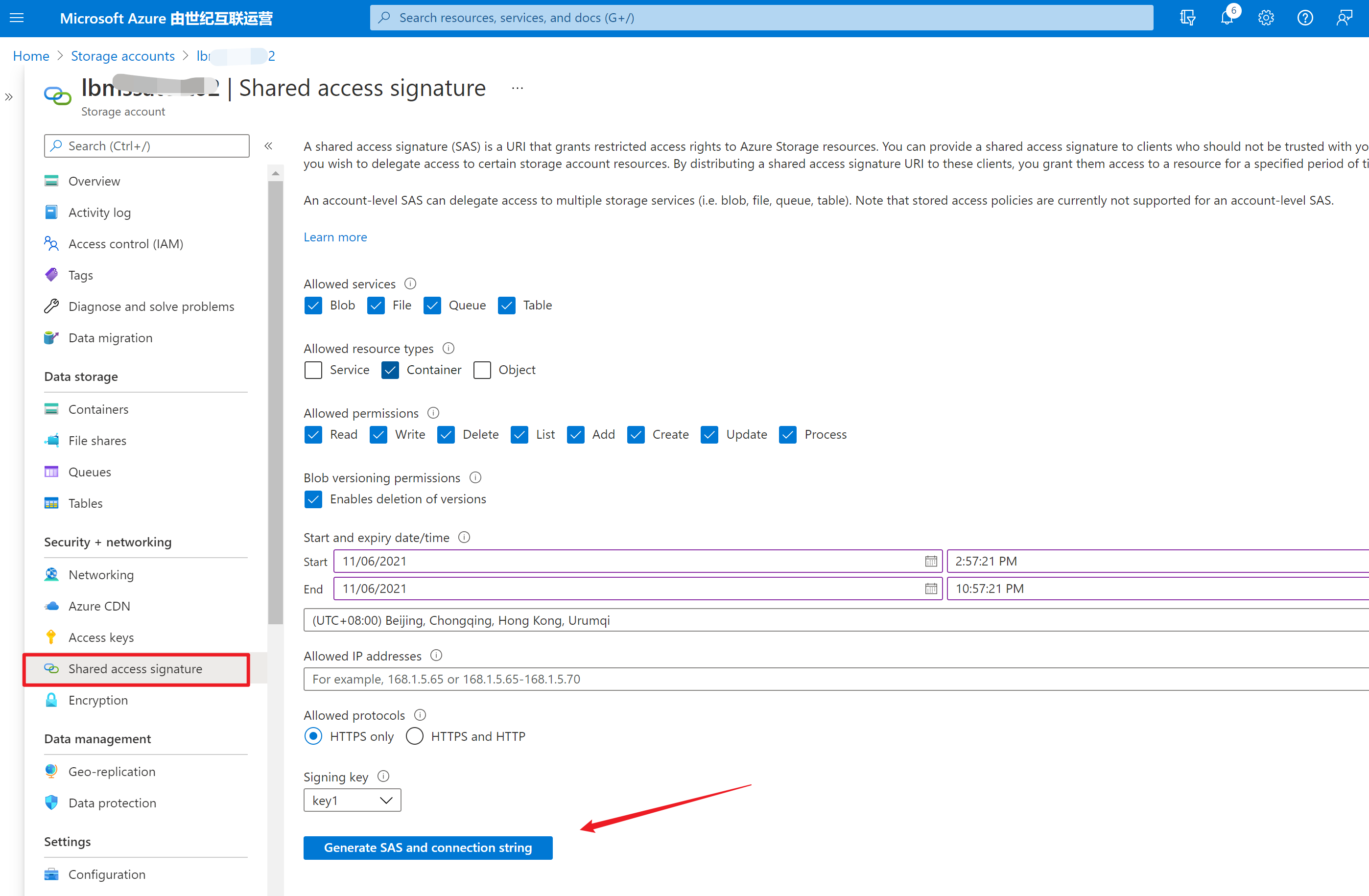
那么使用代码如何来生成呢?
问题回答
以最常见的两种代码作为示例:.NET 和 Java
.NET
Blob SAS 将使用帐户访问密钥(Storage Account Key1 or Key2)进行签名。 使用 StorageSharedKeyCredential 类创建用于为 SAS 签名的凭据。 新建 BlobSasBuilder 对象,并调用 ToSasQueryParameters 以获取 SAS 令牌字符串。官方文档(https://docs.azure.cn/zh-cn/storage/blobs/sas-service-create?tabs=dotnet)中进行了详细介绍,直接使用以下部分代码即可生成Blob的SAS URL。
private static Uri GetServiceSasUriForBlob(BlobClient blobClient,

    string storedPolicyName = null)

{

    // Check whether this BlobClient object has been authorized with Shared Key.

    if (blobClient.CanGenerateSasUri)

    {

        // Create a SAS token that's valid for one hour.

        BlobSasBuilder sasBuilder = new BlobSasBuilder()

        {

            BlobContainerName = blobClient.GetParentBlobContainerClient().Name,

            BlobName = blobClient.Name,

            Resource = "b"

        };

        if (storedPolicyName == null)

        {

            sasBuilder.ExpiresOn = DateTimeOffset.UtcNow.AddHours(1);

            sasBuilder.SetPermissions(BlobSasPermissions.Read |

                BlobSasPermissions.Write);

        }

        else

        {

            sasBuilder.Identifier = storedPolicyName;

        }

        Uri sasUri = blobClient.GenerateSasUri(sasBuilder);

        Console.WriteLine("SAS URI for blob is: {0}", sasUri);

        Console.WriteLine();

        return sasUri;

    }

    else

    {

        Console.WriteLine(@"BlobClient must be authorized with Shared Key

                          credentials to create a service SAS.");

        return null;

    }

}
JAVA
而Java的示例代码在官网中并没有介绍,所以本文就Java生成SAS的代码进行讲解。
从Java新版的SDK(azure-storage-blob)中 ,可以发现 BlobServiceClient,BlobContainerClient ,BlobClient 对象中都包含 generateAccountSas 或 generateSas 方法来实现对Account, Container,Blob进行SAS Token生成,只需要根据它所需要的参数对
    public static void GenerateSASstring(BlobServiceClient blobServiceClient, BlobContainerClient blobContainerClient,

            BlobClient blobClient) {

        /*

         * Generate an account sas. Other samples in this file will demonstrate how to

         * create a client with the sas token.

         */

        // Configure the sas parameters. This is the minimal set.

        OffsetDateTime startTime = OffsetDateTime.now();

        OffsetDateTime expiryTime = OffsetDateTime.now().plusDays(1);

        AccountSasService services = new AccountSasService().setBlobAccess(true);

        AccountSasResourceType resourceTypes = new AccountSasResourceType().setObject(true);

        SasProtocol protocol = SasProtocol.HTTPS_ONLY;

        SasIpRange sasIpRange = SasIpRange.parse("167.220.255.73");

        // Generate the account sas.

        AccountSasPermission accountSasPermission = new AccountSasPermission().setReadPermission(true);

        AccountSasSignatureValues accountSasValues = new AccountSasSignatureValues(expiryTime, accountSasPermission,

                services, resourceTypes);

        accountSasValues.setStartTime(startTime);

        accountSasValues.setProtocol(protocol);

        accountSasValues.setSasIpRange(sasIpRange);

        String accountSasToken = blobServiceClient.generateAccountSas(accountSasValues);

        System.out.println("\nGenerate the account sas & url is :::: \n\t" + accountSasToken + "\n\t"

                + blobServiceClient.getAccountUrl() + "?" + accountSasToken);

        // Generate a sas using a container client

        BlobContainerSasPermission containerSasPermission = new BlobContainerSasPermission().setCreatePermission(true);

        BlobServiceSasSignatureValues serviceSasValues = new BlobServiceSasSignatureValues(expiryTime,

                containerSasPermission);

        serviceSasValues.setStartTime(startTime);

        serviceSasValues.setProtocol(protocol);

        serviceSasValues.setSasIpRange(sasIpRange);

        String containerSasToken = blobContainerClient.generateSas(serviceSasValues);

        System.out.println("\nGenerate the Container sas & url is :::: \n\t" + containerSasToken + "\n\t"

                + blobContainerClient.getBlobContainerUrl() + "?" + containerSasToken);

        // Generate a sas using a blob client

        BlobSasPermission blobSasPermission = new BlobSasPermission().setReadPermission(true);

        serviceSasValues = new BlobServiceSasSignatureValues(expiryTime, blobSasPermission);

        serviceSasValues.setStartTime(startTime);

        serviceSasValues.setProtocol(protocol);

        serviceSasValues.setSasIpRange(sasIpRange);

        String blobSasToken = blobClient.generateSas(serviceSasValues);

        System.out.println("\nGenerate the Blob sas & url is :::: \n\t" + blobSasToken + "\n\t"

                + blobClient.getBlobUrl() + "?" + blobSasToken);

    }
在pom.xml 中所需要加载的依赖项:
    <dependency>

      <groupId>com.azure</groupId>

      <artifactId>azure-storage-blob</artifactId>

      <version>12.13.0</version>

    </dependency>
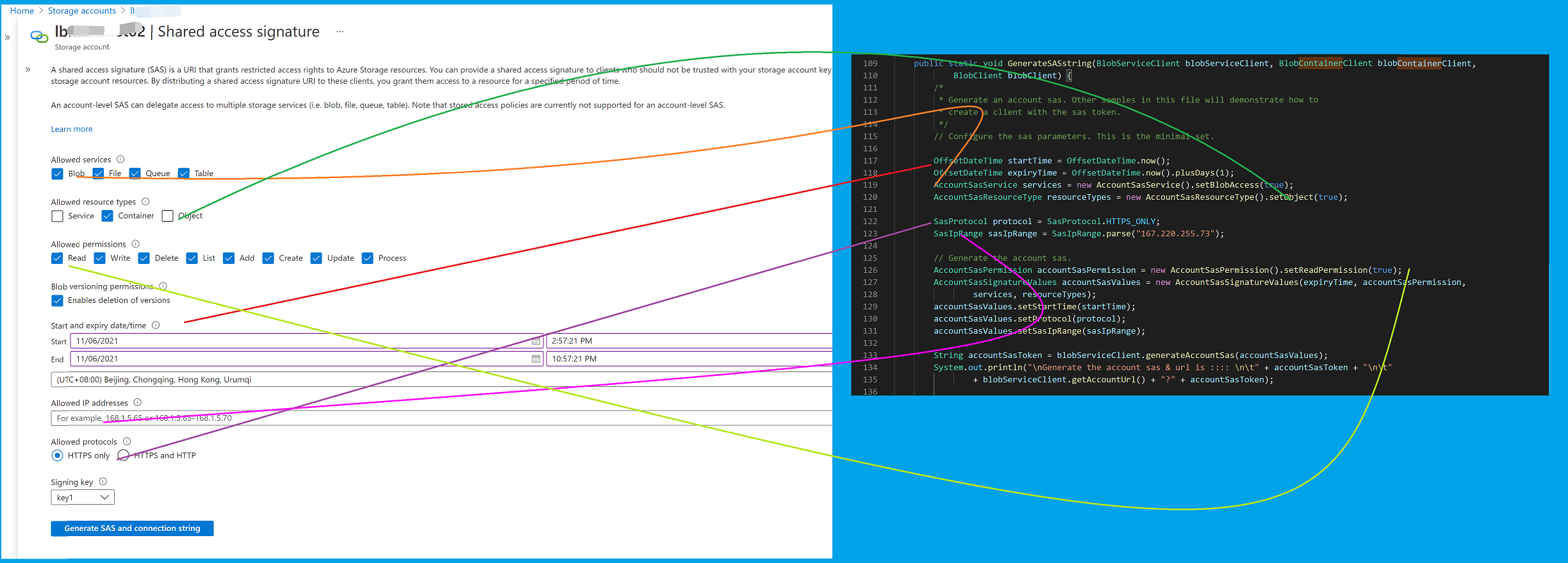
以上代码中的各部分设置项 与 Azure门户上设置项的对应关系如下图:
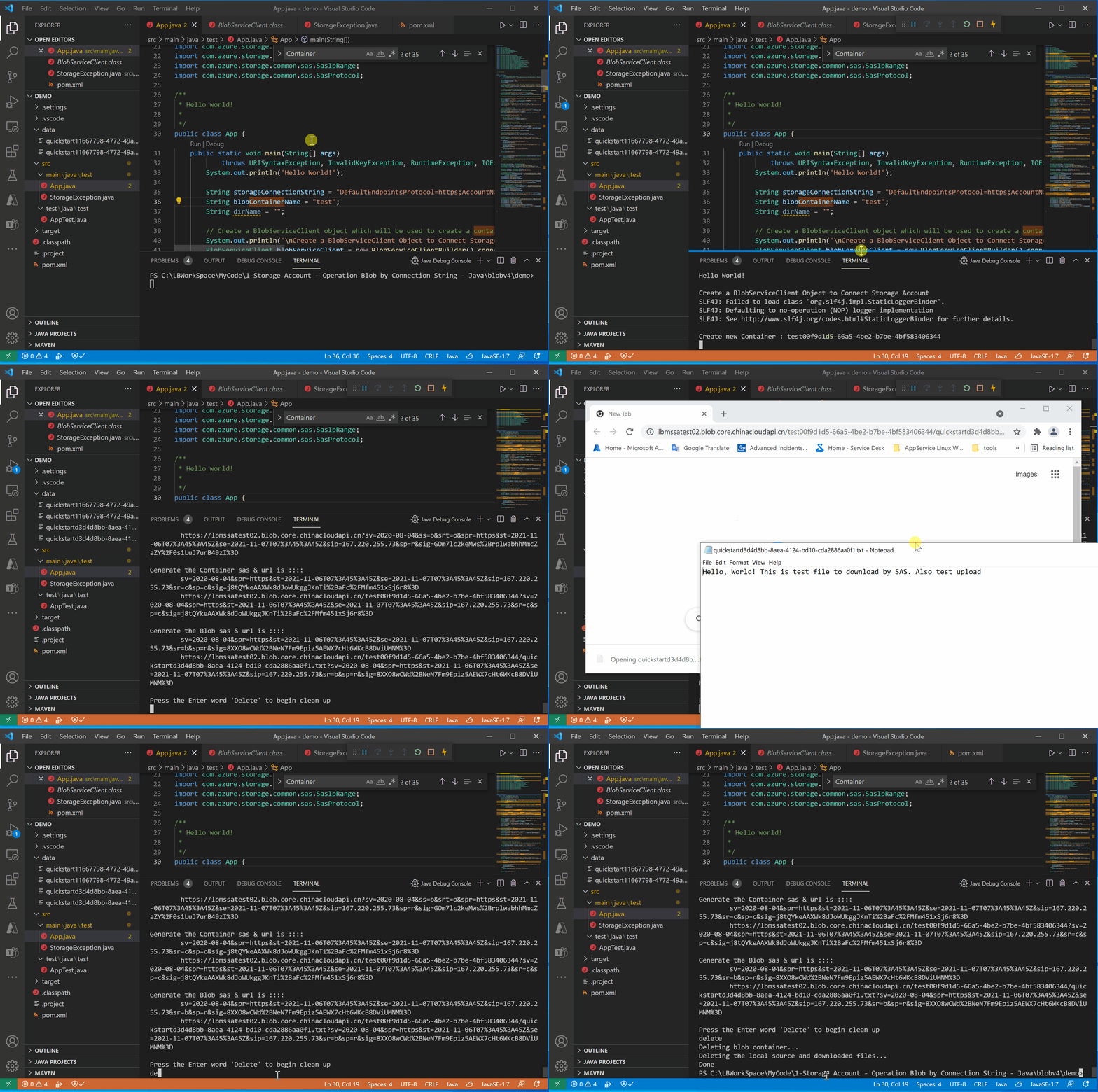
运行效果图
附录一:Java Main函数全部代码:
package test;

import java.io.File;

import java.io.FileWriter;

import java.io.IOException;

import java.net.URISyntaxException;

import java.security.InvalidKeyException;

import java.time.OffsetDateTime;

import java.util.Iterator;

import com.azure.storage.blob.BlobClient;

import com.azure.storage.blob.BlobContainerClient;

import com.azure.storage.blob.BlobServiceClient;

import com.azure.storage.blob.BlobServiceClientBuilder;

import com.azure.storage.blob.models.BlobItem;

import com.azure.storage.blob.sas.BlobContainerSasPermission;

import com.azure.storage.blob.sas.BlobSasPermission;

import com.azure.storage.blob.sas.BlobServiceSasSignatureValues;

import com.azure.storage.common.sas.AccountSasPermission;

import com.azure.storage.common.sas.AccountSasResourceType;

import com.azure.storage.common.sas.AccountSasService;

import com.azure.storage.common.sas.AccountSasSignatureValues;

import com.azure.storage.common.sas.SasIpRange;

import com.azure.storage.common.sas.SasProtocol;

/**

 * Hello world!

 *

 */

public class App {

    public static void main(String[] args)

            throws URISyntaxException, InvalidKeyException, RuntimeException, IOException {

        System.out.println("Hello World!");

        String storageConnectionString = "DefaultEndpointsProtocol=https;AccountName=<your storage account name>;AccountKey=**************************;EndpointSuffix=core.chinacloudapi.cn";

        String blobContainerName = "test";

        String dirName = "";

        // Create a BlobServiceClient object which will be used to create a container

        System.out.println("\nCreate a BlobServiceClient Object to Connect Storage Account");

        BlobServiceClient blobServiceClient = new BlobServiceClientBuilder().connectionString(storageConnectionString)

                .buildClient();

        // Create a unique name for the container

        String containerName = blobContainerName + java.util.UUID.randomUUID();

        // Create the container and return a container client object

        System.out.println("\nCreate new Container : " + containerName);

        BlobContainerClient containerClient = blobServiceClient.createBlobContainer(containerName);

        // Create a local file in the ./data/ directory for uploading and downloading

        System.out.println("\nCreate a local file in the ./data/ directory for uploading and downloading");

        String localPath = "./data/";

        String fileName = "quickstart" + java.util.UUID.randomUUID() + ".txt";

        File localFile = new File(localPath + fileName);

        // Write text to the file

        FileWriter writer = new FileWriter(localPath + fileName, true);

        writer.write("Hello, World! This is test file to download by SAS. Also test upload");

        writer.close();

        // Get a reference to a blob

        BlobClient blobClient = containerClient.getBlobClient(fileName);

        System.out.println("\nUploading to Blob storage as blob:\n\t" + blobClient.getBlobUrl());

        // Upload the blob

        blobClient.uploadFromFile(localPath + fileName);

        System.out.println("\nUpload blob completed : " + blobClient.getBlobName());

        System.out.println("\nListing blobs...");

        // List the blob(s) in the container.

        for (BlobItem blobItem : containerClient.listBlobs()) {

            System.out.println("\t" + blobItem.getName());

        }

        // Download the blob to a local file

        // Append the string "DOWNLOAD" before the .txt extension so that you can see

        // both files.

        String downloadFileName = fileName.replace(".txt", "DOWNLOAD.txt");

        File downloadedFile = new File(localPath + downloadFileName);

        System.out.println("\nDownloading blob to\n\t " + localPath + downloadFileName);

        blobClient.downloadToFile(localPath + downloadFileName);

        // Generate SAS String for blob user..

        System.out.println("\nGenerate SAS String for blob user..");

        GenerateSASstring(blobServiceClient, containerClient, blobClient);

        // Clean up

        System.out.println("\nPress the Enter word 'Delete' to begin clean up");

        boolean isDelete = System.console().readLine().toLowerCase().trim().equals("delete");

        if (isDelete) {

            System.out.println("Deleting blob container...");

            containerClient.delete();

            System.out.println("Deleting the local source and downloaded files...");

            localFile.delete();

            downloadedFile.delete();

        } else {

            System.out.println("Skip to Clean up operation");

        }

        System.out.println("Done");

    }

    public static void GenerateSASstring(BlobServiceClient blobServiceClient, BlobContainerClient blobContainerClient,

            BlobClient blobClient) {

        /*

         * Generate an account sas. Other samples in this file will demonstrate how to

         * create a client with the sas token.

         */

        // Configure the sas parameters. This is the minimal set.

        OffsetDateTime startTime = OffsetDateTime.now();

        OffsetDateTime expiryTime = OffsetDateTime.now().plusDays(1);

        AccountSasService services = new AccountSasService().setBlobAccess(true);

        AccountSasResourceType resourceTypes = new AccountSasResourceType().setObject(true);

        SasProtocol protocol = SasProtocol.HTTPS_ONLY;

        SasIpRange sasIpRange = SasIpRange.parse("167.220.255.73");

        // Generate the account sas.

        AccountSasPermission accountSasPermission = new AccountSasPermission().setReadPermission(true);

        AccountSasSignatureValues accountSasValues = new AccountSasSignatureValues(expiryTime, accountSasPermission,

                services, resourceTypes);

        accountSasValues.setStartTime(startTime);

        accountSasValues.setProtocol(protocol);

        accountSasValues.setSasIpRange(sasIpRange);

        String accountSasToken = blobServiceClient.generateAccountSas(accountSasValues);

        System.out.println("\nGenerate the account sas & url is :::: \n\t" + accountSasToken + "\n\t"

                + blobServiceClient.getAccountUrl() + "?" + accountSasToken);

        // Generate a sas using a container client

        BlobContainerSasPermission containerSasPermission = new BlobContainerSasPermission().setCreatePermission(true);

        BlobServiceSasSignatureValues serviceSasValues = new BlobServiceSasSignatureValues(expiryTime,

                containerSasPermission);

        serviceSasValues.setStartTime(startTime);

        serviceSasValues.setProtocol(protocol);

        serviceSasValues.setSasIpRange(sasIpRange);

        String containerSasToken = blobContainerClient.generateSas(serviceSasValues);

        System.out.println("\nGenerate the Container sas & url is :::: \n\t" + containerSasToken + "\n\t"

                + blobContainerClient.getBlobContainerUrl() + "?" + containerSasToken);

        // Generate a sas using a blob client

        BlobSasPermission blobSasPermission = new BlobSasPermission().setReadPermission(true);

        serviceSasValues = new BlobServiceSasSignatureValues(expiryTime, blobSasPermission);

        serviceSasValues.setStartTime(startTime);

        serviceSasValues.setProtocol(protocol);

        serviceSasValues.setSasIpRange(sasIpRange);

        String blobSasToken = blobClient.generateSas(serviceSasValues);

        System.out.println("\nGenerate the Blob sas & url is :::: \n\t" + blobSasToken + "\n\t"

                + blobClient.getBlobUrl() + "?" + blobSasToken);

    }

}
参考资料
快速入门:使用 Java v12 SDK 管理 blob:https://docs.azure.cn/zh-cn/storage/blobs/storage-quickstart-blobs-java
Azure Storage Blob client library for Java:https://github.com/Azure/azure-sdk-for-java/tree/main/sdk/storage/azure-storage-blob#generate-a-sas-token
示例下载:
【Azure 存储服务】代码版 Azure Storage Blob 生成 SAS (Shared Access Signature: 共享访问签名)的更多相关文章
- 【Azure 存储服务】Java Azure Storage SDK V12使用Endpoint连接Blob Service遇见 The Azure Storage endpoint url is malformed
问题描述 使用Azure Storage Account的共享访问签名(Share Access Signature) 生成的终结点,连接时遇见 The Azure Storage endpoint ...
- 解读 Windows Azure 存储服务的账单 – 带宽、事务数量,以及容量
经常有人询问我们,如何估算 Windows Azure 存储服务的成本,以便了解如何更好地构建一个经济有效的应用程序.本文我们将从带宽.事务数量,以及容量这三种存储成本的角度探讨这一问题. 在使用 W ...
- 玩转Windows Azure存储服务——网盘
存储服务是除了计算服务之外最重要的云服务之一.说到云存储,大家可以想到很多产品,例如:AWS S3,Google Drive,百度云盘...而在Windows Azure中,存储服务却是在默默无闻的工 ...
- Azure Backup (3) 使用Azure备份服务,备份Azure虚拟机
<Windows Azure Platform 系列文章目录> 本将介绍,如何使用Azure备份服务,备份Azure虚拟机. 我们先预先创建2台Windows VM (命名为LeiVM00 ...
- Azure Service Bus 中的身份验证方式 Shared Access Signature
var appInsights=window.appInsights||function(config){ function r(config){t[config]=function(){var i= ...
- Azure进阶攻略丨共享访问签名是个什么东东?
Azure 进阶攻略]一经推出便受到了广大粉丝的热情追捧,大家纷纷表示涨了姿势,并希望能了解更多的攻略~根据大家的投票结果,本期,小编将为大家讲解“如何生成 Shared Access Signatu ...
- 【Azure 存储服务】Python模块(azure.cosmosdb.table)直接对表存储(Storage Account Table)做操作示例
什么是表存储 Azure 表存储是一项用于在云中存储结构化 NoSQL 数据的服务,通过无结构化的设计提供键/属性存储. 因为表存储无固定的数据结构要求,因此可以很容易地随着应用程序需求的发展使数据适 ...
- 玩转Windows Azure存储服务——高级存储
在上一篇我们把Windows Azure的存储服务用作网盘,本篇我们继续挖掘Windows Azure的存储服务——高级存储.高级存储自然要比普通存储高大上的,因为高级存储是SSD存储!其吞吐量和IO ...
- [Azure Storage]使用Java上传文件到Storage并生成SAS签名
Azure官网提供了比较详细的文档,您可以参考:https://azure.microsoft.com/en-us/documentation/articles/storage-java-how-to ...
随机推荐
- ecshop 首页调用指定分类下的销售排行
/*首页调用指定分类下的销售排行*/ function get_cats_top10($cat = '') { $sql = 'SELECT cat_id, cat_name ' . 'FROM ' ...
- P1074 [NOIP2009 提高组] 靶形数独
#include<bits/stdc++.h> using namespace std; const int N=10; int a[N][N],ans[N][N],vis[3][N][N ...
- FreeRTOS-06-信号量
说明 本文仅作为学习FreeRTOS的记录文档,作为初学者肯定很多理解不对甚至错误的地方,望网友指正. FreeRTOS是一个RTOS(实时操作系统)系统,支持抢占式.合作式和时间片调度.适用于微处理 ...
- Python调用函数带括号和不带括号的区别
1.不带括号时,调用的是这个函数本身 ,是整个函数体,是一个函数对象,不需等该函数执行完成 2.带括号(此时必须传入需要的参数),调用的是函数的return结果,需要等待函数执行完成的结果 如果函数本 ...
- qt5 打包exe执行文件
1.pyinstaller 安装 :pip install pyinstaller 执行:pyinstaller -F -w --icon=logo.ico xx.py 打包后的文件 在 dist 下 ...
- AT4144-[ARC098D]Donation【Kruskal重构树,dp】
正题 题目链接:https://www.luogu.com.cn/problem/AT4144 题目大意 \(n\)个点\(m\)条边的一张无向联通图,每个点有两个值\(a_i,b_i\).表示经过该 ...
- 深入浅出WPF-07.Property(属性)
依赖属性 1)字段与属性:字段被封装在实例中,要么能够被外界访问(非Private),要么不能够被外界访问(Private).但是我们直接把数据暴露给外界的做法不安全,容易把错误的数据写入字段.于是我 ...
- 关于C、Java、Python程序运行耗时及内存用量
最近没有刷题,而是在PTA找几个题目寻找有关程序输入流问题以及各种语言在运行时对计算机消耗内存的问题, 以免很多同学解题的时候发现自己做的对但是出现运行超时的问题:针对运行内存,肯定用C/C++的同学 ...
- 论文解读(MPNN)Neural Message Passing for Quantum Chemistry
论文标题:DEEP GRAPH INFOMAX 论文方向: 论文来源:ICML 2017 论文链接:https://arxiv.org/abs/1704.01212 论文代码: 1 介绍 本文的目标 ...
- Golang通脉之数据类型
标识符与关键字 在了解数据类型之前,先了解一下go的标识符和关键字 标识符 在编程语言中标识符就是定义的具有某种意义的词,比如变量名.常量名.函数名等等. Go语言中标识符允许由字母数字和_(下划线) ...