
Android入门(九):CheckBox多选清单和ScrollView滚动条
字符串资源文件strings.xml:
<resources>
    <string name="hello">主类main</string>
    <string name="app_name">选项</string>
    <string name="music">音乐</string>
    <string name="sing">唱歌</string>
    <string name="dance">跳舞</string>
    <string name="travel">旅行</string>
    <string name="reading">阅读</string>
    <string name="writing">写作</string>
    <string name="climbing">爬山</string>
    <string name="swim">游泳</string>
    <string name="exercise">运动</string>
    <string name="fitness">健身</string>
    <string name="photo">摄影</string>
    <string name="eating">美食</string>
    <string name="painting">画画</string>
    <string name="promptSelOK">确定</string>
    <string name="hobList">你的兴趣爱好:</string>
</resources>

界面布局文件main.xml
<?xml version="1.0" encoding="utf-8"?>
<ScrollView xmlns:android="http://schemas.android.com/apk/res/android"
    android:layout_width="match_parent"
    android:layout_height="match_parent">
    <LinearLayout
        android:orientation="vertical"
        android:layout_width="match_parent"
        android:layout_height="match_parent"
        android:gravity="center_horizontal">

        <CheckBox android:id="@+id/chbMusic"
            android:layout_width="200dp"
            android:layout_height="wrap_content"
            android:textSize="30sp"
            android:text="@string/music"/>
        <CheckBox android:id="@+id/chbSing"
            android:layout_width="200dp"
            android:layout_height="wrap_content"
            android:textSize="30sp"
            android:text="@string/sing"/>
        <CheckBox android:id="@+id/chbDance"
            android:layout_width="200dp"
            android:layout_height="wrap_content"
            android:textSize="30sp"
            android:text="@string/dance"/>
        <CheckBox android:id="@+id/chbTravel"
            android:layout_width="200dp"
            android:layout_height="wrap_content"
            android:textSize="30sp"
            android:text="@string/travel"/>
        <CheckBox android:id="@+id/chbReading"
            android:layout_width="200dp"
            android:layout_height="wrap_content"
            android:textSize="30sp"
            android:text="@string/reading"/>
        <CheckBox android:id="@+id/chbWriting"
            android:layout_width="200dp"
            android:layout_height="wrap_content"
            android:textSize="30sp"
            android:text="@string/writing"/>
        <CheckBox android:id="@+id/chbClimbing"
            android:layout_width="200dp"
            android:layout_height="wrap_content"
            android:textSize="30sp"
            android:text="@string/climbing"/>
        <CheckBox android:id="@+id/chbSwim"
            android:layout_width="200dp"
            android:layout_height="wrap_content"
            android:textSize="30sp"
            android:text="@string/swim"/>
        <CheckBox android:id="@+id/chbExercise"
            android:layout_width="200dp"
            android:layout_height="wrap_content"
            android:textSize="30sp"
            android:text="@string/exercise"/>
        <CheckBox android:id="@+id/chbFitness"
            android:layout_width="200dp"
            android:layout_height="wrap_content"
            android:textSize="30sp"
            android:text="@string/fitness"/>
        <CheckBox android:id="@+id/chbPhoto"
            android:layout_width="200dp"
            android:layout_height="wrap_content"
            android:textSize="30sp"
            android:text="@string/photo"/>
        <CheckBox android:id="@+id/chbEating"
            android:layout_width="200dp"
            android:layout_height="wrap_content"
            android:textSize="30sp"
            android:text="@string/eating"/>
        <CheckBox android:id="@+id/chbPainting"
            android:layout_width="200dp"
            android:layout_height="wrap_content"
            android:textSize="30sp"
            android:text="@string/painting"/>
        <Button android:id="@+id/btnSelOK"
            android:layout_width="200dp"
            android:layout_height="wrap_content"
            android:textSize="30sp"
            android:text="@string/promptSelOK"/>
        <TextView android:id="@+id/txtHobList"
            android:layout_width="300dp"
            android:layout_height="wrap_content"
            android:textSize="20sp"
            android:text="@string/hobList"/>
    </LinearLayout>
</ScrollView>
程序代码:
public class MainActivity extends Activity {

    private CheckBox chbMusic, chbSing, chbDance, chbTravel, chbReading, chbWriting, chbClimbing,
            chbSwim, chbExercise, chbFitness, chbPhoto, chbEating, chbPainting;

    private Button btnSelOK;
    private TextView txtHobList;

    @Override
    public void onCreate(Bundle savedInstanceState) {
        super.onCreate(savedInstanceState);
        setContentView(R.layout.activity_main);

        setupViewComponent();
    }

    private void setupViewComponent()
    {
        chbMusic = (CheckBox)findViewById(R.id.chbMusic);
        chbSing = (CheckBox)findViewById(R.id.chbSing);
        chbDance = (CheckBox)findViewById(R.id.chbDance);
        chbTravel = (CheckBox)findViewById(R.id.chbTravel);
        chbReading = (CheckBox)findViewById(R.id.chbReading);
        chbWriting = (CheckBox)findViewById(R.id.chbWriting);
        chbClimbing = (CheckBox)findViewById(R.id.chbClimbing);
        chbSwim = (CheckBox)findViewById(R.id.chbSwim);
        chbExercise = (CheckBox)findViewById(R.id.chbExercise);
        chbFitness = (CheckBox)findViewById(R.id.chbFitness);
        chbPhoto = (CheckBox)findViewById(R.id.chbPhoto);
        chbEating = (CheckBox)findViewById(R.id.chbEating);
        chbPainting = (CheckBox)findViewById(R.id.chbPainting);
        btnSelOK = (Button) findViewById(R.id.btnSelOK);
        txtHobList = (TextView) findViewById(R.id.txtHobList);

        btnSelOK.setOnClickListener(btnSelOKOnClick);
    }

    private Button.OnClickListener btnSelOKOnClick = new Button.OnClickListener()
    {
        public void onClick(View v)
        {
            String s = getString(R.string.hobList);
            if(chbMusic.isChecked())
            {
                s += chbMusic.getText().toString();
            }

            if(chbSing.isChecked())
            {
                s += chbSing.getText().toString();
            }

            if(chbDance.isChecked())
            {
                s += chbDance.getText().toString();
            }

            if(chbTravel.isChecked())
            {
                s += chbTravel.getText().toString();
            }

            if(chbReading.isChecked())
            {
                s += chbReading.getText().toString();
            }

            if(chbWriting.isChecked())
            {
                s += chbWriting.getText().toString();
            }

            if(chbClimbing.isChecked())
            {
                s += chbClimbing.getText().toString();
            }

            if(chbSwim.isChecked())
            {
                s += chbSwim.getText().toString();
            }

            if(chbExercise.isChecked())
            {
                s += chbExercise.getText().toString();
            }

            if(chbFitness.isChecked())
            {
                s += chbFitness.getText().toString();
            }

            if(chbPhoto.isChecked())
            {
                s += chbPhoto.getText().toString();
            }

            if(chbEating.isChecked())
            {
                s += chbEating.getText().toString();
            }

            if(chbPainting.isChecked())
            {
                s += chbPainting.getText().toString();
            }

            txtHobList.setText(s);
        }
    };
}
效果图: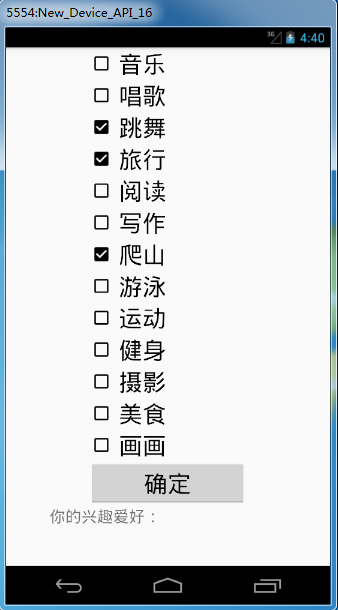
Android入门(九):CheckBox多选清单和ScrollView滚动条的更多相关文章
- elementUI 学习入门之 checkbox 复选框
CheckBox 复选框 与单选框基本类似.如:按钮样式.带边框.复选框按钮大小. eg: <template> <el-checkbox-group v-model="s ...
- Android入门(九)文件存储与SharedPreferences存储
原文链接:http://www.orlion.ga/578/ Android系统中主要提供了三种方式用于简单地实现数据持久化功能,即文件存储.SharedPreference存储以及数据库存储.当然, ...
- Android 单选按钮(RadioButton)和复选框(CheckBox)的使用
1.RadioButton (1)介绍 (2)单选按钮点击事件的用法 (3)RadioButton与RadioGroup配合使用实现单选题功能 (4)xml布局及使用 <?xml version ...
- Android基础控件单选按钮RadioButton和Checkbox复选按钮的使用
1.相关简介 RadioButton需要和RadioGroup结合使用,在RadioGroup设置布局方式! Checkbox是单独使用,本文为了方便放在了RadioGroup中! 2.简单使用 方法 ...
- Android控件之CheckBox(复选框控件)
一.有两种状态: 选中状态(true).未选中状态(false) 二.属性 android:id = "@+id/checkbox" android:layout_width=&q ...
- Android笔记-5-EditText密码和Checkbox二选一
EditText密码:明文和密文 密文: public class MainActivity extends Activity { private EditText password = null; ...
- Android的CheckBox(多选框)
1.布局文件 <LinearLayout xmlns:android="http://schemas.android.com/apk/res/android" xmlns:t ...
- Android中ListView结合CheckBox判断选中项
本文主要实现在自定义的ListView布局中加入CheckBox控件,通过判断用户是否选中CheckBox来对ListView的选中项进行相应的操作.通过一个Demo来展示该功能,选中ListView ...
- 网络编程懒人入门(九):通俗讲解,有了IP地址,为何还要用MAC地址?
1.前言 标题虽然是为了解释有了 IP 地址,为什么还要用 MAC 地址,但是本文的重点在于理解为什么要有 IP 这样的东西.本文对读者的定位是知道 MAC 地址是什么,IP 地址是什么. (本文同步 ...
随机推荐
- python 面向对象(类)
面向对象,即是将具备某种共性的事物抽象成一个类(模板),然后再根据类来创建实例对象进行具体的使用. 概述 面向过程:根据业务逻辑从上到下写垒代码 函数式:将某功能代码封装到函数中,日后便无需重复编写, ...
- 使用safari对webview进行调试
在web开发的过程中,抓包.调试页面样式.查看请求头是很常用的技巧.其实在iOS开发中,这些技巧也能用(无论是模拟器还是真机),不过我们需要用到mac自带的浏览器Safari.所以,本文将讲解如何使用 ...
- XML-->DTD&Schema Notes
The need for XML “schemas” •Unlike any other data format, XML is totally flexible, elements can be ...
- JavaScript事件处理程序
JavaScript中的事件处理程序主要分为3种: HTML事件处理程序: <script type="text/javascript"> // HTML事件处理程序 ...
- PHP二维数组排序(list_order)
/** * 对二维数组进行排序 * 模拟 数据表记录按字段排序 * * <code> * @list_order($list, $get['orderKey'], $get['orderT ...
- PHP获取当前页面的URL
/** * 获取当前页面完整URL地址 * * @author 52php.cnblogs.com */ function http_get_page_url() { global $_G; if ( ...
- 如何对Azure磁盘性能进行测试
Azure的云存储一直是Azure比较自豪的东西,想到AWS的LSA后面有若干个9,搞得大家都以为它的存储最优秀,其实不然,Azure存储到现在没有丢过客户1bit的数据,但是Azure不会去说我们的 ...
- 【Alpha版本】冲刺-Day5
队伍:606notconnected 会议时间:11月13日 会议总结 张斯巍(433) 今天安排:完成昨天没完成的,设置界面设计 完成度:85% 明天计划:学习UI设计 遇到的问题:无 感想:一定要 ...
- 听说你们要开始学C了
同学们好: 先自我介绍一下,我是你们的助教吴喆(厚颜无耻地要求大家叫我吉吉老师:-D),本科学的电子,所以陆陆续续接触了不少C/C++的工作,曾经被编码折磨得死去活来,如今却对其念念不舍,颇有点“斯德 ...
- python之路五
内建模块 time和datetime 在Python中,通常有这几种方式来表示时间:1)时间戳 2)格式化的时间字符串 3)元组(struct_time)共九个元素.由于Python的time模块实现 ...