
Android基础控件单选按钮RadioButton和Checkbox复选按钮的使用
1、相关简介
RadioButton需要和RadioGroup结合使用,在RadioGroup设置布局方式!
Checkbox是单独使用,本文为了方便放在了RadioGroup中!
2、简单使用
方法说明:
final RadioGroup radioGroup = (RadioGroup)findViewById(R.id.radioGroup);

radioGroup.getChildCount() //获取子控件数量

RadioButton radioButton = (RadioButton)radioGroup.getChildAt(i); //获取子控件

radioButton.isChecked() //获取按钮选择状态

radioButton.getText() //获取按钮文本
xml布局文件
        <RadioGroup

            android:layout_width="wrap_content"

            android:layout_height="wrap_content"

            android:id="@+id/radioGroup"

            android:orientation="horizontal">

                <RadioButton

                    android:layout_width="wrap_content"

                    android:layout_height="wrap_content"

                    android:id="@+id/radio11"

                    android:text="男"

                    android:checked="true"/>

                <RadioButton

                    android:layout_width="wrap_content"

                    android:layout_height="wrap_content"

                    android:id="@+id/radio22"

                    android:text="女"/>

                <RadioButton

                    android:layout_width="wrap_content"

                    android:layout_height="wrap_content"

                    android:id="@+id/radio33"

                    android:text="太监"/>

        </RadioGroup>

        <Button

            android:layout_width="wrap_content"

            android:layout_height="wrap_content"

            android:id="@+id/radioBtn"

            android:text="提交"/>

        <RadioGroup

            android:layout_width="wrap_content"

            android:layout_height="wrap_content"

            android:id="@+id/boxGroup"

            android:orientation="vertical">

                <CheckBox

                    android:layout_width="wrap_content"

                    android:layout_height="wrap_content"

                    android:id="@+id/box11"

                    android:text="男"

                    />

                <CheckBox

                    android:layout_width="wrap_content"

                    android:layout_height="wrap_content"

                    android:id="@+id/box22"

                    android:text="女"/>

        </RadioGroup>

        <Button

            android:layout_width="wrap_content"

            android:layout_height="wrap_content"

            android:id="@+id/boxBtn"

            android:text="提交"/>
Java文件:
    protected void onCreate(Bundle savedInstanceState) {

        super.onCreate(savedInstanceState);

        setContentView(R.layout.activity_login);

        // Set up the login form.

        final RadioGroup radioGroup = (RadioGroup)findViewById(R.id.radioGroup);

//        方法一

//        radioGroup.setOnCheckedChangeListener(new RadioGroup.OnCheckedChangeListener() {

//            @Override

//            public void onCheckedChanged(RadioGroup radioGroup, int i) {

//                RadioButton radioButton = (RadioButton)findViewById(i);

//                Toast.makeText(getApplicationContext(),"你选择了"+radioButton.getText(),Toast.LENGTH_LONG).show();

//            }

//        });

//        方法二

        Button button = (Button)findViewById(R.id.radioBtn);

        button.setOnClickListener(new OnClickListener() {

            @Override

            public void onClick(View view) {

                for (int i = 0;i < radioGroup.getChildCount();i++){

                    RadioButton radioButton = (RadioButton)radioGroup.getChildAt(i);

                    if (radioButton.isChecked()){

                        Toast.makeText(getApplicationContext(),"你选择了"+radioButton.getText(),Toast.LENGTH_SHORT).show();

                    }

                }

            }

        });

        Button button1 = (Button)findViewById(R.id.boxBtn);

        final RadioGroup boxGroup = (RadioGroup)findViewById(R.id.boxGroup);

        button1.setOnClickListener(new OnClickListener() {

            @Override

            public void onClick(View view) {

                String choos = "";

                for (int i=0;i<boxGroup.getChildCount();i++){

                    CheckBox checkBox = (CheckBox)boxGroup.getChildAt(i);

                    if (checkBox.isChecked()){

                        choos +=checkBox.getText().toString();

                    }else {

                        if (choos.indexOf(checkBox.getText().toString())!=-1){

                            choos.substring(choos.indexOf(checkBox.getText().toString()));

                        }

                    }

                    if (i==boxGroup.getChildCount()-1){

                        Toast.makeText(getApplicationContext(),"选了"+choos,Toast.LENGTH_SHORT).show();

                    }

                }

            }

        });

    }

}
效果图
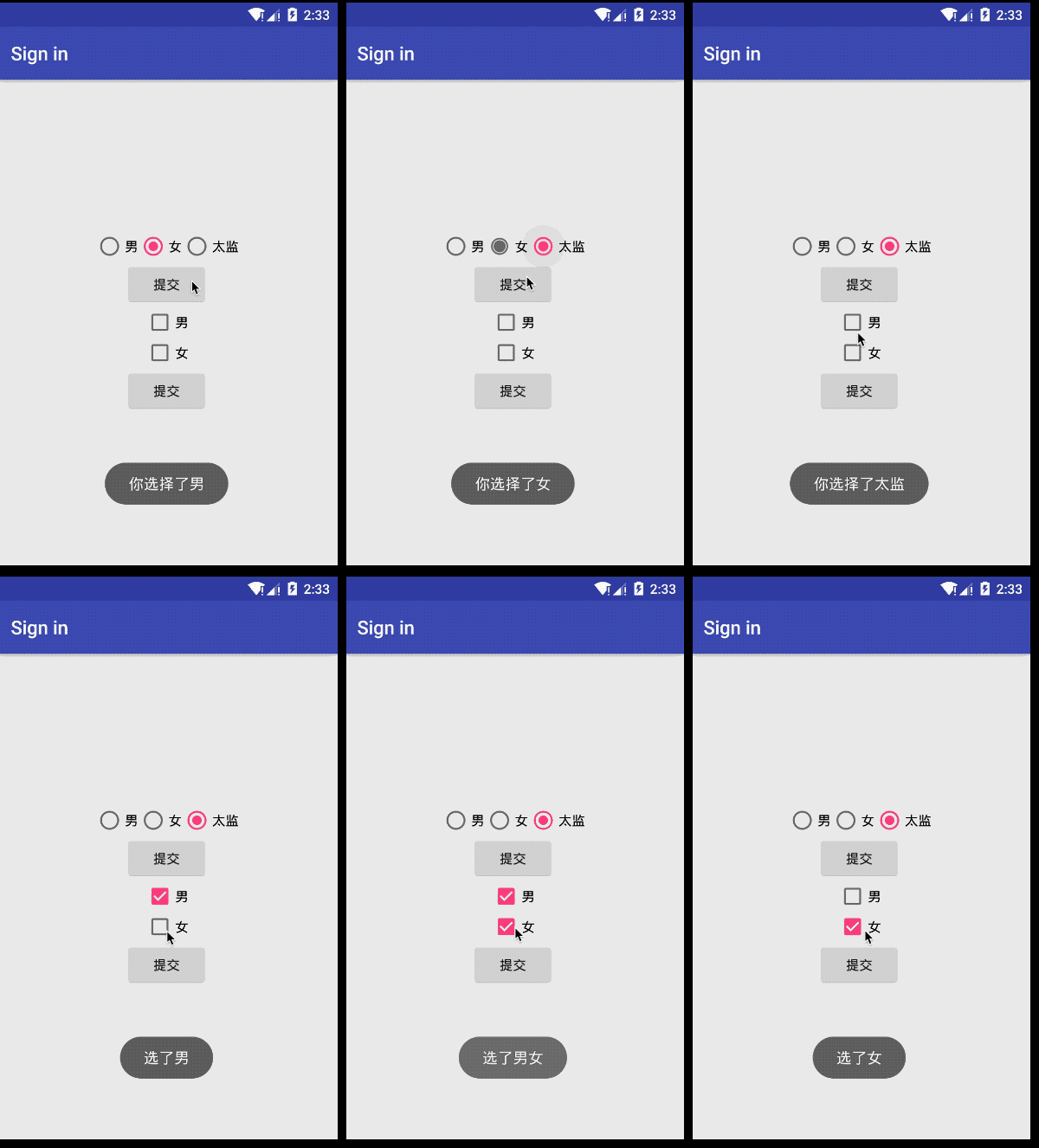
Android基础控件单选按钮RadioButton和Checkbox复选按钮的使用的更多相关文章
- Android基础控件ListView基础操作
1.简介 基于Android基础控件ListView和自定义BaseAdapter适配器情况下,对ListView的数据删除和添加操作: public boolean add(E e) {//添加数据 ...
- android基础控件的使用
控件在屏幕上位置的确定 通常情况下控件在屏幕上确定至少要连接两条线(一条水平,一条垂直) 如下图连接了四条线 辅助线 辅助线的调出: 水平辅助线:进入activity.xml的设计模式之后如下图 为了 ...
- android 基础控件(EditView、SeekBar等)的属性及使用方法
android提供了大量的UI控件,本文将介绍TextView.ImageView.Button.EditView.ProgressBar.SeekBar.ScrollView.WebView ...
- 矩阵, 矩阵 , Android基础控件之ImageView
天下文章大家抄,以下所有内容,有来自copy,有来自查询,亦有自己的总结(目的是总结出自己的东西),所以说原创,不合适,说是转载也不恰当,所以我称之为笔记,可惜没有此分类选项,姑且不要脸一点,选择为原 ...
- android基本控件学习-----RadioButton&CheckBox
RadioButton(单选框)和CheckBox(复选框)讲解: 一.基本用法和事件处理 (1)RadioButton单选框,就是只能选择其中的一个,我们在使用的时候需要将RadioButton放到 ...
- android 基础控件 EditText
EditText 简介: EditText 控件继承 TextView ,它有TextView的所有属性和方法,并且自身是可编辑的: extends TextView java.lang.Object ...
- Android 基础控件 TextView
一TextView介绍: TextView是UI最基本的组件,使用TextView可以显示丰富的文本信息.设置添加TextView最常见的方法就是在xml中添加TextView元素,并指定属性.Tex ...
- Android基础控件TextClock和Chronometer的使用
1.简介 DigitalClock, TextClock,AnalogClock,Chronometer其中DigitalClock和AnalogClock废弃了! TextClock是在Androi ...
- Android基础控件ProgressBar进度条的使用
1.简介 ProgressBar继承与View类,直接子类有AbsSeekBar和ContentLoadingProgressBar, 其中AbsSeekBar的子类有SeekBar和RatingBa ...
随机推荐
- linux 网络监控软件nethogs iftop
1.nethogs yum -y install nethogs 装上了这个工具之后,使用起来就非常简单了.敲入nethogs 就会给出所有的信息.看下面的例子. root@ubuntu2:~# ne ...
- Python+Django+ansible playbook自动化运维项目实战✍✍✍
Python+Django+ansible playbook自动化运维项目实战 整个课程都看完了,这个课程的分享可以往下看,下面有链接,之前做java开发也做了一些年头,也分享下自己看这个视频的感受 ...
- 通过Matlab SDK 获取tushare数据
概要说明 版本要求:Matlab需要2016b及以上版本 接口说明:可以用help pro_api和help pro_bar查看 demo程序:请参考tushare_pro_test.m文件 程序包下 ...
- C++数据类型之字符串类型&布尔类型&数据的输入
字符串型 **作用**:用于表示一串字符 **两种风格** 1. **C风格字符串**: char 变量名 [ ] = "字符串值" 2.**C++风格字符串**: stri ...
- VMware 安装android-x86系统。
首先先安装 VMware 虚拟机,并下载 android-x86_64-8.1-r2.iso 系统. VMware安装完成后,打开VMware Workstation,单击“创建新的虚拟机”,或者在菜 ...
- PL SQL 12.0.7的安装及注册码,汉化包,连接Oracle远程数据库,中文乱码问题处理
首先,在官网下载PL SQL 的对应版本,本机是64位的就下载64位的,网址:https://www.allroundautomations.com/downloads.html#PLS 点击应用程序 ...
- 进程通信类型 管道是Linux支持的最初Unix IPC形式之一
管道 Linux环境进程间通信(一) https://www.ibm.com/developerworks/cn/linux/l-ipc/part1/index.html 管道及有名管道 郑彦兴200 ...
- 转:Linux环境下段错误的产生原因及调试方法小结
源地址:http://www.cnblogs.com/panfeng412/archive/2011/11/06/2237857.html 补充:http://baike.baidu.com/link ...
- Font Awesome 完全兼容 Bootstrap 的所有组件。
"F_FullName": "其他", "F_Icon": "glyphicon glyphicon-backward fa-lg ...
- Map、可变参数、静态导入、Collections、Arrays、集合嵌套
Map双列集合 key 键 value 值 方法: put(K, V) //判断key值是否相等,相等,覆盖元素,不相等,存储 remove(K) Map集合的遍历(不要看到java提供了很多方法做一 ...