
live555库中的testRTSPClient实例
1、testRTSPClient简介
testRTSPClient是个简单的客户端实例,这个实例对rtsp数据交互作了详细的描述,其中涉及到rtsp会话的两个概念Source和Sink.
Source是生产数据,Sink是消费数据.
testRTSPClient非常简洁,除了接收服务端发送过来的数据,什么都没干,所以我们很方便在这个基础上改造,做我们自己的项目.
2、testRTSPClient编译,运行
在linux下编译运行更方便,鉴于我的电脑太渣,虚拟机跑起来费劲,就转到windows下来折腾.
在windows下只需要加载这一个文件就可以编译,我们以mediaServer为服务端,以testRTSPClient为客户端。
当然也可以用支持rtsp协议的摄像机或其他实体设备作为服务端。
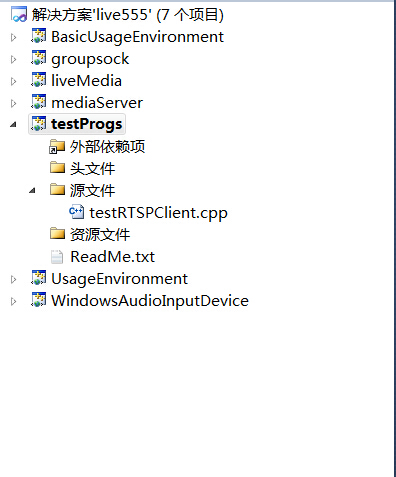

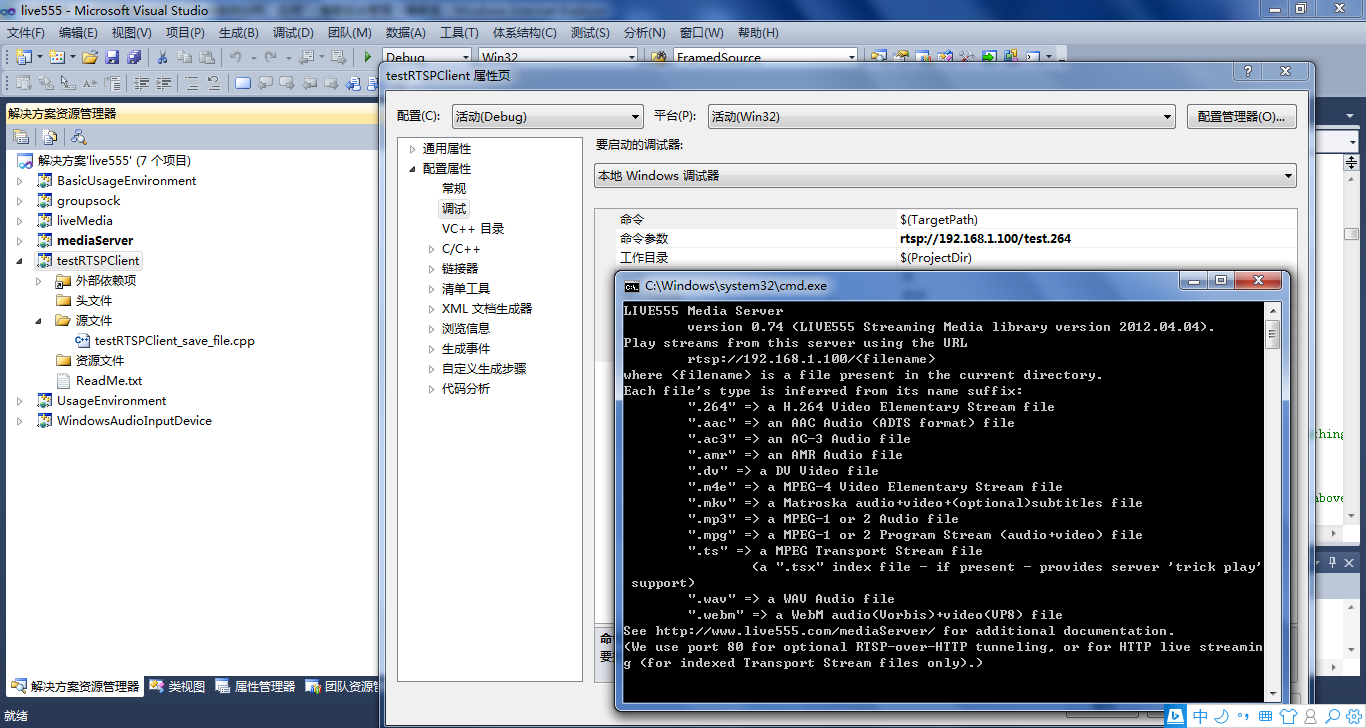
先启动mediaServer,然后在testRTSPClient项目的命令菜单里填入mediaServer 提示的IP, 再启动testRTSPClient即可。
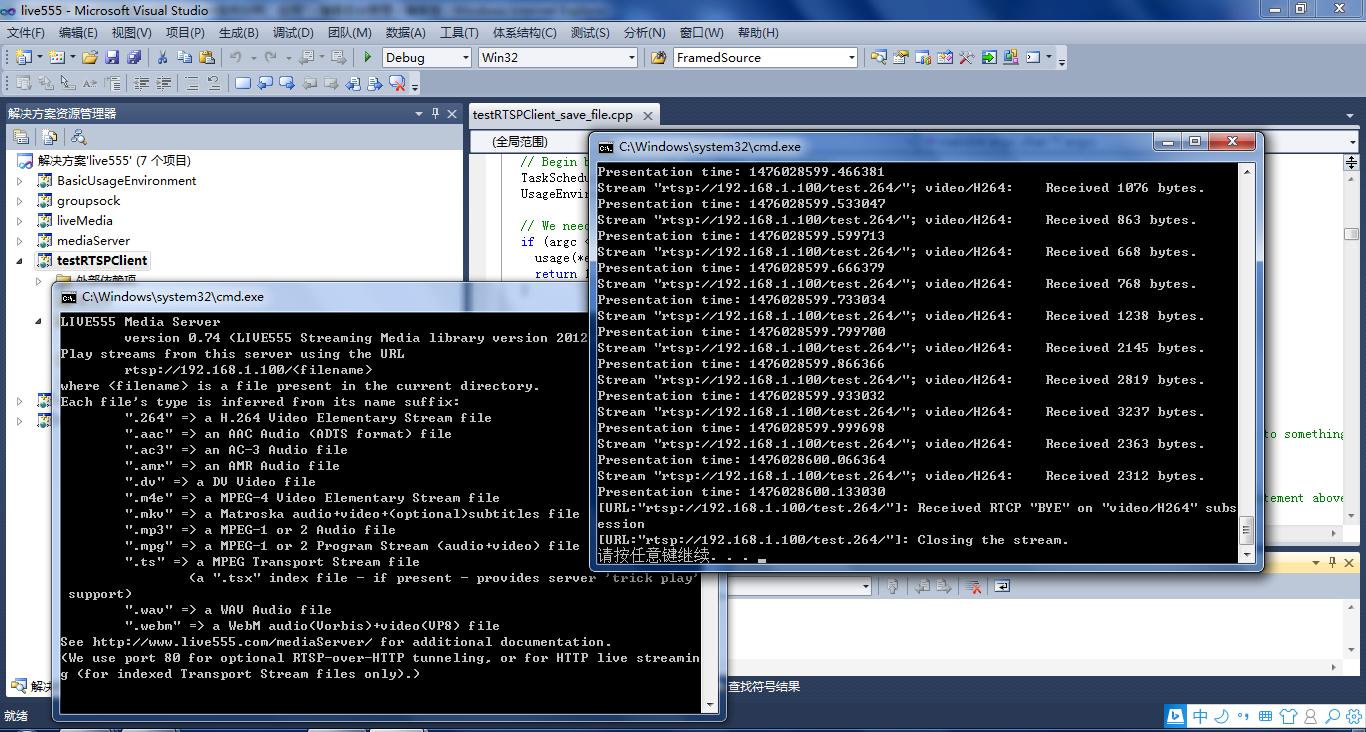
3、testRTSPClient核心代码解读
1)看代码之前可以大致浏览一下总体的框架,这位博主画了个流程图http://blog.csdn.net/smilestone_322/article/details/17297817
void DummySink::afterGettingFrame(unsigned frameSize, unsigned numTruncatedBytes,

                  struct timeval presentationTime, unsigned /*durationInMicroseconds*/) {

  // We've just received a frame of data.  (Optionally) print out information about it:

#ifdef DEBUG_PRINT_EACH_RECEIVED_FRAME

  if (fStreamId != NULL) envir() << "Stream \"" << fStreamId << "\"; ";

  envir() << fSubsession.mediumName() << "/" << fSubsession.codecName() << ":\tReceived " << frameSize << " bytes";

  if (numTruncatedBytes > 0) envir() << " (with " << numTruncatedBytes << " bytes truncated)";

  char uSecsStr[6+1]; // used to output the 'microseconds' part of the presentation time

  sprintf(uSecsStr, "%06u", (unsigned)presentationTime.tv_usec);

  envir() << ".\tPresentation time: " << (unsigned)presentationTime.tv_sec << "." << uSecsStr;

  if (fSubsession.rtpSource() != NULL && !fSubsession.rtpSource()->hasBeenSynchronizedUsingRTCP()) {

    envir() << "!"; // mark the debugging output to indicate that this presentation time is not RTCP-synchronized

  }

  envir() << "\n";

#endif

  // Then continue, to request the next frame of data:

  continuePlaying();

}

Boolean DummySink::continuePlaying() {

  if (fSource == NULL) return False; // sanity check (should not happen)

  // Request the next frame of data from our input source.  "afterGettingFrame()" will get called later, when it arrives:

  fSource->getNextFrame(fReceiveBuffer, DUMMY_SINK_RECEIVE_BUFFER_SIZE,

                        afterGettingFrame, this,

                        onSourceClosure, this);

  return True;

}
2)有网友在testRTSPClient基础上,把接收的数据写成h264文件了http://blog.csdn.net/occupy8/article/details/36426821
void DummySink::afterGettingFrame(void* clientData, unsigned frameSize, unsigned numTruncatedBytes,

                  struct timeval presentationTime, unsigned durationInMicroseconds) {

  DummySink* sink = (DummySink*)clientData;

  sink->afterGettingFrame(frameSize, numTruncatedBytes, presentationTime, durationInMicroseconds);

}

// If you don't want to see debugging output for each received frame, then comment out the following line:

#define DEBUG_PRINT_EACH_RECEIVED_FRAME 1

void DummySink::afterGettingFrame(unsigned frameSize, unsigned numTruncatedBytes,

 struct timeval presentationTime, unsigned /*durationInMicroseconds*/) {

  // We've just received a frame of data.  (Optionally) print out information about it:

#ifdef DEBUG_PRINT_EACH_RECEIVED_FRAME

  if (fStreamId != NULL) envir() << "Stream \"" << fStreamId << "\"; ";

  envir() << fSubsession.mediumName() << "/" << fSubsession.codecName() << ":\tReceived " << frameSize << " bytes";

  if (numTruncatedBytes > 0) envir() << " (with " << numTruncatedBytes << " bytes truncated)";

  char uSecsStr[6+1]; // used to output the 'microseconds' part of the presentation time

  sprintf(uSecsStr, "%06u", (unsigned)presentationTime.tv_usec);

  envir() << ".\tPresentation time: " << (unsigned)presentationTime.tv_sec << "." << uSecsStr;

  if (fSubsession.rtpSource() != NULL && !fSubsession.rtpSource()->hasBeenSynchronizedUsingRTCP()) {

    envir() << "!"; // mark the debugging output to indicate that this presentation time is not RTCP-synchronized

  }

  envir() << "\n";

#endif

  //todo one frame

  //save to file

  if(!strcmp(fSubsession.mediumName(), "video"))

  {

     if(firstFrame)

     {

         unsigned int num;

         SPropRecord *sps = parseSPropParameterSets(fSubsession.fmtp_spropparametersets(), num);

         // For H.264 video stream, we use a special sink that insert start_codes:

         struct timeval tv= {0,0};

         unsigned char start_code[4] = {0x00, 0x00, 0x00, 0x01};

         FILE *fp = fopen("test.264", "a+b");

         if(fp)

         {

             fwrite(start_code, 4, 1, fp);

             fwrite(sps[0].sPropBytes, sps[0].sPropLength, 1, fp);

             fwrite(start_code, 4, 1, fp);

             fwrite(sps[1].sPropBytes, sps[1].sPropLength, 1, fp);

             fclose(fp);

             fp = NULL;

         }

         delete [] sps;

         firstFrame = False;

     }

     char *pbuf = (char *)fReceiveBuffer;

     char head[4] = {0x00, 0x00, 0x00, 0x01};

     FILE *fp = fopen("test.264", "a+b");

     if(fp)

     {

         fwrite(head, 4, 1, fp);

         fwrite(fReceiveBuffer, frameSize, 1, fp);

         fclose(fp);

         fp = NULL;

     }

  }

  // Then continue, to request the next frame of data:

  continuePlaying();

}

Boolean DummySink::continuePlaying() {

  if (fSource == NULL) return False; // sanity check (should not happen)

  // Request the next frame of data from our input source.  "afterGettingFrame()" will get called later, when it arrives:

  fSource->getNextFrame(fReceiveBuffer, DUMMY_SINK_RECEIVE_BUFFER_SIZE,

                        afterGettingFrame, this,

                        onSourceClosure, this);

  return True;

}
testRTSPClient接收的fReceiveBuffer缓存没有起始码,start_code[4] = {0x00, 0x00, 0x00, 0x01}; 写成文件或者播放都需要自行加上。
3)testRTSPClient这个实例还支持多路录放,网上搜到有人已经实现了,搬过来.
http://blog.chinaunix.net/uid-15063109-id-4482932.html
——缺什么补什么
live555库中的testRTSPClient实例的更多相关文章
- RTSP客户端接收存储数据(live555库中的testRTSPClient实例)
1.testRTSPClient简介 testRTSPClient是个简单的客户端实例,这个实例对rtsp数据交互作了详细的描述,其中涉及到rtsp会话的两个概念Source和Sink. Source ...
- live555库中的testH264VideoStreamer实例
1.h264文件的推送 testH264VideoStreamer.cpp文件的开头就定义了 char const* inputFileName = "test.264"; 后面接 ...
- live555库中的openRTSP实例
一.openRTSP编译运行 a)windows下编译运行 还是以mediaServer作为服务端,openRTSP作为客户端 b)Linux下编译运行 转自http://kuafu80.blog.1 ...
- RTSP客户端接收存储数据(live555库中的openRTSP实例)
一.openRTSP编译运行 a)windows下编译运行 还是以mediaServer作为服务端,openRTSP作为客户端 b)Linux下编译运行 转自http://kuafu80.blog.1 ...
- RTSP服务端转发服务(live555库中的testH264VideoStreamer.cpp和testOnDemandRTSPServer.cpp实例)
1.h264文件的推送 testH264VideoStreamer.cpp文件的开头就定义了 char const* inputFileName = "test.264"; 后面接 ...
- 宣布在 Azure 镜像库中正式推出 Windows Server 2012 R2 并降低 Windows Azure 的实例定价
我们今天将宣布两条消息,为使用基础结构服务的客户提供更多选择和成本节约:在镜像库中推出 Windows Server 2012 R2 以及降低 Memory Intensive 计算实例定价. 虚拟机 ...
- NSClassFromString 实例话静态库中的类
Class myClass = NSClassFromString("StaticLibyClassName"); StaticLibyClassName是从静态库中实例化一个Cl ...
- Solr的原理及在项目中的使用实例.
前面已经讲过 如果安装及配置Solr服务器了, 那么现在我们就来正式在代码中使用Solr.1,这里Solr主要是怎么使用的呢? 当我们在前台页面搜索商品名称关键词时, 我们这时是在Solr库中去查找 ...
- linux静态与动态库创建及使用实例
一,gcc基础语法: 基本语法结构:(由以下四部分组成) gcc -o 可执行文件名 依赖文件集(*.c/*.o) 依赖库文件及其头文件集(由-I或-L与-l指明) gcc 依赖文件集(*.c/*.o ...
随机推荐
- Zookeeper总结
Zookeeper数据模型 zookeeper有一个层级的命名空间,更像一个分布式的文件系统. 唯一的区别就是命名空间中的每一个节点同它关联. ZNodes zookeeper树上的每一个节点被 ...
- log4net在Asp.net Mvc中的应用配置与介绍
log4net在.NET中的地位就不多言语了,此篇文章着重配置.较少介绍使用.因为在网上你可以在网上搜到几十万的文章告诉你怎么用.安装的话也不废话了,很简单.Nuget里搜索一下"log4n ...
- 自定义多列排序:C++/Java实现
前言: 有些时候,我们在编程中会遇到多列排序的需求.假如在execle,这事儿就太easy了.不过没办法,现在就需要你用Java或者C++实现这样一个功能! 比如将下表无序的数据通过重排之后按照以下规 ...
- OPRNGL之渲染过程大概梳理
将OPENGL绘制对象的过程类比为摄像机拍摄物体的过程 视图变换:对摄像机位置与朝向(还有朝上朝下)进行定义 模型变换:对物体的位置,旋转,缩放进行定义 以上是对摄像机和物体的两个基础定义 投影:对摄 ...
- shell 常用小命令总结
1. 重命名 1) 较简单的处理命令:mv 原文件名 新文件名 如:mv myFile newName ### 将MyFile重命名为newN ...
- 【BZOJ-4524】伪光滑数 堆 + 贪心 (暴力) [可持久化可并堆 + DP]
4524: [Cqoi2016]伪光滑数 Time Limit: 10 Sec Memory Limit: 512 MBSubmit: 183 Solved: 82[Submit][Status] ...
- codeforces 723D: Lakes in Berland
Description The map of Berland is a rectangle of the size n × m, which consists of cells of size 1 × ...
- VisualSVN Server搭建VDFS分布式仓研究(未成功)
FSFS与VDFS的使用区别在于FSFS是本地仓库,VDFS是分布式仓库,实现在同一个局域网内多台仓库进行同步:以下是我的猜测,因为没搭建成功: 1.必须是同一个局域网,如果有外内网基本是不可实现,需 ...
- bzoj2765[JLOI2010]铁人双项比赛
题意:铁人双项比赛由长跑和骑自行车组成,参赛选手必须先完成k公里的长跑,然后完成r公里的骑车,才能到达终点.参赛选手有的擅长长跑,有的擅长骑车. 如果总赛程s=k+r一定,那么K越大,对擅长长跑的选手 ...
- type parameters of <T>T cannot be determined; no unique maximal instance exists for type variable T with upper bounds int,java.lang.Object
今天在进行代码检查的时候出现下面的异常: type parameters of <T>T cannot be determined; no unique maximal instance ...