
4. Android框架和工具之 android-async-http
1. android-async-http 简介
HttpClient拥有众多的API,实现稳定,bug很少。
HttpURLConnection是一种多用途、轻量的HTTP客户端,使用它来进行HTTP操作可以适用于大多数的应用程序。HttpURLConnection的API比较简单、扩展容易。不过在Android 2.2版本之前,HttpURLConnection一直存在着一些bug。
比如说对一个可读的InputStream调用close()方法时,就有可能会导致连接池失效了。所以说2.2之前推荐使用HttpClient,2.2之后推荐HttpURLConnection。
好了,那现在话又说回来,在android-async-http中使用的是HttpClient。哎…好像在Volley中分析过Volley对不同版本进行了判断,所以针对不同版本分别使用了HttpClient和HttpURLConnection。还是google牛逼啊!
回过神继续android-async-http吧,不瞎扯了。android-async-http是专门针对Android在Apache的HttpClient基础上构建的异步http连接。所有的请求全在UI(主)线程之外执行,而callback使用了Android的Handler发送消息机制在创建它的线程中执行
主要有以下功能:
(1)发送异步http请求,在匿名callback对象中处理response信息;
(2)http请求发生在UI(主)线程之外的异步线程中;
(3)内部采用线程池来处理并发请求;
(4)通过RequestParams类构造GET/POST;
(5)内置多部分文件上传,不需要第三方库支持;
(6)流式Json上传,不需要额外的库;
(7)能处理环行和相对重定向;
(8)和你的app大小相比来说,库的size很小,所有的一切只有90kb;
(9)在各种各样的移动连接环境中具备自动智能请求重试机制;
(10)自动的gzip响应解码;
(11)内置多种形式的响应解析,有原生的字节流,string,json对象,甚至可以将response写到文件中;
(12)永久的cookie保存,内部实现用的是Android的SharedPreferences;
(13)通过BaseJsonHttpResponseHandler和各种json库集成;
(14)支持SAX解析器;
(15)支持各种语言和content编码,不仅仅是UTF-8;
附注:
android-async-http项目地址:https://github.com/loopj/android-async-http
android-async-http文档介绍:http://loopj.com/android-async-http/
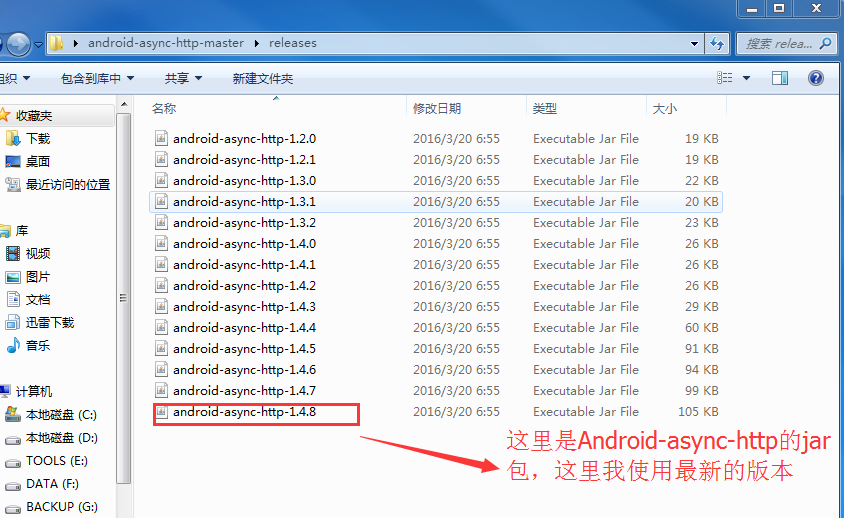
由上面的项目地址下载开源框架,解压如下:

2. 主要类介绍
- AsyncHttpRequest
继承自Runnabler,被submit至线程池执行网络请求并发送start,success等消息
- AsyncHttpResponseHandler
接收请求结果,一般重写onSuccess及onFailure接收请求成功或失败的消息,还有onStart,onFinish等消息
- TextHttpResponseHandler
继承自AsyncHttpResponseHandler,只是重写了AsyncHttpResponseHandler的onSuccess和onFailure方法,将请求结果由byte数组转换为String
- JsonHttpResponseHandler
继承自TextHttpResponseHandler,同样是重写onSuccess和onFailure方法,将请求结果由String转换为JSONObject或JSONArray
- BaseJsonHttpResponseHandler
继承自TextHttpResponseHandler,是一个泛型类,提供了parseResponse方法,子类需要提供实现,将请求结果解析成需要的类型,子类可以灵活地使用解析方法,可以直接原始解析,使用gson等。
- RequestParams
请求参数,可以添加普通的字符串参数,并可添加File,InputStream上传文件
- AsyncHttpClient
核心类,使用HttpClient执行网络请求,提供了get,put,post,delete,head等请求方法,使用起来很简单,只需以url及RequestParams调用相应的方法即可,还可以选择性地传入Context,用于取消Content相关的请求,同时必须提供ResponseHandlerInterface(AsyncHttpResponseHandler继承自ResponseHandlerInterface)的实现类,一般为AsyncHttpResponseHandler的子类,AsyncHttpClient内部有一个线程池,当使用AsyncHttpClient执行网络请求时,最终都会调用sendRequest方法,在这个方法内部将请求参数封装成AsyncHttpRequest(继承自Runnable)交由内部的线程池执行。
- SyncHttpClient
继承自AsyncHttpClient,同步执行网络请求,AsyncHttpClient把请求封装成AsyncHttpRequest后提交至线程池,SyncHttpClient把请求封装成AsyncHttpRequest后直接调用它的run方法。
RequestParams的基础使用:
RequestParams params = new RequestParams();

params.put("username", "yanbober");

params.put("password", "123456");

params.put("email", "yanbobersky@email.com");

/**

*Create RequestParams for a single parameter:

*/

RequestParams params = new RequestParams("single", "value");

/**

*Create RequestParams from an existing Map of key/value strings:

*/

RequestParams params = new RequestParams();

Map<String, String> map = new HashMap<String, String>();

map.put("first_name", "jesse");

map.put("last_name", "yan");

params.put("user", map);

/**

*Upload a File:

*/

RequestParams params = new RequestParams();

params.put("file_pic", new File("test.jpg"));

params.put("file_inputStream", inputStream);

params.put("file_bytes", new ByteArrayInputStream(bytes))//bytes is a byte array

/**

*Create RequestParams from an existing set :

*/

RequestParams params = new RequestParams();

Set<String> set = new HashSet<String>();

set.add("haha");

set.add("wowo");

params.put("what", set);

/**

*Create RequestParams from an existing List :

*/

RequestParams params = new RequestParams();

List<String> list = new ArrayList<String>();

list.add("Java");

list.add("C");

params.put("languages", list);

/**

*Create RequestParams from an existing String[] :

*/

RequestParams params = new RequestParams();

String[] colors = { "blue", "yellow" };

params.put("colors", colors);

/**

*Create RequestParams from an existing Map and List (Map in List) :

*/

RequestParams params = new RequestParams();

List<Map<String, String>> listOfMaps = new ArrayList<Map<String, String>>();

Map<String, String> user1 = new HashMap<String, String>();

user1.put("age", "30");

user1.put("gender", "male");

Map<String, String> user2 = new HashMap<String, String>();

user2.put("age", "25");

user2.put("gender", "female");

listOfMaps.add(user1);

listOfMaps.add(user2);

params.put("users", listOfMaps);
3. 官方建议使用自己新建静态的AsyncHttpClient:
 public class HttpClientUtils {

     private static String sessionId = null;

     private static AsyncHttpClient client = new AsyncHttpClient();

     private static PersistentCookieStore cookieStore ;

     static {

         //设置网络超时时间

         client.setTimeout(5000);

     }

     public static void get(String url, AsyncHttpResponseHandler responseHandler) {

         client.get(url, responseHandler);

     }

     public static void get(Context context,String url,ResponseHandlerInterface responseHandler) {

         client.get(context, url, responseHandler);

     }

     public static void get(String url,RequestParams params, ResponseHandlerInterface responseHandler) {

         client.get(url, params, responseHandler);

     }

     public static void get(Context context, String url, RequestParams params, ResponseHandlerInterface responseHandler) {

         client.get(context, url, params, responseHandler);

     }

     public static void get(Context context, String url, Header[] headers, RequestParams params, ResponseHandlerInterface responseHandler) {

         client.get(context, url, headers, params, responseHandler);

     }

     public static void post(String url,RequestParams params, ResponseHandlerInterface responseHandler){

         client.post(url, params, responseHandler);

     }

     public static AsyncHttpClient getClient(){

         return client;

     }

     public static String getSessionId() {

         return sessionId;

     }

     public static void setSessionId(String sessionId) {

         HttpClientUtils.sessionId = sessionId;

     }

     public static PersistentCookieStore getCookieStore() {

         return cookieStore;

     }

     public static void setCookieStore(PersistentCookieStore cookieStore) {

         HttpClientUtils.cookieStore = cookieStore;

         client.setCookieStore(cookieStore);

     }

 }
4. 请求流程

()调用AsyncHttpClient的get或post等方法发起网络请求。
()所有的请求都走了sendRequest,在sendRequest中把请求封装为了AsyncHttpRequest,并添加到线程池执行。
()当请求被执行时(即AsyncHttpRequest的run方法),执行AsyncHttpRequest的makeRequestWithRetries方法执行实际的请求,当请求失败时可以重试。并在请求开始,结束,成功或失败时向请求时传的ResponseHandlerInterface实例发送消息。
()基本上使用的都是AsyncHttpResponseHandler的子类,调用其onStart,onSuccess等方法返回请求结果。
5. android-async-http最简单基础的使用,只需如下步骤:
创建一个AsyncHttpClient;
(可选的)通过RequestParams对象设置请求参数;
调用AsyncHttpClient的某个get方法,传递你需要的(成功和失败时)callback接口实现,一般都是匿名内部类,实现了AsyncHttpResponseHandler,类库自己也提供许多现成的response handler,你一般不需要自己创建。
6. android-async-http 的使用
- 在匿名callback回调中处理response信息
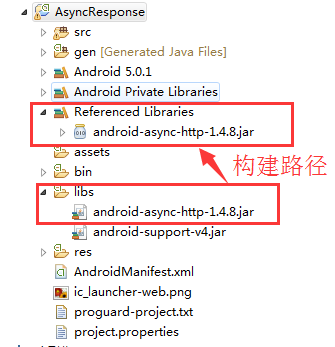
(1)新建一个Android工程,如下:
(2)上面要使用到网络访问,自然需要在AndroidManifest中添加网络权限。
(3)来到MainActivity,如下:
 package com.himi.asyncresponse;

 import org.apache.http.Header;

 import com.loopj.android.http.AsyncHttpClient;

 import com.loopj.android.http.AsyncHttpResponseHandler;

 import android.app.Activity;

 import android.os.Bundle;

 public class MainActivity extends Activity {

     @Override

     protected void onCreate(Bundle savedInstanceState) {

         super.onCreate(savedInstanceState);

         setContentView(R.layout.activity_main);

         AsyncHttpClient client = new AsyncHttpClient();

         client.get("https://www.baidu.com/", new AsyncHttpResponseHandler() {

             @Override

             public void onSuccess(int statusCode, Header[] headers, byte[] responseBody) {

                 System.out.println("--------onSuccess------");

                 System.out.println("反馈结果:");

                 System.out.println(new String(responseBody));

                 System.out.println("状态码:"+statusCode);

                 System.out.println("header:");

                 for(int i=0; i<headers.length; i++) {

                     System.out.println(headers[i]);

                 }

             }

             @Override

             public void onFailure(int statusCode, Header[] headers, byte[] responseBody, Throwable error) {

                 /*System.out.println("--------onFailure------");

                 System.out.println("反馈结果:"+new String(responseBody));

                 System.out.println("状态码:"+new String(responseBody));*/

             }

             @Override

             public void onStart() {

                 super.onStart();

                 System.out.println("--------onStart------");

             }

             @Override

             public void onFinish() {

                 super.onFinish();

                 System.out.println("--------onFinish------");

             }

             @Override

             public void onRetry(int retryNo) {

                 super.onRetry(retryNo);

                 System.out.println("--------onRetry------");

             }

             @Override

             public void onCancel() {

                 super.onCancel();

                 System.out.println("--------onCancel------");

             }

             public void onProgress(int bytesWritten, int totalSize) {

                 super.onProgress(bytesWritten, totalSize);

                 System.out.println("--------onProgress------");

             }

         });

     }

 }
布署程序到模拟器上,观察Logcat如下:

上面是使用Get方法,不带参数的。
下面我们介绍使用Get方法、Post方法带参数的,基本使用如下:
带参数Get请求:
 HttpClientUtils.get("http://www.baidu.com", new AsyncHttpResponseHandler() {

      @Override

      public void onSuccess(int statusCode, Header[] headers, byte[] responseBody) {

           System.out.println(response);

      }

      @Override

      public void onFailure(int statusCode, Header[] headers, byte[] responseBody, Throwable

  error)

  {

           error.printStackTrace(System.out);

      }

  });
带参数Post请求:
 RequestParams params = new RequestParams();

 params.put("value1", value1);

 params.put("value2", value2);

 HttpClientUtils.post(url, params, new JsonHttpResponseHandler(){

                 @Override

                 public void onSuccess(int statusCode, Header[] headers,

                         JSONObject response) {

                     //请求成功回调

                 }

                 @Override

                 public void onFinish() { //请求完成

                 }

                 @Override

                 public void onFailure(int statusCode, Header[] headers,

                         String responseString, Throwable throwable) {

                     //请求失败

                 }

             });
- 文件上传(支持断点上传)
核心代码示例:
File myFile = new File("/sdcard/test.java");

RequestParams params = new RequestParams();

try {

    params.put("filename", myFile);

    AsyncHttpClient client = new AsyncHttpClient();

    client.post("http://update/server/location/", params, new AsyncHttpResponseHandler(){

        @Override

        public void onSuccess(int statusCode, String content) {

            super.onSuccess(statusCode, content);

        }

    });

} catch(FileNotFoundException e) {

    e.printStackTrace();

}
- 支持解析成Json格式
(1)JsonHttpResponseHandler带Json参数的POST:
try {

    JSONObject json = new JSONObject();

    json.put("username", "ryantang");

    StringEntity stringEntity = new StringEntity(json.toString());

    client.post(mContext, "http://api.com/login", stringEntity, "application/json", new JsonHttpResponseHandler(){

        @Override

        public void onSuccess(JSONObject jsonObject) {

            super.onSuccess(jsonObject);

        }

    });

} catch (JSONException e) {

    e.printStackTrace();

} catch (UnsupportedEncodingException e) {

    e.printStackTrace();

}
(2)访问服务器端,获取json数据:
 AsyncHttpClient client = new AsyncHttpClient();

 String url = "http://172.16.237.227:8080/video/JsonServlet";

 client.get(url, new JsonHttpResponseHandler() {

      // 返回JSONArray对象 | JSONObject对象

      @Override

      public void onSuccess(int statusCode, Header[] headers, JSONArray response) {

          super.onSuccess(statusCode, headers, response);

          if (statusCode == 200) {

              //存储数组变量

              List<String> objects = new ArrayList<>();

              for (int i = 0; i < response.length(); i++) {

                   try {

                        // 获取具体的一个JSONObject对象

                         JSONObject obj = response.getJSONObject(i);

                         objects.add(obj.getString("name"));

                       } catch (JSONException e) {

                          // TODO Auto-generated catch block

                         e.printStackTrace();

                       }

                  }

              //C控制层主要就是对数据处理

              ArrayAdapter<String> adapter = new ArrayAdapter<String>(MainActivity.this, android.R.layout.simple_list_item_1, objects);

              //设置显示的内容

              lv_users.setAdapter(adapter);// C空置

           }

       }

     });
BinaryHttpResponseHandler下载文件:
AsyncHttpClient client = new AsyncHttpClient();

client.get("http://download/file/test.java", new BinaryHttpResponseHandler() {

    @Override

    public void onSuccess(byte[] arg0) {

        super.onSuccess(arg0);

        File file = Environment.getExternalStorageDirectory();

        File file2 = new File(file, "down");

        file2.mkdir();

        file2 = new File(file2, "down_file.jpg");

        try {

            FileOutputStream oStream = new FileOutputStream(file2);

            oStream.write(arg0);

            oStream.flush();

            oStream.close();

        } catch (Exception e) {

            e.printStackTrace();

            Log.i(null, e.toString());

        }

    }

});
- PersistentCookieStore持久化存储cookie
官方文档里说PersistentCookieStore类用于实现Apache HttpClient的CookieStore接口,可自动将cookie保存到Android设备的SharedPreferences中,如果你打算使用cookie来管理验证会话,这个非常有用,因为用户可以保持登录状态,不管关闭还是重新打开你的app。
PersistentCookieStore继承自CookieStore,是一个基于CookieStore的子类, 使用HttpClient处理数据,并且使用cookie持久性存储接口。
文档里介绍了持久化Cookie的步骤:
()创建 AsyncHttpClient实例对象;
()将客户端的cookie保存到PersistentCookieStore实例对象,带有activity或者应用程序context的构造方法;
()任何从服务器端获取的cookie都会持久化存储到myCookieStore中,添加一个cookie到存储中,只需要构造一个新的cookie对象,并且调用addCookie方法;
AsyncHttpClient client = new AsyncHttpClient();

PersistentCookieStore cookieStore = new PersistentCookieStore(this);

client.setCookieStore(cookieStore);

BasicClientCookie newCookie = new BasicClientCookie("name", "value");

newCookie.setVersion(1);

newCookie.setDomain("mycompany.com");

newCookie.setPath("/");

cookieStore.addCookie(newCookie);
4. Android框架和工具之 android-async-http的更多相关文章
- 13. Android框架和工具之 Android Drawable Factory
1. AndroidDrawableFactory 一个生成Android应用所需尺寸图片的工具. 托管在Github之中: https://github.com/tizionario/Android ...
- 3. Android框架和工具之 xUtils(DbUtils )
1. xUtils简介 xUtils 包含了很多实用的android工具.xUtils 最初源于Afinal框架,进行了大量重构,使得xUtils支持大文件上传,更全面的http请求协议支持(10种谓 ...
- 3. Android框架和工具之 xUtils(BitmapUtils)
1. BitmapUtils 作用: 加载bitmap的时候无需考虑bitmap加载过程中出现的oom和android容器快速滑动时候出现的图片错位等现象: 支持加载网络图片和本地图片: 内存管理使用 ...
- 3. Android框架和工具之 xUtils(HttpUtils)
1. HttpUtils 作用: 支持同步,异步方式的请求: 支持大文件上传,上传大文件不会oom: 支持GET,POST,PUT,MOVE,COPY,DELETE,HEAD请求: 下载支持301/3 ...
- 10. Android框架和工具之 AppMsg(消息提示)
1. AppMsg 优雅的弹出类似Toast的消息提示,支持3种状态Alert(警告),Confirm(确认)以及Info(消息). 2. AppMsg使用: (1)AppMsg下载地址 ...
- 7. Android框架和工具之 android-percent-support-lib-sample(百分比支持)
1. android-percent-support-lib-sample介绍: 谷歌最新的百分比布局库的示例项目.其实LinearLayout的layout_weight也能实现百分比效果,不过这个 ...
- 5. Android框架和工具之 ZXing(二维码)
Android进阶笔记06:Android 实现扫描二维码实现网页登录
- 3. Android框架和工具之 xUtils(ViewUtils )
1. ViewUtils 作用: 完全注解方式就可以进行UI绑定和事件绑定. 无需findViewById和setClickListener等. 2. UI绑定 和 事件绑定 (1)UI绑定 下面我們 ...
- Android框架式编程之Android Architecture Components
1. 当前Android开发面临的问题 Android开发不同于传统的桌面程序开发,桌面程序一般都有唯一的快捷方式入口,并且常作为单进程存在:而一个典型的Android应用通常由多个应用组件构成,包括 ...
- 6. Android框架和工具之 JSON解析
Android进阶笔记17:3种JSON解析工具(org.json.fastjson.gson)
随机推荐
- POJ 3177 Redundant Paths POJ 3352 Road Construction
这两题是一样的,代码完全一样. 就是给了一个连通图,问加多少条边可以变成边双连通. 去掉桥,其余的连通分支就是边双连通分支了.一个有桥的连通图要变成边双连通图的话,把双连通子图收缩为一个点,形成一颗树 ...
- 利用预渲染加速iOS设备的图像显示
最近在做一个UITableView的例子,发现滚动时的性能还不错.但来回滚动时,第一次显示的图像不如再次显示的图像流畅,出现前会有稍许的停顿感.于是我猜想显示过的图像肯定是被缓存起来了,查了下文档后发 ...
- oradmin相关用法
[转]oradmin相关用法 创建例程: -NEW -SID sid | -SRVC 服务 [-INTPWD 口令] [-MAXUSERS 数量] [-STARTMODE a|m] [-PFILE 文 ...
- 高分辨率 2x图像: -webkit-min-device-pixel-ratio 的常见值对照
-webkit-min-device-pixel-ratio的常见值对照 原文地址:http://zhangyaochun.iteye.com/blog/1816582 前言: 本文来自于对 http ...
- OC:通讯录实战
实战(使用OC的知识制作一个简易通讯录) //语法糖.笑笑语法 // NSString * string = [NSString stringWithFormat:@"string" ...
- Myeclipse的快捷键大全
选择你要注释的那一行或多行代码,按Ctrl+/即可,取消注释也是选中之后按Ctrl+/即可. 如果你想使用的快捷键的注释是的话,那么你的快捷键是ctrl+shift+/ 我以前都是手动注释的,直接打/ ...
- System.Runtime.InteropServices.COMException (0x800706BA) 解决方法
提示“操作失败:无法获取MAC地址.”错误的解决方法. .NET 获取 MAC地址可能会遇到 System.Runtime.InteropServices.COMException (0x8007 ...
- [转]Swift Cheat Sheet
原文:http://kpbp.github.io/swiftcheatsheet/ A quick cheat sheet and reference guide for Apple's Swift ...
- 修改MyEclipse内存-------OutOfMemoryError错误
1.打开MyEclipse后,进入Windows/Preferences/Java/Installed JREs 点击后,在右边窗口选择JREs,双击后进入 2.在Default VM Argumen ...
- Swift学习笔记九
闭包 闭包是指能够在代码中使用和传递的自包含(self-contained)的块. Swift中的闭包和C以及OC中的块很相似.它们可以捕获并且存储定义它们的上下文中的任何常量和变量的引用.Swift ...