
android122 zhihuibeijing 主页面使用fragment搭建
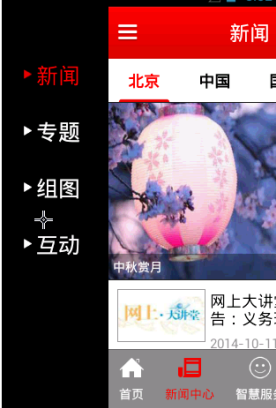

fragment的生命周期:

onAttach()当fragment添加进Activity的时候调用(这个时候Activity对象已经存在了,不然就依赖不上去的)

onCreate()当fragment创建的时候调用。

onCreateView()当fragment画界面的时候调用。

onActivityCreated()当fragment依附的Activity创建完成的时候调用。

onStart(),onResume(),onPause(),onStop(),onDestroyView(),onDestroy().

onStart()对着onStop(),

onResume()对着onPause(),

onDestroyView()对着onCreateView(),

onDestroy()对着onCreate()。
Mainactivity
package com.itheima.zhbj52;

import android.os.Bundle;

import android.support.v4.app.FragmentManager;

import android.support.v4.app.FragmentTransaction;

import com.itheima.zhbj52.fragment.ContentFragment;

import com.itheima.zhbj52.fragment.LeftMenuFragment;

import com.jeremyfeinstein.slidingmenu.lib.SlidingMenu;

import com.jeremyfeinstein.slidingmenu.lib.app.SlidingFragmentActivity;

/**

 * 主页面

 */

public class MainActivity extends SlidingFragmentActivity {//使用开源SlidingMenu框架实现侧边栏,

    private static final String FRAGMENT_LEFT_MENU = "fragment_left_menu";

    private static final String FRAGMENT_CONTENT = "fragment_content";

    @Override

    public void onCreate(Bundle savedInstanceState) {

          super.onCreate(savedInstanceState);

          setContentView(R.layout.activity_main);//主页面是一个空的FrameLayout,后面会用Fragment填充。

          setBehindContentView(R.layout.left_menu);//侧边栏也是一个空的FrameLayout,后面会用Fragment填充,SlidingFragmentActivity这个库的方法,设置左侧边栏布局。

          SlidingMenu slidingMenu = getSlidingMenu();// 获取侧边栏对象

          slidingMenu.setTouchModeAbove(SlidingMenu.TOUCHMODE_FULLSCREEN);// 设置主屏幕可以全屏触摸进行滑动,

          slidingMenu.setBehindOffset(200);// 设置预留屏幕的宽度,左右侧边栏滑动的时候主屏幕最少有100像素。

          initFragment();

    }

    /**

     * 初始化fragment, 将fragment数据填充给布局文件

     */

    private void initFragment() {

        FragmentManager fm = getSupportFragmentManager();

        FragmentTransaction transaction = fm.beginTransaction();// 开启事务

        //fl_left_menu和fl_content位于不同的xml

        transaction.replace(R.id.fl_left_menu, new LeftMenuFragment(),

                FRAGMENT_LEFT_MENU);// 用fragment替换framelayout,FRAGMENT_LEFT_MENU是名字。

        transaction.replace(R.id.fl_content, new ContentFragment(),

                FRAGMENT_CONTENT);

        transaction.commit();// 提交事务

        // Fragment leftMenuFragment = fm.findFragmentByTag(FRAGMENT_LEFT_MENU);根据名字找fragment,

    }

}
activity_main.xml
<?xml version="1.0" encoding="utf-8"?>

空布局,就是一个容器。

<FrameLayout xmlns:android="http://schemas.android.com/apk/res/android"

    android:id="@+id/fl_content"

    android:layout_width="match_parent"

    android:layout_height="match_parent" >

</FrameLayout>
left_menu.xml
<?xml version="1.0" encoding="utf-8"?>

空布局,就是一个容器。

<FrameLayout xmlns:android="http://schemas.android.com/apk/res/android"

    android:id="@+id/fl_left_menu"

    android:layout_width="match_parent"

    android:layout_height="match_parent" >

</FrameLayout>
LeftMenuFragment
package com.itheima.zhbj52.fragment;

import com.itheima.zhbj52.R;

import android.view.View;

/**

 * 侧边栏

 *

 * @author Kevin

 *

 */

public class LeftMenuFragment extends BaseFragment {

    @Override

    public View initViews() {

        View view = View.inflate(mActivity, R.layout.fragment_left_menu, null);

        return view;

    }

}
fragment_left_menu.xml
<RelativeLayout xmlns:android="http://schemas.android.com/apk/res/android"

    xmlns:tools="http://schemas.android.com/tools"

    android:layout_width="match_parent"

    android:layout_height="match_parent"

    android:background="#f00" >

    <TextView

        android:layout_width="wrap_content"

        android:layout_height="wrap_content"

        android:text="我是侧边栏!" />

</RelativeLayout>
ContentFragment
package com.itheima.zhbj52.fragment;

import com.itheima.zhbj52.R;

import android.view.View;

/**

 * 主页内容

 *

 * @author Kevin

 *

 */

public class ContentFragment extends BaseFragment {

    @Override

    public View initViews() {

        View view = View.inflate(mActivity, R.layout.fragment_content, null);

        return view;

    }

}
fragment_content.xml
<RelativeLayout xmlns:android="http://schemas.android.com/apk/res/android"

    xmlns:tools="http://schemas.android.com/tools"

    android:layout_width="match_parent"

    android:layout_height="match_parent" >

    <TextView

        android:layout_width="wrap_content"

        android:layout_height="wrap_content"

        android:text="我是主页面哦!" />

</RelativeLayout>
BaseFragment
package com.itheima.zhbj52.fragment;

import android.app.Activity;

import android.os.Bundle;

import android.support.v4.app.Fragment;

import android.view.LayoutInflater;

import android.view.View;

import android.view.ViewGroup;

/**

 * fragment基类

 */

public abstract class BaseFragment extends Fragment {

    public Activity mActivity;

    // fragment创建

    @Override

    public void onCreate(Bundle savedInstanceState) {

        super.onCreate(savedInstanceState);

        mActivity = getActivity();//拿到fragment所依赖Activity的对象,fragment创建创建的时候Activity对象肯定是已经存在了,所以这个对象不会是空的。

    }

    // 处理fragment的布局

    @Override

    public View onCreateView(LayoutInflater inflater, ViewGroup container,

            Bundle savedInstanceState) {

        return initViews();//子类实现,因为每个布局不一样。

    }

    // 依附的activity创建完成

    @Override

    public void onActivityCreated(Bundle savedInstanceState) {

        super.onActivityCreated(savedInstanceState);

        initData();

    }

    // 子类必须实现初始化布局的方法

    public abstract View initViews();

    // 初始化数据, 可以不实现

    public void initData() {

    }

}
android122 zhihuibeijing 主页面使用fragment搭建的更多相关文章
- android122 zhihuibeijing 主页面搭建
右边主页面布局设计: 文字颜色选择器和是否点击的图片选择器 路径和写法: <?xml version="1.0" encoding="utf-8"?&g ...
- android122 zhihuibeijing 新闻中心NewsCenterPager加载网络数据实现
新闻中心NewsCenterPager.java package com.itheima.zhbj52.base.impl; import java.util.ArrayList; import an ...
- Android主页导航:fragment+viewpager
简单实现Fragment+ViewPager实现主页导航控制,效果如下: 一.activity_main.xml布局文件: <?xml version="1.0" encod ...
- 用Fragment制作的Tab页面产生的UI重叠问题
本文出处:http://blog.csdn.net/twilight041132/article/details/43812745 在用Fragment做Tab页面,发现有时候进入应用会同时显示多个T ...
- Hexo+Github搭建博客
要使用Hexo,需要在你的系统中支持Nodejs以及Git,如果还没有,那就开始安装吧! 安装Node.js 下载Node.js 参考地址:安装Node.js 安装Git 下载地址:http://gi ...
- android TranslateAnimation 顶部segment分段移动动画
这里实现的功能是从主页布局的fragment点击跳转到一个acitivity,然后顶部是一个切换的segment顶部是一个listview,点击segment分段让listview加载不同的内容.我这 ...
- 自动化测试-20.selenium之FireFox下载项配置
前言: 当我们在使用Selenium运行自动化测试时,偶尔需要用到下载功能,但浏览器的下载可能会弹出下载窗口,或者下载路径不是我们想要保存的位置,所以在通过Selenium启动浏览器时需要做相关的设置 ...
- BBS项目架构
数据库设计 用户表(用的是auth_user那张表,通过自定义表继承AbstractUser) phone 电话 avatar 头像 create_time 创建时间#外键 blog 一对一个人站点表 ...
- webservice的使用-axis1-01
1.搭建axis服务器 1.1 下载axis-bin-1_4.zip文件并解压 1.2 拷贝\axis-1_4\webapps目录下的axis到tomcat目录下的webapps目录下并启动 1.3 ...
随机推荐
- 多线程程序设计学习(9)worker pattern模式
Worker pattern[工作模式]一:Worker pattern的参与者--->Client(委托人线程)--->Channel(通道,里边有,存放请求的队列)--->Req ...
- 自定义SharePoint列表新增、编辑、查看页面(NewForm、EditForm、DispForm)
转:http://blog.csdn.net/lance_lot1/article/details/7966571 在项目中,用户需求涉及在一个列表录入项目信息,选择一个项目后,与该项目相关的信息实现 ...
- SharePoint中的权限体系
转:http://blog.csdn.net/yl_99/article/details/7767053 1.MOSS中的权限结构 MOSS中的权限结构主要有三部分:网站权限,列表权限,个人权限. 网 ...
- SharePoint 2010 master page 控件介绍(1)
转:http://blog.csdn.net/lgm97/article/details/6409204 以下所有的内容都是根据Randy Drisgill (MVP SharePoint Serve ...
- NET下RabbitMQ实践[实战篇]
之前的文章中,介绍了如何将RabbitMQ以WCF方式进行发布.今天就介绍一下我们产品中如何使用RabbitMQ的! 在Discuz!NT企业版中,提供了对HTTP错误日志的记录功能 ...
- VISUAL SVN安装 及客户端使用
1.为什么要用VisualSVN Server,而不用Subversion? 回答: 因为如果直接使用Subversion,那么在Windows 系统上,要想让它随系统启动,就要封装SVN Serve ...
- Iterator和ListIterator区别
我们在使用List,Set的时候,为了实现对其数据的遍历,我们经常使用到了Iterator(迭代器).使用迭代器,你不需要干涉其遍历的过程,只需要每次取出一个你想要的数据进行处理就可以了. 但是在使用 ...
- 树-伸展树(Splay Tree)
伸展树概念 伸展树(Splay Tree)是一种二叉排序树,它能在O(log n)内完成插入.查找和删除操作.它由Daniel Sleator和Robert Tarjan创造. (01) 伸展树属于二 ...
- Linux下复制粘贴快捷键
1. 在控制台下: 1.1.鼠标选中要复制的文本,按鼠标中键,即为复制 或者 1.2.复制命令 ...
- MFC用PostMessage传递消息
1.自定义消息ID. #define WM_MY_MESSAGE (WM_USER+100) WM_USER为windows系统为非系统消息保留的ID,这里至少要用100,因为其它控件 ...