
WebServic dynamic url
How to make your Web Reference proxy URL dynamic
开发环境和部署环境,Webservice 的URL不同
需将url 配置到 web.config文件中。
Introduction
I have been asked before, how to make the URL property for a web reference to a web service in a project, configurable in a config file instead of compiled in the web reference proxy. This is most useful when you want to deploy a project with a web reference between different business environments (like between Test/QA and Production) without recompiling the project. There is a simple way to do this that requires no coding at all on the developer's part (provided you are using Visual Studio for .NET).
Getting Started
To follow this article, first you need to have a compiled web service to reference, and a project in which you wish to add a web reference. After you have added your web reference (which creates the proxy class with references to the web service for you automatically using VS .NET), you need to set your solution view to 'Show All':
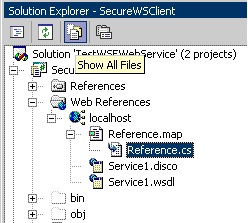
This shows the Reference.cs file for the Reference.map. This is the proxy class file that VS.NET generates automatically for you when you add a web reference.
Open up this file and notice under the constructor for the proxy class that the URL is hard coded for you inside the constructor:
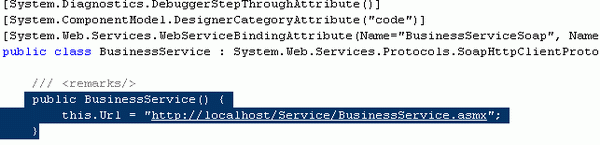
Changing the URL from Static to Dynamic
We are going to change the hard coded URL in the proxy class Reference.cs to a key in the web.config of the web service client project. An appSettings section will be added automatically with the current URL, and code will be placed in theReference.cs proxy class constructor to look for the URL there. All this will be done by changing one property setting on the proxy reference.
If you look at the web reference properties (below):
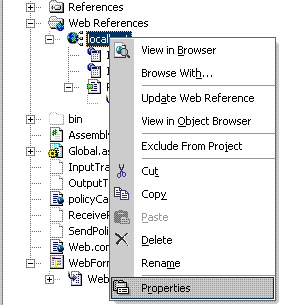
you can see that there is a configuration setting called 'URL Behavior'. This setting is by default set to Static.
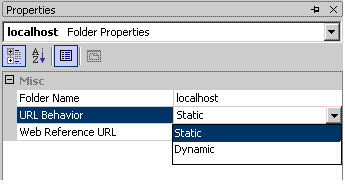
To make the URL in the Reference.cs map class code behind look for the web service URL in your web.config file, we need to change this setting to Dynamic:
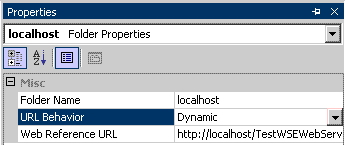
Doing this in VS.NET does two things for you. It changes the Reference.cs file to have the code to look for the WSDL URL in the project's web.config file:
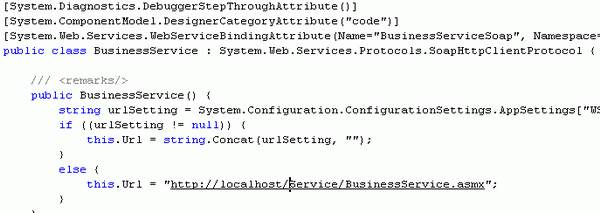
And it adds the URL as a key value to the projects web.config file under appSettings:

Now you can set the URL to different servers for deployment in different environments, without having to change the code. You just change the URL in your config file for your project.
WebServic dynamic url的更多相关文章
- Feign Dynamic URL
原创转载请注明出处:https://www.cnblogs.com/agilestyle/p/11811932.html Project Directory Maven Dependency < ...
- Ionic 动态配置url路由的设置
随着Ionic App功能的不断增加,需要路由的url设置就越来越多,不喜欢在config函数中写一堆硬代码,一则不美,二则维护起来也麻烦,能不能把这些数据独立出来呢? 经过查找资料与各种实验,最终找 ...
- OkHttp,Retrofit 1.x - 2.x 基本使用
Square 为广大开发者奉献了OkHttp,Retrofit1.x,Retrofit2.x,运用比较广泛,这三个工具有很多相似之处,初学者可能会有一些使用迷惑.这里来总结一下它们的一些基本使用和一些 ...
- 项目二(业务GO)——跨域上传图片(请求接口)
之前,就听过“跨域上传”图片的问题,只是疏于研究,也就一再搁置,直至今天再次遇见这个不能避免的“坑”,才不得不思考一下,怎么“跨域上传”图片或者文件? 问题来源: 何为“跨域”? ——就是给你一个接口 ...
- dubbo框架揭秘之服务发布
通常情况下是通过Spring配置的方式去实现服务的发布,为了方便调试,我就不采用Spring配置的方式. DemoService demo = new DemoServiceImpl(); Appli ...
- Dubbo源码学习--服务发布(ServiceBean、ServiceConfig)
前面讲过Dubbo SPI拓展机制,通过ExtensionLoader实现可插拔加载拓展,本节将接着分析Dubbo的服务发布过程. 以源码中dubbo-demo模块作为切入口一步步走进Dubbo源码. ...
- Dubbo学习-源码学习
Dubbo概述 dubbo框架提供多协议远程调用,服务提供方可以是分布式部署.dubbo框架可以很简单的帮我们实现微服务. 此处援引官网上图片 dubbo分为客户端和服务提供方 服务方将服务注册到注册 ...
- RPC -dubbo 服务导出实现
在阅读此文章之前,我希望阅读者对Spring 扩展机制的有一定的了解,比如:自定义标签与Spring整合, InitializingBean 接口,ApplicationContextAware,Be ...
- dubbo源码分析14——DubboProtocol的export方法分析
走到了这一步也挺不容易的,把之前的暴露入口代码再列出来回顾一下: //配置为none不暴露 if (! Constants.SCOPE_NONE.toString().equalsIgnoreCase ...
随机推荐
- 【BZOJ】1604: [Usaco2008 Open]Cow Neighborhoods 奶牛的邻居
[算法]并查集+平衡树+数学+扫描线 [题解] 经典曼哈顿距离转切比雪夫距离. 曼哈顿距离:S=|x1-x2|+|y1-y2|<=c 即:max(x1-x2+y1-y2,x1-x2-y1+y2, ...
- 【bzoj3510】首都 LCT维护子树信息(+启发式合并)
题目描述 在X星球上有N个国家,每个国家占据着X星球的一座城市.由于国家之间是敌对关系,所以不同国家的两个城市是不会有公路相连的. X星球上战乱频发,如果A国打败了B国,那么B国将永远从这个星球消失, ...
- webstorm es6 语法报错
设置settings javascript language version后 <script>标签加个 type <script type="text/ecmascrip ...
- poj 2312 Battle City(优先队列+bfs)
题目链接:http://poj.org/problem?id=2312 题目大意:给出一个n*m的矩阵,其中Y是起点,T是终点,B和E可以走,S和R不可以走,要注意的是走B需要2分钟,走E需要一分钟. ...
- Newtonsoft.Json 序列化和反序列化 以及时间格式
1.JSON序列化 string JsonStr= JsonConvert.SerializeObject(Entity); eg: A a=new A(); a.Name="Elain ...
- Log4Net的控制台,WinForm,WebApplication使用
一.Log4Net的控制台,WinForm,WebApplication使用 1.首先使用nuget 添加log4Net 到控制台项目中 log4j每个符号的具体含义:%d %5p %c{1}:%L ...
- Selenium2+python自动化45-18种定位方法(find_elements)【转载】
前言 江湖传言,武林中流传八种定位,其中xpath是宝刀屠龙,css是倚天剑. 除了这八种,其实还有十种定位方法,眼看就快失传了,今天小编让失传已久的定位方法重出江湖! 一.十八种定位方法 前八种是大 ...
- (十四)基于GTID的主从复制
(1)GTID主从复制 1)环境介绍 /etc/redhat-release CentOS Linux release 7.3.1611 (Core) MySQL版本:5.7 mysql> se ...
- ubuntu 18.04下编译最新版本的KMS
KMS:kurento媒体服务,即 kurento media server 很庞大的一个WEBRTC项目,GIT库主项目:https://github.com/Kurento 基础实现,修改了gst ...
- Jquery获取服务器端控件的三种方式
一 Jquery获得服务器控件值的方法由于ASP.NET网页运行后,服务器控件会随机生成客户端id,jquery获取时候不太好操作,google了下,总结有以下3种方法: 服务器控件代码:<as ...