
WPF中,如何将Vista Aero效果扩展到整个窗口
原文:WPF中,如何将Vista Aero效果扩展到整个窗口
WPF中,如何将Vista Aero效果扩展到整个窗口
周银辉
效果图: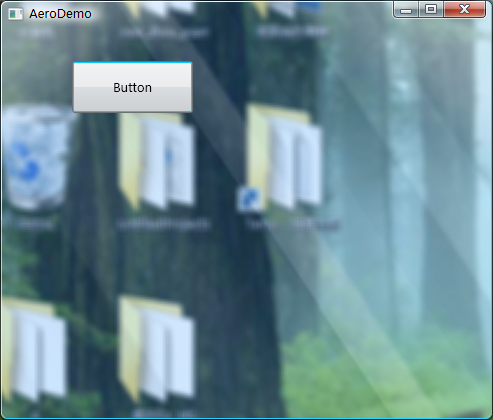
有不少示例介绍了如何将Vista Aero效果扩展到整个窗口,但大都是针对Windows Form应用程序,而不是WPF(即前者针对的是Form类,后者是针对的Window类),比如http://www.cnblogs.com/zhouyinhui/archive/2007/05/30/765416.html
其实与其类似,都是调用dwmapi,只不过Window类没有直接给我们提供句柄,我们需要这样的代码来找到其句柄:
 IntPtr hwnd = new System.Windows.Interop.WindowInteropHelper(window).Handle;
然后将窗口的背景设置为透明:
window.Background = Brushes.Transparent; HwndSource.FromHwnd(hwnd).CompositionTarget.BackgroundColor = Colors.Transparent;最后调用
DwmApi.DwmExtendFrameIntoClientArea(hwnd, margins);注意,我们应该在窗口被显示之后(SourceInitialized之后)再调用我们的函数否则会引发异常。
参考代码:
public partial class Window1 : System.Windows.Window

 {
{ public Window1()
 { InitializeComponent();
 } protected override void OnSourceInitialized(EventArgs e) { base.OnSourceInitialized(e); DWMLib.AeroHelper.ExtendGlassFrame(this, new Thickness(-1)); }
 }public class AeroHelper { public static bool ExtendGlassFrame(Window window, Thickness margin) { if (!DwmApi.DwmIsCompositionEnabled()) return false; IntPtr hwnd = new WindowInteropHelper(window).Handle; if (hwnd == IntPtr.Zero) throw new InvalidOperationException("The Window must be shown before extending glass."); // Set the background to transparent from both the WPF and Win32 perspectives window.Background = Brushes.Transparent; HwndSource.FromHwnd(hwnd).CompositionTarget.BackgroundColor = Colors.Transparent; DWMLib.DwmApi.MARGINS margins = new DWMLib.DwmApi.MARGINS((int)margin.Left, (int)margin.Top, (int)margin.Right, (int)margin.Bottom); DwmApi.DwmExtendFrameIntoClientArea(hwnd, margins); return true; }public class DwmApi { [DllImport("dwmapi.dll", PreserveSig = false)] public static extern void DwmEnableBlurBehindWindow(IntPtr hWnd, DWM_BLURBEHIND pBlurBehind); [DllImport("dwmapi.dll", PreserveSig = false)] public static extern void DwmExtendFrameIntoClientArea(IntPtr hWnd, MARGINS pMargins); [DllImport("dwmapi.dll", PreserveSig = false)] public static extern bool DwmIsCompositionEnabled(); [DllImport("dwmapi.dll", PreserveSig = false)] public static extern void DwmGetColorizationColor( out int pcrColorization, [MarshalAs(UnmanagedType.Bool)]out bool pfOpaqueBlend); [DllImport("dwmapi.dll", PreserveSig = false)] public static extern void DwmEnableComposition(bool bEnable); [DllImport("dwmapi.dll", PreserveSig = false)] public static extern IntPtr DwmRegisterThumbnail(IntPtr dest, IntPtr source); [DllImport("dwmapi.dll", PreserveSig = false)] public static extern void DwmUnregisterThumbnail(IntPtr hThumbnail); [DllImport("dwmapi.dll", PreserveSig = false)] public static extern void DwmUpdateThumbnailProperties(IntPtr hThumbnail, DWM_THUMBNAIL_PROPERTIES props); [DllImport("dwmapi.dll", PreserveSig = false)] public static extern void DwmQueryThumbnailSourceSize(IntPtr hThumbnail, out Size size); [StructLayout(LayoutKind.Sequential)] public class DWM_THUMBNAIL_PROPERTIES { public uint dwFlags; public RECT rcDestination; public RECT rcSource; public byte opacity; [MarshalAs(UnmanagedType.Bool)] public bool fVisible; [MarshalAs(UnmanagedType.Bool)] public bool fSourceClientAreaOnly; public const uint DWM_TNP_RECTDESTINATION = 0x00000001; public const uint DWM_TNP_RECTSOURCE = 0x00000002; public const uint DWM_TNP_OPACITY = 0x00000004; public const uint DWM_TNP_VISIBLE = 0x00000008; public const uint DWM_TNP_SOURCECLIENTAREAONLY = 0x00000010; } [StructLayout(LayoutKind.Sequential)] public class MARGINS { public int cxLeftWidth, cxRightWidth, cyTopHeight, cyBottomHeight; public MARGINS(int left, int top, int right, int bottom) { cxLeftWidth = left; cyTopHeight = top; cxRightWidth = right; cyBottomHeight = bottom; } } [StructLayout(LayoutKind.Sequential)] public class DWM_BLURBEHIND { public uint dwFlags; [MarshalAs(UnmanagedType.Bool)] public bool fEnable; public IntPtr hRegionBlur; [MarshalAs(UnmanagedType.Bool)] public bool fTransitionOnMaximized; public const uint DWM_BB_ENABLE = 0x00000001; public const uint DWM_BB_BLURREGION = 0x00000002; public const uint DWM_BB_TRANSITIONONMAXIMIZED = 0x00000004; } [StructLayout(LayoutKind.Sequential)] public struct RECT { public int left, top, right, bottom; public RECT(int left, int top, int right, int bottom) { this.left = left; this.top = top; this.right = right; this.bottom = bottom; } } }
Demo, 要正确运行Demo,你应该使用开启Aero效果的Vista版本
WPF中,如何将Vista Aero效果扩展到整个窗口的更多相关文章
- WPF中利用RadialGradient模拟放大镜效果
原文:WPF中利用RadialGradient模拟放大镜效果 --------------------------------------------------------------------- ...
- WPF中,如何屏蔽WebBrowser弹出的脚本错误窗口?
WPF没有自带屏蔽这些窗口的方法或属性,可以使用反射的方法来屏蔽弹出脚本错误窗口: public void SuppressScriptErrors(WebBrowser wb, bool Hide) ...
- wpf实现IE菜单栏自动隐藏效果
IE菜单栏默认为隐藏状态,按下键盘Alt键后显示,菜单失去焦点则自动隐藏.下面说说WPF中如何实现这样的效果. 第一步:Menu默认设置为隐藏(Visibility="Collapsed&q ...
- 扩展ArcGIS API for Silverlight/WPF 中的TextSymbol支持角度标注
原文 http://blog.csdn.net/esricd/article/details/7587136 在ArcGIS API for Silverlight/WPF中原版的TextSymbol ...
- WPF中查找控件的扩展类
在wpf中查找控件要用到VisualTreeHelper类,但这个类并没有按照名字查找控件的方法,于是搜索网络,整理出下面这个类,感觉用起来很是方便. 贴出来,供大家参考. /// <summa ...
- 在WPF中使用PlaneProjection模拟动态3D效果
原文:在WPF中使用PlaneProjection模拟动态3D效果 虽然在WPF中也集成了3D呈现的功能,在简单的3D应用中,有时候并不需要真实光影的3D场景.毕竟使用3D引擎会消耗很多资源,有时候使 ...
- 浏览器扩展系列————在WPF中定制WebBrowser快捷菜单
原文:浏览器扩展系列----在WPF中定制WebBrowser快捷菜单 关于如何定制菜单可以参考codeproject上的这篇文章:http://www.codeproject.com/KB/book ...
- wpf中xaml的类型转换器与标记扩展
原文:wpf中xaml的类型转换器与标记扩展 这篇来讲wpf控件属性的类型转换器 类型转换器 类型转换器在asp.net控件中已经有使用过了,由于wpf的界面是可以由xaml组成的,所以标签的便利也需 ...
- WPF中制作立体效果的文字或LOGO图形(续)
原文:WPF中制作立体效果的文字或LOGO图形(续) 上篇"WPF中制作立体效果的文字或LOGO图形"(http://blog.csdn.net/johnsuna/archive/ ...
随机推荐
- pthread使用
https://developer.apple.com/library/content/documentation/Cocoa/Conceptual/Multithreading/CreatingTh ...
- BZOJ3053:The Closest M Points(K-D Teee)
Description The course of Software Design and Development Practice is objectionable. ZLC is facing a ...
- ACM-ICPC(9/25)
DP专题 记忆化搜索与递推(方式) DAG模型 记忆化搜索: 用d[状态] 的特殊值表示是否计算过. 用vis[状态]是否访问过 DAG模型: 矩形嵌套:d(i) 以 i 结点开始的最长长度, 存在 ...
- 使用Mosh,本地Mac locale与Remote Debian locale不一致的问题
事实上, 你并不需要安装语言包, 只需安装中文字体并将/etc/locale.gen 中zh_CN.UTF-8 前的注释符号去掉, 执行sudo locale-gen 然后重启即可.
- PC Android IOS资料同步更新
在程序发布后,特别是IOS版本,想替换里边的内容,重新发布版本很是麻烦.我们就可以动态用AssetBundle更新内容. 如果是自定义二进制文件,先要改为“.Bytes”后缀的文件,Unity会把这个 ...
- Question 20171115 String&&StringBuffer&&StringBuilder的区别与联系?
Question 20171114 String&&StringBuffer&&StringBuilder的区别和联系 创建成功的String对象,其长度是固定的,内容 ...
- spring入门(七) spring mvc+mybatis+generator
1.Mybatis-Generator下载 地址:https://github.com/mybatis/generator/releases 我使用的是 mybatis-generator-core- ...
- MySQL的数据类型(二)
MySQL中提供了多种对字符数据的存储类型,不同的版本可能有所差异.以5.0版本为例,MySQL包括了CHAR.VARCHAR.BINARY.VARBINARY.BLOB.TEXT等多种字符串类型. ...
- c++后台开发 准备材料
后台开发知识点 面面俱到很难,一个领域钻研的很深也很难.我认识的大神里有把C++语言吃的非常透的,也有实验室就是搞分布式的,拿offer都非常轻松. 博客(C++后台/基础架构) http://www ...
- ABAP术语-Function Group
Function Group 原文:http://www.cnblogs.com/qiangsheng/archive/2008/02/13/1067699.html Group of logical ...