
.Net商品管理(注释,百度,提问,对比,总结)
管理控制器
using System;

using System.Collections.Generic;

using System.Linq;

using System.Web;

using System.Web.Mvc;

using SportsStore.Domain.Entities;

using SportsStore.Domain.Abstract;

namespace SportsStore.WebUI.Controllers

{

    public class AdminController : Controller

    {

        private IProductRepository repository;

        public AdminController(IProductRepository repo)

        {

            repository = repo;

        }

        public ViewResult Index()

        {

            return View(repository.Products);

        }

        public ViewResult Edit(int productId)

        {

            Product product = repository.Products

                .FirstOrDefault(p => p.ProductID == productId);

            return View(product);

        }

        // 专门接受post请求处理的

        [HttpPost]

        public ActionResult Edit(Product product)

        {

            if (ModelState.IsValid) // 检测数据是否合法

            {

                repository.SaveProduct(product); // 调用保存数据的方法

                TempData["message"] = string.Format("{0} has been saved", product.Name);

                return RedirectToAction("Index"); // 跳转到Index页面

            }

            else

            {

                return View(product);

            }

        }

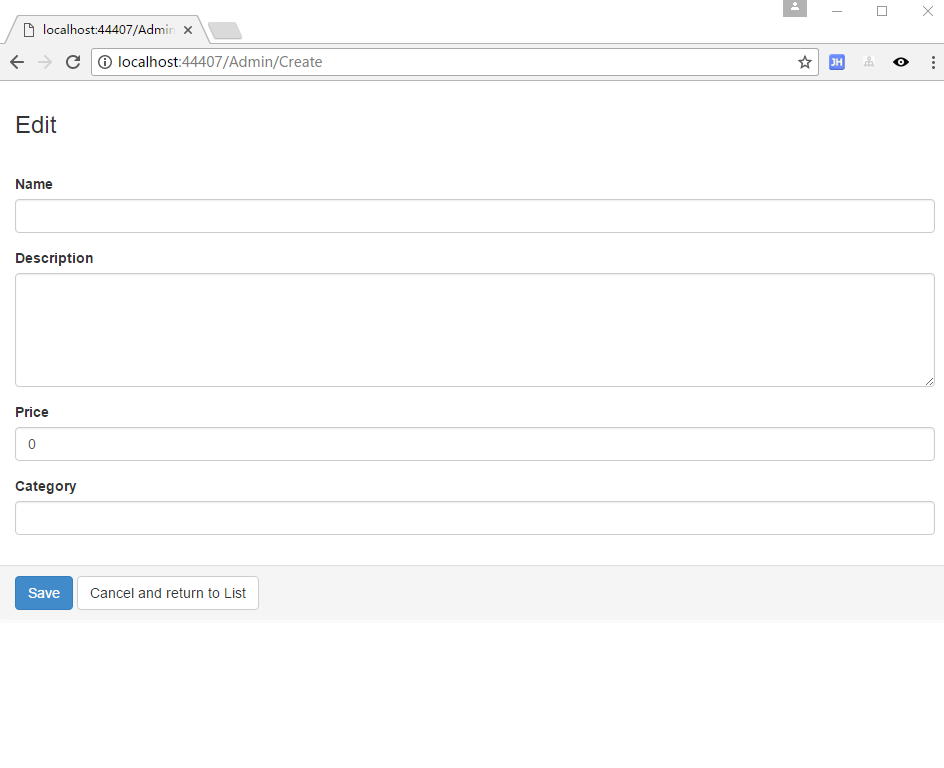
        public ViewResult Create()

        {

            return View("Edit", new Product());

        }

    }

}
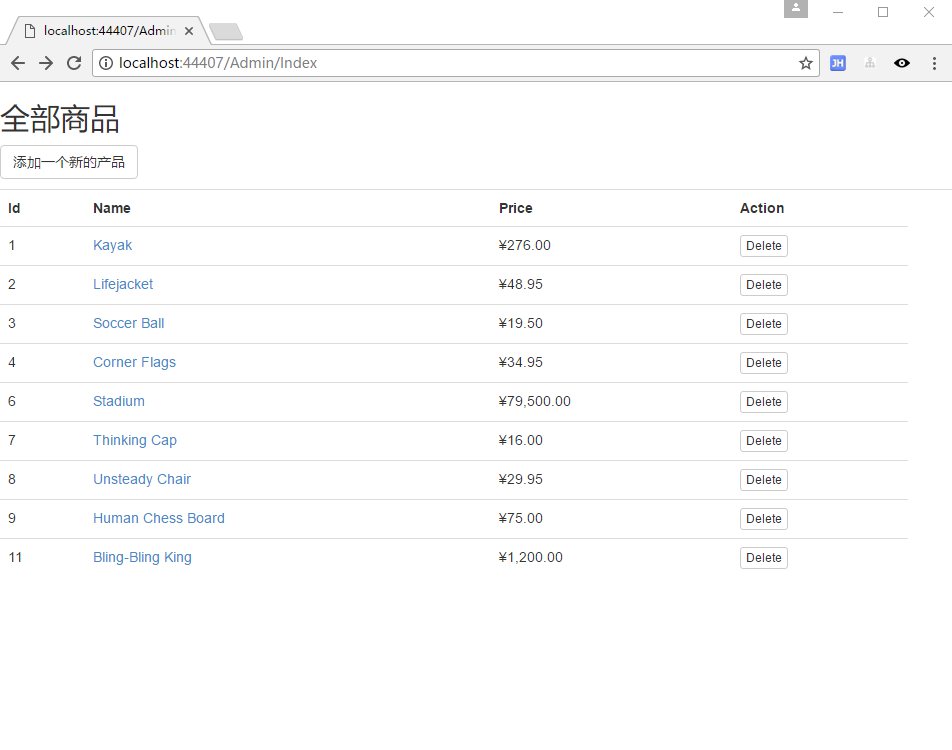
列表页面
@model IEnumerable<SportsStore.Domain.Entities.Product>

@{

    ViewBag.Title = "Index";

    Layout = "~/Views/Shared/_AdminLayout.cshtml";

}

<h2>全部商品</h2>

<p>

    @Html.ActionLink("添加一个新的产品", "Create",null,new {@class = "btn btn-default" })

</p>

<table class="table">

    <tr>

        <th>

            Id

        </th>

        <th>

            Name

        </th>

        <th>

            Price

        </th>

        <th>

            Action

        </th>

        <th></th>

    </tr>

@foreach (var item in Model) {

    <tr>

        <td>

            @item.ProductID

        </td>

        <td>

            @Html.ActionLink(item.Name, "Edit", new { item.ProductID })

            @*默认就是ProductID*@

            @*超链接*@

        </td>

        <td>

            @item.Price.ToString("c")

        </td>

        <td>

            @using (Html.BeginForm("Delete","Admin"))

            {

                @Html.Hidden("ProductId", item.ProductID)

                //创建传参的隐藏元素

                <input type="submit" class="btn btn-default btn-xs" value="Delete">

            }

            @*@Html.ActionLink("Delete", "Delete", new { id=item.ProductID })*@

        </td>

    </tr>

}

</table>
修改页面
@model SportsStore.Domain.Entities.Product

@{

    ViewBag.Title = "Admin: Edit " + @Model.Name;

    Layout = "~/Views/Shared/_AdminLayout.cshtml";

    HtmlHelper.ClientValidationEnabled = false;

    HtmlHelper.UnobtrusiveJavaScriptEnabled = false;

}

<div class="panel">

    <div class="panel-heading">

        <h3>Edit @Model.Name</h3>

    </div>

    @*@using (Html.BeginForm())*@

    @*设置固定的跳转目录*@

    @using (Html.BeginForm("Edit", "Admin"))

    {

        <div class="panel-body">

            @Html.HiddenFor(m => m.ProductID)

            @foreach (var property in ViewData.ModelMetadata.Properties)

            {

                if (property.PropertyName != "ProductID")

                {

                    <div class="form-group">

                        <label>@(property.DisplayName ?? property.PropertyName)</label>

                        @if (property.PropertyName == "Description")

                        {

                            @Html.TextArea(property.PropertyName, null,

          new { @class = "form-control", rows = 5 })

                        }

                        else

                        {

                            @Html.TextBox(property.PropertyName, null,

          new { @class = "form-control" })

                        }

                        @*提示错误的验证消息*@

                        @Html.ValidationMessage(property.PropertyName)

                    </div>

                }

            }

        </div>

        <div class="panel-footer">

            <input type="submit" value="Save" class="btn btn-primary" />

            @Html.ActionLink("Cancel and return to List", "Index", null, new

       {

           @class = "btn btn-default"

       })

        </div>

    }

</div>
产品模型修饰
using System;

using System.Collections.Generic;

using System.Linq;

using System.Text;

using System.Threading.Tasks;

using System.ComponentModel.DataAnnotations;

using System.Web.Mvc;

namespace SportsStore.Domain.Entities

{

    public class Product

    {

        [HiddenInput(DisplayValue = false)]

        // 隐藏起来,不显示在编辑选项中

        public int ProductID { get; set; }

        [Required(ErrorMessage = "Please enter a product name")]

        // 必填项

        public string Name { get; set; }

        [DataType(DataType.MultilineText)]

        [Required(ErrorMessage = "Please enter a description")]

        // 设置多行显示文本

        public string Description { get; set; }

        [Required]

        [Range(0.01, double.MaxValue, ErrorMessage = "Please enter a positive price")]

        public decimal Price { get; set; }

        [Required(ErrorMessage = "Please specify a category")]

        public string Category { get; set; }

    }

}
接口定义修改方法
using System;

using System.Collections.Generic;

using System.Linq;

using System.Text;

using System.Threading.Tasks;

using SportsStore.Domain.Entities;

namespace SportsStore.Domain.Abstract

{

    public interface IProductRepository

    {

        IEnumerable<Product> Products { get; }

        // 定义保存商品的方法

        void SaveProduct(Product product);

    }

}
实现修改方法
using System;

using System.Collections.Generic;

using System.Linq;

using System.Text;

using System.Threading.Tasks;

using SportsStore.Domain.Abstract;

using SportsStore.Domain.Entities;

namespace SportsStore.Domain.Concrete

{

    public class EFProductRepository : IProductRepository

    {

        private EFDbContext context = new EFDbContext();

        public IEnumerable<Product> Products

        {

            get { return context.Products; }

        }

        // 继承接口,就要实现它的方法

        public void SaveProduct(Product product)

        {

            if (product.ProductID == 0)

            {

                context.Products.Add(product);

            }

            else

            {

                Product dbEntry = context.Products.Find(product.ProductID); // 找到商品

                if (dbEntry != null)

                {

                    dbEntry.Name = product.Name;

                    dbEntry.Description = product.Description;

                    dbEntry.Price = product.Price;

                    dbEntry.Category = product.Category;

                }

            }

            context.SaveChanges(); // 保存

        }

    }

}


方法论:理解之后,再写个博客总结一下。不然写完博客,一样不理解。注释,百度,提问,对比,总结是一个很好的学习方法和过程。
.Net商品管理(注释,百度,提问,对比,总结)的更多相关文章
- 「超市管理系统——商品管理」 · Java Swing + MySQL JDBC开发
项目下载:https://download.csdn.net/download/weixin_44893902/13715024 1.9元付费赞助下载:https://download.csdn.ne ...
- C#开发微信门户及应用(23)-微信小店商品管理接口的封装和测试
在上篇<C#开发微信门户及应用(22)-微信小店的开发和使用>里面介绍了一些微信小店的基础知识,以及对应的对象模型,本篇继续微信小店的主题,介绍其中API接口的封装和测试使用.微信小店的相 ...
- SQL Server 【附】创建"商品管理数据库"、"学生选课数据库"的SQL语句
附:(创建“商品管理数据库”的SQL语句) --建立"商品管理数据库"数据库-- create database 商品管理数据库 on(name='商品管理数据库_m', file ...
- GZFramwork快速开发框架演练之会员系统(四)添加商品管理
1.1:创建表结构 新建三张商品关联的表,表模型如下: 创建SQL语句略 1.2:生成表Model(生成方法见上一节) 1.3:生成tb_ProductType的单结构界面然后添加到项目中 1.4:修 ...
- oldboy s21day12.设计商城系统,主要提供两个功能:商品管理、会员管理。
#!/usr/bin/env python# -*- coding:utf-8 -*- # 1.写出三元运算的基本格式及作用?'''a if a>b else b''' # 2.什么是匿名函数? ...
- Vue小案例 之 商品管理------学习过滤器 使用过滤器处理日期的格式
代码学习过滤器 过滤器介绍:过滤模型数据,在数据显示前做预处理操作: 内置过滤器:在1.x中,Vue提供了内置过滤器,但是在2.x中已经完全废除: 解决办法: (1)使用第三方库来替代1.x中的内置过 ...
- Vue小案例 之 商品管理------修改商品数量以及增加入库日期属性
实现修改商品的数量: 加入的代码: css: .clear-btn{ text-align: right; padding-right: 10px; } .table-warp a{ text-dec ...
- Vue小案例 之 商品管理------批量删除与商品数量的调整
通过索引进行删除,进行测试,是否获取其索引: 测试效果: 测试代码,在vue中定义一个空的数组,以便后面进行数据的绑定: data:{ imgUrl:'../res/images/', imgName ...
- Vue小案例 之 商品管理------删除商品与提示
实现删除商品功能 根据索引来进行删除商品: 实现删除商品的HTML: <!--显示表格--> <div class="table-warp"> <di ...
随机推荐
- 解决wps的ppt演示不能打开的问题libbz2.so.1.0
安装 wps-office-10.1.0.5707-1.a21.x86_64 无法打开ppt 其他正常
- 紫书 习题 8-21 UVa 1621 (问题分析方法)
知道是构造法但是想了挺久没有什么思路. 然后去找博客竟然只有一篇!!https://blog.csdn.net/no_name233/article/details/51909300 然后博客里面又说 ...
- mysql5.7 安装方法 (跟旧的不一样了)
MySQL 5.7发布之后很多网友都在说,打开想安装文件夹.但是文件夹中没有DATA目录, 没有mysqly默认库.启动不了数据库,那是因为5.7的数据库的初始化方法和之前的初始化不一样了. 首先这里 ...
- idea 包的显示方式
idea 可以通过点击Project的导航栏里的小齿轮里面有一个 Flatten packages 选项,将其勾上.就可以得到跟eclipse一样的包的显示方式. 没有设置默认是这样的 2018-06 ...
- OO问题
设计一个在线的酒店预订系统,并且可以通过城市搜索出来 解决办法: Main Class: User Room Hotel Booking Adress Enums : 房间的状态和类型 public ...
- hadoop学习;datajoin;chain签名;combine()
hadoop有种简化机制来管理job和control的非线性作业之间的依赖.job对象时mapreduce的表现形式.job对象的实例化可通过传递一个jobconf对象到作业的构造函数中来实现. x. ...
- LoadRunner使用入门 进行Webservice负载測试
1.什么是LoadRunner LoadRunner是HP公司的一款付费工具,该工具是一种预測系统行为和性能的负载測试工具. 通过模拟上千万用户实施并发负载来确认和查找问题. 2.什么是负载測试 通过 ...
- nyoj--1009--So Easy[Ⅰ](数学)
So Easy[Ⅰ] 时间限制:1000 ms | 内存限制:65535 KB 难度:2 描述 给出任意一个三角形的三个边a,b,c. 要求:求出这个三角形的外接圆半径. 输入 输入数据有多组. ...
- 45.angular路由设置
转自:https://www.cnblogs.com/best/tag/Angular/ AngularJS 路由也可以通过不同的模板来实现. $routeProvider.when 函数的第一个参数 ...
- Django关于图片验证码显示笔记
.访问页面 /login/ - 内部需要创建一张图片,并且给用户返回 - 创建一个白板 Session存放验证码 .POST - 根据用户提交的数据与session里面比较 .登录界面 和 验证码 分 ...